



What Happens After You Report a Phishing Click? (It's OK!)


Join thousands of professionals and get the latest insight on Compliance & Cybersecurity.
That sinking feeling in your stomach. The sudden rush of panic. The "oh no" moment when you realize you've clicked on what might be a malicious link. Your heart races as you wonder, "How screwed am I?" or picture a hacker doing their worst on your workplace computer right now.
First, take a deep breath. You're not alone. Even the most vigilant employees with the strongest "spidey sense" can be fooled by today's sophisticated phishing attempts. Maybe it was an email that appeared to come from a legitimate client in your CRM system, or perhaps it looked like an invoice from a trusted vendor.
The good news? Reporting the click was absolutely the right thing to do. What follows is a routine, manageable procedure designed to protect both you and the company. It's not about blame—it's about defense.
The Reality of Phishing Attacks
Before we walk through what happens next, understand that phishing is incredibly common:
- 71% of organizations experienced at least one successful phishing attack last year
- An astounding 255 million phishing attacks were reported in just the first half of 2022—a 61% increase from the previous year
- Approximately 90% of data breaches start with a phishing attack
Organizations expect these incidents to happen. That's why they have response plans in place. Your security team isn't shocked or disappointed—they're grateful you reported it quickly.
Immediate First Steps: What You Should Do
If you've just clicked on what you suspect is a phishing link, here's what to do:

1. Don't Panic, and Don't Hide It
The absolute worst thing you can do is nothing. Your quick action is the company's best defense against a potential breach.
2. Disconnect from the Network (If Possible)
If you can, disconnect your computer from the internet. Unplug the ethernet cable or turn off Wi-Fi. This simple action can prevent malware from communicating with its control servers or spreading to other systems.
3. Alert Your IT/Security Team Immediately
This is the most critical step. Use your personal phone or a colleague's computer to contact IT or your Security Operations Center (SOC).
Provide as much detail as you can:
- What the email or message said
- What you clicked on
- What happened after you clicked (did a website load? did you enter any credentials?)
- Whether you noticed anything unusual happening on your computer
4. Don't Turn Off or Restart Your Computer
Leave your computer exactly as is—don't shut it down, restart it, or even put it in sleep mode. This preserves valuable evidence that your IT team needs for their investigation.
5. Do Not Enter Any Additional Information
If the phishing attempt led you to a fake login page, do not enter your username, password, or other credentials. If you already did, make sure to tell IT immediately so they can prioritize a password reset and MFA (Multi-Factor Authentication) review.
Behind the Curtain: What Your IT Team is Doing Now
Once you've reported the incident, a structured response process kicks into action. Understanding this process can help ease anxiety about what's happening behind the scenes. Let's pull back the curtain on what your IT team or SOC is doing after your report.
Phase 1: Acknowledgment and Triage
When your report comes in, IT first acknowledges it and begins a preliminary assessment to determine severity. This typically includes:
- Analyzing the phishing email and any malicious links using tools like Virus Total and URLscan.io to identify "what kind of badness it is"
- Examining email headers to trace the origin
- Determining if this is a mass phishing campaign or a targeted spear phishing attack aimed specifically at you
- Checking if other employees received the same email
During this phase, they're looking for Indicators of Compromise (IOCs) that help them understand what they're dealing with.
Phase 2: Building the Barricade (Containment)
The immediate goal now is to limit potential damage. This is crucial to prevent a small incident from becoming a major breach. Containment strategies typically include:
- Isolating your computer from the network to prevent lateral movement of threats
- Temporarily disabling your user account to prevent unauthorized access
- Blocking the malicious link or sender's email address across the organization
- Searching for other instances of the same phishing email in other employees' inboxes
If the phishing attempt was part of a Business Email Compromise (BEC) scheme, they'll take additional steps to prevent financial fraud.
Phase 3: The Deep Dive (Eradication and Recovery)
Once contained, the team works to eliminate the threat completely:
- They'll scan your system for malware, particularly for infostealers or Remote Access Trojans (RATs) that could give attackers ongoing access
- If you entered credentials on a fake site, they'll initiate a password reset and review your MFA settings
- They'll check for any unauthorized email forwarding rules that might have been created
- They'll examine logs to see if any token theft occurred
The recovery process then begins:
- Restoring systems to normal operation
- Installing any necessary security patches
- Setting up enhanced monitoring for your account and device
Phase 4: The All-Clear and Lessons Learned
Communication is key in this final phase. Your IT team will:
- Inform you about their findings and actions taken
- Provide guidance on any additional steps you might need to take
- Answer questions and address concerns you may have
Perhaps most importantly, they'll document the incident and use the lessons learned to strengthen security for everyone. This could involve updating security software, improving email filters, or enhancing employee training.
You Are the Solution, Not the Problem
Here's something crucial to understand: your quick reporting of the incident is not something to be embarrassed about—it's something to be proud of.
A punitive response to user errors is counterproductive and creates a "user blame culture" that security experts strongly advise against. Organizations should foster an environment where reporting is encouraged without fear of reprimand.
Worried about being fired for clicking a phishing link? This is extremely rare. Even failed phishing simulations are designed to be "a safe space to practice and learn," not a "box ticking activity" that results in punishment.
The value of your report cannot be overstated. Remember that an estimated 90% of data breaches start with a phishing attack. By reporting quickly, you activated your company's entire defense system and potentially prevented a breach that could cost millions (the average cost of a ransomware breach is $4.54 million).
Your report also provides the security team with a fresh, real-world threat sample that helps them fine-tune their defenses for everyone.
Know Your Enemy: Common Phishing Scams
Understanding different types of phishing can help sharpen your spidey sense for future encounters. Here are some common varieties:
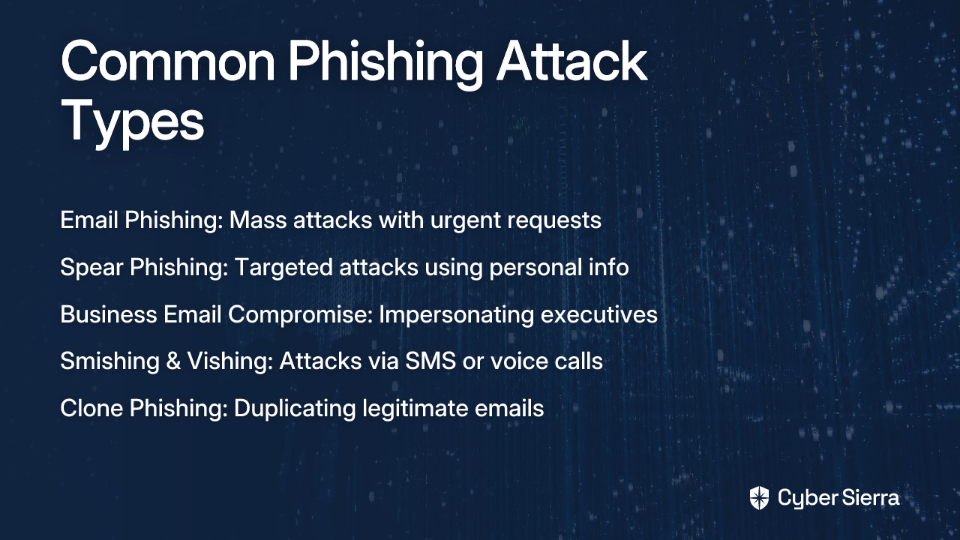
Email Phishing
Generic attacks sent to millions of users, hoping a percentage will click. These often contain urgent requests, suspicious links, or attachments.
Spear Phishing
Highly targeted attacks using personal information (your name, job title, etc.) to appear legitimate. These are much more convincing because they're customized to you.
Business Email Compromise (BEC)
A sophisticated form of spear phishing where attackers impersonate executives or vendors to trick employees into transferring funds or sharing sensitive information.
Smishing & Vishing
Phishing conducted via SMS text messages (Smishing) or voice calls (Vishing), which can be harder to detect than email-based attacks.
Clone Phishing
A legitimate email you've already received is copied and resent with malicious links or attachments replaced.
Protecting Yourself Going Forward
While your IT team handles the current incident, here are ways to strengthen your defenses:
- Trust that spidey sense: If something feels off about an email or message, even if it appears to come from someone you know, take a moment to verify through another channel.
- Check sender details carefully: Look beyond the display name to the actual email address. Hover over links (without clicking) to see where they really lead.
- Be wary of urgency: Phishers often create a false sense of urgency to make you act before thinking. "Your account will be closed in 24 hours" is a classic pressure tactic.
- Use MFA everywhere possible: Multi-Factor Authentication provides an extra layer of security even if your password is compromised.
- Report suspicious messages: Don't wait until after you've clicked—if something seems fishy, report it immediately.
Conclusion: You Did the Right Thing
That moment of fear after clicking a suspicious link is normal, but what you do next defines the outcome. Reporting the incident immediately is the single most important action you can take.
The IT incident response is a structured, routine process designed to contain and resolve the threat methodically. And remember—you are not in trouble. You are a crucial part of your organization's cybersecurity defense.
Your spidey sense and your willingness to report are invaluable assets to your company's security posture. By taking quick action, you've helped protect not just your own data, but potentially the entire organization's.
So take a deep breath. It's going to be OK. You did exactly what you should have done, and your security team is grateful for your vigilance.
Frequently Asked Questions
What should I do immediately after clicking a phishing link?
If you click a suspected phishing link, you should immediately disconnect your computer from the network (if possible) and alert your IT or security team right away. Do not hide the incident, and avoid turning off or restarting your computer, as this preserves crucial evidence for the investigation.
Can I get fired for clicking on a phishing link?
It is extremely rare for an employee to be fired for clicking a phishing link, especially if they report it promptly. Most organizations foster a non-punitive security culture, viewing these incidents as learning opportunities. Your quick reporting is valued far more than the initial mistake, as it helps the company prevent a potentially costly data breach.
What happens after I report a phishing click to IT?
After you report a phishing click, your IT team will launch a structured incident response plan. This involves containing the threat by isolating your computer, investigating the impact by analyzing the malicious link, and restoring your system. They will communicate their findings to you once the investigation is complete.
Why is it so important to report a phishing click?
Reporting a phishing click immediately is crucial because it allows the security team to contain the threat before it can spread and cause a major data breach. Since approximately 90% of data breaches start with a phishing attack, your fast action activates the company's entire defense system and helps protect the whole organization.
How can I spot a phishing email in the future?
You can spot a phishing email by checking the sender's actual email address, hovering over links to see their true destination, and being wary of messages that create a false sense of urgency. Trust your instincts—if an email feels "off," it probably is. Always verify suspicious requests through a separate communication channel, like a phone call.
Should I turn off my computer if I think I've been hacked?
No, you should not turn off or restart your computer if you suspect you've clicked a malicious link. Leaving your computer on preserves volatile memory (RAM) and other temporary data that contains valuable evidence for the IT security team's investigation. Shutting it down can erase critical forensic information needed to understand and eradicate the threat.
This article is part of our cybersecurity awareness series. Remember that a strong security culture depends on everyone feeling empowered to report incidents without fear.
