



Secure API Keys in React: A Comprehensive Guide



Join thousands of professionals and get the latest insight on Compliance & Cybersecurity.
You've just finished building a slick React application that needs to connect to a third-party API. You've got your API key and you're ready to integrate it. But then, doubt creeps in: "Wait, how do I actually store this API key securely?"
If you're feeling confused or overwhelmed by contradictory advice online, you're not alone. This topic is genuinely "mind-boggling" for many developers, especially those without experience working alongside security professionals.
Let me clear something up right away: Any code, data, or variable in your React application is downloaded and executed in the user's browser, making it publicly accessible. This fundamental truth is the key to understanding why securing API keys in React requires a specific approach.
The Common Misconception: Why .env Files Are Not a Secret Vault
One of the most widespread misunderstandings in React development is the belief that storing API keys in .env files keeps them secure. Let's address this head-on:
// .env file
REACT_APP_API_KEY=your_very_secret_key

// Your React component
const apiKey = process.env.REACT_APP_API_KEY;
console.log("Making API call with key:", apiKey);
Many developers think that because:
- The
.envfile is included in.gitignore(keeping it out of version control) - The key is accessed through
process.env - The original
.envfile isn't deployed
...that somehow the API key remains hidden from users. This is incorrect.
Here's what actually happens during the build process:
When you run npm run build, your bundler (like Webpack) processes your code and replaces process.env.REACT_APP_API_KEY with the literal string value "your_very_secret_key". This string ends up directly in your JavaScript bundle, which is then downloaded and executed in every user's browser.
Don't believe me? Try building your React app and then examining the minified JavaScript in your build folder. Search for your API key string—you'll find it right there in plain text.
Even the official Create React App documentation warns about this explicitly:
"Warning: Do not store any secrets (like API keys) in your React app! Environment variables are embedded into the build, meaning anyone can view them by inspecting your app's files."
This isn't just a theoretical risk. In 2017, researchers found over 300 Android apps containing hardcoded API keys for services like Dropbox and Twitter, leading to significant security vulnerabilities.

The Professional Solution: The Backend-for-Frontend (BFF) Pattern
So how do "big websites" really secure their API keys? The answer is simple in concept but requires a fundamental architectural change: They never let secret API keys reach the frontend in the first place.
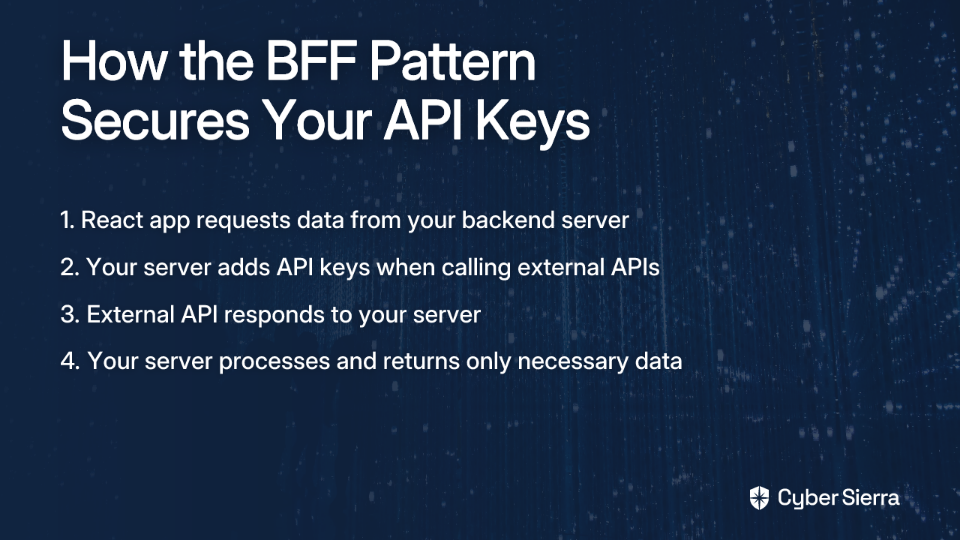
The industry-standard approach is called the Backend-for-Frontend (BFF) pattern, sometimes also referred to as an API Proxy. Here's how it works:
- Your React app makes requests to your own backend server, not directly to third-party APIs
- Your backend server stores the API keys securely and uses them to make requests to external services
- Your backend processes the responses and sends only the necessary data back to your React app
This creates a secure intermediary that shields your sensitive credentials from exposure.
The Secure Data Flow
Let's visualize how data flows in this architecture:
React App                Your Backend Server                 External API
    |                            |                                |
    | Request data               |                                |
    |--------------------------->|                                |
    |                            | Add API key & make request     |
    |                            |------------------------------->|
    |                            |                                |
    |                            |        Return response         |
    |                            |<-------------------------------|
    |                            |                                |
    |    Return processed data   |                                |
    |<---------------------------|                                |
This pattern solves the fundamental security problem by keeping secrets where they belong—on the server, away from curious eyes.
Practical Guide: Building a Simple API Proxy with Node.js & Express
Let's build a basic implementation of this pattern using Node.js and Express for the backend, and a standard React app for the frontend.
1. Setting Up the Backend Server
First, create a new directory for your backend server:
mkdir api-proxy-server
cd api-proxy-server
npm init -y
npm install express axios dotenv cors
Create a .env file in the server directory (and make sure to add it to .gitignore):
# .env (in your server directory)
THIRD_PARTY_API_KEY=your_actual_secret_key_here
Now, create a server.js file:
require('dotenv').config();
const express = require('express');
const axios = require('axios');
const cors = require('cors');

const app = express();
const PORT = process.env.PORT || 3001;

// Use CORS middleware
// In production, restrict this to your frontend's domain:
// app.use(cors({ origin: 'https://your-react-app-domain.com' }));
app.use(cors());

app.get('/api/external-data', async (req, res) => {
  try {
    const apiKey = process.env.THIRD_PARTY_API_KEY;
    const apiURL = `https://api.someexternalprovider.com/data?apiKey=${apiKey}`;

    const response = await axios.get(apiURL);
    res.json(response.data);
  } catch (error) {
    console.error('Error proxying API request:', error);
    res.status(500).json({ error: 'Failed to fetch data' });
  }
});

app.listen(PORT, () => console.log(`Proxy server running on port ${PORT}`));
2. Updating the React Frontend
Now, your React components can fetch data without any API keys:
// src/components/DataFetcher.js
import React, { useState, useEffect } from 'react';

function DataFetcher() {
  const [data, setData] = useState(null);
  const [loading, setLoading] = useState(true);
  const [error, setError] = useState(null);

  useEffect(() => {
    // Fetch data from our own backend proxy, not the external API
    fetch('http://localhost:3001/api/external-data')
      .then(response => {
        if (!response.ok) throw new Error('Network response was not ok');
        return response.json();
      })
      .then(data => {
        setData(data);
        setLoading(false);
      })
      .catch(error => {
        console.error('Error fetching data:', error);
        setError(error.message);
        setLoading(false);
      });
  }, []);

  if (loading) return <p>Loading...</p>;
  if (error) return <p>Error: {error}</p>;

  return (
    <div>
      <h2>Data from API:</h2>
      <pre>{JSON.stringify(data, null, 2)}</pre>
    </div>
  );
}

export default DataFetcher;
Hardening Your Security: Advanced Best Practices
A basic API proxy is a good start, but for production applications, you'll want to implement additional security measures:
1. User Authentication with JWT
An open proxy endpoint can be abused by anyone who discovers it. Protect your backend by implementing user authentication, typically using JSON Web Tokens (JWT):
// Example of a protected endpoint
app.get('/api/external-data', authenticateToken, async (req, res) => {
  // Only authenticated requests get through
  // ...rest of the code
});

function authenticateToken(req, res, next) {
  const authHeader = req.headers['authorization'];
  const token = authHeader && authHeader.split(' ')[1];

  if (token == null) return res.sendStatus(401);

  jwt.verify(token, process.env.JWT_SECRET, (err, user) => {
    if (err) return res.sendStatus(403);
    req.user = user;
    next();
  });
}
2. Implementing Strict CORS Policy
In production, always restrict your API to accept requests only from your frontend's domain:
// Strict CORS configuration
app.use(cors({
  origin: 'https://your-frontend-domain.com',
  methods: ['GET', 'POST'],
  allowedHeaders: ['Content-Type', 'Authorization']
}));
This prevents other websites from making requests to your backend. Learn more about CORS on MDN.
3. Adding Rate Limiting
Protect your backend (and your budget) from abuse by implementing rate limiting:
const rateLimit = require('express-rate-limit');

const apiLimiter = rateLimit({
  windowMs: 15 * 60 * 1000, // 15 minutes
  max: 100, // Limit each IP to 100 requests per windowMs
  message: 'Too many requests from this IP, please try again later'
});

// Apply rate limiting to API routes
app.use('/api/', apiLimiter);
4. Managing Secrets in Team Environments
For teams, especially when working with interns or contractors, managing API key access becomes critical. As one developer noted, "The pain in the ass is when you need to rotate these keys," which is why professional teams use dedicated secrets management solutions.
Consider implementing a Secrets Vault like HashiCorp Vault or cloud provider solutions like AWS Secrets Manager or Azure Key Vault. These tools provide:
- Centralized storage for all your secrets
- Fine-grained access control (who can access which secrets)
- Automated key rotation
- Detailed audit logs
For example, with AWS Secrets Manager, your backend can retrieve secrets programmatically:
const AWS = require('aws-sdk');
const secretsManager = new AWS.SecretsManager();

async function getApiKey() {
  const data = await secretsManager.getSecretValue({
    SecretId: 'my-api-key'
  }).promise();

  const secret = JSON.parse(data.SecretString);
  return secret.apiKey;
}

Conclusion: From Confused to Confident
The journey from confusion to confidence in API key security comes down to one fundamental principle: Secret API keys belong on the server, never in the client.
By implementing the Backend-for-Frontend pattern, you're adopting the same approach used by professional development teams worldwide. While it requires setting up and maintaining a backend server, the security benefits are well worth the additional complexity.
To recap:
- Never store sensitive API keys in React's environment variables or anywhere in your frontend code
- Use a backend server to proxy requests to external APIs, keeping your keys secure
- Implement additional security measures like authentication, CORS, and rate limiting
- For team environments, consider a dedicated secrets management solution
With these practices in place, you can confidently build React applications that integrate with external APIs without compromising security. The initial learning curve may be steep, but mastering this architectural pattern is a fundamental step toward becoming a security-conscious professional developer.
Remember: in the world of frontend security, the only truly secure secret is one that never reaches the browser in the first place.
For more advanced use cases, consider exploring full-stack frameworks like Next.js that make implementing the BFF pattern more straightforward with their API routes feature.

Frequently Asked Questions (FAQ)
Why can't I just use a .env file to store my API key in React?
You cannot use a .env file for secret API keys in React because environment variables starting with REACT_APP_ are embedded directly into the JavaScript build files. This means the key becomes plain text in the code sent to the user's browser, making it publicly visible to anyone who inspects your app's files. The .env file is only a development convenience; it does not create a secure server-side environment for a client-side application.
What is the most secure way to manage API keys in a React application?
The most secure way to manage API keys is to never expose them to the frontend. Instead, use a backend server that acts as a proxy, often called the Backend-for-Frontend (BFF) pattern. Your React app communicates with your own backend, and your backend securely stores the API key and makes the actual call to the third-party service. This ensures the secret key never leaves your server environment.
Are there any types of API keys that are safe to expose in a React app?
Yes, API keys that are explicitly designated as "public" or "publishable" by the service provider are safe to use in your frontend code. These keys are typically used for services like Google Maps or Stripe.js and are designed to be public. They are often restricted by domain (so they only work on your website) and have limited permissions, preventing them from being used for sensitive operations. Always check the service's documentation to see if a key is publishable.
How does a Backend-for-Frontend (BFF) or API proxy improve security?
A Backend-for-Frontend (BFF) improves security by creating a protective layer between your React application and the third-party API. It prevents secret API keys from ever being sent to the user's browser. Your backend server holds the keys and manages the API calls, so all sensitive credentials remain on the server. Additionally, a BFF allows you to implement other security measures like rate limiting, authentication, and caching before forwarding requests.
What if I don't want to build a whole backend server just for this?
If you don't want to build a full server, you can use serverless functions (like AWS Lambda, Google Cloud Functions, or Vercel/Netlify Functions) as a lightweight API proxy. Serverless functions are small, single-purpose pieces of code that run on-demand in the cloud. They are an excellent, often cost-effective way to implement the BFF pattern without managing a traditional server. Frameworks like Next.js also have built-in API routes that make this process much simpler.
Does this security principle apply to other frontend frameworks like Vue or Angular?
Yes, this principle applies to all client-side JavaScript frameworks, including Vue, Angular, Svelte, and others. The core issue is not specific to React. Any secret, API key, or sensitive data included in the code for a client-side application will be downloaded to the user's browser and can be discovered. The Backend-for-Frontend (BFF) pattern is the standard security solution regardless of the frontend framework you use.
