



How to Build Your First Threat Model Without the Corporate Complexity


Join thousands of professionals and get the latest insight on Compliance & Cybersecurity.
You've heard about threat modeling. Maybe your tech-savvy friend mentioned it, or you stumbled across the term while reading about yet another data breach. Now you're curious but also intimidated. After all, isn't threat modeling something that security professionals do with fancy diagrams and corporate jargon?
"I don't know how to put the pieces together and come up with something coherent," you might be thinking. Or perhaps you're wondering if it's even worth the effort when you could just follow a checklist of security best practices instead.
The good news? You don't need a 50-page document or a security certification to create an effective threat model. In fact, you're probably already doing some informal threat modeling without realizing it.
What is Threat Modeling (and Why You Actually Need It)?
At its core, threat modeling is simply a structured way to think about what could go wrong with your digital life or project, and what you can do about it. According to OWASP, it's "a process to identify, communicate, and understand potential threats and mitigations related to something of value."
In everyday terms? It's like checking the locks on your doors and windows before bed, but for your digital life.
"I think you're better off focusing on best practices instead of threat model," is a common sentiment. Many people believe that following generic security advice—using a password manager, enabling two-factor authentication (2FA), keeping software updated—is sufficient.
These practices are absolutely important, but they're tools, not a strategy. Threat modeling helps you decide which tools to use, where to use them, and why they matter for your specific situation.
Think of it this way: A password manager is like a hammer. It's a useful tool, but knowing where and when to use it requires a blueprint—that's your threat model.
The Simple Framework: Answer Three Questions to Build Your Model
Let's strip away the complexity. Based on insights from security discussions on Reddit, answering just three questions will get you most of the way to a functional threat model:
Question 1: What Are You Protecting? (Your Assets)
Start by identifying what's valuable to you. These are your "assets"—the things worth protecting.
Don't feel overwhelmed by the need to catalog every file on your computer. As one privacy advocate puts it, "No need to list out all my data." Instead, think in categories:

For a small project or business, your assets might include:
- Customer or user data
- Source code
- API keys and access credentials
- Intellectual property
Question 2: Who Are You Protecting It From? (Your Threat Actors)
This is where many people get stuck. "It leaves out who is threatening you and what are their capabilities," noted one Reddit user.
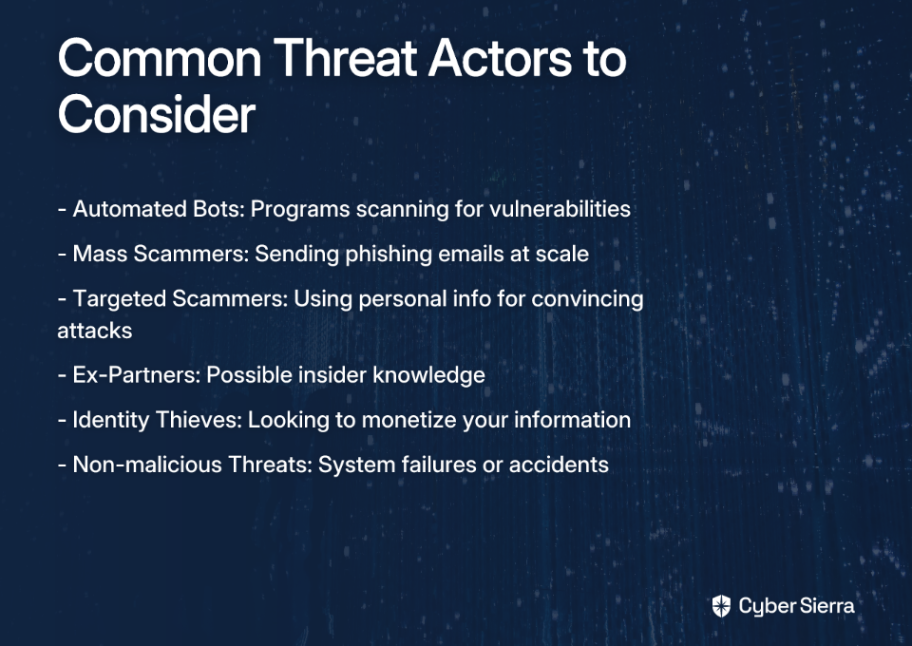
You don't need to imagine specific individuals targeting you. Instead, think about categories of potential attackers, based on their motivations and capabilities:
Question 3: How Could They Attack? (Your Vulnerabilities)
This is where you start connecting the dots between your assets and potential attackers. For each combination, ask: "How might this type of attacker try to access this asset?"
For example:
- Automated bots might try to guess your email password using common combinations
- Scammers might try to trick you into revealing your banking information through fake emails
- An ex-partner might know your security questions or have old passwords you've reused
A Practical 4-Step Guide to Your First Threat Model
Now that we've established the foundational questions, let's walk through a simple, practical approach based on the widely-recognized OWASP Four Question Framework. I'll use a personal blog with a contact form as our example throughout.
Step 1: What are we working on? (Map It Out Simply)
First, create a basic visual representation of your system. This doesn't require special software—a piece of paper or a digital whiteboard will do.
Action: Draw boxes for key components and arrows showing how data flows between them.
For our personal blog example:
- Visitors (Users) access your blog through their browsers
- Their requests go to your Web Server
- The Web Server retrieves content from your Database
- Visitors can submit comments through a form, which are stored in your Database

Don't worry about making it perfect. As Martin Fowler suggests, starting from your data flows is the most important part.
Step 2: What can go wrong? (Brainstorm Threats with STRIDE)
Now, look at each component and connection in your diagram and ask, "What could go wrong here?" To make this systematic, use the STRIDE framework from OWASP's Threat Modeling Cheat Sheet:

Spoofing (pretending to be someone else)
- What if someone posts comments pretending to be you, the blog owner?
- What if a fake version of your blog tricks users into entering their information?
Tampering (modifying data)
- What if someone modifies the content of your blog posts during transmission?
- What if an attacker alters the comments in your database?
Repudiation (denying an action)
- What if a user posts harmful comments and later denies doing so?
- What if you need to prove who did what on your site?
Information Disclosure (exposing sensitive data)
- What if your database backup containing user emails is accidentally made public?
- What if error messages reveal too much about your server setup?
Denial of Service (making the system unavailable)
- What if your site gets flooded with so much traffic that legitimate users can't access it?
- What if your hosting provider has an outage?
Elevation of Privilege (gaining unauthorized permissions)
- What if a regular visitor finds a way to access your admin dashboard?
- What if a plugin vulnerability gives attackers control of your server?
Don't try to identify every possible threat—focus on what seems most relevant to your situation. Remember, as one security professional put it, "You don't need a fancy document the likes of which we see in the corporate world."
Step 3: What are we going to do about it? (Choose Your Defenses)
For each significant threat you've identified, decide on a course of action:
- Mitigate: Reduce the risk by implementing controls.
- For Spoofing: Implement user authentication for comments
- For Information Disclosure: Use HTTPS to encrypt data in transit
- Eliminate: Remove the vulnerable component.
- If comment spam is a major issue, you might decide to disable comments entirely
- Transfer: Shift the risk to a third party.
- Use a trusted service like Disqus to handle comments instead of building your own system
- Accept: Acknowledge the risk and decide it's acceptable.
- You might accept the risk of brief downtime from your hosting provider
This is where standard security practices come into play—but now you're applying them with purpose, based on your specific risks, rather than following a generic checklist.
Step 4: Did we do a good job? (Review and Repeat)
Threat modeling isn't a one-time activity. As OWASP notes, you should revisit your model when:
- You add new features (like a newsletter signup to your blog)
- A security incident occurs (you discover someone has been spamming your comment section)
- You make architectural changes (moving from shared hosting to a cloud provider)
The goal isn't perfection—it's continuous improvement of your security posture.
Making Threat Modeling a Habit, Not a Project
One of the most valuable insights from modern security thinking is that threat modeling works best when integrated into your regular routine, not treated as a massive one-off project.
As Martin Fowler explains, "Conducting short sessions (15-30 mins) linked to current work is more effective than lengthy workshops."
Here's how to make threat modeling a habit:
For Personal Security
- When signing up for a new service, take 5 minutes to consider:
- What information am I giving them?
- What could go wrong if this service is breached?
- How can I limit my exposure? (Using a unique password, limiting shared data, enabling 2FA)
- When setting up a new device:
- What sensitive information will live on this device?
- What's the worst that could happen if I lose it or it's stolen?
- What protections should I prioritize? (Encryption, remote wipe capabilities, automatic backup)
For Small Teams and Projects
- Before starting a new feature, have a quick "what could go wrong?" conversation
- After any security incident (even a minor one), review what happened and update your threat model
- Schedule a quarterly "security check-in" to revisit your most critical assets and threats
The beauty of this approach is that it makes security an ongoing conversation rather than an intimidating hurdle. As one Reddit commenter reassured, "It sounds like you have answers to the questions, so you have a basic threat model."
You Now Have a Threat Model
If you've followed along, congratulations! You now have a basic threat model. It might not be elaborate, but it's yours, and it addresses your specific situation better than any generic security checklist could.
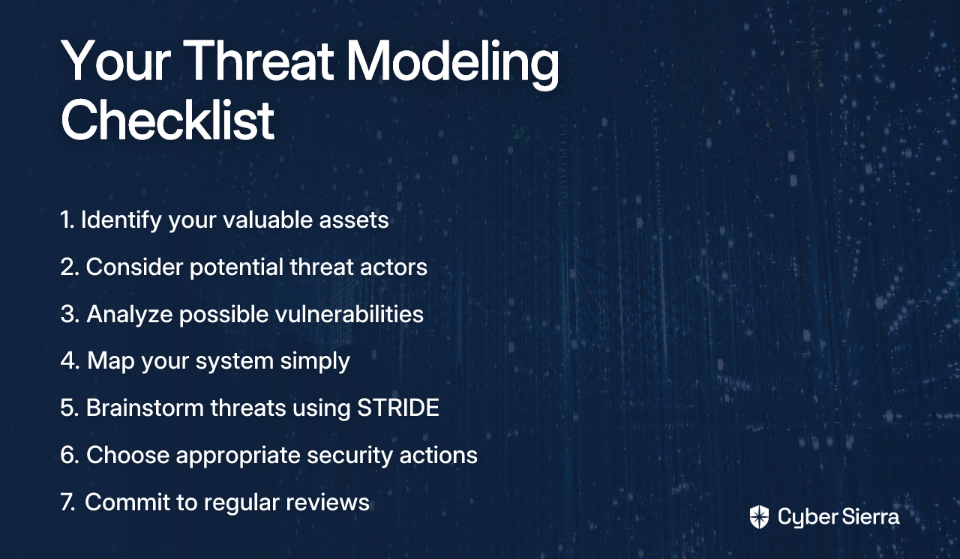
Let's recap what you've accomplished:
Remember the common pain point: "I don't know how to put the pieces together and come up with something coherent." You've now done exactly that, without getting bogged down in corporate complexity.
The most important security insight isn't about using the fanciest tools or following every best practice blindly. It's about understanding your unique risks and making informed decisions about how to address them.
As you continue your security journey, remember that perfect security doesn't exist. The goal is to make reasonable trade-offs based on your specific situation. As one security-minded Reddit user put it, "If the answers are ordinary answers, just do a good job and you'll be fine."
Start simple—hold a 30-minute session to sketch a diagram and articulate threats. The most important step is the first one, and you've already taken it.

Frequently Asked Questions
What is the simplest way to start threat modeling?
The simplest way to start threat modeling is by answering three fundamental questions: What are you trying to protect (your assets)? Who are you protecting it from (your threat actors)? And how could they attack (your vulnerabilities)? This simple framework helps you focus on what's most important without getting lost in complex methodologies.
Why is threat modeling better than just using a security checklist?
Threat modeling is better than a security checklist because it provides context and strategy. While checklists offer valuable tactics (like using 2FA), a threat model helps you understand why and where those tactics are most needed for your specific situation. It shifts you from blindly following rules to making informed decisions based on your unique risks.
How often should I do threat modeling?
Threat modeling should be an ongoing activity, not a one-time project. You should revisit your threat model whenever you add new features, make significant architectural changes to your system, or after a security incident occurs. For personal security, it's useful to do a quick mental threat model when signing up for a new service or setting up a new device.
What is the STRIDE framework in threat modeling?
STRIDE is a mnemonic that helps you brainstorm different categories of threats. It stands for Spoofing, Tampering, Repudiation, Information Disclosure, Denial of Service, and Elevation of Privilege. By considering each category, you can systematically identify a wider range of potential security weaknesses in your system.
Who needs to do threat modeling? Is it only for big companies?
Everyone can benefit from threat modeling, not just big companies. Individuals can use it to protect their personal digital lives, while small teams and project owners can use it to build more secure products from the start. The process can be scaled down to be as simple as a 15-minute conversation, making it accessible for any situation.
Want to learn more about threat modeling? Check out these resources:
- OWASP Threat Modeling - A comprehensive guide from the Open Web Application Security Project
- The Threat Modeling Manifesto - Core principles and values for effective threat modeling
- OWASP Threat Dragon - A free, open-source threat modeling tool if you want to take your diagrams to the next level
