



Building Your First Cloud Security Home Lab



Join thousands of professionals and get the latest insight on Compliance & Cybersecurity.
You've got a stack of certifications, but every job posting still asks for "hands-on experience." Sound familiar? You scroll through Reddit cybersecurity forums and see the same story repeated: "I can't get a cloud security job even though I have all these certifications."
The hard truth is that certifications alone won't cut it in cloud security. Employers want proof that you can actually apply your knowledge in real-world scenarios.
But here's the good news: you can build that experience yourself, without waiting for someone to hire you first.
In this guide, I'll walk you through creating your own cloud security home lab—a practical, hands-on environment where you can develop the exact skills employers are looking for. We'll focus on implementing essential cloud security tools like CSPM (Cloud Security Posture Management) and CWPP (Cloud Workload Protection Platform) using free and low-cost resources.
Why a Home Lab is Non-Negotiable for Cloud Security Engineers
When I speak with hiring managers in cloud security, they consistently mention the same thing: they need people who can hit the ground running. A home lab provides several critical advantages:

- It bridges the gap between theoretical knowledge and practical application
- It gives you a safe, controlled environment to experiment with security tools
- It helps you build a portfolio of demonstrable skills you can discuss in interviews
- It provides deep familiarity with cloud architecture, networking, and security configurations
As one Reddit user put it: "Try labbing and get hands-on practice in home labs... try to get hands-on experience with various cloud security solutions."
The Foundation: Key Cloud Security Concepts to Master
Before we dive into building the lab, let's quickly review the core concepts you'll be putting into practice:
The Shared Responsibility Model
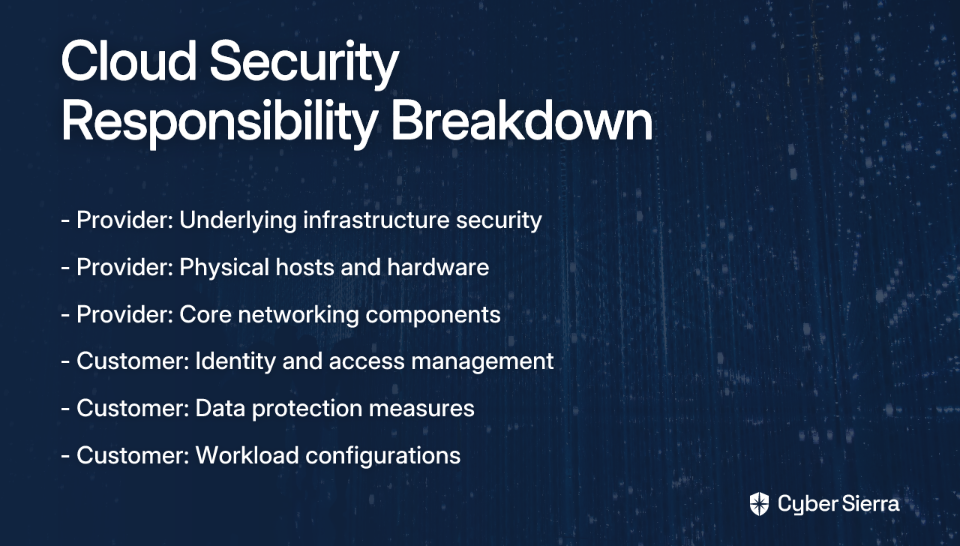
Cloud security is a partnership between providers and customers. According to Check Point's cloud security overview, responsibilities break down as follows:
- Provider's Responsibility: Securing the underlying infrastructure, physical hosts, and core network
- Customer's Responsibility: Securing everything they put in the cloud, including identity and access management (IAM), data protection, and workload configurations
Your lab will focus primarily on the customer side of this equation.
Zero Trust Security
The "never trust, always verify" mindset is essential in cloud environments. Every user, device, and application must be verified before being granted access, implementing least privilege access and micro-segmentation to contain potential breaches.
Common Cloud Security Challenges You'll Simulate
Your lab will help you tackle real-world challenges:
- Increased Attack Surface: Public clouds create more entry points for attackers
- Lack of Visibility: Tracking all assets and their configurations can be difficult
- Dynamic Workloads: Traditional security tools struggle with ephemeral cloud resources
- Granular Privilege Management: Overly broad permissions create significant risks
Blueprint for Your Lab: Two Paths to Hands-On Experience
Let's address another common pain point from the forums: "Lack of knowledge on necessary hardware for setting up a cybersecurity lab." I'll outline two different approaches:
Path A: The Traditional On-Prem Virtual Lab
This approach uses your existing computer to run virtual machines.
Hardware Requirements:
- Processor: Minimum quad-core CPU (Intel i5/Ryzen 5 or better)
- RAM: At least 16GB, but 32GB is recommended for running multiple VMs
- Storage: Minimum 500GB SSD for performance
Some power users on Reddit suggest much higher specs: "You need at least 8/16 cores/threads, 64GB+ RAM, and 2+ NICs for PCAP/management." While these specs are ideal for serious pentesting, you can start with more modest hardware.
Software Stack:
- Virtualization: VirtualBox (Free), VMware Workstation Pro (Paid), or Proxmox VE (Open-source)
- Operating Systems: Kali Linux (for pentesting), Windows Server (for Active Directory), Ubuntu (for web servers)
- Key Tools: Wireshark, Nmap, Metasploit, Snort, Burp Suite
Path B: The Modern, Cost-Effective Cloud-Native Lab (Recommended)
This path addresses the pain of cost while providing a more authentic cloud security experience.
Core Infrastructure: Leverage the Oracle Cloud Free Tier. This provides:
- 2 AMD-based Compute VMs with 1/8 OCPU and 1 GB memory each
- A flexible block of 4 Arm-based Ampere A1 cores and 24 GB of memory
This generous free tier lets you run multiple VMs without spending a dime, making it ideal for those who don't want to invest in expensive hardware upfront.
Optional Hybrid Component:
- A Raspberry Pi can serve as a low-power on-prem server for DNS filtering or code repositories
- Example use case: Install Pi-hole for network-wide ad-blocking and DNS monitoring
- Example use case: Deploy Gitea for a self-hosted Git service
Project Walkthrough: Building and Securing Your First Cloud Workload
Now let's get practical with a step-by-step guide to setting up your lab.
Step 1: Provision Your Cloud Infrastructure
- Sign up for the Oracle Cloud Free Tier
- Create an Ampere A1 VM with Ubuntu, which offers generous memory for running security tools
- Configure basic security: SSH keys instead of passwords, and restrict inbound connections
Step 2: Establish Secure Remote Access
Don't expose management ports (like SSH) directly to the internet. Instead:
- Set up a VPN server using OpenVPN on a small, dedicated VM
- Configure the VPN to allow access to your internal lab network
- Ensure all sensitive management interfaces are only accessible via the VPN
The DigitalOcean OpenVPN Guide provides detailed instructions for this process on Ubuntu.
Step 3: Gaining Posture Visibility with CSPM
What is CSPM? Cloud Security Posture Management tools provide visibility into your entire cloud environment, identifying misconfigurations and compliance violations. According to Palo Alto Networks, good security starts with visibility.
Lab Action: Connect a free-tier or trial CSPM tool to your Oracle Cloud account. Options include:
- Wiz (offers limited free access)
- Prisma Cloud (trial available)
- CloudSploit (open-source option)
Run an initial scan to discover assets and identify default misconfigurations (e.g., public storage buckets, overly permissive firewall rules).
Step 4: Protecting Workloads with CWPP
What is CWPP? Cloud Workload Protection Platforms focus on securing individual workloads like VMs, containers, and serverless functions. According to GetGuru, they provide vulnerability management, threat detection, and configuration security at the workload level.
CSPM vs. CWPP Explained: This is a common point of confusion, so let me clarify:
- CSPM looks at the configuration of your cloud "house" (Are the doors locked? Are the windows shut?)
- CWPP looks at what's happening inside the rooms (Is there a thief in the living room? Is the oven on fire?)

As one Reddit user recommended: "If you care more about runtime and workload visibility and are willing to install an agent, try Sysdig. If you're looking for more asset discovery and posture stuff and don't care about the runtime agent stuff, try Orca."
Lab Action:
- Deploy a lightweight CWPP agent (using a free trial from Sysdig, Trend Micro, or Falco) onto your Ubuntu VM
- Perform a vulnerability scan to find outdated packages
- Set up runtime monitoring to detect suspicious activities
Putting Your Lab to Use: Practical Scenarios
Now that your lab is set up, here are some exercises to build your skills:
Scenario 1: Misconfiguration Detection and Remediation
- Intentionally create a misconfiguration (e.g., open a port in a security group to
0.0.0.0/0) - Use your CSPM tool to detect the issue
- Remediate the finding and re-run the scan to confirm the fix
Scenario 2: Vulnerability Management
- Use your CWPP agent to scan your Ubuntu VM for vulnerabilities
- Practice patching the vulnerability (
sudo apt update && sudo apt upgrade) - Verify the fix with another scan
Scenario 3: Network Traffic Analysis
- Install
tcpdumpon your VM and capture traffic while accessing a simple web server - Analyze the PCAP file in Wireshark to understand HTTP requests and responses
- Identify potential security issues in the traffic patterns
From Lab to Livelihood
A hands-on lab is the most direct path to a cloud security career. As we've seen from numerous Reddit discussions, the industry values practical experience over paper certifications.
The best part? You can build this experience at minimal to no cost using free-tier cloud services. Start with this basic setup and then expand by adding more services, exploring container security (Kubernetes), or building a SIEM with Security Onion for log aggregation.
Remember what we see time and again in the cybersecurity community: "You will come back a few months later with a new post, 'I can't get a cloud security job even though I have all of these certifications.'" Don't be that person. Stop just collecting certs. Start building. Your future career will thank you.
By creating and maintaining a cloud security home lab, you'll develop the skills, confidence, and portfolio needed to stand out in job interviews. When asked about your experience with CSPM or CWPP tools, you won't just reference a certification—you'll be able to describe how you used these tools to solve real security problems in your lab environment.
And that's exactly what employers are looking for.
Frequently Asked Questions
Why is a cloud security home lab so important for getting a job?
A cloud security home lab is crucial because it provides the hands-on, practical experience that employers demand. While certifications validate theoretical knowledge, a home lab allows you to apply that knowledge by building, configuring, and securing real cloud environments. This demonstrates to hiring managers that you can solve actual security problems, bridge the gap between theory and practice, and discuss your skills with confidence during interviews.
What is the real cost of setting up a cloud security lab?
You can build a fully functional cloud security lab for free. By leveraging generous free-tier offerings like the Oracle Cloud Free Tier, you can provision virtual machines and other cloud resources without any initial investment in hardware or cloud credits. The guide recommends this cloud-native approach specifically because it eliminates the cost barrier, making it accessible to everyone.
What is the main difference between CSPM and CWPP?
The primary difference is their area of focus: CSPM secures your overall cloud environment, while CWPP protects the individual workloads running within it. Think of CSPM as checking the security of your house (Are the doors locked? Are the windows shut?). In contrast, CWPP monitors what's happening inside the rooms (Is there a threat in the living room?). Both are essential for a comprehensive cloud security strategy.
How can I showcase my home lab projects to employers?
The best way to showcase your work is by creating a portfolio. You can document your lab projects on a personal blog, a GitHub repository, or even in a dedicated section of your resume. For each project, describe the architecture you built, the tools you used (like Wiz for CSPM or Sysdig for CWPP), the challenges you overcame, and the skills you learned. This provides tangible proof of your abilities that you can share with recruiters and discuss in detail during interviews.
What should I do after setting up my basic lab?
Once your basic lab is operational, start running practical scenarios to build your skills. Begin with the exercises in this guide, such as detecting and remediating misconfigurations with your CSPM tool and managing vulnerabilities with your CWPP agent. From there, you can expand your lab's complexity by exploring container security with Kubernetes, setting up a SIEM like Security Onion for log analysis, or practicing incident response drills.
Have you built your own cloud security home lab? Share your experiences and tips in the comments below!
