



How to Tune SIEM Alerts to Eliminate False Positives



Join thousands of professionals and get the latest insight on Compliance & Cybersecurity.
You stare at your screen, bleary-eyed from the endless stream of security alerts flooding your dashboard. Another 12-hour shift of alert whack-a-mole. Your SIEM system has flagged hundreds of potential security incidents, but experience tells you that most will be false positives—harmless events incorrectly identified as threats. Your team is drowning in noise, and you can feel the creeping dread that a real attack might slip through simply because everyone is overwhelmed.
Sound familiar? You're not alone.
According to research from RedLegg, a staggering 43% of organizations report that more than 20% of their security alerts are false positives. Even more concerning, 15% of organizations state that over 50% of their alerts are false positives. This overwhelming volume of noise isn't just annoying—it's dangerous. As one security analyst put it in a Reddit discussion: "The only way to deal with alert fatigue is to fix alerts to eliminate false positives."
In this article, I'll provide a strategic, step-by-step guide to tuning your SIEM alerts, refining correlation rules, and leveraging advanced techniques to eliminate noise and focus on genuine threats. With these methodical approaches, you can transform your SIEM from a source of frustration into a powerful, precision tool for threat detection.
Why Your SIEM is Crying Wolf: The Root Causes of False Positives
Before diving into solutions, it's essential to understand why your SIEM is generating so many false positives in the first place.
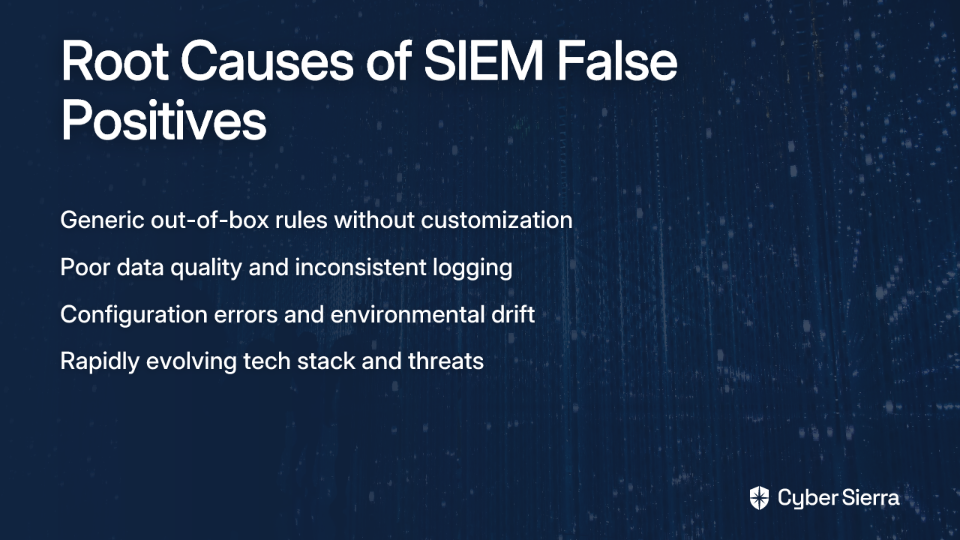
Over-Reliance on Generic, Out-of-the-Box Rules
Many organizations deploy their SIEM with default rule sets and never customize them to their specific environment. These generic rules cast too wide a net, flagging benign activities alongside genuine threats. UnderDefense reports that organizations using primarily default rules often see detection gaps and inefficiencies that leave them vulnerable despite the alert overload.
Poor Data Quality and Inconsistent Log Sources
Your SIEM is only as good as the data feeding into it. Organizations are projected to see a 250% increase in data over the next five years, according to Cribl. Without proper normalization and filtering, this tsunami of logs creates noise that makes it nearly impossible to spot genuine security incidents.
Configuration Errors and Environmental Drift
As one security professional noted on Reddit, "The most common thing that I see on a SIEM are errors created by wrong firewall changes or errors on automated changes." These configuration issues trigger alerts that have nothing to do with security threats—they're simply operational problems that need fixing.
Rapidly Changing Technology Stack and Threat Landscape
Your environment is constantly evolving: new applications, cloud migrations, changing user behaviors, and emerging threats. Without continual tuning, your SIEM rules quickly become outdated, leading to an increasing number of false positives over time.
The Strategic Tuning Playbook: A Step-by-Step Guide to High-Fidelity Alerts
Now that we understand the problem, let's implement a structured approach to eliminate false positives and make your SIEM work for you, not against you.
Step 1: Establish Your Environmental Baseline
Before you can spot abnormalities, you need to define what's normal in your environment. This critical first step establishes the foundation for all your tuning efforts.
How to implement:
- Start small and focused. Begin with high-priority assets like domain controllers, critical application servers, or privileged user accounts.
- Monitor normal operations for at least 2-4 weeks. This timeframe usually captures regular business cycles and activities.
- Document patterns and exceptions. Note regular maintenance windows, backup schedules, patch cycles, and other expected operational activities.
According to Exabeam, implementing behavioral baselines gradually is key to building effective behavioral profiles that can distinguish between normal operations and genuine threats.
Step 2: Master Your Correlation Rules
This step is the heart of SIEM tuning. Generic correlation rules must be customized to your specific environment and risk profile.
Follow this systematic approach (vendor-agnostic):

- Identify ineffective rules. Run reports to find the rules generating the most false positives. Look for patterns in what's triggering these alerts.
- Adjust thresholds and parameters. Refine rules by tweaking parameters like:
- Time windows (e.g., 5 minutes vs. 30 minutes)
- Event counts (e.g., 10 failed logins vs. 3)
- IP ranges and exclusion lists
- User accounts and service accounts
- Test modifications. Use a staging environment or historical data to validate your modified rules before deploying them.
- Deploy and monitor. Roll out changes incrementally and continuously monitor their effectiveness.
UnderDefense demonstrates the power of this approach—they increased their MITRE ATT&CK framework coverage from 20% to 90% by reviewing 500 default rules and creating 275 new, customized ones.
For those looking to create custom correlation rules, this GitHub repository from AtlasInsideCorp provides examples and instructions for creating rules using YML files.
Step 3: Fine-Tune Alert Thresholds
Many false positives stem from thresholds that are too sensitive. Finding the sweet spot is crucial.
Practical threshold adjustment tactics:
- Review historical incidents. Analyze past confirmed threats to identify patterns in the data that preceded them.
- Consider business context. Adjust thresholds based on business hours, expected traffic patterns, and normal system behavior. For example, if a server regularly hits 80% CPU usage during backups, set the alert threshold higher than that to avoid constant false alarms.
- Implement differential thresholds. Apply different thresholds for different assets based on their criticality and normal behavior patterns.
As Cribl notes, striking the right balance between useful alerts and insignificant ones is essential for maintaining an effective security posture without overwhelming your team.
Step 4: Enrich Alerts with Context and Quality Data
An alert without context is just noise. Enriching your alerts with additional information helps analysts quickly determine whether an alert requires attention.
Enhancement strategies:
- Add asset context. Tag assets with information like:
- Asset criticality (high, medium, low)
- Business function
- Data classification
- Owner/department
- Add user context. Enrich user-related alerts with:
- Role and department
- Normal working hours and locations
- Access privileges and patterns
- Improve data quality. Implement data normalization to standardize log formats from different sources, improving the reliability of your correlation rules.
Step 5: Implement Smart Filtering with Tagging
Use tagging to systematically categorize known, benign activity that would otherwise trigger alerts.
Implementation process:
- Define tagging criteria. Establish clear criteria based on historical data and known false positives. For example, tag all vulnerability scan traffic from a known internal scanner IP as "Approved Security Scan."
- Configure tag rules. Create rules within your SIEM to automatically apply these tags.
- Monitor and refine. Continuously monitor the effectiveness of your tags to ensure they aren't accidentally silencing real threats.
For specific platform guidance, UTMStack provides documentation on defining false positive tag rules that can significantly reduce noise.
Level Up Your Tuning: Advanced Techniques for Modern SOCs
Once you've implemented the basic tuning strategies, consider these advanced techniques to further reduce false positives and enhance detection.
Leverage Threat Intelligence
Enrich your event data with external threat intelligence feeds to add crucial context. This helps your SIEM determine if an IP address, domain, or file hash is associated with known malicious activity.
According to Exabeam, integrating threat intelligence can dramatically improve the accuracy of your alerts by providing up-to-date information about emerging threats and known bad actors.
Use AI and Statistical Analysis
Modern SIEM platforms are integrating advanced AI to help differentiate false positives from genuine threats.
For example, UTMStack notes that Retrieval Augmented Generation (RAG) can compare an alert against a vast knowledge base of incidents to determine its legitimacy.
These technologies can identify subtle patterns and anomalies that might not be apparent in traditional rule-based detection, leading to more accurate alerts.
Proactive Validation with Atomic Red Team
Don't wait for an attack to find out if your rules work. Use frameworks like Atomic Red Team to simulate specific attacker techniques mapped to the MITRE ATT&CK framework.
This proactive approach allows you to safely test whether your custom correlation rules trigger as expected, ensuring they are effective against real-world threats.
The Tuning Lifecycle: Making SIEM Optimization a Continuous Process
The most important concept to internalize is that SIEM tuning is not a one-time project but an ongoing operational discipline.
Establish a Formal Feedback Loop
Create a structured process for security analysts to provide feedback on false positives. This information is invaluable for refining rules and improving alert fidelity.
As noted by security professionals on Reddit, "tuning and triage is a function of maturity of your cyber security team." A mature team has the processes and expertise to continuously improve their SIEM.
Monitor Performance Metrics
Continuously track key performance indicators (KPIs) like:
- Mean Time to Detect (MTTD)
- False positive ratio
- Ratio of closed alerts to true positives
- Analyst productivity metrics
These metrics provide objective measures of your tuning effectiveness and highlight areas for improvement.
Regular Rule Reviews
Schedule quarterly reviews of your SIEM rules and configurations to ensure they remain aligned with your security policies and risk profile. During these reviews:
- Evaluate rule performance
- Update thresholds based on new data
- Remove obsolete rules
- Add new rules for emerging threats
Frequently Asked Questions (FAQ)
What is SIEM tuning and why is it important?
SIEM tuning is the process of customizing and refining your Security Information and Event Management (SIEM) system's rules, thresholds, and configurations to reduce false positive alerts and improve the accuracy of threat detection. It is crucial because it helps security teams focus on genuine threats, reduces alert fatigue, and accelerates incident response times by eliminating distracting noise.
How can I get started with SIEM tuning if I'm overwhelmed with alerts?
The best way to start is by identifying the top 5-10 rules that generate the most alerts in your environment. Focus your initial efforts on tuning these "noisiest" rules first. By addressing the biggest sources of false positives, you can achieve a significant reduction in alert volume quickly, making the overall tuning process more manageable.
How often should SIEM rules be reviewed and updated?
SIEM rules should be reviewed on a regular, scheduled basis, typically on a quarterly cycle. However, tuning is a continuous process, not a one-time project. A formal feedback loop should be in place for analysts to report false positives as they occur, allowing for immediate adjustments. Regular reviews ensure your rules remain effective as your IT environment and the threat landscape evolve.
What is the difference between tuning correlation rules and adjusting alert thresholds?
Tuning a correlation rule involves changing the logic of what is considered a threat, such as specifying which user accounts or IP ranges to monitor. Adjusting an alert threshold, on the other hand, modifies the sensitivity of a rule, like changing the number of failed logins (e.g., from 3 to 10) that must occur within a specific timeframe to trigger an alert. Both are essential techniques for reducing false positives.
How does integrating threat intelligence improve SIEM accuracy?
Integrating threat intelligence feeds enriches your log data with external context about known malicious indicators, such as IP addresses, domains, or file hashes associated with active threats. This allows your SIEM to more accurately determine if an event is part of a known attack campaign, helping to validate real threats and dismiss benign activity that might otherwise look suspicious.
Is it possible to completely eliminate all false positives?
No, it is not realistic to aim for the complete elimination of all false positives. The goal of SIEM tuning is to reduce false positives to a manageable level so that your security team can operate effectively. A well-tuned SIEM will have a low false positive rate, but some will always occur due to the dynamic nature of IT environments and evolving threat tactics.
Conclusion: From Alert Overload to Actionable Intelligence
By implementing the strategies outlined in this article, you can transform your SIEM from a source of overwhelming noise into a powerful tool for proactive threat detection and response.

The benefits are substantial:
- Saves time: Automation and filtering reduce the workload for security teams.
- Reduces alert fatigue: Prevents critical alerts from being missed in a sea of noise.
- Accelerates response: Custom rules can significantly shorten response times. UnderDefense saw response times for critical alerts reduced by 42% and high-severity alerts by 29%.
Remember that SIEM tuning is a journey, not a destination. As your environment evolves and new threats emerge, your tuning strategy must adapt accordingly. By making SIEM optimization a continuous process, you'll ensure that your security operations center remains effective and resilient in the face of constantly changing threats.
Take control of your SIEM today—transform it from a source of frustration into your most valuable security asset.
