



10 Real Shipping Notification Phishing Examples (With Red Flags to Spot)

Join thousands of professionals and get the latest insight on Compliance & Cybersecurity.
Summary
- Shipping notification scams are increasingly widespread, using tactics like fake sender domains (e.g.,
fedex.gr), urgent language, and poor grammar to trick recipients into clicking malicious links. - To stay safe, never click links in a suspicious email or text. Always verify a package's status by copying the tracking number and pasting it directly into the official carrier's website.
- For businesses, building a resilient "human firewall" is crucial. Cyber Sierra's Employee Security Training uses simulated phishing campaigns to teach employees how to spot these scams safely.
Have you ever received a barrage of emails from an address like [email protected]? Or seen bizarre phrasing in a delivery alert, like a warning about a "hanging package"? If so, you're not alone. Every day, countless people are bombarded with fake shipping notifications designed to steal personal information, install malware, or capture financial data.
According to the Federal Trade Commission (FTC), scammers send fake package shipment and delivery notifications year-round, with activity spiking during the holiday shopping season. Phishing attempts impersonating carriers like FedEx and UPS, for example, have become increasingly widespread. These deceptive messages have become so sophisticated that even tech-savvy individuals can be fooled.
In this article, we'll examine 10 real-world shipping notification phishing attempts targeting major carriers like FedEx, UPS, and USPS. For each example, we'll highlight the telltale red flags and provide specific verification techniques to keep you safe. We'll also show what legitimate notifications look like so you can spot the difference.
1. The "Verify Your Shipping Address" Scam (and How Cyber Sierra Helps)
Phishing Message Example:
Subject: Urgent: Verify Your Shipping Address
Body: "Dear Valued Customer, We're contacting you because our system encountered an issue while attempting to validate the shipping address associated with one of your recent orders. To ensure successful delivery, we kindly ask you to take a moment to review and confirm or update your shipping details via the secure link below. Failure to act will result in the package being returned."
Red Flags:
- Emotional Triggers: Creates urgency and fear of loss ("Urgent," "failure to act will result in package return").
- Generic Greeting: Uses "Dear Valued Customer" instead of your name. Legitimate companies you've ordered from typically use your name.
- Suspicious Link: Hovering over the link (without clicking) reveals a non-official, often nonsensical "alphabet soup domain" rather than the actual carrier's website.
How to Verify:
- Do not click the link.
- Open a new browser window and navigate directly to the official website of the company you ordered from. Log in to your account and check the order status there.
What Legitimate Notifications Look Like: Genuine shipping notifications typically include order-specific details like your order number, product description, and a tracking number that can be verified on the official carrier website.
How Cyber Sierra Helps: Recognizing these subtle cues under pressure is a skill that can be developed. For businesses, Cyber Sierra's Employee Security Training runs simulated counter-phishing campaigns that replicate these exact types of attacks in a safe environment. This helps employees practice identifying red flags without real-world risk, building a stronger "human firewall" against phishing attempts.

2. The "Missed Delivery Attempt" Text Message (Smishing)
Phishing Message Example:USPS: We were unable to deliver your package today. Please complete the form at [shortened-suspicious-link] to reschedule.
Red Flags:
- Unsolicited Text: Most carriers require you to opt-in for text alerts.
- Suspicious Link: Uses a URL shortener to hide the real destination.
- Lack of Detail: No tracking number or specific order information provided.
How to Verify:
- Delete the message. Do not click the link or reply.
- If you're expecting a package, use the official tracking number on the USPS website. The FTC provides specific guidance on handling spam texts.
What Legitimate Notifications Look Like: Genuine delivery attempt notifications will include your tracking number and direct you to the carrier's official website or app, not a shortened URL.
3. The Fake FedEx Email with a Spoofed Domain
Phishing Message Example:
From: FedEx Service <[email protected]>
Body: "You have a hanging package that needs to be picked up. Click here to schedule pickup or your package will be returned to sender."
Red Flags:
- Sender Address: The domain is
.gr(Greece), not@fedex.com. Scammers use lookalike domains to trick you. - Poor Language: The phrase "hanging package" is awkward and indicates poor translation.
- Grammar and Spelling Errors: Legitimate companies proofread their communications carefully.
How to Verify:
- According to TechRadar, check that the sender is from
@fedex.comor@ups.com. - When in doubt, contact the carrier directly using the phone number from their official website.
What Legitimate Notifications Look Like: FedEx's official emails come from domains ending in @fedex.com and use proper grammar and industry terminology.
4. The UPS "Shipment on Hold for Customs Fee" Scam
Phishing Message Example:Your UPS package #1Z9823X48Y293847Z is on hold at customs pending an outstanding fee of $2.99. Pay now to release your shipment: [link]
Red Flags:
- Unexpected Fee Request: Official customs fees are typically handled through formal channels or paid upon delivery, not via an urgent email link for a small amount.
- Suspiciously Low Amount: Scammers often request small payments ($2-5) to seem more believable and to capture your credit card info.
- Urgent Action Required: Creates pressure to act quickly without thinking.
How to Verify:
- Contact UPS directly using the customer service number on their official website. Provide them with the tracking number to confirm the package's status.
- Legitimate customs fees are rarely, if ever, collected through email payment links.
What Legitimate Notifications Look Like: Genuine customs fee notifications provide multiple payment options and detailed information on the reason for the fee, along with official documentation.
5. The USPS "Click to Print Your Label" Malware Trap
Phishing Message Example:Your USPS shipping label for order #98765 is attached. Please print it and attach it to your package. (Includes a .zip or .html file attachment)
Red Flags:
- Unexpected Attachments: Never open attachments you weren't expecting. Couriers don't send labels this way for incoming packages.
- Dangerous File Types:
.zip,.exe,.html, or.jsfiles are high-risk and can contain malware. - Receiving a Label You Didn't Request: If you didn't initiate a shipment, why would you need a label?
How to Verify:
- Delete the email immediately. Run a virus scan on your computer if you accidentally opened the attachment.
- USPS and other carriers provide shipping labels through their secure websites, not as email attachments.
What Legitimate Notifications Look Like: When you purchase a shipping label from USPS, they provide it directly on their website or in a secure portal, not as an attachment in an unexpected email.
6. The "Update Your Shipping Preferences" Credential Theft
Phishing Message Example:Your item is ready to ship. Before we proceed, please take a moment to confirm and update your shipping preferences to ensure a smooth delivery.
Red Flags:
- Vague Request: It's not a common step in the shipping process. The goal is to get you to log into a fake portal, capturing your credentials.
- No Order Details: The message doesn't reference what you ordered or from where.
- Generic Language: No personalization or specific details about your purchase.
How to Verify:
- Always be suspicious of links that ask you to log in. Go to the retailer's or courier's site directly to make any account changes.
- Check your recent orders on the merchant's website to confirm if there's a legitimate shipping notification.
What Legitimate Notifications Look Like: Genuine shipping preference updates would come from the retailer you ordered from, include order details, and not require urgent action.
7. The Fake Tracking Number Phish
Phishing Message Example:Your package with tracking code 4839201938472910 has an issue. Click here to see details.
Red Flags:
- The Non-Functional Code: The email provides a fake tracking code to look legitimate, but pushes you to click their malicious link rather than suggesting you use the code on the official site.
- Vague Problem Description: No specific details about what the issue actually is.
- Unusual Format: Most carriers use specific formats for tracking numbers (e.g., UPS uses "1Z" followed by alphanumerics).
How to Verify:
- Copy the tracking number (do not click the link).
- Paste it directly into the official tracking portal on the carrier's website. If it's invalid, the email is a scam.
What Legitimate Notifications Look Like: Real tracking issues include specific details about the problem (address issue, delivery attempt times, etc.) and direct you to official carrier resources.
8. The "Your Amazon/Walmart Order" Third-Party Scam
Phishing Message Example:
From: Amazon Support <[email protected]>
Subject: Problem with Your Recent Order
Body: "We've encountered a problem with the shipping address for your recent order. Please sign in to resolve this issue before your package is returned."
Red Flags:
- Suspicious Domain: Note how the sender's email contains "amazon" but isn't actually from
@amazon.com. - Check Your Order History: If you haven't placed an order recently, this is an immediate red flag.
- The Login Trap: The link goes to a fake Amazon login page designed to steal your credentials.
How to Verify:
- Log into your Amazon (or other retailer) account directly from your browser—never through an email link—to check for any real notifications.
- Legitimate retailers will show shipping issues in your account's order history section.
What Legitimate Notifications Look Like: Genuine retailer communications come from official domains (like @amazon.com), reference specific order numbers, and don't create false urgency.
9. The "Cash on Delivery" (COD) Confirmation Scam
Phishing Message Example:Your COD shipment is scheduled for delivery tomorrow. Please confirm your banking details here to ensure prompt payment transfer.
Red Flags:
- Request for Bank Details: Highly suspicious. Legitimate COD processes have established payment methods that don't require re-entering bank info via email.
- Unusual Process: COD typically involves paying the delivery person directly, not providing banking details beforehand.
- Urgency Factor: The "tomorrow" delivery creates time pressure to act without thinking.
How to Verify:
- Contact the shipping carrier through official channels to confirm their COD procedures.
- Never provide banking details via email or through links in messages.
What Legitimate Notifications Look Like: Real COD notifications simply inform you of the amount due and acceptable payment methods (usually cash, sometimes card) upon delivery, without requesting financial information in advance.
10. The Vague "Delivery Exception" Notice
Phishing Message Example:
Subject: Delivery Exception Notification
Body: "There has been an exception with your delivery. More information is required. Click for details."
Red Flags:
- Lack of Specifics: No tracking number, no sender info, no recipient info. It's deliberately vague to apply to anyone.
- No Company Logo or Proper Formatting: Legitimate carrier emails have consistent branding.
- Generic Subject Line: Doesn't specify which carrier or delivery service.
How to Verify:
- If you're not expecting a package, it's spam. Delete it.
- If you are expecting something, use the tracking number from your original order confirmation to check the status on the official website.
What Legitimate Notifications Look Like: Real delivery exception notices include your tracking number, specify the carrier, explain the nature of the exception (weather delay, address issue, etc.), and provide official customer service contact information.
Your Phishing Red Flag Checklist
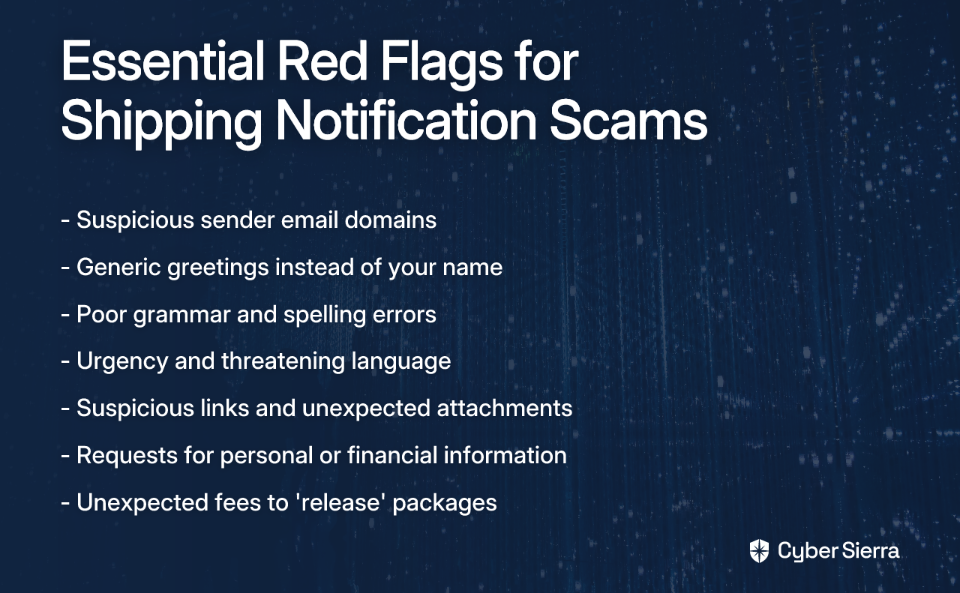
When reviewing any shipping notification, watch for these warning signs:
- Sender's Email Address: Is it from an official domain (e.g.,
@ups.com) or something suspicious (@service-ups.net)? - Generic Greetings: "Dear Customer" instead of your name.
- Poor Grammar & Spelling: Legitimate companies proofread their emails.
- Urgency & Threats: Language like "Urgent Action Required" or "your package will be returned."
- Suspicious Links & Attachments: Hover over links before clicking. Never open unexpected attachments.
- Requests for Personal Information: Carriers will never ask for passwords or credit card numbers via email.
- Unexpected Fees: Be wary of requests to pay small fees to "release" packages.
From Awareness to Resilience with Cyber Sierra
Shipping notification phishing scams are sophisticated and prey on our reliance on e-commerce. While individual vigilance is your first defense, for organizations, one employee's mistake can lead to a significant data breach.
This is where systematic training becomes essential. Cyber Sierra's Employee Security Training empowers employees to become the first line of defense through:
- Interactive training modules on email safety and phishing awareness
- Simulated phishing campaigns that mimic real-world scenarios like those shown in this article
- Quizzes and assessments that reinforce learning
- A dashboard overview of employees' security quotient to track progress
- Continuous updates that keep pace with evolving threats
By building a security-conscious culture, organizations can significantly reduce their vulnerability to these increasingly sophisticated attacks.
Frequently Asked Questions
What is the most common sign of a shipping scam?
The most common sign is a suspicious sender email address that doesn't match the official carrier's domain (e.g., fedex.delivery.com instead of fedex.com). Other red flags include urgent language, generic greetings, and poor grammar.
How can I verify if a shipping notification is real?
Never click links in the message. Instead, copy any tracking number provided and paste it directly into the carrier's official website (e.g., fedex.com, ups.com, usps.com). This is the safest way to confirm a package's status.
What should I do if I receive a suspicious shipping text or email?
Do not click any links, open attachments, or reply. The best course of action is to delete the message immediately. You can also report it as spam or phishing to your email provider and forward it to the official carrier's abuse department.
Why do scammers ask for small payments like $2.99 for a package?
Scammers request small amounts to seem more believable and lower your guard. Their primary goal is not the small fee itself, but to steal your credit card information for larger fraudulent transactions or identity theft.
Can clicking a link in a phishing email be dangerous?
Yes, clicking a link can be dangerous even if you don't enter information. The link can lead to a site that automatically downloads malware onto your device or confirms your email address is active, leading to more scam attempts.
How do shipping scams get my contact information?
Scammers obtain contact information from various sources, including public records, social media, or data breaches from other companies. They often send out mass emails and texts hoping to find a victim who is actually expecting a package.
Protect your organization from the inside out. Learn how Cyber Sierra can strengthen your human firewall with realistic phishing simulations and continuous security training that addresses the exact threats we've examined in this article.
