



How to Use AI to Write Scripts for GRC Automation



Join thousands of professionals and get the latest insight on Compliance & Cybersecurity.
You've set up your GRC program, you're drowning in compliance frameworks like NIST, ISO, and FedRAMP, and now management wants you to "leverage AI" to make it all more efficient. The pressure is mounting, but your team is already understaffed and under-budgeted. Sound familiar?
While there's plenty of AI hype floating around the GRC world today, separating genuine utility from marketing sparkle can be challenging. The truth is, AI won't replace your GRC function, but it can transform how efficiently you operate—especially when it comes to those tedious, repetitive tasks that consume hours of your week.
This guide focuses on a practical, high-impact application: using AI as your personal scripting assistant to automate one of the most time-consuming aspects of compliance work—formatting raw vulnerability scan data into a structured Plan of Action and Milestones (POA&M) for FedRAMP certification.
Why Use an AI Scripting Assistant? The Efficiency Imperative for Modern GRC
As one GRC professional put it on Reddit, "I've been a citizen programmer for like 5 years trying to automate as much of the job as possible." This sentiment resonates across the industry. Even if you "automate 80% of my job," many professionals note they "could still fill another 40 hours in a week."
The reality is that GRC teams are chronically "understaffed and under-budgeted per the amount of work expected out of them." This pressure has created a generation of "citizen programmers"—GRC professionals who aren't software engineers by training but have learned to code out of necessity.
AI-assisted scripting offers three critical advantages for these professionals:
- Accelerated Development: Instead of spending weeks crafting a script to process compliance data, AI can help generate functional code in minutes, with you guiding the process.
- Enhanced Accuracy: Automated data extraction and formatting minimizes the human error inherent in manual copy-pasting—a critical consideration when dealing with security vulnerabilities.
- Democratization of Automation: You no longer need extensive Python experience to create useful scripts. AI lowers the technical barrier, empowering more team members to solve their own automation challenges.
The Hands-On Guide: Automating FedRAMP POA&M Creation with AI
Let's walk through a concrete example: using AI to create a script that transforms raw vulnerability scan data into a properly formatted FedRAMP POA&M—a task that typically requires hours of manual effort.
Part 1: Understanding the FedRAMP POA&M Challenge
The FedRAMP Plan of Action and Milestones (POA&M) is a critical document for Cloud Service Providers (CSPs) working with federal agencies. It serves as a structured approach for tracking and monitoring risk mitigation activities for known security weaknesses.
A compliant POA&M typically includes:
- POA&M ID: A unique identifier for each vulnerability
- Controls: Mapping to relevant NIST 800-53 controls
- Weakness Name and Description: Details about the vulnerability
- Risk Mitigation Approach: The plan to address the issue
- Tasks and Milestones: Specific actions required
- Scheduled Completion Date: Based on risk severity
- Status: Current remediation status
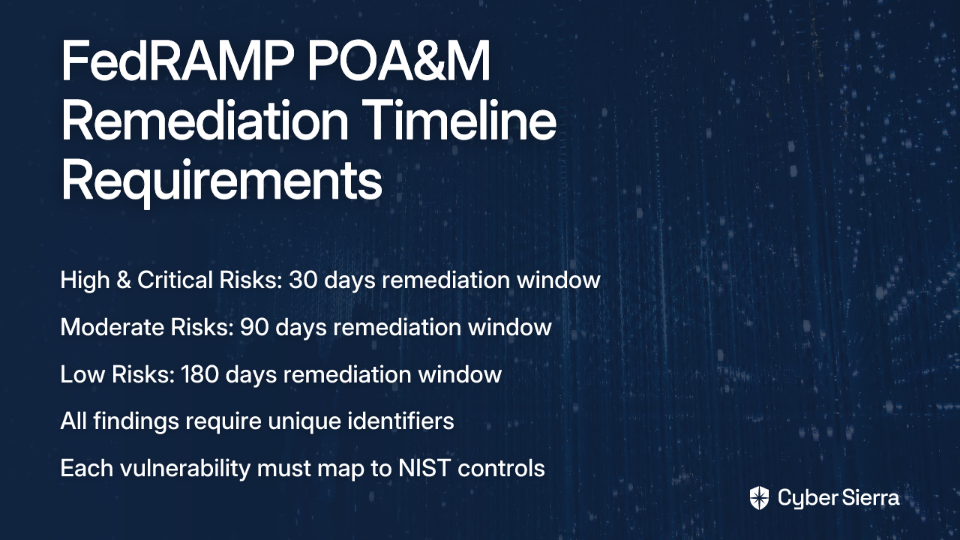
FedRAMP mandates specific remediation timelines based on risk severity:
- High and Critical Risks: Must be remediated within 30 days
- Moderate Risks: Must be remediated within 90 days
- Low Risks: Must be remediated within 180 days
The manual process typically involves:
- Receiving CSV or XML files from vulnerability scanners
- Manually reviewing hundreds or thousands of findings
- Copy-pasting data into the rigid Excel POA&M template
- Calculating appropriate deadlines based on risk levels
- Generating unique identifiers for each finding
This process is tedious, error-prone, and a prime candidate for automation.
Part 2: Your AI Co-pilot - A Step-by-Step Prompting Guide
To solve this problem, we'll use an AI assistant (like GitHub Copilot, ChatGPT, or Claude) to help write a Python script that automates the entire process. The key is using a structured sequence of prompts that guide the AI in creating exactly what we need.
Here's the step-by-step approach:
Prompt 1: Set the Stage
Start by clearly defining the problem and the tools you'll use:
I am a GRC analyst. I need to write a Python script using the pandas library to process a CSV file containing vulnerability scan data and format it into a FedRAMP Plan of Action and Milestones (POA&M). The output should be a new CSV file that matches the official FedRAMP POA&M template structure.
This prompt establishes the context and domain (GRC and FedRAMP compliance), the programming language (Python), the key library (pandas for data manipulation), and the specific task (converting scan data to a POA&M format).
Prompt 2: Define the Input and Output Schemas
Next, specify the exact structure of your data:
My input CSV from the scanner has these headers: 'Plugin ID', 'CVE', 'Risk', 'Host', 'Synopsis', 'Description', 'Solution'. The final POA&M output CSV must have these exact headers: 'POA&M ID', 'Weakness Name', 'Weakness Description', 'Remediation Plan', 'Status', 'Scheduled Completion Date'. Let's start by writing the code to read the input CSV and create a new DataFrame for the POA&M with the correct columns.
This prompt provides crucial details about the data structure, which helps the AI generate accurate code for data transformation.
Prompt 3: Map the Core Data Fields
Now, instruct the AI on how to map fields between the input and output:
Great. Now, let's map the data.
- Populate 'Weakness Name' from the 'Synopsis' column.
- Populate 'Weakness Description' from the 'Description' column.
- Populate 'Remediation Plan' from the 'Solution' column.
- Set the 'Status' for all new items to 'Ongoing'.
This prompt gives clear instructions on the data mapping requirements.
Prompt 4: Implement Business Logic for Timelines
Add the critical compliance logic for setting remediation deadlines:
Now for the critical part. Add logic to calculate the 'Scheduled Completion Date'. Get today's date. Based on the 'Risk' column from the input:
- If 'Risk' is 'Critical' or 'High', set the completion date to 30 days from today.
- If 'Risk' is 'Moderate', set it to 90 days from today.
- If 'Risk' is 'Low', set it to 180 days from today.
This prompt incorporates the FedRAMP-specific remediation timeline requirements.
Prompt 5: Generate Unique Identifiers
Finally, add logic for creating unique identifiers:
Finally, let's create a unique ID for each finding. For the 'POA&M ID' column, generate a unique ID by combining the 'Host' and 'Plugin ID' columns from the input, formatted as 'HOST-PLUGINID'. After this, write the final DataFrame to a new CSV file named 'poam_output.csv'.
The Resulting Python Script
Here's what the AI might produce after this sequence of prompts:
import pandas as pd
from datetime import datetime, timedelta

# Read the input CSV file
def process_vulnerability_data(input_file, output_file):
    # Read the input CSV
    df_input = pd.read_csv(input_file)

    # Create a new DataFrame for the POA&M with the required columns
    df_poam = pd.DataFrame(columns=['POA&M ID', 'Weakness Name', 'Weakness Description',
                                   'Remediation Plan', 'Status', 'Scheduled Completion Date'])

    # Map the data from input to POA&M format
    df_poam['Weakness Name'] = df_input['Synopsis']
    df_poam['Weakness Description'] = df_input['Description']
    df_poam['Remediation Plan'] = df_input['Solution']
    df_poam['Status'] = 'Ongoing'

    # Get today's date
    today = datetime.now()

    # Calculate completion dates based on risk level
    completion_dates = []

    for risk in df_input['Risk']:
        if risk in ['Critical', 'High']:
            completion_date = today + timedelta(days=30)
        elif risk == 'Moderate':
            completion_date = today + timedelta(days=90)
        else:  # Low risk
            completion_date = today + timedelta(days=180)

        completion_dates.append(completion_date.strftime('%Y-%m-%d'))

    df_poam['Scheduled Completion Date'] = completion_dates

    # Generate unique POA&M IDs
    df_poam['POA&M ID'] = df_input['Host'] + '-' + df_input['Plugin ID'].astype(str)

    # Write to output CSV
    df_poam.to_csv(output_file, index=False)

    return f"Successfully processed {len(df_poam)} vulnerabilities and saved to {output_file}"

# Example usage
if __name__ == "__main__":
    result = process_vulnerability_data('vulnerability_scan.csv', 'poam_output.csv')
    print(result)
This script accomplishes several key tasks:
- Reads vulnerability scan data from a CSV file
- Maps scan data fields to the required POA&M format
- Applies FedRAMP-compliant remediation timelines based on risk levels
- Generates unique identifiers for each finding
- Outputs a properly formatted POA&M file ready for submission
What would have taken hours of manual work or significant programming knowledge can now be accomplished in minutes through this guided conversation with an AI assistant.
Choosing Your AI Toolkit
The market for AI developer tools has exploded, and several options are particularly well-suited to GRC professionals looking to automate compliance tasks:
- GitHub Copilot: An AI pair programmer that integrates directly into code editors like Visual Studio Code. It's especially useful for real-time coding assistance and can suggest entire functions based on your comments.
- ChatGPT (with Code Interpreter): Offers a conversational approach to coding, allowing you to describe what you need in natural language and iterate on solutions. The Code Interpreter feature can even execute and test code in real-time.
- Claude: Similar to ChatGPT but with enhanced capabilities for understanding and generating longer, more complex scripts. Particularly good at following detailed instructions.
- Amazon CodeWhisperer: Integrated with AWS environments, making it ideal if your compliance automation needs to interact with AWS services.
For GRC professionals new to scripting, a conversational AI like ChatGPT or Claude may be the most accessible starting point, as they allow you to describe your needs in natural language and guide the development process through conversation.
Beyond POA&Ms: Other High-Impact GRC Scripting Use Cases
The AI-assisted scripting approach isn't limited to POA&M automation. Here are other high-value use cases shared by GRC professionals that you can adapt for your own needs:
Dynamic Policy Generation
Creating and maintaining policies that address the specific needs of different roles in your organization can be time-consuming. One GRC professional described using AI to script:
Creating dynamic policies based on company information collected through a Tines form
You could use a similar prompting approach:
I need to write a Python script that takes a CSV of employee roles and generates a dynamic acceptable use policy. The script should include or exclude specific sections based on the 'Role' column. For example, developers should see sections on code security, while sales staff should see sections on customer data protection.
This approach helps maintain consistent policy standards while tailoring content to specific audiences—essential for complex compliance frameworks like SOX or ISO 27001.
Third-Party Risk Assessment Automation
Another GRC professional shared their approach to automating third-party risk assessments:
Reviewing Chrome Extensions (Downloading extensions from the Chrome Web Store, Extracting the .crx files and Basic manifest analysis). I am also having the script review the Terms and conditions + privacy policy of the company to determine if any potential conflicts.
This is a fascinating example of using AI to script complex vendor risk assessments. You could adapt this approach with a prompt like:
I need a Python script that can download a Chrome extension, extract its manifest.json file, and analyze the permissions it requests. Then, the script should scrape the linked privacy policy and search for keywords related to data sharing. Finally, it should generate a risk report based on both analyses.
This type of automation is invaluable for organizations managing extensive third-party risk profiles and vendor assessments.
Automated Evidence Collection for Audits
Preparing for audits often involves gathering evidence from various systems. You can use AI to help write scripts that query APIs to check for configurations required by frameworks like SOC 2 or ISO 27001:
I need a script that queries the AWS API to verify that all our S3 buckets have encryption enabled and block public access, as required by our SOC 2 compliance program. The script should generate a CSV report showing compliant and non-compliant resources.
Cross-Framework Control Mapping
One of the most time-consuming aspects of GRC is mapping controls between different frameworks. As one professional noted, "CMMC is its own beast, so trying to cross-map it from other frameworks, like other GRCs do, can be tedious and erroneous."
You could use AI to help create a mapping script:
I have a JSON file containing our implemented NIST 800-53 controls. I need a Python script that maps these to the corresponding CMMC Level 2 practices. The script should output a table showing the NIST control, the mapped CMMC practice, and notes on any gaps that need to be addressed.
Machine Learning for Risk Taxonomy
Beyond simple scripts, you can use AI to help develop more advanced Machine Learning applications for your GRC program:
I need help creating a Python script that uses natural language processing to categorize our incident reports into our risk taxonomy categories. The script should analyze incident descriptions and assign them to the appropriate category in our risk framework.
This approach helps standardize risk categorization across your organization and can provide insights into emerging risk patterns.
Best Practices and Pitfalls: Wielding AI Responsibly
As you begin using AI for GRC automation, keep these best practices in mind:
Best Practices
- Establish Clear Objectives First: Define exactly what you want your script to accomplish before engaging with the AI. The more specific your goal, the better guidance you can provide.
- Iterate and Refine: Build your script in logical chunks. Don't expect to get a perfect script in one go. Test each piece before moving to the next phase.
- Provide Quality Context: The more specific your prompts and examples, the better the AI's response will be. Include sample data formats, business rules, and compliance requirements.
- Maintain Human Oversight: As one GRC professional noted, "We're a ways off from good AI for auditing." Always review and validate AI-generated scripts before deploying them in production environments, especially for compliance-critical tasks.
- Document Your Approach: Create clear documentation explaining how your AI-assisted scripts work, what compliance requirements they address, and how they should be maintained. This is essential for audit trails and knowledge transfer.
Common Pitfalls to Avoid
- Over-Reliance on Automation: Never blindly deploy a script that handles critical compliance data without thorough testing and validation. AI can make mistakes or misinterpret requirements.
- Garbage In, Garbage Out: The script is only as good as the data you feed it and the instructions you provide. Ensure your source data is clean and your requirements are clear.
- Ignoring Security: Scripts with access to sensitive compliance data or APIs need proper security controls. Ensure credentials aren't hardcoded, and implement appropriate access controls.
- Failing to Test Edge Cases: Make sure your scripts handle unusual scenarios correctly. What happens if the input data is malformed? What if a service is unavailable?
- Neglecting Leadership Buy-In: For larger automation initiatives, ensure you have management support. Help leadership understand how AI-assisted automation aligns with your organization's compliance strategy and risk appetite.
Conclusion: From Analyst to Automator
The pressure to incorporate AI into GRC processes isn't going away. However, rather than viewing this as another burden, forward-thinking GRC professionals can leverage AI as a scripting assistant to transform their effectiveness.
By automating tedious tasks like formatting FedRAMP POA&Ms, generating dynamic policies, or mapping controls between frameworks like NIST and CMMC, you free up valuable time to focus on what truly matters: strategic risk analysis and thoughtful compliance decisions that protect your organization.
The approach outlined in this article—using structured prompting to guide an AI in writing automation scripts—democratizes coding capabilities. You don't need to be a software engineer to create powerful automation tools; you just need to understand your compliance requirements clearly enough to explain them to your AI assistant.
Remember that AI is not replacing GRC professionals—it's augmenting them. As one practitioner noted, even if you "automate 80% of my job," most GRC professionals "could still fill another 40 hours in a week" with valuable strategic work. The goal isn't to eliminate jobs but to eliminate drudgery.
Getting Started Today
- Identify Your Pain Points: What manual, repetitive tasks consume the most time in your GRC workflow? POA&M formatting? Control mapping? Evidence collection? These are your prime automation candidates.
- Choose Your AI Tool: Start with a conversational AI like ChatGPT or Claude if you're new to scripting, or GitHub Copilot if you already have some coding experience.
- Start Small: Begin with a well-defined, non-critical task to build your confidence. As you become more comfortable with the process, you can tackle more complex automation challenges.
- Share Your Success: Document and share your automation wins with your team and leadership. This helps build support for broader adoption of AI-assisted automation within your GRC program.
- Continuously Improve: As compliance frameworks evolve, so should your automation scripts. Regularly review and update your scripts to ensure they remain aligned with current requirements.
The future of GRC belongs to those who can effectively blend human expertise with technological augmentation. By embracing AI as your scripting assistant, you position yourself at the forefront of this evolution—not as a victim of it, but as its master.
In a field where teams are chronically understaffed and under-budgeted, the ability to automate routine compliance tasks isn't just a nice-to-have skill—it's increasingly becoming essential. The most valuable GRC professionals won't be those who can manually process the most documents or fill out the most templates; they'll be those who can leverage tools like AI to eliminate that work entirely, focusing instead on the strategic insights and risk management decisions that truly protect their organizations.
Start your journey from analyst to automator today. Your future self—with more time for meaningful work and less time spent on tedious formatting—will thank you.
Frequently Asked Questions
What is an AI scripting assistant for GRC?
An AI scripting assistant is a tool, like ChatGPT or GitHub Copilot, that helps GRC professionals write code to automate repetitive compliance tasks, even with minimal programming experience. It works by taking natural language prompts (your instructions) and generating functional scripts (e.g., in Python) to handle tasks like data formatting, evidence collection, and control mapping. This article demonstrates how to use it to automate the creation of a FedRAMP POA&M.
Why should GRC teams use AI for automation?
GRC teams should use AI for automation to significantly increase efficiency, improve accuracy, and empower more team members to solve automation challenges without needing to be expert coders. Many GRC teams are understaffed and face a high volume of repetitive work. AI-assisted scripting accelerates development, reduces human error common in manual tasks, and lowers the technical barrier, allowing GRC analysts to build their own solutions.
How can AI help with FedRAMP POA&M creation?
AI can help by generating a script that automatically transforms raw vulnerability scan data into a compliant FedRAMP Plan of Action and Milestones (POA&M) file. By providing a series of clear prompts, you can guide an AI to write a Python script that reads vulnerability data, maps it to the correct POA&M columns, applies FedRAMP's specific remediation timelines (e.g., 30 days for High risks), and generates unique IDs for each finding. This automates a process that typically takes hours of manual, error-prone work.
Do I need to be a programmer to use AI for GRC automation?
No, you do not need to be an expert programmer. Modern AI assistants are designed to work with natural language, allowing GRC professionals with deep domain knowledge but limited coding skills to generate effective automation scripts. The process relies on your ability to clearly describe the compliance task, the input data, and the desired output. The AI translates these instructions into code, turning you into a "citizen programmer" guided by your GRC expertise.
Will AI replace GRC professionals?
No, AI is not expected to replace GRC professionals. Instead, it will augment their capabilities by automating tedious and repetitive tasks, allowing them to focus on strategic work. AI excels at data processing but lacks the critical thinking, ethical judgment, and strategic decision-making skills core to the GRC function. Professionals who leverage AI will have more time for high-value activities like risk analysis and complex compliance strategy, making them more valuable to their organizations.
What are the best AI tools for GRC scripting?
The best AI tool depends on your needs. For beginners, conversational AIs like ChatGPT or Claude are excellent starting points because they allow you to describe requirements in plain English. For those with some coding experience, an integrated tool like GitHub Copilot is highly effective as it works directly within a code editor. For teams using AWS, Amazon CodeWhisperer is another strong option.
What other GRC tasks can be automated with AI-assisted scripting?
Beyond POA&Ms, AI-assisted scripting can automate a wide range of GRC tasks, including dynamic policy generation, third-party risk assessment, automated audit evidence collection, and cross-framework control mapping. For example, you can create scripts to automatically query APIs to check security configurations for SOC 2 compliance, analyze vendor privacy policies for keywords, or map your implemented NIST controls to the CMMC framework. The key is to identify any manual, rule-based, and repetitive process in your workflow.
Additional Resources
For those looking to dive deeper into AI-assisted GRC automation:
- GitHub Copilot - AI pair programming tool
- Tines - No-code automation platform popular in security and GRC
- FedRAMP POA&M Template - Official template for POA&M documentation
- NIST Special Publication 800-53 - Security and Privacy Controls for Information Systems and Organizations
- CMMC Model - Official resource for Cybersecurity Maturity Model Certification
Remember, the key to success with AI-assisted automation isn't just technical skill—it's your domain expertise in GRC requirements and processes. The AI is your assistant, but your compliance knowledge is what makes the automation truly valuable.
