



How to Choose the Right GRC Tool for Small Organizations Under 100 Users



Join thousands of professionals and get the latest insight on Compliance & Cybersecurity.
You've just been tasked with managing your company's compliance program. Maybe it's for PCI compliance, or perhaps your clients are asking about your security posture. You search online for policy templates, only to discover you need dozens of documents, a risk register, and a way to track it all. The enterprise GRC tools you find seem designed for Fortune 500 companies with dedicated compliance teams—not your 50-person organization with you wearing multiple hats.
Sound familiar? You're not alone.
Small organizations face unique challenges when selecting Governance, Risk, and Compliance (GRC) tools. While spreadsheets might seem sufficient initially, they quickly become unwieldy as compliance requirements grow. Meanwhile, enterprise-grade solutions like Archer are excessive and require resources you simply don't have.
Why Spreadsheets Aren't Enough for Modern GRC
"I started creating policies from templates, but realized I need a better way to manage them in the long run," shared one IT manager on Reddit. This sentiment echoes across many small organizations.
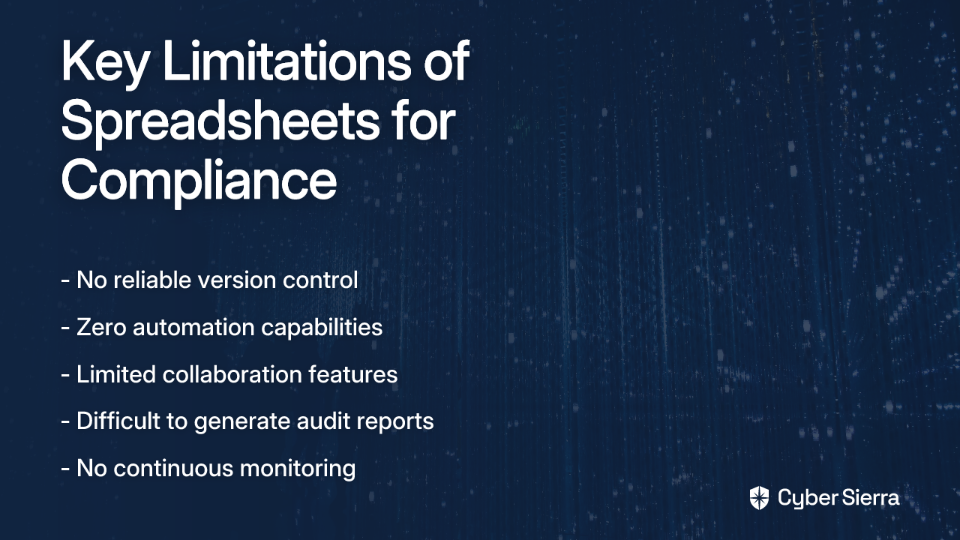
While spreadsheets might work for a basic risk register, they fall short in several critical areas:
- Version Control Issues: Documents quickly become outdated with no clear "source of truth"
- No Automation: Manual evidence collection is time-consuming and error-prone
- Difficult Collaboration: Multiple stakeholders can't easily contribute or review
- Limited Reporting: Generating audit-ready reports requires significant manual effort
- No Continuous Compliance: Spreadsheets provide point-in-time snapshots, not ongoing monitoring
As regulatory requirements expand and customer security questionnaires multiply, these limitations become increasingly problematic. The right GRC tool transforms compliance from a reactive scramble into a proactive, streamlined process.
Key Factors for Small Organizations: An Evaluation Checklist
When evaluating GRC tools for organizations under 100 users, these factors should top your priority list:
1. Cost-Effectiveness & Total Cost of Ownership
For small organizations, budget constraints are real. GRC software can range from $5,000 to over $250,000 annually, with enterprise solutions at the higher end.
What to look for:
- Transparent, predictable pricing models
- Tiered plans that allow you to start small and scale
- No hidden fees for basic integrations or report generation
- Reasonable per-user costs (critical for small teams)
Some GRC tools designed for small businesses start as low as a few dollars per user per month, making them accessible options for organizations just beginning their compliance journey.
2. Ease of Implementation & Use
"I feel like a lot of the offerings still have a ways to go UI-wise," noted one user reviewing GRC tools. User experience is particularly crucial for small teams where the GRC administrator is likely handling multiple other responsibilities.
What to look for:
- Cloud-based setup with minimal IT requirements
- Intuitive user interface that doesn't require extensive training
- Guided workflows for common compliance frameworks like ISO 27001 or NIST
- Quality documentation and responsive support
3. Required Team Size & Resources
Enterprise GRC tools often assume dedicated compliance teams. As one Reddit user noted about Archer: "It's a good option if you have 100 people to support it." For small organizations, this simply isn't realistic.
What to look for:
- Solutions manageable by a single administrator
- Automation features that reduce manual workload
- Self-service capabilities for control owners
- Minimal training requirements for end users
The right tool should enhance your team's productivity, not create another full-time job managing the GRC platform itself.
4. API Access & Integration Capabilities
"They didn't have API access, which I wanted for the long term, so I wrote them off," shared one security professional discussing a GRC solution. This highlights a critical consideration: your GRC tool must connect with your existing tech stack.
What to look for:
- Pre-built integrations with common business tools
- API access for custom integrations
- Ability to import data from cloud services (AWS, Azure, Google Cloud)
- Automated evidence collection from security tools
These integrations significantly reduce manual data entry and ensure your compliance data stays current with minimal effort.
5. Scalability for Future Growth
Today you might only need SOC 2 compliance, but what happens when clients start asking about ISO 27001 or PCI compliance? Your GRC solution should grow with you.
What to look for:
- Support for multiple compliance frameworks
- Ability to map controls across frameworks (reducing duplicate work)
- Flexible workflow capabilities
- Clear pricing for scaling users and modules
A Practical Evaluation Framework in 4 Steps

Follow this systematic approach when selecting your GRC tool:
Step 1: Define Your Core Requirements
Before evaluating any tools, clarify your specific needs:
- Which compliance frameworks are most important right now? (PCI, SOC 2, ISO 27001, NIST, etc.)
- What are your key use cases? (Policy management, risk assessments, vendor management, audit prep)
- Do you need boilerplate policies to start from scratch? Many small organizations begin with templates based on NIST guidelines.
- What's your timeline and budget? Be realistic about both.
Step 2: Shortlist & Research
With your requirements defined, create a shortlist of potential tools:
- Look for solutions specifically designed for small businesses
- Check user reviews and peer recommendations
- Consider tools with freemium models or free trials
- Evaluate vendor reputation and support quality
Solutions like Vanta, Drata, Hyperproof, ZenGRC, and 6clicks are frequently mentioned for smaller organizations. For even smaller teams, tools like SimpleRisk offer freemium options that may be sufficient.
Step 3: Evaluate Core Functionality
For each shortlisted option, assess these critical capabilities:
- Automation depth: How effectively does it automate evidence collection and continuous control monitoring?
- Policy management: Does it provide acceptable use policy templates and version control?
- Risk register capabilities: Is the risk assessment process intuitive and scalable?
- Reporting: Can it generate clear, customizable reports for stakeholders and auditors?
- Vendor risk management: Does it streamline third-party assessments?
Step 4: Run a Pilot or Free Trial
This step is non-negotiable. As one user stated, "Until I do pilots of both, I can't comment on ease of use." Most reputable GRC vendors offer free trials or demonstrations.
During your pilot:
- Test the user interface with actual team members
- Attempt to set up a compliance framework relevant to your organization
- Try importing existing policies and controls
- Test integrations with at least one of your critical systems
- Evaluate the reporting capabilities
Common Pitfalls: How to Avoid Buying Expensive Shelfware
Many small organizations make these common mistakes when selecting GRC tools:
1. The Over-Engineering Trap
"It's not as robust as Archer, but unless you're managing risk for a very large organization, you probably don't need most of the advanced features anyway," noted one security professional. Enterprise solutions often include complex audit modules and extensive customization options that small teams simply don't need.
Solution: Choose tools designed specifically for small to mid-sized organizations that provide just enough functionality without overwhelming complexity.
2. Ignoring User Adoption Factors
A GRC tool with poor usability will face resistance from your team and ultimately become unused shelfware.
Solution: Include potential end-users in the evaluation process and prioritize solutions with intuitive interfaces and workflows.
3. Starting Without Policy Templates
Many small organizations lack established policies and procedures. Starting from scratch can be overwhelming.
Solution: Look for GRC tools that include quality templates aligned with frameworks like NIST, saving you countless hours of policy development.
4. Underestimating Integration Needs
Without proper integration, your GRC tool becomes another data silo requiring manual updates.
Solution: Prioritize API access and pre-built integrations, even if you don't need them immediately. They'll become crucial as your compliance program matures.
Beyond GRC: The Power of an Integrated Security Platform
As your organization grows, you may benefit from platforms that extend beyond traditional GRC functionality. An integrated approach can provide a single view of your entire security program, moving from periodic compliance checks to continuous compliance monitoring.
Platforms like Cybersierra offer this integrated approach by combining:
- Governance, Risk & Compliance (GRC): Automating data collection and framework management for SOC 2, ISO 27001, and other standards
- Continuous Control Monitoring: Providing real-time visibility into your security controls
- Third-Party Risk Management: Simplifying vendor assessments and monitoring
- Threat Intelligence: Identifying vulnerabilities across your attack surface
For small organizations, this unified approach can be particularly valuable, as it reduces the need to purchase, integrate, and manage multiple security tools as you grow.
Conclusion: Finding Your Right-Sized Solution
Selecting the right GRC tool for a small organization isn't about finding the one with the most features—it's about finding the right fit for your size, budget, and maturity level.
By prioritizing cost-effectiveness, ease of use, minimal resource requirements, integration capabilities, and scalability, you can find a solution that transforms compliance from a burdensome obligation into a strategic advantage.
Remember:
- Start with a clear understanding of your immediate compliance needs
- Choose tools designed for organizations your size
- Prioritize user experience and automation capabilities
- Ensure the solution can grow with you
- Consider integrated platforms as you mature
The right GRC tool should simplify your compliance journey, not complicate it. It should provide a scalable compliance engine that grows with your organization, helping you build trust with customers and secure your business for the long term.
Frequently Asked Questions
What is a GRC tool and why do small businesses need one?
A GRC (Governance, Risk, and Compliance) tool is a software platform that helps organizations manage their policies, assess risks, and track compliance with various regulations and standards. Small businesses need a GRC tool to move beyond inefficient spreadsheets, automate the collection of audit evidence, and streamline the management of frameworks like SOC 2, ISO 27001, and PCI DSS, saving significant time and reducing errors.
How much should a small business expect to pay for a GRC tool?
For small businesses, GRC tools typically range from $5,000 to $25,000 annually. The price depends on the number of users, the complexity of the compliance frameworks needed, and the level of automation and integration offered. Unlike enterprise solutions that can cost hundreds of thousands, these tools are priced to be accessible and provide a clear return on investment by reducing manual compliance work.
How can a GRC tool help if we have no existing security policies?
Many GRC platforms designed for small organizations are ideal for this situation because they include libraries of pre-built policy templates. These templates are often aligned with common frameworks like NIST or ISO 27001, giving you a strong foundation to build upon. This feature saves countless hours of writing policies from scratch and ensures you're starting with industry-accepted best practices.
What are the most important features to look for in a GRC tool for a small team?
The most critical features for a small team are ease of use, automation, and integration. Look for a tool with an intuitive interface that doesn't require a dedicated administrator, features that automate evidence collection from your cloud services (like AWS or Azure), and pre-built integrations with your existing tech stack. This ensures the tool reduces your workload rather than adding to it.
When is the right time to move from spreadsheets to a GRC tool?
The right time to switch is when spreadsheets become a bottleneck. Key triggers include: managing more than one compliance framework, spending too much time manually collecting evidence for audits, having difficulty tracking document versions, or receiving frequent security questionnaires from clients. A GRC tool becomes necessary when you need a reliable "source of truth" for your compliance program.
What is the difference between a GRC tool and an integrated security platform?
A traditional GRC tool focuses specifically on managing policies, risks, and compliance requirements for audits. An integrated security platform does all of that plus it incorporates other security functions like continuous control monitoring, vulnerability management, and vendor risk assessment into a single, unified solution. For a growing organization, an integrated platform offers a more holistic and proactive approach to security and compliance.
Looking for more information on GRC tools for small organizations? Contact Cybersierra for a personalized consultation on right-sizing your compliance approach.
