Clicked a Phishing Link? Your 5-Step Action Plan


Join thousands of professionals and get the latest insight on Compliance & Cybersecurity.
That sinking feeling when you realize you've clicked a suspicious link is unmistakable. Your heart races, your stomach drops, and suddenly you're thinking: "Is a hacker doing their worst on my computer right now?"
First, take a deep breath. You're not alone. Even IT professionals and cybersecurity experts occasionally fall for sophisticated phishing attempts. What matters most isn't that you made this common mistake—it's what you do right now.
This guide provides a simple, actionable 5-step plan to secure your device, protect your data, and help your organization after clicking a suspicious link. Whether you're a new employee who clicked what looked like a legitimate client email, someone who was rushing to finish work on time, or just someone whose "spidey sense" kicked in a moment too late—we've got you covered.
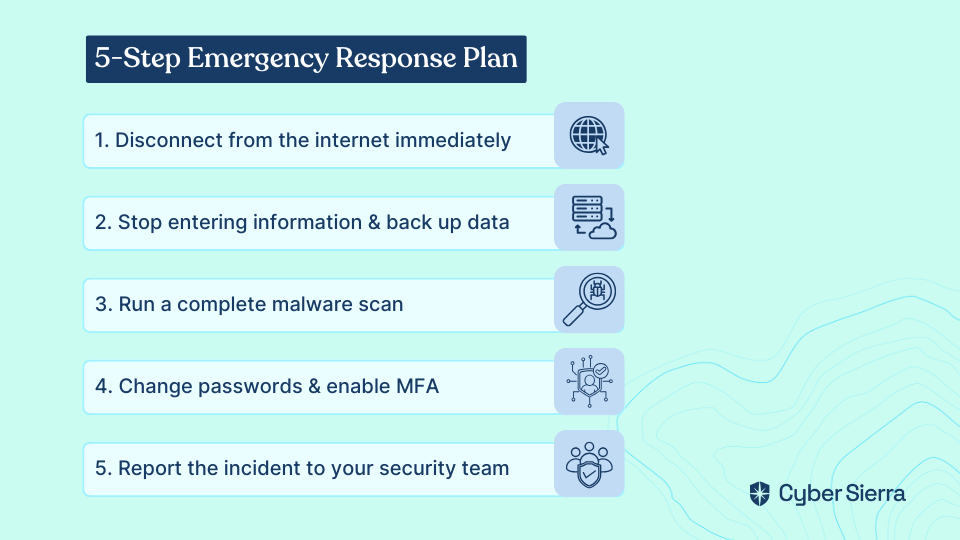
Step 1: Disconnect Your Device from the Internet. Immediately.
Why this matters: This critical first step cuts off the attacker's connection to your device, preventing them from stealing more data, downloading additional malware, or spreading to other systems on your network.
How to disconnect:
- If using a wired connection, unplug the Ethernet cable
- If on Wi-Fi, turn it off completely (don't just put your device to sleep)
- On a mobile device, activate Airplane Mode to disable all connections
Putting your device to sleep isn't enough—many types of malware will simply reestablish their connection when the machine wakes up. You need to physically sever the connection.
Step 2: Do Not Provide Any More Information & Back Up Your Data
Why this matters: Even if you haven't submitted information yet, sophisticated phishing sites may already be harvesting what you've typed through keylogging or AJAX requests that send data in real-time.
What to do:
- Close the suspicious browser tab or the entire browser immediately
- Do not enter any usernames, passwords, or personal details on the suspicious page
- If you have access to an external, encrypted storage device, back up your most important files while disconnected from the internet
This protects your data in case you need to completely wipe your device later if a malicious program like a RAT (Remote Access Trojan) or infostealer is detected.
Step 3: Scan Your Device for Malware
Why this matters: Clicking a malicious link can trigger an automatic download of malware even if the page appears blank, fails to load, or displays an error message. A comprehensive scan is necessary to identify and quarantine potential threats.
How to perform a scan:
- Ensure your antivirus or anti-malware software is up to date
- Run a complete system scan while disconnected from the internet
- If your organization has an EDR (Endpoint Detection and Response) system, make sure it's running
- For additional security, consider using a secondary scanner from a reputable provider
Remember that "no threats detected" doesn't always guarantee safety—some sophisticated malware is designed to evade detection. This is why the next steps remain crucial even after a clean scan.
Step 4: Change Your Passwords and Enable MFA
Why this matters: You should assume any credentials entered are compromised. Additionally, passwords saved in your browser could be at risk if token theft malware was installed.
Critical password reset steps:
- Use a separate, uncompromised device (like your phone or another computer) to change passwords
- Start with the account the phishing email was impersonating (bank, email provider, etc.)
- Change the password for the email account where you received the phishing message
- Update any accounts that use similar credentials
Best security practices:
- Use a password manager to create and store strong, unique passwords
- Enable MFA (Multi-Factor Authentication) on every account that offers it
- Check for any unusual email forwarding rules that may have been set up
- Review account recovery options to ensure they haven't been changed
Step 5: Report the Incident. Seriously.
Why this matters: This step isn't about getting in trouble—it's about protecting the entire organization. Your Security Operations Center (SOC) or IT team needs to know immediately to check for wider breaches, block the malicious site for others, and look for lateral movement or similar emails targeting your colleagues.
How to report effectively:
- Contact your IT/security department immediately with specific details
- Share the IOC (Indicator of Compromise)—the sender's email, subject line, and the malicious link (don't click it again!)
- Explain the steps you've already taken
- If personal financial information was compromised, contact your bank immediately
Hiding a mistake is far more dangerous than reporting it. Organizations with the strongest security postures are those where employees feel safe reporting incidents without fear of blame.
Understanding the Threat: What is Phishing?
Phishing is a type of cyberattack where criminals masquerade as trustworthy entities to trick you into providing sensitive information or inadvertently deploying malware. Understanding the different types can help you spot them:
- Spear Phishing: Highly targeted attacks using your personal information (name, job title, company) to appear credible—like the "client from the CRM" scenario
- Business Email Compromise (BEC): Attackers compromise legitimate business email accounts to conduct unauthorized fund transfers or data theft
- Clone Phishing: An attacker copies a legitimate, previously delivered email but replaces a link or attachment with a malicious one
- Credential Phishing: Designed specifically to steal login information by mimicking trusted login pages
When a phishing attempt succeeds, attackers may deploy various threats, from infostealers that harvest your saved passwords to more complex malware that enables remote control of your system.
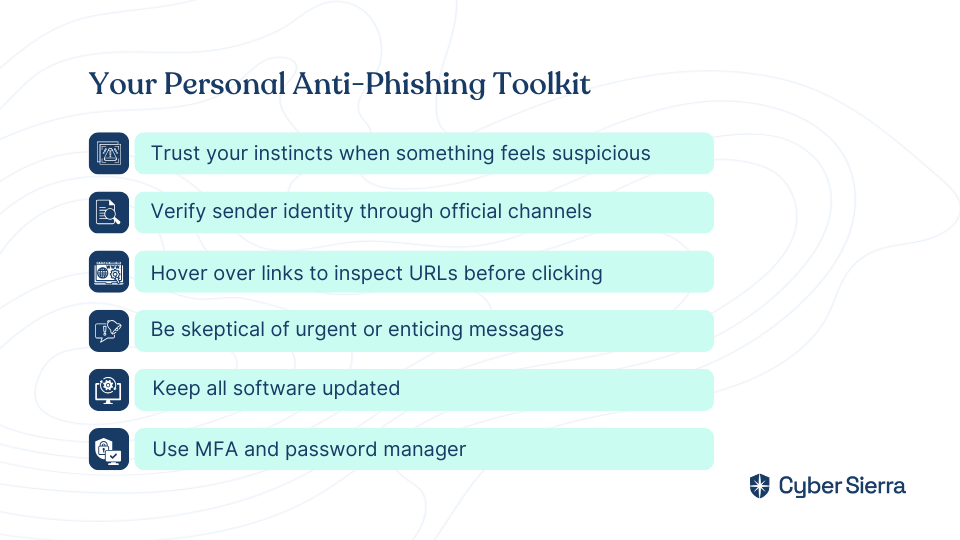
For the Future: Building Your Personal Phishing Defense
Trust your instincts: That "spidey sense" that something feels off is often your subconscious noticing subtle inconsistencies. Pay attention to it!
Verify before you trust:
- Always verify the sender through official channels—if an email from a "client" seems unusual, call them using a number from your official records, not from the email
- Hover over links to inspect the true URL before clicking
- Be wary of urgency, threats, or enticing offers—these are psychological manipulation tactics
Strengthen your technical defenses:
- Keep your operating system, browser, and security software updated
- Use MFA wherever possible to prevent password-only account takeovers
- Use a password manager to avoid reusing passwords
A Final Note: Fostering a Culture of Security, Not Blame
Mistakes happen to everyone. The focus should be on swift and correct incident response, not punishment.
For employees: Be vigilant, but also brave enough to report incidents immediately. Your prompt report is a critical piece of your company's defense against phishing.
For employers: Punishing employees for clicking leads to a culture of silence and hidden incidents—which is far more dangerous than an openly reported mistake. Instead:
- Invest in regular user awareness training
- Establish clear, accessible security protocols and incident response plans
- Create a supportive environment where reporting is encouraged and recognized as a strength
Remember: Phishing targets human psychology, not just technology. A supportive security culture where people feel safe reporting mistakes is your best defense against these evolving threats.
By following these steps and fostering an environment of security awareness, organizations can significantly reduce the impact of phishing attempts and build resilience against future attacks.
Frequently Asked Questions
What is the very first thing I should do after clicking a suspicious link?
The absolute first step is to immediately disconnect your device from the internet. This action severs any connection an attacker might have established, preventing them from stealing more data, downloading additional malware, or moving to other devices on your network. Unplug ethernet cables, turn off Wi-Fi, or enable Airplane Mode on mobile devices.
What damage occurs after clicking a phishing link?
Clicking a phishing link can lead to several negative outcomes, including malware infection, credential theft, and data breaches. Attackers may install malware like ransomware or spyware on your device, steal login credentials you enter on a fake page, or gain access to sensitive personal or company data. This is why it's crucial to disconnect from the internet, scan your device, and change your passwords immediately.
Is my device safe if an antivirus scan finds no malware?
Not necessarily. While a clean antivirus scan is a good sign, some sophisticated malware is designed to evade detection. For this reason, it is critical to follow all recovery steps, especially changing your passwords and reporting the incident. You should assume your credentials have been compromised and act accordingly, even if a scan comes back clean.
Why should I report clicking a phishing link at work?
Reporting the incident immediately helps protect the entire organization from a wider attack. Your IT or security team can use the information you provide to block the malicious link for other employees, search for similar threats across the network, and contain any potential breach before it spreads. Reporting is a critical part of a company's collective defense, not a reason for punishment.
How can I get better at spotting phishing emails?
You can spot phishing emails by looking for red flags like a sense of urgency, generic greetings, spelling errors, and email addresses or links that don't match the supposed sender. Always hover your mouse over links to see the actual destination URL before clicking. If an email seems suspicious, verify it through a separate, trusted channel, like calling the person or company directly.
Do I need to change passwords for accounts not related to the phishing email?
Yes, it is highly recommended to change passwords for other important accounts, especially if you reuse passwords or if they are saved in your browser. Sophisticated malware can steal all the passwords stored in your web browser, not just the one you entered on the fake site. Prioritize changing the password for the impersonated account, your primary email account, and any other accounts that share similar credentials.