



How to Build a Unified Compliance Dashboard for Your Organization


Join thousands of professionals and get the latest insight on Compliance & Cybersecurity.
You've set up multiple compliance frameworks. You run scripts manually once a month to check if your systems comply with ISO 27001 and SOC 2. But when you check your infrastructure, you're shocked to discover an unencrypted RDS instance that's been exposing sensitive data for weeks—something your periodic checks completely missed.
This reactive approach to compliance isn't just inefficient—it's dangerous. In today's complex digital landscape, managing compliance through siloed tools and spreadsheets creates visibility gaps, contributes to audit fatigue, and leaves your organization vulnerable to security breaches and regulatory penalties.
There's a better way. A unified compliance dashboard transforms compliance from a periodic, stressful event into a continuous, automated process that gives you real-time visibility into your security posture.
What is a Unified Compliance Dashboard (And Why You Urgently Need One)
A unified compliance dashboard is a centralized, digital interface that consolidates, tracks, and visualizes your organization's compliance status against multiple regulatory frameworks and internal policies in real-time. It serves as a single source of truth for compliance data, enabling proactive risk management and informed decision-making.
Why is this approach so critical in today's environment?
Eliminate Manual Toil & Boost Productivity
Manual evidence collection and compliance checks are time-consuming and error-prone. Automated compliance solutions can result in 82% less time spent on framework audits and make compliance teams 129% more productive. Instead of scrambling to collect evidence during audit season, your team can focus on strategic security initiatives.
Achieve Proactive Risk Management
A unified dashboard shifts your compliance posture from point-in-time assessments to continuous visibility. Real-time alerts for non-compliance allow you to identify and remediate risks before they become major incidents or compliance violations. This transforms your security approach from reactive to proactive.
Streamline Audit Preparedness
With a centralized repository of evidence, control status, and documentation, your organization maintains a constant state of audit-readiness. When auditors request evidence, you can generate reports with a few clicks rather than launching a company-wide evidence gathering exercise.
Enable Data-Driven Decision-Making
Clear, visual, and quantifiable data on your organization's compliance posture enables stakeholders from the CISO to the board to make informed decisions about security investments and risk acceptance.
The Anatomy of an Effective Dashboard: Key Metrics & Features
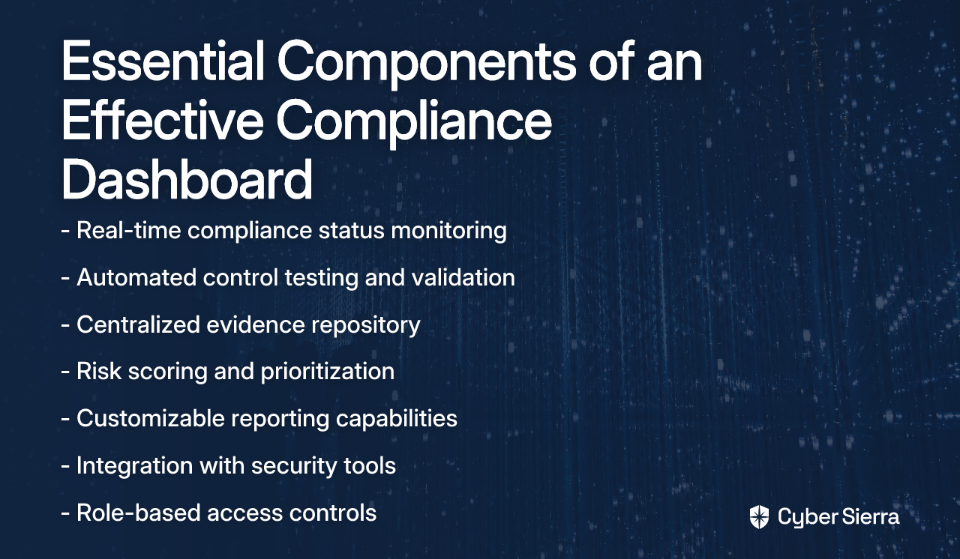
An effective compliance dashboard is only as good as the data it presents and how it presents that data. Here are the essential components:
Key Metrics to Track
Focus on metrics that are actionable and aligned with business objectives:
Compliance Status Metrics
- Percentage of controls implemented and tested per framework (SOC 2, ISO 27001, PCI DSS)
- Policy adherence rates and exception tracking
- Time to remediation for compliance gaps
Risk Management Metrics
- Number of open risks categorized by severity (High, Medium, Low)
- Risk remediation progress and aging of open risks
- Risk trends over time to identify patterns
Control Effectiveness & Monitoring
- Status of automated vs. manual controls
- Real-time alerts for control failures or configuration drifts
- Control testing frequency and results
Vendor Compliance Metrics
- Third-party risk scores and compliance status of critical vendors
- Vendor assessment completion rates
- Outstanding vendor remediation items
Training & Awareness Metrics
- Employee security training completion rates
- Policy acknowledgment status
- Security awareness program effectiveness
Essential Dashboard Features
Centralized Data Integration
Your dashboard must be able to aggregate data from disparate sources—cloud providers like AWS, vulnerability scanners, HR systems, and more—into a single, coherent view. This addresses the common challenge of information siloing that plagues many compliance programs.
Real-Time Monitoring & Automated Alerts
"I want to see alerts on my dashboard if any resource is non-compliant (for example, if encryption is not enabled on some RDS instance)," notes one AWS user on Reddit. The dashboard must provide continuous updates, not static weekly reports. Automated alerts for high-risk issues are non-negotiable for effective risk management.
Customizable Views & Role-Based Access Control (RBAC)
Different stakeholders need different views of the data. An executive needs a high-level summary, while a security analyst needs granular, drill-down capabilities. RBAC ensures users only see relevant data based on their role and responsibilities.
Automated Reporting & Audit Trails
The ability to generate downloadable reports for stakeholders and auditors on demand addresses one of the most common pain points in compliance management. As another Reddit user asked, "How can I generate a report or parse all resources against a policy?" Your dashboard should make this process seamless.
A Step-by-Step Guide to Building Your Compliance Dashboard
Ready to build your unified compliance dashboard? Here's a practical roadmap for implementation:
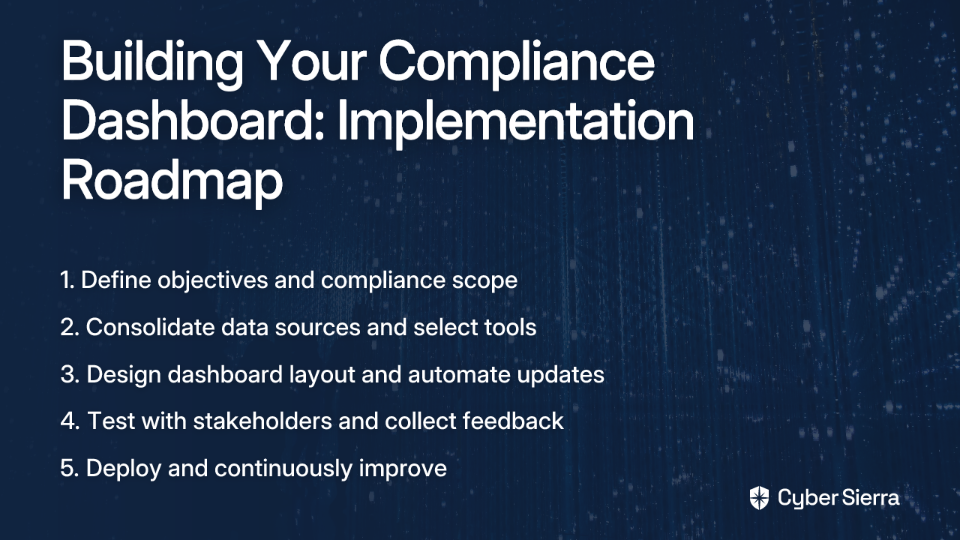
Step 1: Define Objectives & Scope
Start by clearly identifying what you want to achieve with your dashboard:
- Which compliance frameworks do you need to monitor? (ISO 27001, SOC 2, HIPAA, GDPR, etc.)
- Who are the primary users of the dashboard?
- What specific pain points are you trying to address?
- What level of detail is required for different stakeholders?
Documenting these requirements will guide your technology selection and implementation approach.
Step 2: Consolidate Data Sources & Choose Your Tooling Strategy
This is where you decide on your approach to building the dashboard. You have several options:
Option A: DIY with Native Cloud Tools
For AWS-centric environments, you can leverage tools like AWS Config and Security Hub for cloud resource monitoring. AWS Audit Manager can help with report generation.
Pros: Cost-effective (though be mindful of AWS Config costs), deep integration with the cloud environment.
Cons: Complex to configure, may not provide a unified view across multi-cloud or on-premise systems, and often requires significant engineering effort to build a true "dashboard."
Option B: Open-Source Solutions
Tools like ScoutSuite can perform security posture assessments across cloud environments.
Pros: No licensing cost, community support.
Cons: Requires manual setup and ongoing maintenance, lacks dedicated support, may not have robust reporting or integration capabilities needed for enterprise GRC.
Option C: Invest in a Unified GRC Platform
This is the most direct path to a unified dashboard. Platforms designed specifically for compliance management offer pre-built integrations, automated evidence collection, and purpose-built dashboards.
For a truly holistic view, platforms like Cybersierra integrate these capabilities into a single pane of glass. Its Continuous Control Monitoring (CCM) module automates evidence collection and provides real-time posture visibility, while the GRC module centralizes management of multiple frameworks like SOC 2 and ISO 27001.
Step 3: Design the Layout & Automate Updates
Organize metrics logically and use visual cues like color-coding (red, yellow, green) for quick status identification. Consider these design principles:
- Simplicity: Focus on the most critical metrics to avoid information overload
- Visual hierarchy: Place the most important information prominently
- Consistency: Use consistent visualization methods for similar types of data
- Interactivity: Enable drill-downs for deeper investigation
Most importantly, ensure data feeds are automated via API integrations for a truly live dashboard. Manual data entry defeats the purpose of real-time visibility.
Step 4: Test, Roll Out, and Iterate
Before full deployment:
- Validate the accuracy of the metrics against known compliance statuses
- Test the dashboard with representatives from different user groups
- Train users on how to use and interpret the dashboard
- Establish feedback mechanisms to capture user suggestions
Regularly solicit feedback and refine the dashboard to meet evolving business needs and regulatory requirements.
Common Pitfalls to Avoid
Information Overload
Avoid cluttering the dashboard with vanity metrics that don't drive action. Focus on KPIs that inform strategy and risk management decisions. As one compliance professional notes, "The goal isn't to show everything—it's to show what matters."
Forgetting the "Why"
A dashboard isn't just for reporting; it's for managing risk and improving security posture. Ensure every metric is tied to a specific compliance objective or risk scenario to maintain focus on business outcomes.
Neglecting the Human Element
A dashboard is a tool, not a silver bullet. It must be supported by strong governance processes and a culture of security awareness. The most sophisticated dashboard won't help if your team doesn't understand how to interpret and act on the data it provides.
Technical solutions work best when paired with a comprehensive security awareness program. Cybersierra's Employee Security Training can help build a security-conscious workforce that understands the importance of compliance.
Conclusion
A unified compliance dashboard is no longer a luxury but a necessity for modern governance, risk, and compliance management. It transforms compliance from a fragmented, manual burden into a streamlined, strategic, and automated function.
By providing a single source of truth, real-time visibility, and actionable intelligence, you can enhance your security posture, ace your audits, and build trust with customers and stakeholders.
Ready to move beyond spreadsheets and manual checks? Explore how a dedicated platform can accelerate your journey. Cyber Sierra's AI-enabled platform provides the automation, continuous monitoring, and intelligence needed to build a world-class unified compliance dashboard, turning GRC into a competitive advantage rather than a necessary evil.
Whether you choose to build your dashboard in-house or leverage a specialized platform, the key is to start now. Every day spent with fragmented compliance visibility is another day of unnecessary risk exposure.
Frequently Asked Questions
What is a unified compliance dashboard?
A unified compliance dashboard is a centralized platform that provides real-time visibility into an organization's compliance status across multiple regulatory frameworks like SOC 2, ISO 27001, and HIPAA. It consolidates data from various systems (cloud providers, HR systems, vulnerability scanners) to serve as a single source of truth for all compliance-related activities.
Why is continuous compliance monitoring important?
Continuous compliance monitoring is important because it shifts security from a reactive, point-in-time approach to a proactive one. Instead of discovering issues during periodic checks, continuous monitoring provides real-time alerts for non-compliance, allowing you to identify and fix security gaps like unencrypted databases before they become major incidents. This drastically reduces risk and ensures ongoing audit-readiness.
How do you build a compliance dashboard?
Building a compliance dashboard involves four key steps: 1) Define your objectives and the frameworks you need to monitor. 2) Consolidate data sources and choose a tooling strategy (DIY, open-source, or a dedicated GRC platform). 3) Design the dashboard layout with key metrics and automate data feeds. 4) Test, roll out to users, and iterate based on feedback.
What key metrics should a compliance dashboard track?
An effective compliance dashboard should track actionable metrics related to compliance status, risk management, and control effectiveness. Key metrics include the percentage of controls implemented per framework, the number of open risks by severity, real-time alerts for control failures, and vendor compliance status.
How does a unified dashboard help with audits?
A unified dashboard significantly streamlines audit preparedness by maintaining a constant state of readiness. It centralizes all necessary evidence, control statuses, and documentation, allowing you to generate comprehensive reports for auditors with just a few clicks. This eliminates the last-minute scramble for evidence and reduces the time and effort spent on audit cycles.
Can I use native cloud tools like AWS to build a dashboard?
Yes, you can use native cloud tools like AWS Config and Security Hub to build a compliance dashboard, especially for an AWS-centric environment. While this can be cost-effective, it often requires significant engineering effort to configure and may not provide a truly unified view if you operate in a multi-cloud or hybrid environment. For a more holistic view, a dedicated GRC platform is often more efficient.
