



Top 5 Internal Audit Software Alternatives for Enterprises: Cost vs Capabilities


Join thousands of professionals and get the latest insight on Compliance & Cybersecurity.
Summary
- Choosing the right internal audit software is critical, as manual processes are inefficient and the wrong tool can be complex, clunky, or unusable.
- Evaluate platforms based on key criteria such as comprehensive features, integration capabilities, scalability, user-friendliness, and vendor support.
- The future of auditing is shifting from periodic checks toward proactive, continuous monitoring and integrated Governance, Risk, and Compliance (GRC).
- To modernize your audit program, consider an integrated GRC platform like Cyber Sierra, which uses automation and continuous monitoring to provide real-time risk visibility.
You've set up your enterprise's internal audit department with a clear mandate to strengthen governance and compliance. But when you start looking for the right software to streamline your processes, you're immediately overwhelmed by the number of options, each claiming to be the perfect solution.
"I hear so many mixed reviews, and there's so many, it's hard to navigate," as one audit professional on Reddit aptly put it. Others complain about software being "fairly complex and a bit overkill" or having interfaces so "clunky" they become "awful to the point of being unusable at times."
In today's complex regulatory environment, manual audit processes are no longer sufficient—they're inefficient, prone to error, and can easily miss critical control weaknesses. But choosing the wrong audit software solution can create even bigger headaches, wasting both time and budget while frustrating your team.
This article cuts through the noise to provide a clear comparison of the top five enterprise-grade internal audit software alternatives, with a laser focus on the critical balance between cost and capabilities.
What to Look For: Key Criteria for Selecting Enterprise Internal Audit Software
Before diving into specific solutions, let's establish a framework for evaluation. Consider these essential criteria when selecting your enterprise's internal audit software:

1. Comprehensive Features & Capabilities
The platform must cover core audit management needs:
- Audit Planning Tools: For creating and managing efficient audit programs
- Document Management: A centralized system for working papers and evidence
- Risk Assessment Tools: Structured frameworks aligned with global standards
- Issue Tracking & Remediation: Continuous tracking of audit issues and their resolution
- Automation: For repetitive tasks, evidence collection, and reporting
- Reporting & Dashboards: User-friendly dashboards with real-time metrics and audit plan progress reporting
2. Integration with Existing Systems
The software should integrate seamlessly with your existing tech stack, including ERPs, GRC tools, and other business systems. This prevents creating data silos and facilitates smooth information transfer.
3. Scalability and Flexibility
As your organization grows and compliance requirements evolve, your audit platform should scale accordingly. Look for solutions that allow adding users, features, and custom frameworks without losing previous work.
4. User-Friendliness & Adoption
This is a critical point consistently highlighted in user feedback. An intuitive interface drives quick adoption, while "clunky" tools with steep learning curves hinder productivity and team morale.
5. Compliance Management
Your chosen solution must support relevant regulations and standards like SOX, GDPR, ISO 27001, HIPAA, and PCI DSS, ideally with built-in frameworks and control libraries.
6. Vendor Support and Training
Look for vendors that provide comprehensive training programs and responsive customer support to ensure successful implementation and ongoing use.
Deep Dive: Top 5 Internal Audit Software Alternatives
1. Cyber Sierra
Overview: Cyber Sierra is an AI-enabled GRC automation platform designed to streamline security compliance, risk management, and internal audits through continuous monitoring and automation. It transforms security from periodic checks to proactive, near real-time visibility.
Key Features:
- Continuous Control Monitoring (CCM): Provides ongoing visibility into security controls, automates control testing, and builds a central controls repository with near real-time updates across frameworks like NIST, ISO 27001, and PCI DSS
- Automated GRC: Automates data collection, risk assessments, and reporting for SOC2, ISO 27001, GDPR, HIPAA, and other frameworks
- Third-Party Risk Management (TPRM): Simplifies and automates vendor risk assessment, onboarding, and continuous monitoring
- Integrated Threat Intelligence: Combines vulnerability scanning and security posture insights for proactive defense
Pros:
- Extensive automation reduces manual evidence collection and testing
- Highly customizable to manage multiple compliance frameworks and custom controls
- Provides a unified, real-time view of security and compliance posture
- Seamless integration capabilities with existing security and IT tools
Cons:
- May be more expensive than basic audit tools, particularly for startups or small teams
- Comprehensive feature set might be excessive for organizations with simple audit needs
Cost vs. Capabilities Verdict: Ideal for enterprises that need a comprehensive, integrated GRC and security platform, not just a tool for managing working papers. The higher cost is justified by its continuous monitoring and automation capabilities, which reduce manual effort and provide proactive risk intelligence, leading to a strong ROI for mature security and audit programs.
2. AuditBoard
Overview: A popular cloud-based platform for audit, risk, and compliance management. It is widely recognized for its user-friendly interface and collaborative features. As one Reddit user noted, "Everyone seems to be implementing AuditBoard these days, it works pretty well."
Key Features:
- Real-time risk assessments
- Built-in workflows for efficient collaboration
- Centralized management of policies and documents
- Automated evidence management and continuous tracking of audit issues
Pros:
- Highly user-friendly interface and intuitive dashboard
- Strong reporting and collaboration capabilities
- Responsive customer support
- Straightforward implementation process
Cons:
- Limited customization options compared to some competitors
- Some users report limited capabilities for audit scheduling and cross-functionality
- Can be expensive for smaller organizations
Cost vs. Capabilities Verdict: AuditBoard strikes a strong balance for teams prioritizing usability and collaboration. While it may lack the deep customization of other platforms, its ease of use can lead to faster adoption and higher engagement. The cost is generally considered mid-to-high tier, reflecting its robust feature set for core audit and risk management.
3. Workiva
Overview: A cloud platform known for its excellent collaboration features and integrated reporting, connecting GRC, audit, and financial reporting in one place.
Key Features:
- Integrated governance and audit planning
- Real-time dashboards
- Automation of repetitive tasks
- Readymade audit templates and workflows
- Advanced document collaboration
Pros:
- Excellent collaboration features, allowing multiple users to work on documents simultaneously
- Easy-to-use interface with strong document controls
- Centralized platform for enhanced reporting across finance and compliance
- Strong data linking capabilities
Cons:
- High cost, especially for new or smaller organizations
- Potential for performance lag between pages
- Can have a steep learning curve; spreadsheet functionality can be cumbersome
Cost vs. Capabilities Verdict: Workiva is a premium choice for enterprises where collaborative reporting across finance, audit, and compliance is a primary driver. The high cost reflects its powerful, connected reporting capabilities. It's less of a pure-play audit tool and more of a comprehensive reporting and compliance platform.
4. SAP Audit Management
Overview: A solution designed for organizations heavily invested in the SAP ecosystem, offering deep integration with other SAP solutions for a unified approach to audit and risk.
Key Features:
- Mobile access for conducting audits on the go
- Automation of audit activities and workpapers
- Integrated risk assessment and management
- Advanced analytics and strong reporting capabilities
- Seamless data flow from SAP ERP and other modules
Pros:
- Seamless integration within the SAP ecosystem
- Built-in security features and a fast setup guide for SAP environments
- Robust capability for handling large data volumes
- Strong support for regulatory compliance
Cons:
- Can be very costly for organizations not already using SAP
- May have a steep learning curve and challenging configuration for beginners
- Limited flexibility for non-SAP environments
Cost vs. Capabilities Verdict: For enterprises running on SAP, this tool offers unparalleled integration and data access, making the high cost justifiable. For non-SAP organizations, the cost and complexity make it a non-starter. Its value is almost entirely dependent on the existing technology stack.
5. TeamMate+
Overview: A long-standing and comprehensive audit management solution from Wolters Kluwer. However, user sentiment is highly polarized, especially regarding the newer "Plus" version.
Key Features:
- End-to-end audit management
- Focus on document management and risk
- Flexible deployment options
- Continuous risk assessments
- Workflow automation
Pros:
- Comprehensive document management capabilities
- Strong collaborative features for audit teams
- Established presence in the market with large user base
- Extensive training resources
Cons:
- Overwhelmingly negative user feedback from recent experiences. Users on Reddit advise to "Avoid TeamMate+ at all costs!!!! ☠️" and describe the new version as "awful to the point of being unusable at times" and "clunky"
- Limited integration options with other enterprise systems
- Can be expensive, with users citing maintenance fees around "$1000 per year" even with discounts
Cost vs. Capabilities Verdict: Despite its legacy and comprehensive feature set, the significant usability issues reported by the community make it a high-risk choice. The cost may not be justified if the platform hinders productivity due to its clunky interface. Enterprises should proceed with extreme caution and conduct thorough demos before committing.
The Future of Auditing: Emerging Trends and Modern Capabilities
The landscape of internal audit software is rapidly evolving, with several key trends shaping the future:
The Shift to Proactive, Real-Time Auditing
The industry is moving away from point-in-time audits to continuous monitoring approaches:
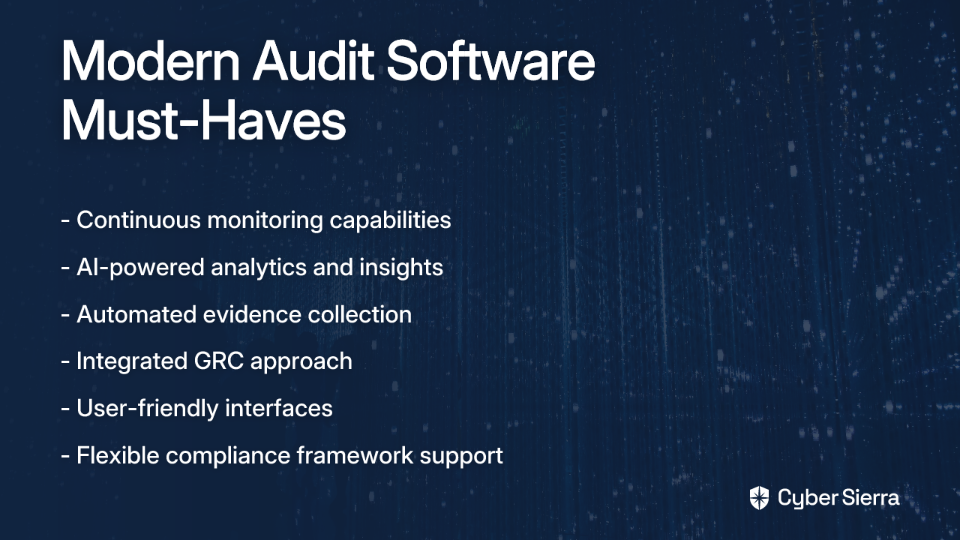
- Real-Time Analytics: Modern platforms empower auditors to make informed decisions based on current data, identifying emerging risks promptly instead of discovering them months later
- AI Transformation: AI is enhancing efficiency by analyzing vast amounts of data in real-time to identify anomalies and potential risks that human auditors might miss
- Automation of Evidence Collection: Reducing the manual burden on both auditors and auditees
This shift aligns with user sentiments like: "Good bye to the traditional word/PDF audit report and hello three tab Power BI live and interactive audit report."
Integrated GRC and The Three Line Monitoring Model
Modern platforms are breaking down silos between audit, risk, and compliance functions. An integrated GRC approach provides:
- A single source of truth for control information
- Alignment between operational, compliance, and audit teams
- Reduced duplication of effort across the three lines
- More dynamic and interactive reporting capabilities
This is where platforms like Cyber Sierra shine, as they're built around integrated GRC and continuous monitoring principles, supporting the evolution to more connected, proactive audit functions.
Conclusion
There is no one-size-fits-all solution when it comes to enterprise internal audit software. The best choice depends on your organization's specific needs—budget constraints, team size, technical expertise, and existing technology infrastructure.
When evaluating options, consider these key trade-offs:
- AuditBoard: Excellent for usability and adoption, with strong collaboration features
- Workiva: Shines in reporting and document control, especially when finance integration is critical
- SAP Audit Management: The clear choice for SAP-centric organizations
- TeamMate+: A comprehensive but potentially problematic legacy solution
- Cyber Sierra: Ideal for organizations seeking to modernize with automation, continuous monitoring, and integrated GRC capabilities
Before making a final decision, utilize the criteria outlined in this article to build your own evaluation scorecard. Request demos from multiple vendors to compare how each solution addresses your unique challenges and requirements.
For enterprises looking to build a more proactive and resilient audit and compliance program, consider platforms that offer automation, continuity, and intelligence. A unified GRC platform like Cyber Sierra, with its focus on Continuous Control Monitoring and GRC automation, represents the future direction of internal audit—moving from periodic, manual checks to proactive, near real-time risk management.
Frequently Asked Questions
What is internal audit software?
Internal audit software is a specialized tool designed to help organizations manage and streamline their entire audit lifecycle, from planning and risk assessment to execution, reporting, and issue remediation. It replaces manual, spreadsheet-based processes with a centralized platform for managing workpapers, tracking findings, and collaborating with stakeholders. This automation helps improve efficiency, reduce human error, and provide a clear, auditable trail of all activities.
Why is using dedicated audit software important for enterprises?
Dedicated audit software is important because it enhances the efficiency, accuracy, and effectiveness of an enterprise's governance, risk, and compliance (GRC) functions. Manual processes are often inefficient, prone to errors, and struggle to provide real-time visibility into an organization's risk posture. By automating repetitive tasks, centralizing evidence, and providing powerful analytics, audit software allows teams to focus on higher-value activities and identify critical control weaknesses faster.
What are the key features to look for in an enterprise internal audit tool?
The most critical features include comprehensive audit planning and management, risk assessment frameworks, issue tracking and remediation, robust reporting dashboards, and seamless integration with existing business systems. Beyond these core functions, modern platforms also offer capabilities like continuous control monitoring (CCM) and automation for evidence collection. Usability is another key factor, as an intuitive interface is crucial for team adoption and productivity.
How is modern audit software different from traditional tools?
Modern audit software is shifting from periodic, point-in-time audits to a proactive, continuous monitoring approach, often integrated within a broader Governance, Risk, and Compliance (GRC) platform. While traditional tools focus on managing workpapers for individual audits, modern solutions leverage AI and automation to provide near real-time visibility into control effectiveness. This integrated approach breaks down silos between audit, risk, and compliance teams, enabling a more strategic view of the organization's risk landscape.
How can I choose the right internal audit software for my organization?
To choose the right software, you should evaluate solutions based on your organization's specific needs, including budget, team size, existing technology stack, and key compliance requirements. Start by defining your essential criteria, such as the need for specific frameworks (e.g., SOX, ISO 27001) or integration with your ERP. Request demos from top vendors to compare usability and features directly. For instance, a team prioritizing ease of use might lean toward AuditBoard, while a company seeking deep automation and integrated GRC might find Cyber Sierra a better fit.
