



How to Tame the Vulnerability Beast in PCI DSS 4.0.1 Authenticated Scans


Join thousands of professionals and get the latest insight on Compliance & Cybersecurity.
You've set up your authenticated vulnerability scans as required by the new PCI DSS 4.0.1 standards, and now you're staring at a report with hundreds—maybe thousands—of findings. Your heart sinks as you scroll through page after page of vulnerabilities, each one flagged with technical jargon and severity ratings that don't seem to align with your actual business risk.
"Is this normal?" you wonder. "How is anyone supposed to address all of these findings before our next assessment?"
If this scenario sounds painfully familiar, you're not alone. Across forums and industry discussions, compliance professionals are voicing the same frustration: authenticated vulnerability scans are creating an overwhelming flood of findings that's nearly impossible to manage effectively.
The culprit? PCI DSS Requirement 11.3.1.2—a new mandate taking effect on March 31, 2025, that requires authenticated internal vulnerability scans. While this requirement strengthens security, it's also generating an unprecedented volume of vulnerabilities that teams must verify, prioritize, and remediate.
This article will provide you with practical strategies to tame this compliance beast. You'll learn how to filter the noise, efficiently handle false positives, and create realistic remediation timelines that satisfy both auditors and your security team.
The New Mandate: Deconstructing PCI DSS Requirement 11.3.1.2
Before diving into solutions, let's understand exactly what's required. Requirement 11.3.1.2 mandates authenticated internal vulnerability scans with specific components:
- Frequency: Internal scans must be performed at least every three months
- Remediation: All high-risk and critical vulnerabilities must be addressed according to your organization's risk ranking policy
- Rescanning: Follow-up scans are required to verify remediation
- Tooling: Scanning tools must be kept up-to-date with the latest vulnerability signatures
- Personnel: Scans must be performed by qualified individuals with a clear separation of duties
This represents a significant shift from previous requirements, which primarily focused on unauthenticated scans. The difference? Unauthenticated scans only see what's visible from outside a system, like open ports or services. Authenticated scans, however, log into systems with credentials, revealing a much deeper layer of potential vulnerabilities—including missing patches, misconfigurations, and vulnerable software versions.
"Is This Normal?" – Why Authenticated Scans Feel Overwhelming
Yes, it's entirely normal to feel overwhelmed by authenticated scan results. As one compliance professional noted on Reddit, "Auth Vuln Scans cause more problems than other area in 4.0.x." Another lamented, "running these scans often results in an overwhelming number of vulnerabilities, making it nearly impossible to verify false positives efficiently."
Here's why this happens:
- Deeper visibility equals more findings: Authenticated scans see everything a logged-in user can see—installed software versions, patch levels, detailed configurations—resulting in exponentially more data than unauthenticated scans.
- Scanners are designed for strict compliance: Vulnerability scanners must report software with known vulnerable version numbers as findings, even if a mitigating configuration or workaround is in place, leading to numerous potential false positives.
- Severity ratings lack context: Most scanners use generic CVSS scores that don't account for your specific environment, potentially flagging low-risk systems with high-severity ratings.

A Strategic Framework: Adopting the Vulnerability Management Lifecycle (VMLC)
Rather than drowning in a sea of vulnerabilities, successful organizations adopt a structured approach—the Vulnerability Management Lifecycle (VMLC). This framework, outlined by security professionals, transforms vulnerability management from a reactive firefighting exercise into a systematic, sustainable process.
The VMLC consists of four key stages:
- Identify: Use authenticated scans to discover vulnerabilities within the Cardholder Data Environment (CDE).
- Investigate: Assess the scope and impact of findings, determining actual risk to cardholder data.
- Address: Implement patches or mitigating controls based on prioritization.
- Maintain: Continuously monitor, rescan to verify fixes, and adapt to new threats.

With this framework in mind, let's explore specific strategies for each stage that address the most pressing pain points compliance professionals face.
Taming the Beast: Actionable Strategies for Scan Results
Step 1: Prioritize Ruthlessly - Filtering the Noise
"If you're dealing with an overload of vulns, then you should filter down to just those high and critical and get them addressed," advised one Reddit user in a discussion about vulnerability management. This approach aligns with PCI DSS requirements while making the workload manageable.
PCI DSS requires remediation of all vulnerabilities, but it allows for prioritization based on risk. Requirement 6.3.1 mandates that organizations identify vulnerabilities and assign risk rankings, while Requirement 11.4.4 states that all identified "exploitable vulnerabilities" must be remediated.
Here's how to prioritize effectively:
- Filter by Severity First: Begin by focusing exclusively on vulnerabilities rated as critical or high. These represent your most urgent compliance concerns.
- Define Your Risk Ranking: Don't rely solely on the scanner's generic CVSS score. Your organization must have a documented standard for what qualifies as "critical" or "high" that considers:
- Is the system internet-facing?
- Does it store, process, or transmit cardholder data?
- Are there mitigating controls in place?
- Is there a known public exploit for the vulnerability?
- Perform a Targeted Risk Analysis: As one compliance professional advised, "Do your own Targeted Risk Analysis to determine your risk rating. Be mindful of a realistic patch timeline." This analysis should consider both the technical severity and the business context.
Step 2: Conquer False Positives - The Art of Documentation
One of the most frustrating aspects of authenticated scans is the prevalence of false positives—vulnerabilities that are technically present but pose no actual risk due to mitigating controls or configurations.
According to Tenable, vulnerability scanners must report known vulnerable software versions as vulnerable, even if a workaround or mitigating configuration exists. This compliance-focused approach creates noise but can be managed with proper documentation.
Here's how to handle false positives effectively:

- Establish a Validation Process: Don't accept scan results at face value. Create a documented process for technical teams to verify each finding and determine if it's a true vulnerability or a false positive.
- Document Everything: For each identified false positive, maintain detailed documentation explaining:
- Why it's considered a false positive
- Specific technical details of any mitigating controls in place
- References to vendor documentation if applicable (e.g., a Microsoft bulletin stating a patch is not needed if a certain registry key is set)
- Prepare for the Auditor: This documentation isn't just for your internal team—it's essential evidence to present to your PCI QSA (Qualified Security Assessor) during an audit. Having thorough, technical explanations ready will streamline the assessment process.
Step 3: Build a Realistic Timeline - From Panic to Plan
The pressure to remediate vulnerabilities immediately can lead to burnout and hasty actions. Instead, create a structured remediation plan that aligns with PCI requirements while remaining realistic for your team.
PCI DSS Requirement 6.3.3 mandates that critical or high-security patches must be installed within one month of release. Use this as a foundation for your timeline, but develop a comprehensive schedule based on your risk rankings.
Here's how to build an effective remediation timeline:
- Plan Ahead: Don't wait until your quarterly scan to start planning. Schellman recommends scheduling vulnerability scans at least six months before your audit to allow ample time for remediation.
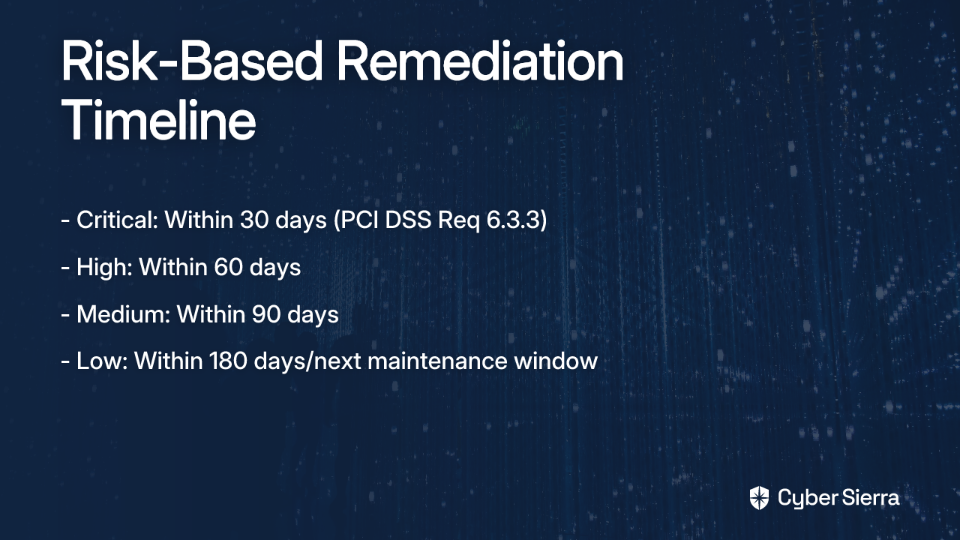
- Create a Risk-Based Schedule: Use your risk rankings to set clear remediation deadlines:
- Critical: Within 30 days (as per Req 6.3.3)
- High: Within 60 days
- Medium: Within 90 days
- Low: Within 180 days or at the next scheduled maintenance window
- Document Your Policy: Formalize these timeframes in a written policy. Your auditor will expect to see documentation of your remediation approach, not just the results.
- Verify with Rescans: After implementing patches or mitigating controls, always conduct a follow-up scan to confirm the vulnerability has been addressed. This verification step is explicitly required by PCI DSS 11.3.1.2.
- Show Progress: As one compliance professional noted, "Keep on patching...this is important, it demonstrates commitment to reducing the number of vulns." Even if you can't remediate everything immediately, showing consistent progress will satisfy most auditors.
Moving from Reactive to Proactive
Taming the vulnerability beast created by PCI DSS 4.0.1's authenticated scan requirement isn't about eliminating every finding at once. It's about implementing a structured, documented, and risk-based process that manages vulnerabilities effectively over time.
By adopting the Vulnerability Management Lifecycle framework, ruthlessly prioritizing based on risk, systematically documenting false positives, and creating realistic remediation timelines, you can transform an overwhelming flood of findings into a manageable compliance program.
Remember that while authenticated scans create challenges, they also provide unprecedented visibility into your security posture. Embracing this requirement isn't just about checking a compliance box—it's about enhancing your overall security and protecting cardholder data more effectively.
The March 31, 2025 deadline for implementing Requirement 11.3.1.2 gives organizations time to prepare. Start building these processes now, and you'll be well-positioned to maintain continuous compliance without the panic that comes from reactive approaches.

As your vulnerability management process matures, you'll likely find that what once seemed like an overwhelming beast becomes a valuable tool in your security arsenal—one that helps you identify and address risks before they can be exploited.
Frequently Asked Questions
What is the new authenticated scanning requirement in PCI DSS 4.0?
PCI DSS Requirement 11.3.1.2 mandates that organizations conduct internal vulnerability scans with authenticated credentials at least once every three months. Unlike unauthenticated scans that only see a system's exterior, authenticated scans log in to provide a much deeper view of potential vulnerabilities, such as missing patches and software misconfigurations.
Why do authenticated vulnerability scans find so many issues?
Authenticated scans find more issues because they have deeper visibility into a system's configuration. By logging in with credentials, they can see all installed software, patch levels, and detailed settings, similar to what a logged-in user would see. This comprehensive view naturally uncovers exponentially more potential findings compared to unauthenticated scans, which only inspect for open ports and services from the outside.
How should we prioritize vulnerabilities to meet PCI DSS requirements?
You should prioritize vulnerabilities based on risk, starting with those rated as "critical" and "high." PCI DSS allows for this risk-based approach. To do this effectively, create a documented risk-ranking policy that considers factors beyond the scanner's generic CVSS score, such as whether the system is internet-facing, if it handles cardholder data, and if mitigating controls are in place.
What is a false positive and how do we document it for an auditor?
A false positive is a finding reported by a scanner that does not pose an actual risk in your specific environment, often due to a mitigating control or a unique configuration. To handle these for an audit, you must maintain detailed documentation for each one explaining why it is not a threat, referencing the specific mitigating controls, and including vendor documentation if available. This documentation serves as crucial evidence for your PCI QSA.
What is a realistic timeline for remediating vulnerabilities?
A realistic timeline is based on your organization's risk rankings. According to PCI DSS Requirement 6.3.3, critical and high-risk security patches must be installed within one month of release. You can use this as a baseline to create a documented policy with tiered deadlines, such as 30 days for critical, 60 for high, 90 for medium, and 180 for low-risk vulnerabilities.
When does the authenticated scanning requirement (11.3.1.2) become mandatory?
The requirement for authenticated internal vulnerability scans, PCI DSS Requirement 11.3.1.2, becomes effective on March 31, 2025. Until this date, it is considered a best practice, giving organizations time to implement the necessary processes and tools to manage the findings effectively.
