What Is Vulnerability Age and Why It Beats Vulnerability Count



Join thousands of professionals and get the latest insight on Compliance & Cybersecurity.
You've set up a vulnerability scanning program, and your dashboard shows thousands of vulnerabilities across your enterprise. Leadership wants to know: "How are we doing on security?" You proudly present your dashboard showing a total vulnerability count of 5,789, down from 6,200 last month.
But instead of the praise you expected, you're met with blank stares. One executive asks, "Is that... good?" Another wonders, "What does this number actually tell us about our risk?"
And they're right to question. While counting vulnerabilities is the most common approach to vulnerability management reporting, it's also one of the least effective ways to measure your actual security posture.
The Problem with Counting: Why Total Vulnerability Count is a Misleading Metric
Vulnerability count is exactly what it sounds like: a raw tally of identified vulnerabilities across your assets. It's appealing because it's simple to understand and easy to track. But this simplicity comes at a steep cost to accuracy and usefulness.
Lacks Context
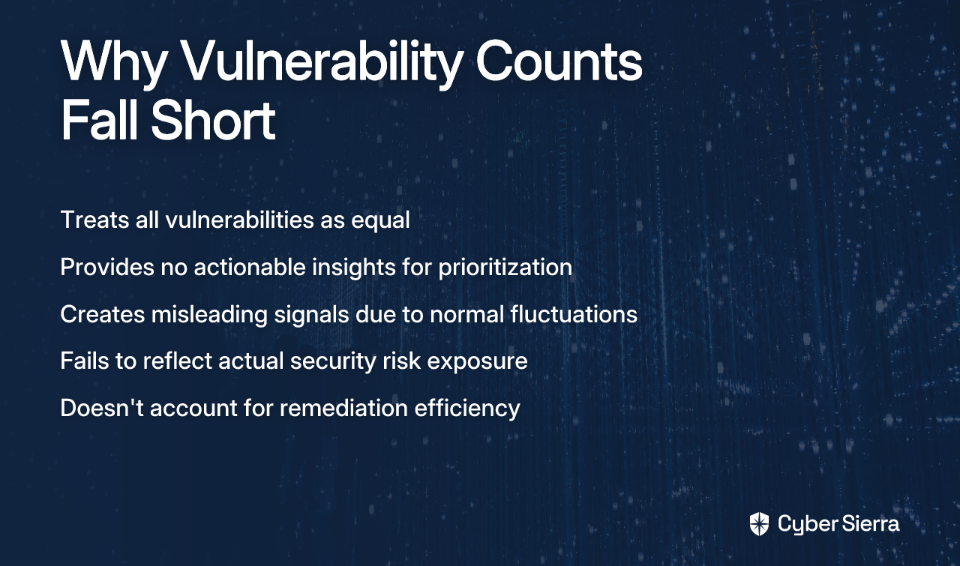
A vulnerability count treats all vulnerabilities as equal—which they decidedly are not. A critical remote code execution vulnerability on your public-facing web server poses a vastly different risk than a low-severity local privilege escalation on an internal development workstation. Yet in a simple count, both register as "+1 vulnerability."
As one security professional notes on Reddit: "Most obvious choices for KPIs are wildly wrong." This is especially true for vulnerability counts, which lack the context needed to drive meaningful action.
Not Actionable
What exactly should your team do when confronted with a dashboard showing 10,000 vulnerabilities? Where do they start? Which ones matter most?
Without additional context, this number offers no guidance for prioritization—it's just an overwhelming figure that can lead to analysis paralysis. As another security professional wisely points out, "each data point should spark an action; showing numbers just because does a disservice to your effort."
Creates Noise and False Signals
Vulnerability counts can fluctuate dramatically based on normal operational factors:
- After Microsoft's Patch Tuesday, your count might spike as new vulnerabilities are identified
- Adding new scan coverage can cause apparent "increases" in vulnerabilities
- Different scanning tools or configuration changes can create artificial jumps or drops
These fluctuations create noise that makes it difficult to discern actual improvement or deterioration in your security posture. A decrease in total count might give leadership a false sense of security, while an increase might trigger unnecessary panic.
A Better Metric: Defining Vulnerability Age
What if, instead of simply counting vulnerabilities, you measured how long they've been sitting unpatched in your environment?
Vulnerability Age is defined as the number of days since a vulnerability was publicly disclosed or identified in your environment (whichever is later). This simple shift in perspective transforms a static count into a dynamic measure of your response efficiency.
Along with vulnerability age, several related metrics provide even deeper insights:
- Mean Time to Remediate (MTTR): The average time taken to fix vulnerabilities after they've been identified.
- Mean Open Vulnerability Age (MOVA): The average age of all currently open vulnerabilities in your environment.
- SLA Breach Rate: The percentage of vulnerabilities that remain unpatched beyond your defined service level agreements.
Together, these time-based metrics create a more comprehensive picture of your vulnerability management program's effectiveness than a simple count ever could.
Why Age Matters: The Power of Prioritizing by Time
Vulnerability age isn't just a different way to count—it fundamentally changes how you understand and communicate risk. Here's why it's superior to raw vulnerability counts:
Older Vulnerabilities Pose Greater Risk
The longer a vulnerability remains unpatched, the more likely it is to be exploited. According to IBM's X-Force report, approximately 78% of vulnerabilities exploited in 2023 had been known for months or years (VikingCloud). This statistic reveals a sobering truth: attackers systematically target older, unpatched vulnerabilities because they know organizations struggle to keep up with remediation.
While new zero-days grab headlines, most actual breaches occur through vulnerabilities with readily available patches that organizations simply failed to apply promptly.
Moves Beyond Flawed CVSS-Only Prioritization
Many organizations rely heavily on CVSS scores for prioritization, but this approach has significant limitations. CVSS scores are static and don't account for real-world exploitation.
Consider this reality check: In 2024, tens of thousands of vulnerabilities were disclosed, but only 0.91% were considered weaponized (Brinqa). This means that blindly prioritizing all "Critical" or "High" CVSS vulnerabilities will waste significant resources on vulnerabilities that pose little actual threat.
Vulnerability age provides a dynamic element to prioritization. When combined with CVSS and other risk factors, age helps distinguish between:
- A newly disclosed Critical vulnerability with no known exploits
- A six-month-old High vulnerability being actively exploited in the wild
Enables Better Communication and Accountability
Perhaps the most powerful benefit of tracking vulnerability age is how it transforms technical data into business risk that leadership can understand. Compare these two statements:
- "We have 1,000 critical vulnerabilities in our environment."
- "We have 50 critical vulnerabilities that are over 90 days old, violating our patching policy and exposing critical assets."
The second statement creates urgency, implies clear accountability, and ties technical findings directly to business policy. It answers the "So what?" question that executives inevitably ask.
This addresses a common pain point identified in user research: "Management loves flashy colors. But I'll be damned if they know what any of it means." Vulnerability age provides meaning and context that raw numbers lack.
Improves Operational Efficiency
Focusing on vulnerability age naturally directs attention to lingering issues rather than the constant influx of new findings. This helps combat "alert fatigue" by emphasizing what matters most—the vulnerabilities that have remained unpatched despite having had ample time for remediation.
Putting It Into Practice: A Framework for Implementing Vulnerability Age
While vulnerability age is powerful, it works best as part of a comprehensive risk-based vulnerability management (RBVM) approach. Here's how to implement it effectively:
Step 1: Establish a Risk-Based Framework
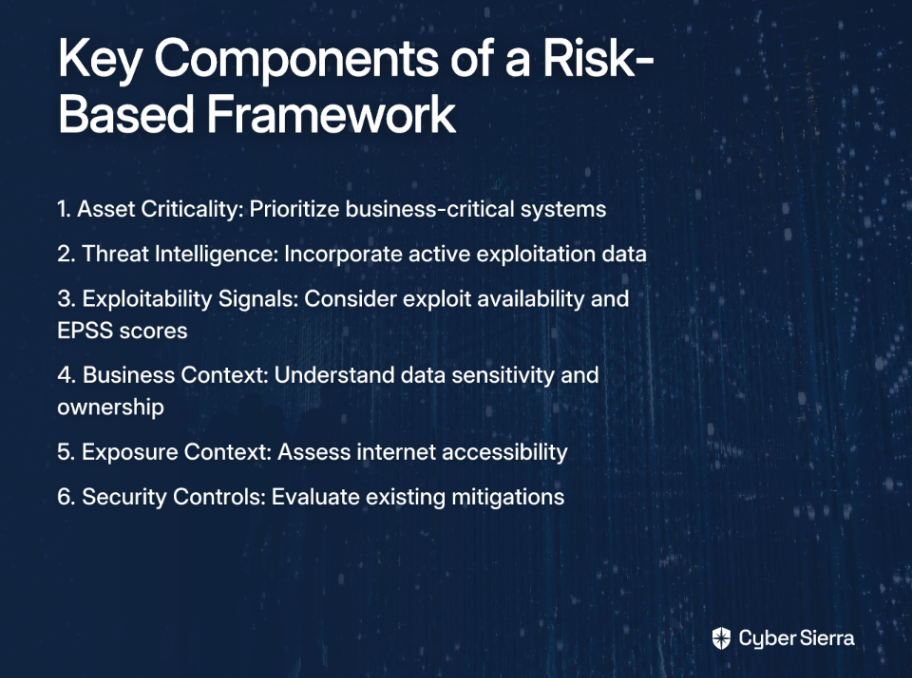
Vulnerability age should be one factor in a broader prioritization framework that includes:
- Asset Criticality: Vulnerabilities on business-critical systems require faster remediation.
- Threat Intelligence: Incorporate data on active exploitation (e.g., from CISA's Known Exploited Vulnerabilities Catalog).
- Exploitability Signals: Consider the availability of exploit code and the EPSS (Exploit Prediction Scoring System) score.
- Business Context: Understand the data processed by the asset and its ownership.
- Exposure Context: Determine if the asset is accessible from the internet or only internally.
- Security Controls: Evaluate the effectiveness of existing mitigating controls.
(Brinqa)
Step 2: Define Clear SLAs Based on Risk
Establish patching timeframes based on vulnerability severity and asset criticality. For example:
- Critical vulnerabilities on internet-facing systems: 7 days
- Critical vulnerabilities on internal systems: 14 days
- High vulnerabilities on internet-facing systems: 14 days
- High vulnerabilities on internal systems: 30 days
These SLAs create the foundation for measuring vulnerability age effectively. They transform age from a simple metric into an actionable threshold that drives remediation efforts.
Step 3: Implement Tracking and Reporting
Start measuring vulnerability age from the moment a vulnerability is identified in your environment. Track key metrics including:
- Average age by severity level
- Number of vulnerabilities exceeding SLAs
- Trend lines showing age improvements over time
- Rate of recurrence for previously fixed vulnerabilities
Step 4: Build a Continuous Improvement Loop
Use vulnerability age data to identify systemic issues in your patching process:
- Which teams consistently have the oldest vulnerabilities?
- Which vulnerability types tend to linger the longest?
- Are there specific assets that consistently fall behind on patching?
This analysis helps target process improvements rather than just driving tactical remediation.
Building a Dashboard That Speaks to Leadership
Now that you understand why vulnerability age matters, how do you present this information effectively to leadership? The key is creating a dashboard that transforms technical metrics into business insights.

Essential KPIs for Your Vulnerability Age Dashboard
Include these critical metrics on your executive dashboard:
- Mean Open Vulnerability Age (MOVA): Display as a trend line over time, broken down by severity. This shows whether your remediation efficiency is improving or declining.
- SLA Compliance Rate: Show the percentage of vulnerabilities remediated within defined timeframes. This demonstrates accountability and process effectiveness.
- Vulnerabilities Breaching SLA: Highlight the count of high-risk vulnerabilities past their due date, broken down by owner. This creates accountability and focuses attention on the most urgent issues.
- Asset Scan Coverage: Display the percentage of assets successfully scanned for vulnerabilities. This contextualizes your findings and identifies blind spots.
- Rate of Recurrence: Track how often previously fixed vulnerabilities reappear, indicating potential issues in your patching process (PurpleSec).
Presentation Tips for Maximum Impact
To ensure your dashboard resonates with leadership:
- Use color-coding wisely: Red for SLA violations, amber for approaching deadlines, green for compliant assets.
- Focus on trends over time: Show improvement or deterioration rather than point-in-time snapshots.
- Translate risk into business terms: Where possible, connect vulnerabilities to potential business impacts.
- Provide clear context: Include benchmark data or industry comparisons to help leadership understand what "good" looks like.
- Enable drill-downs: Allow viewers to dig deeper into problematic areas without overwhelming the main dashboard.
Stop Counting, Start Aging Your Vulnerabilities
The shift from vulnerability count to vulnerability age represents a fundamental evolution in security program maturity. While counting tells you where you are, aging tells you how effectively you're responding to threats over time.
By focusing on vulnerability age, you:
- Prioritize what truly matters for risk reduction
- Create meaningful accountability through SLAs
- Communicate security posture in business terms
- Drive operational efficiency in your remediation process
This approach directly addresses the gap between security teams and management identified in user research: "Management doesn't usually know what they need, and most obvious choices for KPIs are wildly wrong." Vulnerability age provides a KPI that is both technically sound and business-relevant.
As you evolve your vulnerability management program, remember that the goal isn't to have zero vulnerabilities—that's neither realistic nor necessary. Instead, the goal is to effectively manage risk by ensuring that the most dangerous vulnerabilities are remediated quickly, while less critical issues are addressed according to their actual risk.
Begin tracking vulnerability age today, and watch how it transforms not just your metrics, but your entire approach to vulnerability management.
Frequently Asked Questions
What is vulnerability age and why is it a better metric than a simple vulnerability count?
Vulnerability age is the time a vulnerability has existed unpatched in your environment since its discovery. It is a better metric than a simple count because it measures your team's response efficiency and focuses on the time-based risk of older, more exploitable vulnerabilities, rather than just tallying all issues regardless of their actual threat level. While a raw count treats a brand-new, low-risk issue the same as a year-old critical vulnerability, vulnerability age highlights the lingering threats that pose the greatest danger. Attackers often target older, known vulnerabilities, so reducing their age in your environment directly reduces your real-world risk.
How do I start tracking vulnerability age?
To start tracking vulnerability age, you need to define clear Service Level Agreements (SLAs) for patching based on risk (e.g., 14 days for critical vulnerabilities). Then, configure your vulnerability management tool or system to record the discovery date for each vulnerability and calculate the time it remains open, flagging any that exceed your defined SLAs. The process begins with establishing a risk-based framework that considers asset criticality and threat intelligence. Once SLAs are set, you can track key metrics like Mean Time to Remediate (MTTR) and Mean Open Vulnerability Age (MOVA). Most modern vulnerability management platforms have built-in capabilities to track and report on these time-based metrics.
What is the difference between Mean Time to Remediate (MTTR) and Mean Open Vulnerability Age (MOVA)?
Mean Time to Remediate (MTTR) is a historical metric that measures the average time it took to fix closed vulnerabilities, while Mean Open Vulnerability Age (MOVA) is a current-state metric that measures the average age of all currently open vulnerabilities. MTTR tells you how efficient your remediation process has been in the past. MOVA gives you a snapshot of your current risk exposure from unpatched vulnerabilities. A high MOVA indicates a growing backlog of aging, high-risk vulnerabilities, even if your MTTR for recently closed tickets looks good. Both are crucial for a complete picture of your program's health.
Does focusing on vulnerability age mean I should ignore CVSS scores?
No, you should not ignore CVSS scores; instead, you should use them in conjunction with vulnerability age as part of a comprehensive risk-based model. CVSS provides a baseline for severity, while vulnerability age adds crucial context about your exposure over time and the likelihood of exploitation. A strong prioritization strategy combines multiple factors. A high CVSS score on a business-critical asset indicates high potential impact. When that same vulnerability is also old and has known public exploits (high threat intelligence), it becomes a top priority. Vulnerability age enriches CVSS data, helping you distinguish between a new "critical" vulnerability and an old, actively exploited one.
What is a good target for vulnerability age?
There is no single "good" target for vulnerability age, as it depends entirely on your organization's risk appetite, resources, and the criticality of the assets involved. The best practice is to set internal SLAs based on risk—for example, remediating critical vulnerabilities on external systems within 7-14 days and high-severity ones within 30 days. Your goal should be continuous improvement. Start by measuring your current baseline for Mean Open Vulnerability Age (MOVA) and your SLA breach rate. Then, set realistic goals to reduce these numbers over time. Industry benchmarks can be helpful for context, but your primary focus should be on consistently meeting your own risk-based SLAs.
How can I convince my leadership to focus on vulnerability age instead of total count?
To convince leadership, frame the discussion around business risk and operational efficiency, not just technical details. Present vulnerability age using clear, actionable statements like, "We have 50 critical vulnerabilities that are over 90 days old, violating our policy," which is far more impactful than, "We have 5,000 vulnerabilities." Use dashboards that visualize trends in SLA compliance and Mean Open Vulnerability Age (MOVA). Show how these metrics directly relate to reducing the window of opportunity for attackers. Emphasize that focusing on age helps the team prioritize the riskiest issues, making the remediation process more efficient and effective at reducing the likelihood of a breach.