blog-hero-background-image
Governance & Compliance

Compliance Automation Platform ROI: How Fast Can You Break Even?
backdrop
Table of Contents

Join thousands of professionals and get the latest insight on Compliance & Cybersecurity.


Summary

  • Manual compliance consumes up to 60% of a team's time; automation can reduce that by 60-80%, often delivering a payback period of less than 6 months.
  • Calculate ROI by quantifying hard savings (labor, audit fees), cost avoidance (fines, breaches), and strategic gains (faster sales cycles).
  • A unified GRC platform provides a stronger business case than multiple separate tools by reducing integration overhead and simplifying management.
  • Cybersierra's unified GRC platform helps you build a clear ROI case by combining continuous monitoring and automated evidence collection to deliver faster, measurable savings.

Your CFO just asked for the payback period on a compliance automation platform. You know the tool will save time — your team is already drowning in spreadsheets, scrambling before audits, and spending days every month just gathering evidence. But "saves time" doesn't cut it in a budget meeting.

What you need are numbers.

This article gives you a practical framework to calculate the return on investment (ROI) of a compliance automation platform — labor savings, audit cost reduction, risk avoidance, and the strategic benefits that don't show up on a timesheet. By the end, you'll have what you need to make the business case.

The True Cost of Manual Compliance

Before you can calculate ROI, you need to quantify what you're currently spending. And the honest answer is: probably more than you think.

The Labor Drain Is Real — And Measurable

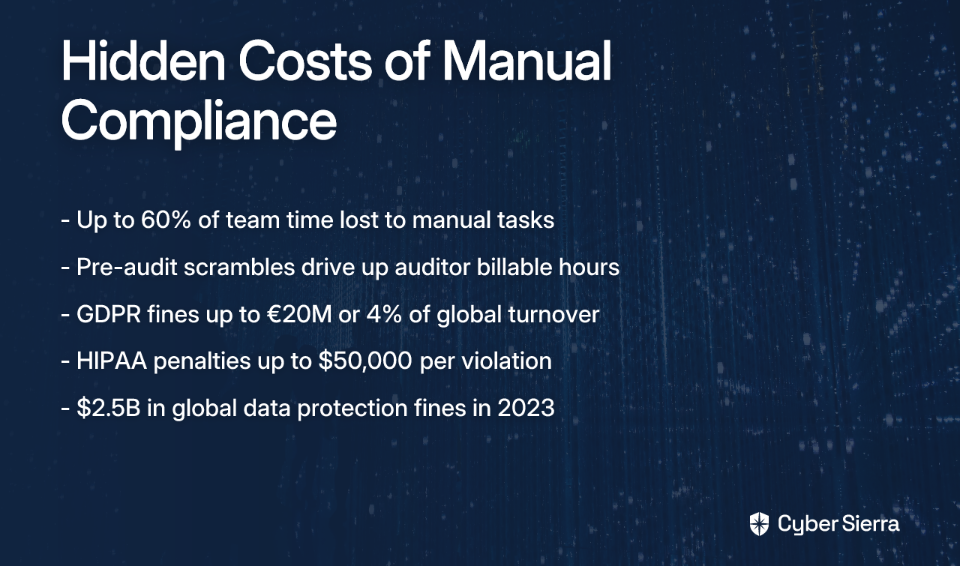
Compliance teams often spend up to 60% of their time on manual tasks — evidence collection, documentation, control reviews, and audit prep. That's not time spent on security strategy. That's time spent wrangling screenshots and chasing down control owners.

Put that in dollar terms: two compliance officers earning $80,000 each means roughly $96,000 per year spent on work that automation could largely eliminate. One team highlighted on the Hyperproof blog — Acuity International — was spending 4,000 hours per year on manual compliance management before they automated.

The same source documents that AGDATA saved $22,000 annually and cut 80 hours of security administration per year after switching to automated compliance workflows.

The Pre-Audit Fire Drill Has a Cost Too

Anyone who's been through a manual audit cycle knows the feeling: scrambling before an audit because the penetration test is 13 months old or someone forgot to screenshot the quarterly access review. That chaos is expensive — not just in stress, but in billable auditor hours and internal resource time.

Companies like Appian have reported saving over $100,000 per audit cycle by being continuously audit-ready rather than preparing in reactive bursts. That figure alone can justify most platform costs.

Non-Compliance Carries a Price Tag Your CFO Will Recognize

Regulatory fines are the number a CFO will immediately understand. In 2023, regulators imposed $2.5 billion in fines for data protection violations globally. Under the General Data Protection Regulation (GDPR), a single infraction can result in high financial penalties — up to €20 million or 4% of global annual turnover, whichever is higher.

Even smaller penalties are material. A single HIPAA violation can range from $100 to $50,000 per violation category, with annual caps in the millions. These are not theoretical risks. They are line items in organizations that let manual processes create compliance gaps.
Building Your ROI Case: A Three-Part Framework

ROI from a compliance automation platform falls into three categories: hard savings, cost avoidance, and strategic gains. A complete business case addresses all three.

Part 1: Hard Savings — What You Stop Paying For

These are the most defensible numbers in any CFO presentation.

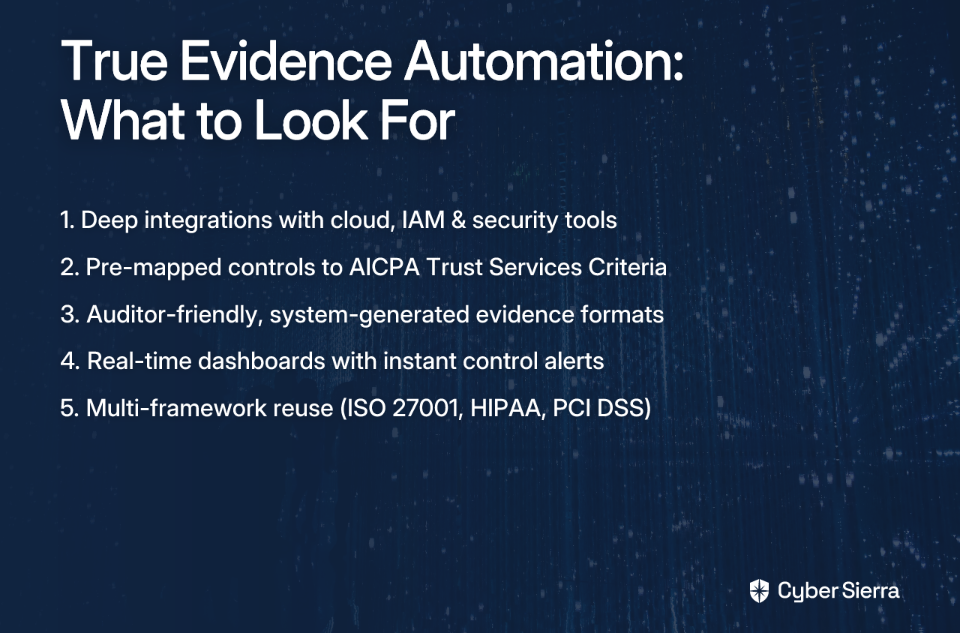
  • Labor cost reduction. Automation typically cuts time spent on manual compliance tasks by 60–80%. Use this formula to size the savings: (Current Annual Hours on Manual Compliance) × (Average Hourly Rate) × 0.60 to 0.80. For a team spending 2,000 hours per year at a blended rate of $50/hour, that's $60,000–$80,000 in recoverable labor annually.
  • Reduced audit preparation costs. Continuous audit readiness means your external auditor spends less time fishing for evidence. Some organizations save over $45,000 annually on audit fees alone once evidence collection is automated and centralized.
  • Avoided headcount. A compliance automation platform allows organizations to scale their program without hiring. Avoiding a single compliance specialist hire can represent $80,000–$90,000 in annual compensation — before benefits and overhead.

Part 2: Cost Avoidance — Quantifying Risk Reduction

This is where many business cases fall short. Cost avoidance is harder to present than direct savings, but it's often where the biggest numbers live.

  • Reduced breach probability. Continuous Control Monitoring (CCM) provides near real-time visibility into security gaps, allowing teams to close vulnerabilities before they become incidents. A Forrester study on Bitsight found a 45% reduction in cyber breach risk across first and third parties. With the average cost of a data breach running into the millions, a meaningful reduction in breach probability carries significant financial weight.
  • Avoided regulatory fines. Automated compliance monitoring can significantly reduce the rate of violations and the risk of costly fines.
  • Lower cyber insurance premiums. Insurers increasingly reward demonstrable cyber hygiene. Organizations with mature, automated Governance, Risk, and Compliance (GRC) programs may qualify for premium discounts. A platform that helps you demonstrate cyber hygiene to underwriters can directly reduce what you pay for coverage each year.

Part 3: Strategic Gains — The Business Enablers

These benefits are harder to assign a dollar sign to, but any CFO focused on growth will recognize them.

  • Faster sales cycles. Prospects in regulated industries routinely ask for SOC 2 or ISO 27001 reports as a condition of procurement. Being perpetually audit-ready removes compliance as a deal blocker. The faster you close enterprise deals, the more measurable the revenue impact becomes.
  • Team retention. Skilled security analysts don't want to spend their careers copying screenshots into spreadsheets. Automating low-value work frees your team for actual security strategy — and reduces the burnout that drives turnover. Replacing a mid-level security professional is a significant expense.
  • Better board-level visibility. A continuous control monitoring platform gives executives a real-time view of security posture. That's not just operationally useful — it's what boards and regulators increasingly expect.

Calculating Your Payback Period

Here's how to put it all together into the number your CFO is actually asking for.

A Worked Example

Consider a mid-market organization — call them FinTech Corp — running compliance manually across SOC 2 and ISO 27001.
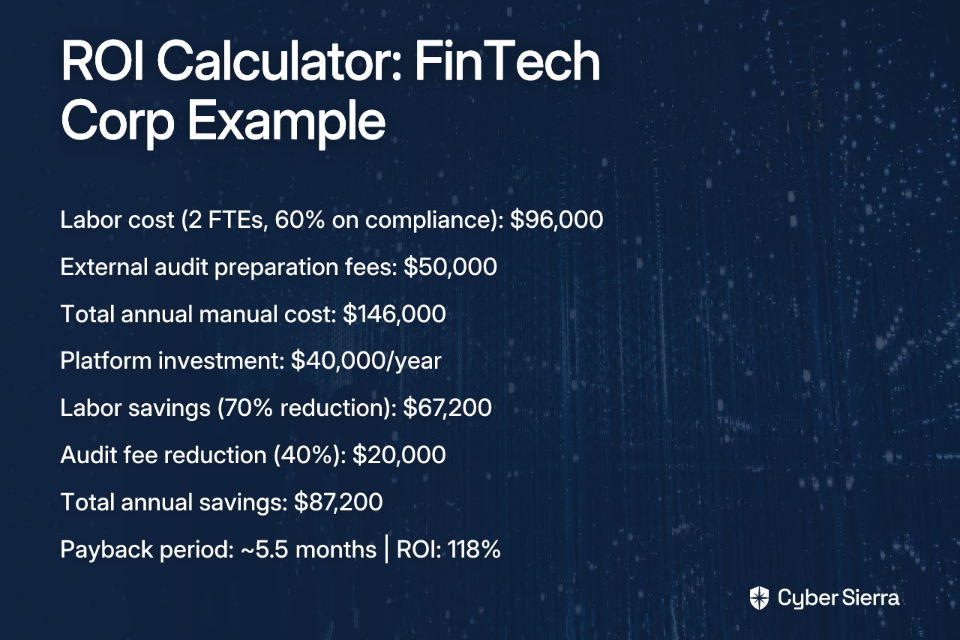
This isn't an outlier scenario. The Forrester study on Bitsight calculated a quick payback period of less than 6 months and a three-year ROI of 297% — driven by efficiency gains and risk reduction combined.

One Variable That Changes Everything

The ROI calculation shifts significantly depending on how unified the platform is. One of the real practitioner complaints in the compliance community is that automation tools can "just move the headache to a different spot" — you reduce evidence collection effort, but now you have another tool to integrate, configure, and maintain.

A fragmented toolset — separate point solutions for GRC, Third-Party Risk Management (TPRM), threat intelligence, and training — multiplies integration overhead, licensing costs, and team context-switching. A unified GRC platform that consolidates these functions delivers materially higher ROI than five tools loosely duct-taped together.

That's also why implementation friction matters. A steep learning curve delays time-to-value and erodes early ROI. When evaluating platforms, ask vendors for median time-to-first-audit-readiness and reference customer onboarding timelines — not just feature lists.

Build Your Business Case for Automation

Making the case for compliance automation isn’t an uphill battle. It’s about shifting the conversation from a cost center to a strategic investment with a clear, defensible return.

The path to a successful business case is straightforward:

  • Quantify the manual drain. Start by calculating the hours your team spends on evidence collection, audit prep, and control reviews. This is your baseline for hard savings.
  • Calculate the full ROI. Combine labor and audit cost reductions with the financial impact of risk avoidance (fines, breaches) and strategic gains like faster sales cycles.
  • Prioritize a unified platform. A single, integrated GRC platform eliminates the hidden costs of managing multiple point solutions, delivering a faster, higher return.

Your next step is simple: Block 30 minutes this week to estimate your team's manual compliance hours. That number is the foundation of your ROI calculation.

When you're ready to transform those hours into measurable savings, explore Cyber Sierra's GRC platform. We can help you build the numbers you need to get your CFO's approval.

Frequently Asked Questions

What is the primary benefit of a compliance automation platform?

The primary benefit is significant cost and time savings. It automates manual tasks like evidence collection, reducing labor costs by 60-80% and freeing up your security team for strategic work, which directly translates to a strong return on investment (ROI).

How do you calculate the ROI of compliance automation?

Calculate ROI by summing hard savings (labor, audit fees), cost avoidance (fines, breach costs), and strategic gains (faster sales). Subtract the platform's cost from total savings, then divide by the platform cost to find your ROI percentage.

What are the biggest hidden costs of manual compliance?

The biggest hidden costs are lost productivity and audit inefficiency. Teams often spend up to 60% of their time on repetitive tasks, and last-minute audit preparations inflate auditor bills. These costs represent significant, avoidable expenses that automation solves.

How quickly can you see a return on a compliance platform investment?

The payback period is typically very fast, often between 4 and 8 months. This is achieved through immediate reductions in manual labor hours and streamlined audit preparations, allowing the savings to quickly exceed the initial investment in the platform.

Why is a unified GRC platform better than separate tools?

A unified GRC platform delivers higher ROI by reducing integration overhead, licensing costs, and context-switching. It consolidates GRC, risk management, and monitoring into one system, providing a single source of truth and simplifying compliance management.

How does compliance automation reduce the risk of fines?

It reduces fine risk through continuous control monitoring. The platform automatically checks for security gaps and misconfigurations in near real-time, allowing you to fix issues before they become violations that could lead to costly regulatory penalties.
blog-hero-background-image
Governance & Compliance

4 Best Compliance Automation Software for Multi-Cloud Environments

backdrop
Table of Contents

Join thousands of professionals and get the latest insight on Compliance & Cybersecurity.


Summary

  • Multi-cloud environments create complex compliance challenges, with fragmented controls across providers making manual audit preparation unsustainable.
  • To stay audit-ready, organizations must shift from periodic checks to compliance automation software that provides continuous monitoring and automated evidence collection.
  • A key capability is Continuous Control Monitoring (CCM), which provides real-time visibility into your security posture and ensures evidence is always current for frameworks like SOC 2 and ISO 27001.
  • Cyber Sierra's GRC platform helps teams move from reactive audit fire drills to a state of continuous, proactive compliance across their entire multi-cloud estate.

Managing compliance across a multi-cloud environment is a different kind of hard. It's not just more work — it's fundamentally more complex. Your AWS environment has its own controls, Azure has its own logging structure, and GCP plays by yet another set of rules. Now layer SOC 2, ISO 27001, PCI DSS, and GDPR on top of that, and you can see why compliance teams describe audit prep as an archaeological dig through fragmented, stale evidence.

The most painful part isn't the audit itself — it's the hours spent manually gathering screenshots, pulling logs, and chasing control owners across departments, only to find the evidence is already outdated by the time you submit it. For lean security teams, this is unsustainable.

Compliance automation software addresses this directly. The best platforms integrate with your cloud environments, automate evidence collection, and provide continuous visibility into your security posture — so you're never scrambling the week before an audit. This guide covers the four tools best equipped to handle that challenge across multi-cloud environments.

Why Multi-Cloud Compliance Is a Unique Challenge

Running workloads across multiple cloud providers isn't just a bigger version of single-cloud compliance — it introduces an entirely different class of problems.

Each provider has its own services, APIs, and native security tooling. Without a unified platform, you end up with siloed data and no clear picture of your overall posture. The shared responsibility model, already nuanced in a single cloud, becomes a tangle of overlapping obligations across providers — a key challenge DataBank highlights when discussing compliance in distributed cloud architectures.

Applying frameworks like NIST Cybersecurity Framework (CSF) or PCI DSS v4.0 consistently across AWS, Azure, and GCP adds another layer of difficulty. Controls and required evidence can vary by environment, leading to duplicated work and coverage gaps. And then there's asset sprawl — new cloud resources spin up faster than security teams can track, leaving sensitive data sitting in unknown, unprotected locations. For regulations like GDPR and HIPAA, that's not a theoretical risk — it's a compliance failure waiting to happen.

Key Features To Look For in a Multi-Cloud Compliance Tool

Before comparing specific platforms, it's worth establishing what separates a strong multi-cloud compliance tool from a basic audit checklist.

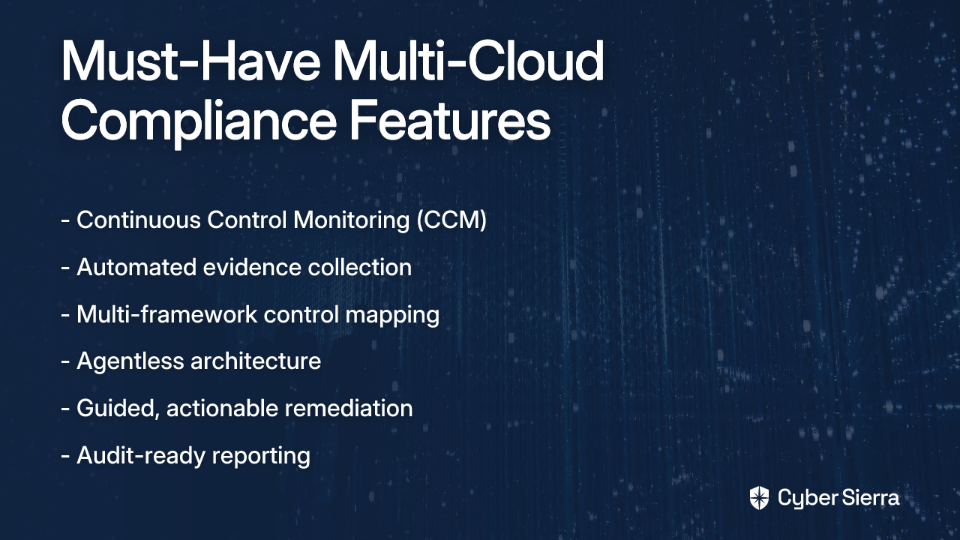
Here are the capabilities that matter most:

  • Continuous Control Monitoring (CCM). Periodic snapshots are no longer enough. As Qualys notes, modern compliance demands real-time visibility into whether controls are actually operating as intended — not just at audit time.
  • Automated evidence collection. The single biggest time sink in any audit cycle. The best tools integrate directly with your cloud providers, identity systems, and SaaS stack to pull evidence automatically, eliminating the manual gathering that practitioners consistently call the most painful part.
  • Multi-framework mapping. A strong platform maps a single control implementation to multiple frameworks simultaneously. One MFA configuration should satisfy relevant controls in SOC 2, ISO 27001, and PCI DSS — not generate three separate evidence requests.
  • Agentless architecture. In dynamic cloud environments with containers, serverless functions, and ephemeral workloads, agent-based tools leave significant coverage gaps. Orca Security notes that traditional agent-dependent solutions can leave less than 50% of assets protected. Agentless scanning eliminates that risk.
  • Guided, actionable remediation. Finding a misconfiguration is only useful if the team knows how to fix it fast. Look for platforms that provide context-aware remediation guidance — not just a list of findings.
  • Audit-ready reporting. Compliance evidence needs to be organized, timestamped, and auditor-accessible. Strong reporting capabilities reduce the back-and-forth between your team and external auditors significantly.

4 Best Compliance Automation Software for Multi-Cloud Environments

The tools below were selected based on their ability to handle the multi-cloud challenges described above — continuous monitoring, automated evidence collection, multi-framework support, and broad cloud coverage.

1. Cyber Sierra

Best for: Enterprises and high-growth companies needing a unified platform for Governance, Risk, and Compliance (GRC), Continuous Control Monitoring (CCM), and third-party risk across multi-cloud environments. Supported frameworks: SOC 2, ISO 27001, HIPAA, PCI DSS, GDPR, NIST, and custom frameworks. Deployment: Cloud-based SaaS with API integrations.

Cyber Sierra is an AI-enabled cybersecurity platform that consolidates compliance automation, risk management, and security monitoring into a single interface. Rather than patching together a GRC tool, a Cloud Security Posture Management (CSPM) scanner, and a vendor risk platform, Cyber Sierra handles all of it — giving Chief Information Security Officers (CISOs) and compliance managers a single source of truth across their entire security program.

Recognized as a Sample Vendor in the Gartner® Hype Cycle™ for Cyber-Risk Management, 2024, Cyber Sierra is built around the principle that compliance should be continuous, not reactive. Its Continuous Control Monitoring capabilities track control effectiveness in near real-time, automatically detecting exceptions and anomalies before they become audit findings. This directly addresses the core frustration of evidence being stale by the time it reaches an auditor.

Key features:

  • Continuous Control Monitoring (CCM). Provides near real-time visibility into control effectiveness across multiple frameworks, with automated testing and anomaly detection running continuously.
  • Automated evidence collection. Integrates with cloud providers and enterprise SaaS tools to eliminate manual evidence gathering — one of the most consistent pain points raised by compliance practitioners.
  • Multi-framework mapping. Automatically maps evidence and controls across overlapping frameworks, reducing redundant work when maintaining SOC 2, ISO 27001, and PCI DSS simultaneously.
  • Integrated GRC module. Manages policies, risk assessments, and audit workflows within the same platform — no switching between tools. Learn more about the GRC module.
  • Third-Party Risk Management (TPRM). Extends compliance monitoring beyond internal controls to the vendor supply chain, providing continuous visibility into third-party security posture rather than point-in-time questionnaires.

2. Orca Security

Best for: Security teams prioritizing deep risk context and 100% asset visibility in complex multi-cloud and containerized environments. Supported frameworks: 150+ frameworks and benchmarks, including PCI DSS, SOC 2, NIST, ISO 27001, and CIS benchmarks. Deployment: Agentless, cloud-based SaaS.

Orca Security is a strong choice in the Cloud Native Application Protection Platform (CNAPP) space, built around its patented SideScanning™ technology. The agentless architecture scans cloud workloads and configurations without any agents to deploy or maintain, delivering comprehensive coverage across AWS, Azure, GCP, and Kubernetes without performance impact.

For compliance specifically, Orca's platform goes beyond configuration checks. It also identifies unprotected sensitive data — PII, PHI — directly within cloud storage and workloads, which is critical for demonstrating GDPR and HIPAA compliance. As outlined on their multi-cloud compliance page, teams can also enforce compliance checks throughout the software development lifecycle, preventing non-compliant resources from ever reaching production.

Key features:

  • Agentless cloud scanning. Rapid deployment with full coverage of all cloud assets — no blind spots from missing agents on ephemeral workloads.
  • Sensitive data discovery. Automatically identifies where sensitive data lives and whether it's appropriately protected, supporting GDPR and HIPAA obligations.
  • Customizable frameworks. Users can build and modify compliance frameworks to fit their specific environment and risk tolerance.
  • Automated remediation workflows. Integrates with Jira, Slack, and other tools to streamline task assignment and remediation tracking.

3. Wiz

Best for: Organizations managing large-scale, dynamic multi-cloud environments that need attack path analysis alongside compliance posture management. Supported frameworks: SOC 2, PCI DSS, ISO 27001, NIST, and a broad range of security benchmarks. Deployment: Agentless, cloud-based SaaS.

Wiz has built a strong reputation for its graph-based approach to cloud security. Rather than surfacing thousands of isolated findings, it connects risk signals — misconfigurations, vulnerabilities, exposed secrets, excessive IAM (Identity and Access Management) permissions — to visualize actual attack paths. This context is particularly useful for compliance teams trying to prioritize which findings represent real risk versus theoretical gaps.

From a compliance perspective, Wiz provides solid CSPM capabilities with continuous scanning against regulatory standards and security benchmarks. It covers IaaS, PaaS, container, and Kubernetes environments from a single platform. One consideration worth noting: as highlighted in Qualys's analysis, evidence generation can be more snapshot-based, which may require supplemental tooling for teams needing continuous, timestamped evidence streams for auditors.

Key features:

  • Security graph analysis. Visualizes relationships between cloud resources to surface and prioritize the most critical risk combinations.
  • Full-stack cloud coverage. Agentlessly scans IaaS, PaaS, container, and Kubernetes environments across AWS, Azure, GCP, and Oracle Cloud Infrastructure (OCI).
  • Unified vulnerability management. Integrates vulnerability scanning with posture management for a more complete risk picture.
  • Multi-cloud compliance posture. Continuously benchmarks environments against regulatory standards and internal security baselines.

4. Vanta

Best for: Startups and SaaS companies seeking a fast, streamlined path to SOC 2 and ISO 27001 certifications with minimal compliance overhead. Supported frameworks: SOC 2, ISO 27001, HIPAA, GDPR, PCI DSS, and others. Deployment: Cloud-based SaaS with 200+ integrations.

Vanta is one of the most widely adopted compliance automation software options among technology companies, particularly those pursuing SOC 2 Type II or ISO 27001 for the first time. Its strength is breadth of integration — it connects to over 200 cloud services, HR systems, and developer tools to automate evidence collection across the entire tech stack, directly tackling the evidence-gathering burden that practitioners consistently flag as the most painful part of any audit.

As Cynomi's review notes, Vanta's pre-built policy templates and continuous monitoring tests make it straightforward to achieve and maintain compliance without building everything from scratch. Vanta has expanded its capabilities beyond single-cloud startups, but its core strength remains in streamlining the audit preparation process for common tech-focused frameworks rather than deep multi-cloud security posture management.

Key features:

  • Extensive integration library. Connects to a wide range of cloud and SaaS platforms to automate evidence collection and reduce manual compliance work.
  • Continuous monitoring. Runs automated checks against infrastructure and systems to flag compliance gaps as they emerge rather than at audit time.
  • Audit Hub. A centralized, auditor-facing workspace where evidence is securely organized and accessible — significantly reducing back-and-forth during audit reviews.
  • Risk management. Built-in workflows for risk assessments and risk register management, supporting ISO 27001 and SOC 2 Type II requirements.

Shift From Audit Prep To Continuous Assurance

Managing multi-cloud compliance doesn’t have to be an endless cycle of audit fire drills. The key is moving from periodic checks to a state of continuous, automated assurance.

Here’s what that looks like in practice:

  • Automate evidence collection: Stop the manual scramble for screenshots and logs. A unified platform can pull evidence automatically from AWS, Azure, GCP, and your SaaS tools, keeping it audit-ready 24/7.
  • Monitor controls continuously: Instead of discovering issues a week before an audit, use Continuous Control Monitoring (CCM) to get real-time alerts on misconfigurations and control failures as they happen.

Your next step is simple: identify the single most time-consuming task in your current audit preparation. Is it chasing control owners? Correlating logs? That’s the first process you should automate.

When you're ready to see how a unified platform can eliminate that manual work across your entire multi-cloud environment, explore Cyber Sierra's platform.

Frequently Asked Questions

What is multi-cloud compliance automation?

Multi-cloud compliance automation uses software to continuously monitor security controls and automatically collect evidence across multiple cloud providers like AWS, Azure, and GCP. This replaces manual audit preparation, providing real-time visibility into your compliance posture for frameworks like SOC 2.

Why is managing compliance in a multi-cloud environment so challenging?

Managing multi-cloud compliance is challenging due to the differences in services, security controls, and APIs across providers like AWS, Azure, and GCP. This creates data silos and a fragmented view of your security posture, making manual evidence gathering for audits complex and error-prone.

How does compliance automation software simplify the audit process?

Compliance automation simplifies audits by continuously collecting and organizing timestamped evidence from your cloud environments into an auditor-accessible portal. This eliminates the last-minute scramble for screenshots and logs, significantly reducing the manual effort required to prove compliance.

What key features should I look for in a multi-cloud compliance tool?

Look for continuous control monitoring (CCM), automated evidence collection across your tech stack, multi-framework mapping, and an agentless architecture. These features ensure real-time visibility, reduce manual work, and provide actionable steps to fix misconfigurations quickly.

Can compliance automation tools manage multiple frameworks at once?

Yes, a key benefit is the ability to map a single security control to requirements across multiple frameworks simultaneously. For example, one MFA control can provide evidence for SOC 2, ISO 27001, and PCI DSS, saving your team from duplicating efforts for each separate audit.

How do I choose between a GRC-focused tool and a CNAPP or CSPM tool?

Choose a GRC tool like Cyber Sierra for a unified platform covering policy, risk, and vendor management. Opt for a CNAPP/CSPM like Orca or Wiz if your primary need is deep cloud security posture and threat detection, as they focus on attack paths and vulnerabilities.
blog-hero-background-image
Governance & Compliance

7 ISO 27001 Compliance Automation Challenges (And How to Solve Them)

backdrop
Table of Contents

Join thousands of professionals and get the latest insight on Compliance & Cybersecurity.


Summary

  • Automation is a powerful tool for ISO 27001, but it complements, rather than replaces, the need for a strong foundational compliance process.
  • Manual evidence collection for dynamic cloud environments is often unreliable and outdated; Continuous Control Monitoring (CCM) provides real-time validation and a persistent audit trail.
  • Managing multiple frameworks like ISO 27001 and SOC 2 in silos leads to duplicated effort, as control overlap can be as high as 95%.
  • A unified platform that combines GRC, CCM, and TPRM helps shift from periodic audit sprints to a state of continuous, automated compliance.

The compliance software industry has been pushing an "automate everything or die" narrative hard. Vendors promise you can ace your ISO 27001 audit by connecting a few APIs and clicking through a dashboard. It's a compelling pitch — and it's only partly true.

But anyone who has been through a certification audit knows the reality: automation can't replace the fundamental understanding, process discipline, and organizational buy-in that ISO 27001 genuinely requires. Relying on automation alone often leads to critical gaps, audit surprises, and a false sense of security.

This article is for Chief Information Security Officers (CISOs) and Compliance Managers who want a realistic picture. Below are seven common challenges in ISO 27001 compliance automation — what causes them, how to solve them, and where the right tooling can actually help.

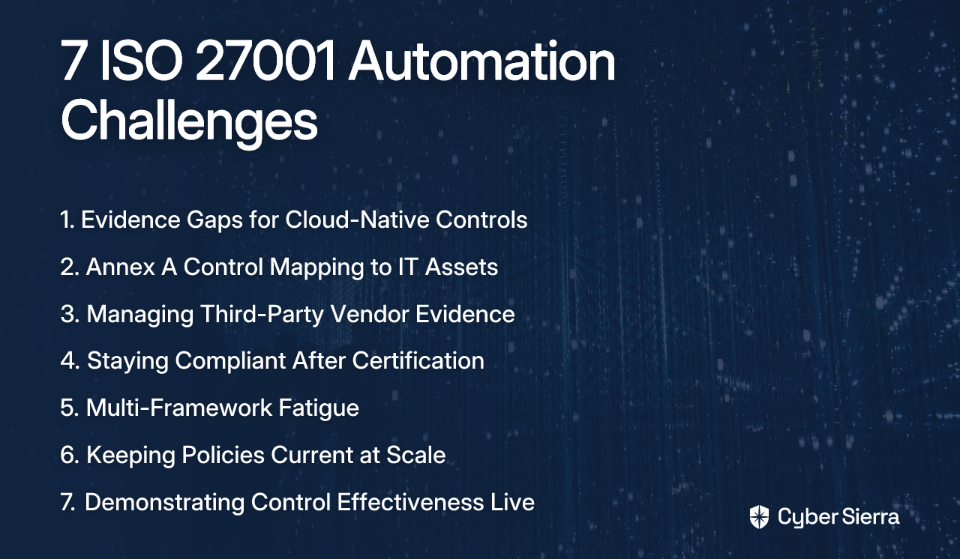
7 ISO 27001 Compliance Automation Challenges

These aren't edge cases. They're the friction points that teams encounter consistently, whether they're going for initial certification or struggling to maintain continuous compliance between surveillance audits.

1. Evidence Gaps for Cloud-Native Controls

ISO/IEC 27001:2022 was designed around a traditional IT environment. Cloud-native architectures — containers, serverless functions, infrastructure-as-code — introduce a layer of dynamism that manual evidence collection simply cannot keep up with.

Taking quarterly screenshots of your AWS or Azure console to prove control effectiveness is, as one practitioner bluntly put it, "soul crushing" when you're trying to run a business." Worse, that evidence is stale the moment it's captured. A misconfigured S3 bucket that gets fixed after the screenshot still existed — and the auditor doesn't know which came first.

Even ISO/IEC 27017, the cloud security extension, still leaves gaps for modern cloud-native systems. The result is compliance posture that looks strong on paper but has real blind spots underneath.

The solution: Implement Continuous Control Monitoring (CCM) that integrates directly with cloud provider APIs. Instead of periodic snapshots, you get always-on validation of controls — HTTPS enforcement, S3 public access blocks, Virtual Private Cloud (VPC) security group configurations — with automated evidence that has a timestamp and audit trail baked in.

Cyber Sierra's CCM module automates evidence collection from cloud environments, providing real-time visibility and flagging misconfigurations before they surface as audit findings. It transforms cloud control monitoring from a quarterly fire drill into a continuous, background process.

2. Annex A Control Mapping to Existing IT Assets

ISO/IEC 27001:2022's Annex A contains 93 controls across four domains. Mapping those controls to a live, changing inventory of servers, endpoints, SaaS applications, and databases is one of the most error-prone tasks in the entire compliance program.

Done manually, it produces a static spreadsheet that's out of date as soon as someone provisions a new cloud instance or onboards a new SaaS tool. Done poorly, it creates the illusion of coverage while leaving real gaps that only get discovered during an audit — at the worst possible moment.

The solution: Use a Governance, Risk, and Compliance (GRC) platform with a pre-built ISO 27001 control library and dynamic asset mapping. The platform should let you link a single control to multiple assets, policies, and risks — creating a single source of truth for your Information Security Management System (ISMS). As Scrut's compliance automation research highlights, this real-time visibility becomes especially critical when new systems are onboarded.

Cyber Sierra's GRC module automates this mapping process. It comes pre-loaded with ISO 27001 controls and connects them dynamically to your asset inventory, so coverage gaps are visible before an auditor finds them — not after.

3. Managing Third-Party Vendor Compliance Evidence

Your ISO 27001 scope doesn't end at your own perimeter. Supplier relationships are explicitly addressed in the standard, which means you need documented evidence of your vendors' security posture — not just a checkbox saying you asked.

The reality in most organizations? Vendor compliance evidence is a mess. Certificates expire without anyone noticing. SOC 2 reports sit in someone's inbox. Questionnaires get sent out once and never followed up. It's a manual, chaotic process that creates genuine supply chain risk blind spots.

The solution: Implement a structured Third-Party Risk Management (TPRM) program with automation. A proper TPRM solution moves beyond point-in-time questionnaires to continuous monitoring of vendor security posture — tracking certificate expiry dates, flagging overdue assessments, and centralizing all vendor evidence in one place.

Cyber Sierra's TPRM module automates vendor onboarding, risk assessments, and evidence collection. It provides near real-time visibility into vendor compliance status, giving you the documentation you need to satisfy ISO 27001's supplier relationship requirements without chasing vendors manually every audit cycle.

4. Staying Continuously Compliant After Initial Certification

Getting certified is the headline. Staying certified is the actual work — and it's where many organizations fall short.

The pattern is predictable: a team sprints to get ISO 27001 certified, then relaxes. Over the following months, policies drift. Controls fail silently. New risks emerge that aren't captured in the risk register. Then the annual surveillance audit arrives, and the scramble begins again. ISO 27001 compliance is not a one-time effort — it requires ongoing maintenance of the ISMS, including regular reviews, internal audits, and continuous control monitoring.

This "audit readiness anxiety" is a direct consequence of treating compliance as periodic rather than continuous.

The solution: Shift from a point-in-time audit mindset to continuous compliance. Embed control monitoring and evidence collection into daily operations so that your ISMS posture is always visible — not just in the weeks before an audit. Automated alerts for control deviations let you remediate proactively rather than reactively.

The combination of Cyber Sierra's CCM and GRC modules is designed exactly for this. Continuous monitoring keeps your control posture visible at all times, and automated evidence collection means recertification becomes a predictable process rather than a stressful sprint.

5. Multi-Framework Fatigue When ISO 27001 Overlaps with SOC 2 or PCI DSS

Most organizations pursuing ISO 27001 are also managing at least one other framework. SOC 2, PCI DSS v4.0, HIPAA, GDPR — the list compounds quickly. And as one compliance professional put it, "the complexity of having to create policies that satisfy multiple frameworks can be overwhelming."

The overlap between ISO 27001 and SOC 2 has significant overlap, depending on how controls are mapped. Yet teams routinely collect the same evidence twice, maintain separate control matrices, and run parallel audit prep processes for each framework. That's duplicated effort — and the root cause is working in silos rather than from a unified control set.

The solution: Adopt a "collect once, apply many" approach using a platform that supports cross-framework control mapping. When a single piece of evidence satisfies a control in both ISO 27001 and SOC 2, it should live in one place and be tagged to both frameworks. Organizations that integrate their compliance efforts across frameworks can cut timelines and costs.

Cyber Sierra's GRC module manages ISO 27001, SOC 2, PCI DSS, GDPR, HIPAA, and NIST Cybersecurity Framework (NIST CSF) from a single platform. Controls are harmonized across frameworks, evidence is centralized, and you get a unified view of your compliance posture — not five separate spreadsheets.

6. Keeping Policies Current as the Business Scales

Policies are the backbone of any ISMS. They demonstrate intent, define responsibilities, and provide the documented foundation that auditors want to see. But in practice, they're often scattered across "many different emails, SharePoint sites and Teams" — a situation that is, as practitioners openly admit, "obviously not sustainable."

Fast-growing companies face this acutely. A policy written when you had 20 employees may be wildly inadequate when you have 200. New products, new markets, new regulatory requirements — all of them should trigger policy reviews. Without a systematic process, those reviews simply don't happen.

The solution: Centralize all ISMS documentation in a dedicated policy management system within your GRC platform. The system should enforce version control, automate review and approval workflows, and link each policy directly to the controls it supports. When a policy changes, the impact on control coverage should be immediately visible.

Cyber Sierra's GRC module provides exactly this — a central repository for creating, reviewing, approving, and distributing policies. Lifecycle management is automated, so policies don't quietly expire. And because they're linked to controls, a policy gap immediately surfaces as a control gap, not a surprise during an audit.
7. Demonstrating Control Effectiveness to Auditors in Real Time

Producing a folder of evidence before an audit is one thing. Being asked to demonstrate a control live — on the spot, during the audit itself — is another challenge entirely.

As one practitioner noted after their certification audit, "well-prepared evidence is great, but you still need to be ready on the fly during the audit itself." An auditor who follows the ISO 27001 control structure closely may ask specific questions about a control's operation that your documentation doesn't directly answer. Fumbling through dashboards and file shares in front of an auditor doesn't inspire confidence in your ISMS.

The format matters too. Auditors are "perfectly happy to see audit evidence as PDFs or screenshots" — they don't need raw JSON files or API exports. What they need is clear, organized, traceable evidence that a control was operating as designed during the period under review.

The solution: Use a compliance platform that provides real-time dashboards and a structured, auditor-accessible evidence hub. Ideally, you should be able to grant auditors read-only access to a dedicated workspace — one that contains organized evidence, historical compliance data, and clear audit trails, without giving them free access to production systems.

Cyber Sierra's CCM and GRC modules are built for this moment. Real-time dashboards provide instant visibility into control performance, and the platform's centralized evidence hub makes it straightforward to surface the right documentation during an audit — organized, timestamped, and tied to the specific Annex A controls being reviewed.

From Audit Sprints to Continuous Compliance

The core message across all these challenges is simple: automation is a powerful co-pilot, not a replacement for a solid compliance strategy. It excels at eliminating tedious, manual work—like chasing evidence for cloud controls or mapping controls across multiple frameworks. This frees your team to focus on the high-judgment work that actually strengthens your security posture.

Before you evaluate any tool, take one next step today: identify the single biggest bottleneck in your current audit cycle. Is it tracking vendor evidence? Proving control effectiveness in your cloud environment? Managing policy updates?

Once you've pinpointed that friction, you can find the right tooling to solve it. If you’re tired of stitching together separate systems for GRC, CCM, and TPRM, Cyber Sierra offers a single, unified platform to move your program from periodic sprints to a state of continuous, audit-ready compliance. Ready to see how it works? See Cyber Sierra's platform.

Frequently Asked Questions

What is the main benefit of ISO 27001 compliance automation?

The primary benefit is transforming compliance from a periodic sprint into a continuous, automated process. It replaces manual, error-prone evidence collection with real-time monitoring, allowing your team to focus on strategic security improvements rather than last-minute audit preparation.

How does automation help with cloud-native environments for ISO 27001?

Automation addresses the dynamic nature of the cloud through Continuous Control Monitoring (CCM). Instead of relying on static screenshots, CCM integrates with cloud APIs to provide real-time validation of controls, automatically generating the timestamped evidence that auditors require.

Why is managing multiple frameworks like SOC 2 and ISO 27001 a challenge?

The challenge lies in duplicated effort. Without a unified system, teams often collect the same evidence for overlapping controls in frameworks like SOC 2 and ISO 27001. This creates inefficiency and increases the risk of inconsistencies across separate audits.

What is the difference between GRC and CCM for ISO 27001?

GRC (Governance, Risk, and Compliance) platforms manage the overall program, including policies, risk assessments, and control mapping. CCM (Continuous Control Monitoring) is the technical tool that automates evidence collection by constantly monitoring your IT systems to verify controls work as intended.

How can we ensure our team stays compliant after the initial ISO 27001 certification?

Adopt a continuous compliance model supported by automation. Instead of treating audits as periodic events, use tools to monitor controls and collect evidence year-round. This provides constant visibility into your security posture and makes recertification a predictable process rather than a stressful scramble.

What is the first step to automating ISO 27001 compliance?

The first step is to map your existing Information Security Management System (ISMS) and identify your biggest manual pain points. Before choosing a tool, understand your assets, controls, and where your team spends the most time on repetitive tasks like evidence collection or vendor tracking.

blog-hero-background-image
Governance & Compliance

8 Best ISO 27001 Compliance Software Tools for BFSI and HealthTech Teams

backdrop
Table of Contents

Join thousands of professionals and get the latest insight on Compliance & Cybersecurity.


Summary

  • Regulated industries like BFSI and HealthTech rarely manage ISO 27001 in isolation; they must also comply with PCI DSS, HIPAA, and other frameworks simultaneously.
  • The right compliance software must provide key features like multi-framework control mapping and integrated TPRM to handle the complexity of regulated environments.
  • To avoid redundant manual work, teams should adopt a unified platform that automates evidence collection across all required frameworks, such as Cyber Sierra’s integrated GRC platform.

ISO 27001 compliance software is supposed to simplify your Information Security Management System (ISMS). But if you're in Banking, Financial Services, and Insurance (BFSI) or HealthTech, you already know the uncomfortable truth: ISO 27001 is rarely a standalone requirement.

Your auditors want ISO 27001. Your card processor demands PCI DSS v4.0. Your HealthTech customers require HIPAA alignment. And if you operate across borders, GDPR, the Digital Operational Resilience Act (DORA), or MAS Technology Risk Management (TRM) guidelines are waiting in the wings. The result is what compliance professionals have described plainly in the field: "a mountain of boring paperwork" — with six different teams arguing over who owns what when controls span multiple systems.

According to a Ponemon Institute survey reported by Healthcare Dive, 88% of healthcare organizations experienced a cyberattack in 2023. The stakes for getting compliance right — not just on paper, but operationally — have never been higher for these sectors.

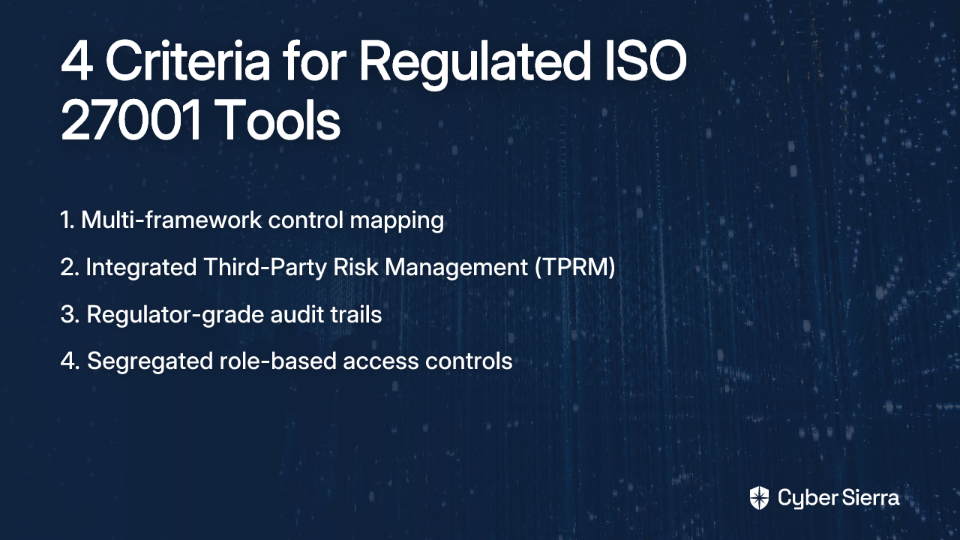
This list doesn't rehash generic ISO 27001 software rankings. Every tool below is evaluated against four criteria that actually matter in regulated verticals: multi-framework control mapping, integrated Third-Party Risk Management (TPRM), regulator-grade audit trails, and segregated access controls.

How We Evaluated ISO 27001 Tools for Regulated Industries

Generic compliance platforms often fall short when BFSI or HealthTech teams apply them to real audits. An ISMS that works beautifully in isolation can become a liability when a regulator asks you to demonstrate PCI DSS Requirement 12 evidence alongside ISO/IEC 27001:2022 Annex A controls — in the same audit window.

The right platform has to function as the central nervous system of your entire compliance program, not just a document repository. Each tool in this list was assessed against:

  • Multi-framework coverage. Can the platform map and reuse ISO 27001 controls against PCI DSS, HIPAA, GDPR, or NIST CSF without your team manually re-collecting the same evidence twice?
  • Integrated TPRM. BFSI and HealthTech firms routinely manage hundreds of third-party vendors. Point-in-time questionnaires go stale immediately. The platform should offer continuous vendor monitoring, not just a spreadsheet of vendor responses.
  • Regulator-grade audit trails. When your auditor or regulator asks for a time-stamped record of who approved a control, who collected the evidence, and when — can the platform produce it cleanly?
  • Segregated access controls. Role-based permissions matter in regulated environments. Auditors, external partners, and internal teams should only see what they need to see.

Top 8 ISO 27001 Compliance Software Tools

The eight tools below cover a range of organizational sizes and use cases, from fast-growing HealthTech startups to large global financial institutions. Each entry includes a quick metadata block for fast scanning, followed by an honest breakdown of where the tool excels.

1. Cyber Sierra

Best for: CISOs and compliance managers in BFSI and HealthTech managing ISO 27001 alongside PCI DSS, HIPAA, or MAS TRM simultaneously. Supported frameworks: ISO 27001, SOC 2, HIPAA, PCI DSS, GDPR, NIST CSF, and custom controls. Deployment: Cloud-based SaaS.

Cyber Sierra is an AI-enabled cybersecurity platform built around the exact problem that BFSI and HealthTech compliance teams face: overlapping frameworks, fragmented evidence, and vendor risk blind spots — all compounding each other at audit time. Rather than offering isolated modules bolted together, it integrates Governance, Risk, and Compliance (GRC), Continuous Control Monitoring (CCM), and TPRM into a single platform.

Cyber Sierra is itself ISO 27001 certified and was recognized as a Sample Vendor in the Gartner® Hype Cycle™ for Cyber-Risk Management, 2024 — a signal that the platform's approach to continuous risk management is drawing attention at the enterprise level. It also holds accreditation from Singapore's Cyber Security Agency (CSA) and won the AI Innovation Awards 2024, presented by Singapore's Ministry of Communications and Information and Google Cloud.

What makes Cyber Sierra particularly relevant for regulated verticals is how its modules work together. Evidence collected for an ISO 27001 control doesn't sit in a silo — it flows automatically into equivalent PCI DSS or HIPAA mappings, cutting the redundant evidence-gathering cycle that compliance teams cite as one of their biggest time drains.

Key features:

  • Unified multi-framework GRC. The GRC module automates data collection and maps controls across ISO 27001, HIPAA, PCI DSS, SOC 2, and GDPR. One evidence artifact satisfies multiple framework requirements — directly addressing the duplicate effort problem.
  • Continuous Control Monitoring. The CCM platform replaces manual screenshot collection with automated, near real-time control validation. It integrates with your cloud infrastructure, identity providers, and endpoint security to keep compliance evidence current, not stale.
  • Integrated TPRM. The TPRM module automates vendor assessment workflows and provides continuous external monitoring of your supply chain — essential for financial services firms with hundreds of third-party relationships and HealthTech organizations sharing patient data with vendors.
  • Regulator-ready audit trails. The platform maintains detailed, time-stamped logs of all compliance activities and provides a dedicated auditor portal, so external reviewers access what they need without disrupting your team's workflow.
  • Role-based access controls. Granular permissions ensure the right people see the right data — whether that's an internal auditor, a department head, or an external regulator.

2. Hyperproof

Best for: Organizations looking for strong multi-framework mapping and structured task automation to reduce manual compliance work. Supported frameworks: ISO 27001:2013 & ISO/IEC 27001:2022, NIST 800-53, PCI DSS, SOC 2. Deployment: Cloud-based SaaS.

Hyperproof is a solid choice for compliance teams that need to manage overlapping frameworks without duplicating effort at every audit cycle. Its core strength is cross-framework control reuse — once you've mapped an ISO 27001 control, Hyperproof can link that evidence to equivalent requirements in other standards, which is a genuine time-saver in regulated environments.

Key features:

  • Automated evidence collection. Integrates with platforms like AWS, Microsoft Azure, and ServiceNow to keep evidence fresh without manual intervention.
  • Multi-framework control mapping. Reduces redundant evidence gathering across ISO 27001, PCI DSS, and other frameworks.
  • Statement of Applicability generation. Accelerates a critical documentation requirement in the ISO 27001 certification process.
  • Compliance dashboard. Provides a shareable, real-time view of audit readiness for stakeholders and leadership.

3. Drata

Best for: Fast-growing FinTech and HealthTech companies that prioritize deep automation and continuous compliance from the ground up. Supported frameworks: ISO 27001, SOC 2, HIPAA, PCI DSS, GDPR. Deployment: Cloud-based SaaS.

Drata has built a strong reputation in the compliance automation space, particularly among cloud-native organizations. Its extensive integration library means that evidence collection happens continuously across your tech stack — rather than in a frantic scramble before each audit. For HealthTech startups scaling their compliance program, Drata's automation depth and policy template library provide meaningful acceleration.

Key features:

  • AI-powered continuous monitoring. Automates evidence collection across hundreds of controls, reducing manual audit prep significantly.
  • Trust Center. Allows organizations to demonstrate their security posture to customers and partners in real time — useful for HealthTech vendors managing customer due diligence.
  • Risk management workflows. Built-in tools for conducting risk assessments and tracking remediation within the platform.
  • Policy Center. A library of pre-built, customizable policy templates that align with ISO 27001 and HIPAA requirements.

4. ISMS.online

Best for: Organizations seeking a guided, all-in-one platform with broad framework coverage and strong implementation support. Supported frameworks: Over 100 frameworks, including ISO 27001, SOC 2, NIS2, HIPAA, and ISO 42001 (AI governance). Deployment: Cloud-based SaaS.

ISMS.online stands out for the sheer breadth of its framework library and its guided implementation approach. The platform is explicitly designed for sectors like healthcare and fintech, and it provides structured "headstart content" — templates and pre-populated controls — to help teams avoid starting from a blank screen. Its integrated management system automatically links evidence and corrective actions across multiple standards.

Key features:

  • Pre-built framework content. Accelerates ISO 27001 implementation with structured templates and guidance baked into the platform.
  • Integrated management system. Links common evidence across multiple standards to minimize redundancy in regulated multi-framework environments.
  • Virtual Coach. In-platform guidance walks users through compliance processes step by step.
  • Expert customer support. Dedicated customer success managers assist from initial setup through certification.

5. Vanta

Best for: Technology-forward organizations, including HealthTech and FinTech, that need to automate compliance for cloud-based environments quickly. Supported frameworks: ISO 27001, SOC 2, HIPAA, PCI DSS. Deployment: Cloud-based SaaS.

Vanta is one of the most widely recognized names in compliance automation, known for helping companies reach audit readiness in weeks. Its large integration ecosystem covers cloud providers, identity platforms, and HR systems, making continuous evidence collection largely hands-off for technical teams. Its Vendor Risk Management tool adds baseline TPRM capability for teams that need it alongside their core ISO 27001 program.

Key features:

  • Continuous monitoring. Integrates with cloud and identity providers to automate evidence collection across frameworks.
  • Audit Hub. A secure, centralized workspace for auditors to review evidence — reducing back-and-forth during audit windows.
  • Vendor Risk Management. Streamlines vendor security reviews and due diligence as part of the ISO 27001 compliance workflow.
  • Employee security training. Tracks training completion for compliance purposes, supporting ISO 27001 awareness requirements.

6. LogicGate

Best for: Mature BFSI and HealthTech organizations that need highly customizable GRC workflows tailored to complex, established processes. Supported frameworks: ISO 27001, SOX, NIST CSF, GDPR. Deployment: Cloud-based SaaS.

LogicGate's Risk Cloud® platform is built for organizations that have outgrown rigid, out-of-the-box tools. Its no-code workflow builder lets teams design custom Governance, Risk, and Compliance (GRC) applications that match how the organization actually operates — rather than forcing teams to adapt their processes to the software. For large financial institutions with layered approval chains and bespoke control definitions, this flexibility is a meaningful advantage.

Key features:

  • Risk Cloud® platform. Highly configurable GRC application builder — no coding required.
  • Advanced analytics. Customizable dashboards provide deep insights into compliance posture and risk trends for board-level reporting.
  • Policy management. Centralizes policy creation, review cycles, and attestation workflows — solving the "policy sprawl" problem.
  • Third-party risk management. Automates vendor onboarding, assessments, and ongoing monitoring within the same platform.

7. MetricStream

Best for: Large, global enterprises in financial services and healthcare needing enterprise-grade GRC with deep integration capabilities and regulatory intelligence. Supported frameworks: ISO 27001, SOX, NIST, and a wide range of sector-specific regulations. Deployment: Cloud-based SaaS or on-premise.

MetricStream is a long-standing enterprise GRC leader, and its scale shows in the platform's depth. Its regulatory change management capabilities — which automatically surface updates to regulations that affect your compliance program — are particularly valuable for global BFSI firms navigating DORA, NIS2, and local central bank requirements simultaneously.

Key features:

  • AiSPIRE. An AI-powered knowledge center that surfaces regulatory intelligence and emerging compliance requirements.
  • Regulatory change management. Automatically alerts teams to changes in regulations, reducing the risk of missing a compliance deadline.
  • Continuous Control Monitoring. Proactively identifies control gaps before they become audit findings.
  • BusinessGRC module. Consolidates GRC functions across large, distributed enterprises into a single governance layer.

8. Sprinto

Best for: Cloud-hosted FinTech and HealthTech teams looking for intelligent automation to manage multi-framework compliance with minimal administrative overhead. Supported frameworks: ISO 27001, SOC 2, HIPAA, PCI DSS, GDPR. Deployment: Cloud-based SaaS.

Sprinto is designed to make compliance accessible and automated for tech companies operating in regulated spaces. It connects directly to a company's cloud environment and maps controls intelligently across frameworks, so teams aren't re-collecting the same evidence for every standard they manage. Its real-time compliance health score gives Chief Information Security Officers (CISOs) a fast, honest read on where their program stands.

Key features:

  • Adaptive automation. Intelligently maps controls across multiple frameworks to eliminate repetitive evidence work.
  • Continuous monitoring. Provides a live health score of your compliance program, updated as controls pass or fail.
  • Tiered TPRM. Automates vendor risk assessments based on criticality tier — reducing questionnaire volume for lower-risk vendors.
  • Integrated security training. Manages and tracks employee security awareness training as compliance evidence.

Comparing ISO 27001 Compliance Software for BFSI and HealthTech

The table below maps each platform against the four criteria that matter most in regulated verticals.

ToolMulti-Framework MappingIntegrated TPRMRegulator-Grade Audit TrailsSegregated Access Controls
Cyber SierraYes — automated cross-framework reuseYes — continuous vendor monitoringYes — dedicated auditor portalYes — role-based
HyperproofYes — ISO 27001, PCI DSS, NISTYesYesYes
DrataYes — ISO 27001, HIPAA, PCI DSSYesYesYes
ISMS.onlineYes — 100+ frameworksYesYesYes
VantaYes — ISO 27001, SOC 2, HIPAAYesYes — Audit HubYes
LogicGateYes — customizableYesYesYes
MetricStreamYes — enterprise-grade, includes regulatory change alertsYesYesYes
SprintoYes — adaptive automationYes — tiered by criticalityYesYes

Unify Your Compliance, Simplify Your Audits

Managing ISO 27001 in BFSI or HealthTech isn't a one-time project. It's an ongoing operational commitment that intersects with PCI DSS, HIPAA, and a growing list of sector-specific mandates. The teams that struggle are the ones relying on disconnected spreadsheets and endless manual evidence gathering.

The most effective programs operate differently. Here’s how:

  • They automate evidence collection once. Instead of chasing screenshots before every audit, they use a unified platform to gather proof continuously from their tech stack.
  • They map controls across all frameworks. That automated evidence is reused for ISO 27001, PCI DSS, HIPAA, and more, eliminating the redundant work that burns out compliance teams.

Your next step today: Take one control from your ISMS and manually map its evidence requirements for another framework you manage. The overlap—and the cost of disconnected systems—will become immediately clear.

When you're ready to stop juggling frameworks for a single source of truth, explore Cyber Sierra's platform. See how our unified GRC, CCM, and TPRM solution can keep you audit-ready, year-round.

Frequently Asked Questions

What is ISO 27001 compliance software?

ISO 27001 compliance software helps organizations build, manage, and automate their Information Security Management System (ISMS). It streamlines tasks like risk assessments, evidence collection, and policy management to simplify the path to certification and maintain compliance over time.

Why do BFSI and HealthTech need specialized ISO 27001 tools?

These sectors face multiple, overlapping regulations (e.g., PCI DSS, HIPAA) beyond ISO 27001. Specialized tools offer multi-framework mapping to reuse evidence across audits, saving significant time and preventing the redundant manual work that generic platforms don't address.

How does multi-framework mapping save time during audits?

Multi-framework mapping links a single piece of evidence to multiple compliance requirements. For instance, one access control log can prove compliance for ISO 27001, PCI DSS, and HIPAA simultaneously, eliminating the need to collect, manage, and present the same evidence three times.

What are the most important features in an ISO 27001 tool for a regulated industry?

The most critical features are multi-framework control mapping, integrated Third-Party Risk Management (TPRM), regulator-grade audit trails, and segregated role-based access controls. These capabilities are essential for managing the complexity and scrutiny of audits in regulated environments.

Can compliance software automate evidence collection?

Yes, modern compliance software automates evidence collection by integrating directly with your technology stack (e.g., cloud providers, identity systems). This provides continuous, real-time proof of compliance, replacing the last-minute manual effort to gather screenshots before an audit.

What is the difference between GRC, CCM, and TPRM?

GRC (Governance, Risk, and Compliance) is the overall strategy for managing compliance. CCM (Continuous Control Monitoring) automates the testing of security controls in real-time. TPRM (Third-Party Risk Management) focuses on managing risks associated with external vendors and suppliers.

blog-hero-background-image
Governance & Compliance

ISO 27001 Compliance Software vs Hiring a Consultant: Cost Comparison

backdrop
Table of Contents

Join thousands of professionals and get the latest insight on Compliance & Cybersecurity.


Summary

  • ISO 27001 certification costs range from $40,000 to $80,000, including hidden costs like penetration testing, gap analysis, and annual surveillance audits.
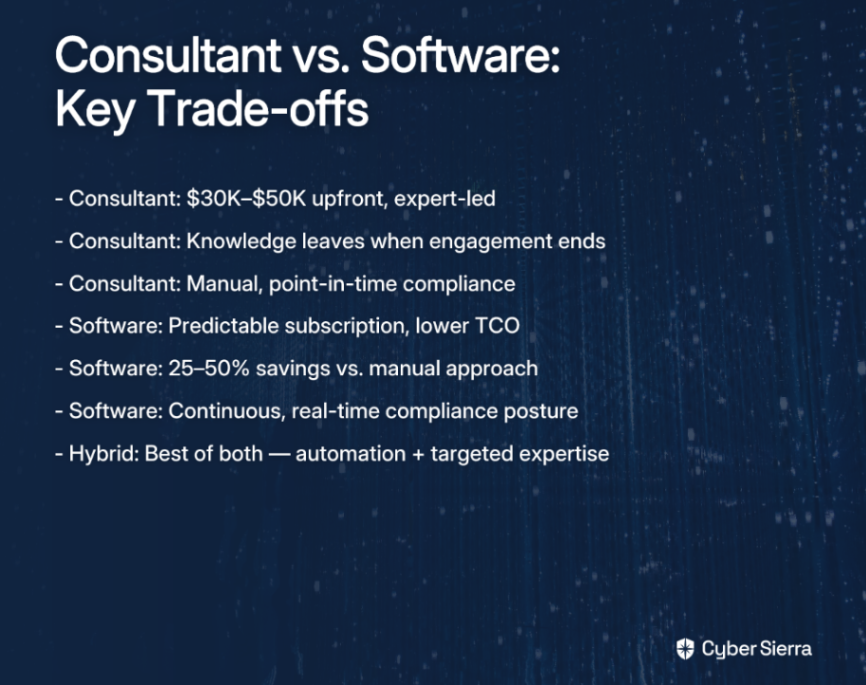
  • The traditional consultant-led approach costs $30,000-$50,000 upfront but creates dependency, while compliance automation software can reduce overall costs by 25-50% and cut certification time in half.
  • The most effective strategy is a hybrid model, using an automation platform for continuous evidence collection and a consultant for high-value, strategic guidance.
  • An AI-enabled GRC automation platform automates up to 70% of compliance tasks, turning certification from a one-time project into a continuous program.

You've been tasked with getting ISO 27001 certified, and your first job is building a budget. Simple enough — until you start making calls and realize nobody will give you a straight number. Consultant quotes range wildly. Certification body fees vary by geography. And every conversation surfaces another "hidden" cost you hadn't accounted for: risk assessments, policy documentation, employee security training, penetration testing.

Then comes the harder question: do you invest in an ISO 27001 consultant to guide you through the entire process, or deploy a compliance automation platform to do the heavy lifting in-house?

This guide breaks down both paths with real numbers — so you can make a defensible case to your CFO and pick the right approach for your organization.

The Anatomy of ISO 27001 Costs: A Realistic Budget

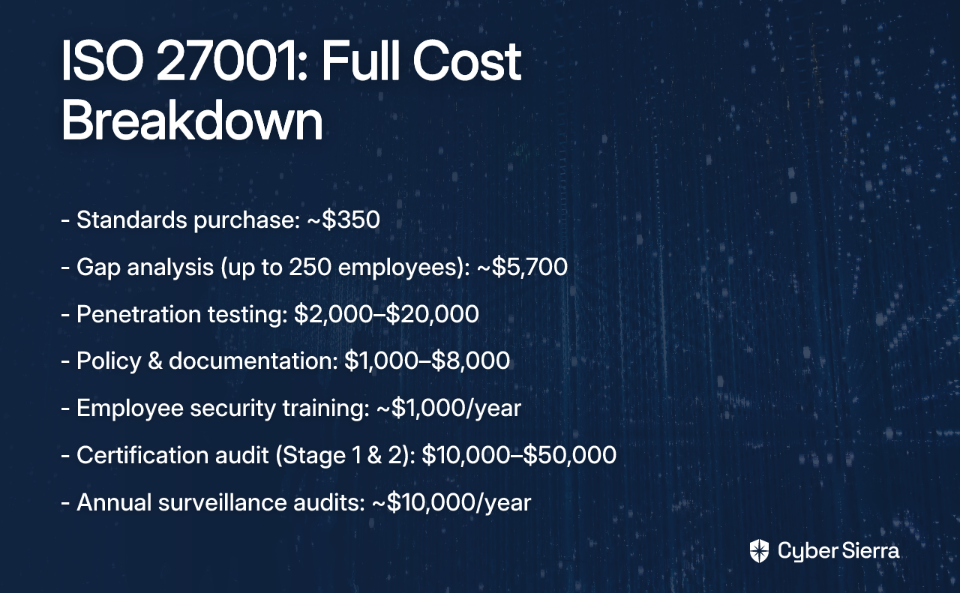
Before comparing consultants and software, it helps to understand what you're actually paying for. The final audit fee is only one line item. According to Secureframe's certification cost breakdown, total ISO 27001 costs typically fall across four phases:

  • Preparation and scoping. Purchasing the ISO/IEC 27001:2022 and ISO/IEC 27002 standards runs approximately $350. A gap analysis — which maps your current Information Security Management System (ISMS) against what the standard requires — can cost around $5,700 for organizations with up to 250 employees.
  • Implementation. This is where most of the effort and money goes. Penetration testing alone can range from $2,000 to $20,000 depending on scope, per Secureframe's pen testing guide. Policy and documentation development adds another $1,000 to $8,000 if done manually or with limited support, as noted by Rhymetec's 2025 cost breakdown. Budget roughly $1,000 annually for employee security awareness training.
  • Certification audit. The Stage 1 and Stage 2 certification audit conducted by an accredited certification body typically runs $10,000 to $50,000, depending on organizational size and complexity.
  • Ongoing maintenance. ISO 27001 certification is valid for three years — but annual surveillance audits in years one and two cost around $10,000 each. A full recertification audit is due at the three-year mark.

One critical note from practitioners: always verify that your certification body is accredited by a recognized authority, such as UKAS in the UK or ANAB in North America. As one experienced auditor put it bluntly in an industry forum, unaccredited bodies "sell easy audits and rubber stamp certifications" that "aren't worth the ink used to print" them. A certificate from an unaccredited body will be rejected by enterprise customers and procurement teams — making the entire investment worthless.

Path 1: The Traditional Route with an ISO 27001 Consultant

The consultant-led approach is the classic model. You bring in a certified expert — typically an ISO 27001 Lead Auditor or Lead Implementer — who project-manages your path to certification from gap analysis through audit day.

What It Costs

According to ISMS.online's consultant cost guide, end-to-end ISO 27001 consulting engagements typically range from $30,000 to $50,000. Hourly rates for individual consultants generally run $100 to $300 per hour. A typical engagement breaks down roughly as follows:

  • Phase I (Discovery and Scoping): ~$20,000, covering ISMS scoping, initial risk assessment, and Statement of Applicability (SoA) development.
  • Phase II (Remediation and Implementation): ~$18,000, covering gap remediation, control implementation guidance, and ISMS build-out.

Costs are also geography-dependent. Engagements in North America and Western Europe command a significant premium over equivalently scoped projects in Southeast Asia or Eastern Europe.

Pros and Cons

Pros:

  • Dedicated expertise. You get direct access to someone who has guided organizations through ISO 27001 dozens of times and knows where auditors focus their scrutiny.
  • Reduced internal workload. The consultant drives the project, freeing your internal team from significant administrative overhead during the implementation phase.
  • Tailored guidance. Advice is adapted to your specific industry, risk environment, and organizational structure rather than being generic framework guidance.

Cons:

  • High upfront investment. A $30,000–$50,000 cash outlay before a single audit fee is paid is a significant budget commitment, particularly for mid-sized organizations.
  • Knowledge drain. When the engagement ends, the expertise walks out the door. Your team may not fully own the ISMS — making ongoing management, surveillance audits, and control updates much harder.
  • Manual and slow. Evidence collection still relies on spreadsheets, email chains, and manually assembled document packages. It doesn't scale.
  • Point-in-time compliance. The consultant's focus is on passing the audit — not building a continuously monitored, always-audit-ready security program.

Path 2: The Modern Approach with ISO 27001 Compliance Software

Compliance automation platforms take a fundamentally different approach. Instead of a human expert guiding a manual process, the software integrates with your existing technology stack, automates evidence collection, and provides a continuously updated view of your compliance posture — turning ISO 27001 from a project into a program.

What It Costs

Compliance software is typically priced as an annual subscription, converting a large capital expense into a predictable operational one. The financial case for automation is strong: organizations using compliance automation report saving 25–50% on overall compliance costs compared to manual approaches. Vanta's product page notes that automation can cut certification timelines by up to 50%, with many organizations achieving compliance in 12–24 weeks rather than 12+ months.

That's not just a speed improvement — it's a direct reduction in internal labor costs, consultant hours, and the opportunity cost of having your security team buried in evidence-gathering instead of doing actual security work.

Core Features That Drive the Savings

The cost efficiency comes from specific capabilities that eliminate the most time-consuming manual tasks:

  • Automated evidence collection. The platform integrates with your cloud infrastructure, identity providers, and development tools to automatically gather control evidence. This eliminates the hundreds of hours security teams typically spend manually collecting screenshots and logs before an audit.
  • Continuous control monitoring. Instead of a periodic snapshot, the platform delivers a real-time dashboard of your compliance posture. Gaps and misconfigurations are flagged the moment they appear — not when an auditor finds them. Platforms like Scrut Automation automate up to 70% of compliance tasks and run daily cloud compliance checks against 230+ CIS benchmarks.
  • Framework cross-mapping. Controls and evidence mapped to ISO 27001 can be automatically cross-referenced against SOC 2, HIPAA, GDPR, and PCI DSS. Organizations pursuing multiple frameworks no longer need to rebuild their evidence library from scratch for each audit.
  • Integrated risk management. Built-in risk assessment workflows aligned with ISO 27005 allow teams to document, track, and treat risks within the same platform — keeping your risk register current rather than letting it age between audits.
  • Auditor collaboration portal. A dedicated, secure workspace where auditors can review policies, controls, and evidence directly removes the back-and-forth of assembling and transmitting audit packages.

Pros and Cons

Pros:

  • Lower total cost of ownership. Predictable subscription fees combined with dramatic reductions in manual labor produce significant long-term savings over the consultant model.
  • Speed to certification. Automation compresses timelines considerably — particularly the evidence-gathering and control-validation phases that consume the most calendar time in manual processes.
  • Scalability. Annual surveillance audits and new framework additions are handled within the same platform, without engaging additional consultants or rebuilding processes from scratch.
  • Sustainable compliance program. The platform becomes a permanent system of record for your ISMS — policies, risk assessments, control evidence, and audit history all in one place, continuously maintained.

Cons:

  • Requires internal ownership. The platform augments your team — it doesn't replace the need for a responsible person to drive the compliance program. Someone still needs to own it.
  • Potential learning curve. Teams need to invest time in onboarding and learning to use the platform effectively before they realize its full value.
  • Integration quality matters. The ROI depends heavily on how well the platform integrates with your specific technology stack. Evaluate integration coverage carefully before committing.

The Case for a Hybrid Strategy

The consultant-vs-software framing is a false choice. The most cost-effective and durable path to certification combines both — strategically.

The model works like this: a compliance automation platform becomes the operational backbone of your ISMS. It handles the 80% of work that is repetitive, data-driven, and time-intensive — automated evidence collection, continuous control monitoring, policy management, and real-time posture reporting. A GRC platform built for ISO 27001 gives your team a single source of truth and keeps you perpetually audit-ready.

A consultant is then engaged for a narrower, high-value scope where human expertise genuinely earns its premium:

  • Finalizing a complex ISMS scope that requires deep industry-specific knowledge
  • Advising on non-obvious control interpretations or edge cases in your environment
  • Conducting the formal internal audit, where independence from implementation is a real requirement

The result: your consultant bills fewer hours at a fraction of the full-engagement cost, your team builds permanent capability they retain after the engagement ends, and your compliance posture doesn't collapse the day after certification.

Your Smartest Path to ISO 27001

Building a defensible ISO 27001 budget isn't about choosing between a consultant and software—it's about making a strategic investment in your security posture. To make the right call, focus on two key takeaways from this guide.

First, understand the total cost of ownership. A realistic budget must account for hidden costs like penetration testing, gap analysis, and annual surveillance audits—not just the final certification fee. Second, embrace a hybrid strategy. Use an automation platform for the heavy lifting of continuous evidence collection and hire a consultant for high-value, targeted advice. This approach cuts costs, accelerates timelines, and keeps critical security knowledge in-house.

Your next step today? Sketch out the key systems and data flows that will define your ISMS scope. This simple exercise will clarify the scale of your project and make your cost estimates far more accurate.

When you’re ready to see how a platform can automate this work and provide a single source of truth for your compliance program, check out Cyber Sierra's pricing. See how our GRC platform turns compliance from a painful project into a powerful business advantage.

Frequently Asked Questions

What is the total cost of ISO 27001 certification?

Total costs typically range from $40,000 to $80,000 for initial certification. This includes standards, gap analysis, pen testing, training, the audit, and fees for consultants or software, varying by company size and complexity.

How long does it take to get ISO 27001 certified?

The timeline for ISO 27001 certification is typically 3 to 12 months. While manual processes can take over a year, compliance automation software can accelerate this to just 12-24 weeks by streamlining evidence collection and control monitoring.

What is the difference between using a consultant and compliance software for ISO 27001?

A consultant provides expert project management, while software automates the process. Consultants offer tailored guidance at a high upfront cost. Software provides a lower total cost of ownership, continuous monitoring, and builds a sustainable, in-house compliance program.

How can automation software reduce ISO 27001 costs?

Automation software reduces costs by minimizing manual labor and consultant hours. It automates time-consuming tasks like evidence collection, which can cut overall compliance costs by 25-50% and significantly compress audit timelines, saving on staff and audit fees.

What are ongoing costs after initial ISO 27001 certification?

Ongoing costs primarily consist of annual surveillance audits, which average around $10,000 each. Your certification requires these audits in years one and two, a full recertification in year three, plus any software subscription or internal staff costs.

Why is using an accredited certification body so important?

Using an accredited certification body ensures your certificate is globally recognized and accepted. Certificates from unaccredited bodies are often rejected by enterprise customers and procurement teams, rendering your entire investment worthless.

blog-hero-background-image
Governance & Compliance

5 HIPAA Compliance Platforms for Multi-State Healthcare Providers

backdrop
Table of Contents

Join thousands of professionals and get the latest insight on Compliance & Cybersecurity.


Summary

  • Multi-state HIPAA compliance is increasingly complex due to a patchwork of state privacy laws that add requirements on top of the federal baseline.
  • Effective compliance now requires continuous control monitoring and automated evidence collection, moving beyond outdated, periodic manual checks.
  • When choosing a tool, prioritize platforms that unify Governance, Risk, and Compliance (GRC) with Third-Party Risk Management (TPRM) to avoid tool sprawl.
  • Unified platforms like Cyber Sierra help consolidate these functions to manage multi-framework requirements and automate compliance in complex environments.

Managing Health Insurance Portability and Accountability Act (HIPAA) compliance is already demanding. Managing it across multiple states — each with its own evolving data privacy laws stacked on top of the federal baseline — is a different challenge entirely.

The frustration is real. When teams search for a solution, they're met with vendors claiming to offer turnkey compliance—only to discover that every platform requires significant customization, ongoing effort, and internal expertise to actually work.

And then there's tool sprawl. Many teams are already paying for four separate tools — Governance, Risk, and Compliance (GRC), Third-Party Risk Management (TPRM), vulnerability scanning, and training — and none of them talk to each other.

This article won't promise a magic bullet. What it will do is cut through the marketing noise and give you a clear-eyed look at five HIPAA compliance platforms worth evaluating, what they're actually strong at, and who they're best suited for.

The Compliance Maze Multi-State Providers Actually Face

HIPAA sets a federal floor, but it no longer stands alone. States are rapidly layering their own requirements on top, creating a fragmented regulatory environment that even experienced compliance teams struggle to navigate.

As Clark Hill's data analysis highlights, this patchwork of state laws presents significant challenges for multi-state providers. Two examples illustrate the scope:

  • California Privacy Rights Act (CPRA). Enhances protections for sensitive personal information, including health data, and applies to many businesses that interact with California residents regardless of where the business is headquartered.
  • Washington's My Health My Data Act. A groundbreaking law applying to any entity collecting health-related data from Washington residents, requiring explicit consumer consent — even for data that falls outside traditional Protected Health Information (PHI) definitions.

The definition of "health data" is also expanding. It now extends well beyond PHI stored in Electronic Health Records (EHRs) to include data from consumer health platforms — many of which are not covered entities under HIPAA but are squarely in scope for new state laws.

Add vendor complexity to the mix. Every Business Associate Agreement (BAA) must be evaluated not just for HIPAA alignment, but for compliance with the state laws applicable to where your patients reside. For a provider operating across five or ten states, that's not a checklist item — it's a full-time operational burden.

What To Look For in a Modern HIPAA Compliance Platform

Before evaluating specific tools, it helps to establish a common framework. The right HIPAA compliance platform should do more than generate policy templates and tick boxes. Here's what separates genuinely useful platforms from ones that create more work than they save.

  • Multi-framework support. The platform must handle HIPAA alongside other frameworks — SOC 2, ISO 27001, PCI DSS, state privacy laws — without duplicating effort. Evidence collected for one framework should map automatically to overlapping controls in others.
  • Continuous control monitoring. Periodic, manual evidence gathering is the compliance equivalent of checking your smoke detector once a year. A modern platform integrates with your cloud infrastructure and SaaS tools to verify controls are working in near real-time, not just at audit time.
  • Automated evidence collection. Manual screenshots, log exports, and policy attestations drain hundreds of hours per audit cycle. Automation here is non-negotiable for any team operating at scale.
  • Integrated risk and vendor management. Internal controls are only part of the picture. Platforms that silo GRC from TPRM force teams to manage two separate tools, two separate dashboards, and two separate workflows. Unified platforms eliminate that overhead.

5 Top HIPAA Compliance Platforms for Multi-State Providers

The platforms below represent a cross-section of approaches — from AI-enabled unified suites to purpose-built healthcare GRC tools. Each has distinct strengths depending on your organization's size, maturity, and operational context.

1. Cyber Sierra

Best for: CISOs and compliance managers in tech-enabled healthcare organizations seeking a unified platform to manage GRC, TPRM, and continuous monitoring across multiple frameworks simultaneously. Supported frameworks: HIPAA, SOC 2, ISO 27001, PCI DSS, GDPR, NIST CSF, and custom frameworks. Deployment: Cloud-based SaaS.

Cyber Sierra is an AI-enabled cybersecurity platform that directly addresses the tool sprawl problem. Rather than paying separately for GRC, TPRM, vulnerability scanning, and security training, teams get a consolidated view across all of those functions in one place. For multi-state providers, the multi-framework GRC module is particularly relevant — it maps overlapping controls across HIPAA, SOC 2, and other frameworks so evidence is collected once and applied broadly, not duplicated across every audit cycle.

Its Continuous Control Monitoring module provides near real-time visibility into whether security controls are configured and operating correctly — a meaningful shift from the periodic, manual checks that leave gaps between audits. The TPRM module adds continuous vendor monitoring to the mix, helping teams manage BAAs and track third-party security posture rather than relying on point-in-time questionnaires that are outdated the moment they're submitted.

Cyber Sierra is recognized as a Sample Vendor in the Gartner® Hype Cycle™ and holds ISO 27001 certification.

Key features:

  • Continuous control monitoring. Provides near real-time visibility into HIPAA technical safeguard controls across cloud and SaaS environments.
  • Unified GRC and TPRM. Manages internal compliance controls and vendor risk, including BAA tracking, within a single platform.
  • Automated evidence collection. Reduces manual audit preparation burden by automatically gathering proof of control effectiveness.
  • Employee security training. Built-in training modules and simulated phishing campaigns address the human element of HIPAA compliance.

2. Drata

Best for: Technology-enabled healthcare providers and Health IT companies requiring deep automation and a broad integration library. Supported frameworks: HIPAA, SOC 2, ISO 27001, PCI DSS, and others. Deployment: Cloud-based SaaS.

Drata is a well-established compliance automation platform with a strong reputation for continuous monitoring and extensive integrations — over 200 systems, including cloud providers, identity platforms, and developer tools. For healthcare organizations with complex technology stacks, this integration depth means fewer manual touchpoints during evidence collection.

Its pre-mapped HIPAA controls walk teams through the specific requirements of the Security and Privacy Rules, making it easier for organizations early in their compliance journey to understand what's actually required. Security awareness training integrations round out the administrative safeguard requirements.

Key features:

  • Continuous automated monitoring. Real-time compliance status across integrated systems, flagging drift before it becomes an audit finding.
  • Automated evidence collection. Automatically gathers and organizes proof of control effectiveness for audit-ready documentation.
  • Pre-mapped HIPAA requirements. Guides users through Security and Privacy Rule controls without requiring teams to build mappings from scratch.
  • Security awareness training. Integrations with training platforms help satisfy HIPAA's workforce training requirements.

3. Vanta

Best for: Technology-driven healthcare startups and SaaS companies building compliance credibility early in their growth stage. Supported frameworks: HIPAA, SOC 2, ISO 27001, and others. Deployment: Cloud-based SaaS.

Vanta focuses on automating compliance to help companies demonstrate security to customers, partners, and prospects. For early-stage healthcare organizations — where potential clients will indeed see visible compliance controls as a non-starter — Vanta provides a fast path to achieving and maintaining HIPAA readiness through deep integrations that automate a significant portion of evidence collection.

Its vendor management tools allow teams to assess third-party security posture and manage BAAs, though organizations with a large, complex vendor ecosystem may find the TPRM capabilities less robust than purpose-built solutions.

Key features:

  • Automated monitoring. Continuously checks systems for compliance gaps and surfaces issues before audits.
  • Policy builder. Customizable policy templates that can be tailored to meet HIPAA's administrative requirements.
  • Vendor management tools. Supports third-party risk assessments and BAA tracking for key business associates.
  • Clear compliance dashboards. At-a-glance visibility into current compliance status across active frameworks.

4. Sprinto

Best for: Cloud-native healthcare organizations looking for a structured, guided approach to implementing HIPAA controls. Supported frameworks: HIPAA, SOC 2, ISO 27001, and others. Deployment: Cloud-based SaaS.

Sprinto takes a notably implementation-focused approach. For teams that have felt overwhelmed by where to even start — the "HIPAA checklist for dummies" problem that comes up repeatedly among practitioners — Sprinto's guided setup process provides a structured path through control implementation rather than handing you a blank template and wishing you luck.

Continuous monitoring checks for policy drift between audits, which is critical for organizations that need to demonstrate ongoing compliance rather than a compliance snapshot taken six weeks before an audit.

Key features:

  • Structured implementation. Guided, customizable setup process for HIPAA control implementation, reducing the ambiguity of getting started.
  • Continuous monitoring. Actively detects deviations from security policies and flags control failures in near real-time.
  • Automated evidence collection. Maintains an always-current audit trail, so evidence is ready when auditors ask — not scrambled together the week before.

5. ComplyAssistant

Best for: Hospitals, multi-facility health systems, and traditional healthcare networks with complex organizational structures. Supported frameworks: HIPAA, SOC 2, ISO 27001, PCI DSS, and state-specific healthcare regulations. Deployment: Cloud-based SaaS.

ComplyAssistant is purpose-built for traditional healthcare providers, making it a natural fit for large health systems that need a compliance platform shaped around healthcare workflows rather than adapted from a generic GRC tool. Its 360-degree, risk-based approach integrates policy management, risk analysis, and incident management into a single framework — particularly useful for organizations managing compliance across multiple facilities and departments.

According to ComplyAssistant's research, the healthcare sector accounts for 32% of all data breaches, underscoring why centralized documentation and automated risk workflows matter at this scale.

Key features:

  • Centralized documentation management. Single, secure repository for all compliance evidence, policies, and audit artifacts — eliminating the archaeological dig through scattered shared drives.
  • Automated risk assessments. Streamlines the Security Risk Analysis workflow required by the HIPAA Security Rule, making it repeatable and documentable.
  • Real-time compliance dashboards. Provides instant visibility into compliance posture and identified risks across the organization.

Your Roadmap to Multi-State HIPAA Readiness

Navigating multi-state HIPAA compliance isn't about finding a magic bullet—it's about building a smarter, more resilient process. The old way of periodic, manual checks just doesn't scale against a patchwork of evolving state laws.

If you remember only two things from this guide, make them these:

  1. Continuous monitoring is non-negotiable. Your controls need to be verified in near real-time, not just during audit season. This is the only way to keep up with a dynamic tech stack and regulatory environment.
  2. Unified platforms beat tool sprawl. Juggling separate tools for GRC and vendor risk (TPRM) creates gaps and drains resources. Consolidating them gives you a single source of truth for your entire compliance posture.

As a next step, take five minutes today to map your current compliance tools and identify the single biggest time sink caused by manual evidence gathering.

When you're ready to eliminate that bottleneck and replace spreadsheets with a unified system, book your Cyber Sierra demo. Seeing automation in action is the fastest way to move from reactive audit prep to continuous, confident compliance.

Frequently Asked Questions

What should you look for in a HIPAA compliance platform?

A modern platform must offer multi-framework support, continuous control monitoring, automated evidence collection, and integrated vendor risk management. This maps evidence across standards like HIPAA and SOC 2, provides real-time visibility, and eliminates manual audit preparation.

Why is HIPAA compliance more difficult for multi-state providers?

Multi-state compliance is challenging because state laws like California's CPRA and Washington's My Health My Data Act add requirements on top of the federal HIPAA baseline. These laws often have broader definitions of health data, increasing the scope of what must be protected.

How do compliance platforms automate HIPAA requirements?

Compliance platforms automate HIPAA by continuously monitoring your tech stack for control failures and automatically collecting evidence. They integrate with your cloud services and SaaS tools to prove controls are working, replacing the manual process of taking screenshots and pulling logs for audits.

Can a platform fully automate HIPAA compliance?

No, a platform cannot fully automate HIPAA compliance. While it automates manual tasks like evidence collection and control monitoring, it still requires your team's expertise for initial setup, policy customization, and managing the overall compliance program. It's a tool, not a replacement for people.

Who is a unified compliance platform like Cyber Sierra best for?

A unified platform is best for tech-enabled healthcare organizations managing multiple compliance frameworks (e.g., HIPAA, SOC 2) across several states. It solves the "tool sprawl" problem by combining GRC, vendor risk management (TPRM), and continuous monitoring in one place.

blog-hero-background-image
Governance & Compliance

Top 3 SOC 2 Compliance Software for Multi-Cloud Environments (AWS, Azure, GCP)

backdrop
Table of Contents

Join thousands of professionals and get the latest insight on Compliance & Cybersecurity.


Summary

  • Managing SOC 2 compliance across multiple clouds like AWS, Azure, and GCP creates visibility gaps and configuration drift that manual processes can't handle.
  • Your choice of compliance software depends on your primary goal: Orca Security for deep risk analysis, Scytale for expert guidance, or Vanta for fast, sales-driven compliance.
  • To stay audit-ready, prioritize automation platforms that provide continuous control monitoring and collect evidence automatically from all your cloud environments.
  • For a unified solution, Cybersierra's GRC platform automates SOC 2 compliance, vendor risk, and security posture management in one place.

Managing SOC 2 compliance is stressful enough on its own. Spread that effort across AWS, Azure, and Google Cloud Platform (GCP) simultaneously, and the complexity multiplies fast — fragmented evidence, inconsistent configurations, and a security posture that changes every time a developer spins up a new service.

The weeks before an audit shouldn't feel like an archaeological dig through screenshots and spreadsheets. Yet for most security teams operating in multi-cloud setups, that's exactly what it becomes. Controls that were green last month may have drifted. Evidence gathered manually is already stale by the time it reaches the auditor.

The solution isn't working harder — it's automating the right things. This article reviews three leading SOC 2 compliance software platforms built to handle the demands of multi-cloud environments, so you can choose the one that fits your organization's maturity, resources, and compliance goals.

Why Automation Is Critical for Multi-Cloud SOC 2 Compliance

SOC 2 is a single framework — but implementing it across multiple cloud providers introduces a layer of complexity that spreadsheets and manual processes simply cannot absorb. Each cloud has its own native security tooling: AWS Config, Azure Policy, Google Security Command Center. Without a compliance platform that unifies these signals, your team is stuck context-switching between dashboards and stitching together a picture that's always incomplete.

A few challenges stand out as particularly common in multi-cloud environments:

  • Visibility gaps. Dynamic cloud environments spin up and tear down assets faster than manual inventories can track. Traditional agent-based scanning often leaves significant blind spots across workloads.
  • Configuration drift. A compliant S3 bucket today can be misconfigured tomorrow. Without continuous control monitoring, these drifts go undetected until an audit — or worse, a breach — surfaces them.
  • Manual evidence overload. As one security practitioner put it when reflecting on their compliance software experience: "the gathering has been outstanding... too outstanding as it shows where I've failed." Manually uploading evidence — encryption status, access logs, policy documents — is tedious, error-prone, and doesn't scale.
  • Technical debt accumulation. Every unresolved finding is a debt that compounds. Teams that can't prioritize remediation effectively end up drowning in alerts, reinforcing a reactive posture rather than a proactive one.

Automation addresses all of these directly. The right platform turns compliance from a periodic fire drill into a continuous, manageable state.

Key Features To Look for in a SOC 2 Compliance Platform

Before evaluating specific tools, it's worth establishing what "good" looks like. Any platform you consider for multi-cloud SOC 2 compliance should deliver on these fundamentals:

Top 3 SOC 2 Compliance Software for Multi-Cloud Teams

Each of the platforms below approaches multi-cloud SOC 2 compliance from a different angle. Here's a detailed look at what each one does well and who it's best suited for.

1. Orca Security

Best for: Security-first teams that need deep, contextual risk visibility across complex multi-cloud and containerized environments. Supported frameworks: SOC 2, ISO 27001, HIPAA, PCI DSS, GDPR, NIST, FedRAMP, DORA, and 150+ others. Deployment: Agentless, cloud-based SaaS platform.

Orca Security approaches SOC 2 compliance through the lens of a Cloud-Native Application Protection Platform (CNAPP). Rather than treating compliance as a checkbox exercise, it connects control failures to underlying vulnerabilities, misconfigurations, and sensitive data exposure — giving security teams a complete risk picture, not just a pass/fail report.

Its agentless architecture is a meaningful differentiator in multi-cloud environments. Instead of requiring agents deployed on each workload, Orca reads cloud configurations and workload data directly, achieving full asset coverage without performance overhead. For teams managing sprawling AWS, Azure, and GCP estates, this eliminates the blind spots that agent-based tools consistently leave behind.

Key features:

  • Agentless asset discovery. Automatically inventories every resource across your cloud environments with no manual deployment required.
  • Unified risk context. Correlates misconfigurations, vulnerabilities, and lateral movement risk into a single prioritized finding — not a flat list of alerts.
  • Sensitive data scanning. Identifies Personally Identifiable Information (PII) stored in cloud databases and object storage, supporting data privacy compliance requirements alongside SOC 2.
  • Automated remediation workflows. Integrates with Jira and Slack to route findings to the right teams and provides AI-guided remediation guidance.
  • Customizable audit reports. Generates compliance reports in multiple formats (CSV, JSON, PDF) for internal stakeholders and external auditors.

2. Scytale

Best for: Organizations navigating their first SOC 2 audit that want automation paired with hands-on Governance, Risk, and Compliance (GRC) expert guidance. Supported frameworks: SOC 2, ISO 27001, HIPAA, GDPR, and more. Deployment: Cloud-based SaaS platform.

Scytale occupies a distinct position in the market by combining compliance automation with dedicated GRC expertise. For teams that don't have a deep in-house compliance bench, this model reduces the risk of misinterpreting framework requirements or missing critical evidence. The platform covers the full SOC 2 audit lifecycle, from initial scoping through continuous monitoring after certification.

One notable capability is Scytale's AI GRC Agent, "Scy," which automates complex tasks like policy gap analysis and risk management workflows. This is particularly useful for compliance managers who would otherwise spend hours manually cross-referencing control requirements. Multi-framework cross-mapping also means that if ISO 27001 is on the roadmap after SOC 2, controls already mapped don't need to be duplicated — addressing one of the most common pain points in mature compliance programs.

Key features:

  • Dedicated GRC expert access. Provides direct support from compliance professionals throughout the audit preparation and execution process.
  • Automated evidence collection. Syncs with cloud environments and SaaS tools to gather evidence in the format that auditors expect, without manual uploads.
  • Continuous control monitoring. Monitors control effectiveness between audits to ensure the organization stays compliant — not just appears compliant on audit day.
  • Multi-framework cross-mapping. Maps overlapping controls across other compliance frameworks to reduce duplicated effort.
  • Vendor risk management. Built-in Third-Party Risk Management (TPRM) workflows help assess and track supplier security obligations required under SOC 2.

3. Vanta

Best for: Scaling tech companies that need to achieve SOC 2 Type II quickly to unblock enterprise sales deals and demonstrate security posture to customers. Supported frameworks: SOC 2, ISO 27001, HIPAA, PCI DSS, GDPR, and more. Deployment: Cloud-based SaaS platform with 400+ integrations.

Vanta is one of the most widely adopted compliance automation platforms in the market, particularly among software companies under pressure to close enterprise deals that require a SOC 2 report. Its core strength is breadth: with over 400 integrations spanning cloud providers, identity platforms, HR systems, and developer tools, Vanta automates a substantial portion of evidence collection from day one.

Where Vanta stands out in multi-cloud environments is the cadence of its automated control testing. Controls are tested on an hourly basis, meaning compliance drift is surfaced quickly rather than discovered at the next annual audit. For fast-moving teams where infrastructure changes daily, that frequency matters.

Key features:

  • 400+ native integrations. Pulls evidence automatically from AWS, Azure, GCP, and a wide ecosystem of SaaS tools, reducing manual effort significantly.
  • Hourly control testing. Runs automated checks on controls every hour, providing near real-time visibility into compliance status.
  • Policy template library. Offers auditor-approved policy templates that can be customized and version-controlled within the platform.
  • Trust Center. A public-facing portal where companies can share compliance reports and security documentation directly with customers and prospects.
  • Vendor risk management. Automates security questionnaires and tracks vendor risk as part of the broader SOC 2 compliance program.

How To Choose the Right Tool for Your Organization

The right platform depends less on feature lists and more on where your organization is in its compliance journey and what your biggest friction point actually is.

  • If your top priority is deep security visibility across a complex multi-cloud estate — and you want compliance findings tied to real exploitability risk — Orca Security is built for that use case.
  • If you need expert guidance alongside automation, particularly for a first-time SOC 2 audit where internal expertise is limited, Scytale's combination of platform and people offers meaningful support.
  • If speed-to-compliance is the primary driver and you need to satisfy enterprise procurement requirements quickly across a broad SaaS stack, Vanta's automation depth and integration breadth make it a strong candidate.

One practical note from practitioners who've been through the evaluation process: watch pricing carefully. Compliance software costs can vary significantly, and some vendors revise pricing mid-sales cycle. Getting a written quote early and verifying what's included in each tier will save friction later.

Make Your Next Audit Your Easiest One

Choosing the right SOC 2 software is a critical first step, but true multi-cloud compliance isn't about passing a single audit. It's about building a continuous, automated program that keeps you secure and audit-ready every day.

Here are the key takeaways to remember:

  • Automation is non-negotiable. Manual evidence collection and monitoring can't keep up with the scale and speed of multi-cloud environments, leading to configuration drift and visibility gaps.
  • Align your tool with your goal. The "best" platform depends on your primary objective, whether it's deep security analysis, expert GRC guidance, or fast, sales-driven compliance.

Your next step today? Identify the single most time-consuming task in your current audit preparation. Is it gathering screenshots? Chasing down configuration owners? That's the first process you should target for automation.

If you're ready to move beyond point solutions and consolidate your SOC 2 compliance, vendor risk, and security posture into a single, proactive program, explore Cyber Sierra's platform. See how you can stay audit-ready without the fire drills.

Frequently Asked Questions

What is multi-cloud SOC 2 compliance and why is it challenging?

Multi-cloud SOC 2 compliance involves applying the SOC 2 security framework across multiple cloud providers like AWS, Azure, and GCP. It's challenging due to visibility gaps, inconsistent configurations, and the difficulty of manually collecting evidence from different environments.

Why is automation essential for SOC 2 compliance in a multi-cloud environment?

Automation is essential because it replaces error-prone manual tasks with continuous monitoring and evidence collection. This provides real-time visibility into your compliance posture, prevents configuration drift, and scales as your cloud environment grows, saving significant time and effort.

What are the most important features in a multi-cloud SOC 2 compliance tool?

Key features include deep API integrations with all your cloud providers (AWS, Azure, GCP), continuous control monitoring for real-time alerts, automated evidence collection in an audit-ready format, and support for multiple frameworks like ISO 27001 and HIPAA to reduce duplicated work.

How do I choose the right SOC 2 compliance software for my business?

Choose based on your primary goal. Select a security-focused tool like Orca for deep risk visibility, a guidance-led platform like Scytale if you need expert support, or an integration-heavy tool like Vanta if speed-to-compliance for sales enablement is your top priority.

Is SOC 2 compliance a one-time project?

No, SOC 2 compliance is an ongoing process, not a one-time project. Achieving a SOC 2 Type II report requires demonstrating that your controls are effective over a period of time (typically 6-12 months). Continuous monitoring is critical to maintain compliance between audits.

How can a compliance platform support other frameworks besides SOC 2?

A good compliance platform maps overlapping controls across frameworks like SOC 2, ISO 27001, and HIPAA. This means evidence collected for one control can be automatically reused for another, saving your team from duplicating efforts as your compliance program matures.

blog-hero-background-image
Governance & Compliance

How to Automate GRC Evidence Collection and Cut Audit Prep by 70%

backdrop
Table of Contents

Join thousands of professionals and get the latest insight on Compliance & Cybersecurity.


Summary

  • Security teams spend up to 60% of their time on manual audit evidence collection, but automation can cut this preparation time by up to 70%.
  • The goal is to move from a stressful, periodic "audit scramble" to a state of continuous readiness where evidence is always current.
  • A successful automation strategy involves four key steps: automated asset discovery, intelligent control mapping, continuous control monitoring, and automated reporting.
  • Cybersierra's GRC platform helps organizations automate this entire workflow, achieving continuous audit readiness and eliminating manual prep work.

Ask any compliance manager what the worst part of their job is, and you'll hear the same answer: the weeks before an audit. The long calls with engineers who may or may not speak Governance, Risk, and Compliance (GRC). The hope that someone remembers where the config lives and can take a timestamped screenshot. The inbox archaeology, hunting through months of emails for a single approval record.

It's not a process problem. It's a structural one.

According to AuditBoard's research, security teams spend over 200 hours manually gathering evidence for a single audit cycle. Separately, ZenGRC estimates that Chief Information Security Officers (CISOs) and compliance teams can burn up to 60% of their time on manual evidence tasks. That's not audit preparation — that's organizational drag.

The good news: organizations that automate this process report cutting audit prep time by up to 70%. This article walks through how to get there.

The True Cost of the "Annual Scramble"

The time drain is real, but it's only part of the picture. Manual GRC evidence collection carries a set of downstream risks that don't always show up on a spreadsheet.

Burnout and degraded quality. When engineers are repeatedly pulled away from patching and infrastructure work to hunt down screenshots and config exports, they start cutting corners — not out of negligence, but survival. Responses become quick and approximate. Evidence quality suffers. As one compliance professional put it on Reddit: "The real cost isn't just the annual scramble; it's the hundreds of hours spent bugging engineers for screenshots and hunting through emails for approvals."

Inconsistency that auditors notice. Without a unified system, evidence collection varies by team, by quarter, and by whoever remembered to check the shared drive. Hyperproof's research identifies irregular collection cadences, poor labeling, and disparate storage as the primary triggers for auditor follow-up requests. And auditors are increasingly skeptical of screenshot-heavy control evidence, particularly for access reviews, logging configurations, and backup verification.

Gaps that surface at the worst moment. Manual processes hide latent failures. An expired certificate. A configuration that drifted after a cloud update. As one GRC practitioner noted: "The real issue is what happens when something small gets missed. You usually do not find out until someone asks for it." That someone is usually your auditor, on day one of fieldwork.

The scaling wall. What works for a 50-person startup breaks entirely at 500. Reddit's GRC community is clear on this: "Manual evidence collection can become critical when you scale and have fast-growth environments with frequent control changes." The process doesn't grow with the organization — it collapses under it.

A Four-Step Framework for GRC Automation

Automating evidence collection isn't a single tool purchase. It's a shift in how your compliance program operates. The following framework breaks that shift into four concrete steps, each building on the last.

Step 1: Automated Asset Discovery

The first step in any GRC automation effort is knowing what you're governing.

Manual asset inventories are outdated the moment they're finished. Cloud environments spin up new instances, SaaS applications get connected by individual teams, and infrastructure changes outpace any quarterly review cycle. Before you can collect evidence, you need a real-time picture of your asset landscape — every cloud workload, database, endpoint, and integrated service that falls within your compliance scope.

Automated asset discovery tools continuously scan your environment and maintain a living inventory, automatically flagging new assets and assessing their compliance status against your active frameworks. This eliminates the "unknown assets" problem and ensures your control coverage doesn't have blind spots.

Key outputs from this step:

  • A continuously updated asset register tied to your compliance frameworks
  • Scope clarity for each audit (SOC 2, ISO 27001, HIPAA, etc.)
  • Immediate visibility into newly provisioned infrastructure that hasn't been assessed yet

Step 2: Intelligent Control Mapping

Once your assets are cataloged, the next step is mapping your controls — and doing it once across all your frameworks.

This is where most manual programs hemorrhage time. A single control like Multi-Factor Authentication (MFA) enforcement might appear as a requirement in SOC 2 Trust Services Criteria, ISO/IEC 27001:2022 Annex A, HIPAA technical safeguards, and PCI DSS v4.0. Without a mapping layer, your team collects and documents the same evidence four separate times.

Intelligent control mapping eliminates that duplication. A modern GRC platform with pre-built framework templates and crosswalk capabilities links a single piece of evidence to every framework requirement it satisfies. Document MFA enforcement once — the system maps it everywhere it applies.

Hyperproof's compliance research identifies this as one of the highest-leverage improvements a compliance team can make: reducing redundant collection while simultaneously improving coverage across overlapping frameworks.

Step 3: Continuous Control Monitoring

This is the structural shift that separates automated compliance programs from manual ones.

Continuous Control Monitoring (CCM) is the automated, near real-time tracking of whether your security controls are actually operating as intended. Instead of verifying controls once a year during pre-audit prep, CCM verifies them constantly — and alerts your team the moment something drifts out of compliance.

According to the Cloud Security Alliance's overview of CCM, common use cases include risk quantification, control gap identification, and exception detection — all of which previously required manual sampling and periodic reviews. With CCM, that work happens in the background, continuously.

Practically, CCM works by integrating directly with your tech stack — cloud providers like AWS and Azure, identity platforms, code repositories, ticketing systems — and running automated tests against defined control objectives. For example:

  • Is MFA enforced for all privileged user accounts? ✓ or ✗, checked continuously
  • Are all S3 buckets encrypted at rest? ✓ or ✗, checked continuously
  • Have access reviews been completed within the required window? ✓ or ✗, tracked automatically

This directly addresses the auditor pushback on screenshot-heavy controls. Reddit's compliance community notes, auditors are increasingly unwilling to treat static screenshots of access reviews or logging configurations as evidence of continuous operation. Live, timestamped, system-generated data is far more credible — and far less labor-intensive to produce.

Cyber Sierra's Continuous Control Monitoring module is built around this model. It integrates with your existing tech stack to automate control testing and validation, detect exceptions in near real-time, and maintain a central controls repository that's always current — not just current as of last quarter's audit prep sprint.

To implement CCM effectively, work through these four stages:

  1. Identify Key Controls. Use your last audit's evidence requests as a starting point. The controls that took the most time to evidence manually are your highest automation priority.
  2. Define Control Objectives. Align each control objective to the specific framework requirements it satisfies (SOC 2 CC6.1, ISO 27001 A.9.4, etc.).
  3. Configure Automated Tests. Set up pass/fail tests within your GRC platform that run against integrated data sources — not manual inputs.
  4. Monitor via Dashboards. Track Key Risk Indicators (KRIs) continuously and configure alerts for any control that fails or drifts outside acceptable thresholds.

Step 4: Automated Reporting and Evidence Generation

The final step is packaging what you've collected into something auditors can actually use.

Without automation, this step involves pulling logs from five different systems, reformatting them for the auditor's template, tracking down the version of the policy that was in effect during the relevant period, and attaching everything to a shared folder you'll spend two weeks managing. It's the part of audit prep that makes compliance managers consider alternative careers.

Automated reporting flips this entirely. A GRC platform that's been running continuous monitoring already has everything it needs: control test results, exception logs, policy versions, asset changes, access review completions. At audit time — or any time — it generates a comprehensive, organized evidence package on demand.

The key benefits:

  • Auditor-ready evidence packages. Evidence is categorized by control, timestamped by the system, and tied directly to framework requirements — no manual assembly required.
  • Real-time executive dashboards. CISOs and board-level stakeholders get live visibility into compliance posture without waiting for a quarterly report to be manually compiled.
  • Audit trail integrity. System-generated evidence is harder to dispute and easier to defend than manually collected screenshots.

Cyber Sierra's GRC module combines automated data collection, continuous control monitoring, and on-demand report generation across SOC 2, ISO 27001, HIPAA, PCI DSS, GDPR, and custom frameworks — giving compliance managers a single source of truth for every evidence request.

Your GRC Automation Starter Checklist

You don't need to automate everything at once. Start here — these six actions can be completed within the next two weeks and will deliver immediate visibility into your compliance posture.

  • Identify your top three manual tasks. Review your last audit's evidence log and pinpoint which requests consumed the most time. User access reviews, vulnerability scan reports, and backup verification logs are common offenders. Automate those first.
  • Map one framework end-to-end. Choose your most pressing compliance requirement — SOC 2, ISO 27001, or HIPAA — and document your current controls against it. This surfaces gaps and redundancies before your auditor does.
  • Select a GRC platform with CCM built in. Look for a tool that integrates with your existing stack, supports your active frameworks, and provides continuous — not periodic — control testing. Point-in-time tools recreate the same manual problem in a slightly shinier interface.
  • Configure one automated alert. Connect your GRC platform to a single data source (your cloud provider is a good start) and set a pass/fail alert for one critical control — public storage bucket exposure, MFA status for admin accounts, or similar. The first automated alert is the proof of concept your leadership needs.
  • Assign formal control owners. Designate a named individual responsible for each key control. Use the platform to manage evidence requests and review schedules, so compliance coordination moves out of email and into a trackable system. Hyperproof's evidence collection guidance identifies undefined ownership as one of the primary causes of evidence gaps during audits.
  • Brief your engineering and operations teams. Automation doesn't eliminate the need for human involvement — it eliminates the need for emergency human involvement. Show your teams how the new process reduces the number of "urgent" Slack messages they receive before every audit window.

From Audit Prep to Audit Ready

Moving away from the annual audit scramble isn't about working harder; it's about building a smarter, automated compliance system. The goal is to shift from periodic fire drills to a state of continuous readiness, where your evidence is always current and your controls are verifiably effective.

This transition hinges on two key takeaways:

  • Map controls once, apply everywhere. Stop collecting the same evidence for SOC 2, ISO 27001, and HIPAA. A unified control framework eliminates redundant work.
  • Monitor continuously, not periodically. Replace last-minute screenshot hunts with a live, system-generated audit trail that proves your controls are working 24/7.

Your next step today is simple: Pinpoint the single most time-consuming evidence request from your last audit. That’s your first automation target.

When you're ready to see how a GRC platform automates that process and gives you back hundreds of hours, book a personalized demo with our team. We'll show you how to make "always audit-ready" your new normal.

Frequently Asked Questions

What is GRC evidence collection automation?

GRC automation uses software to automatically gather, manage, and report on evidence for compliance audits. This replaces manual tasks like taking screenshots and tracking approvals, connecting directly to your systems to prove controls are operating effectively and continuously.

Why is manual GRC evidence collection inefficient?

Manual evidence collection is inefficient because it consumes hundreds of hours, leads to engineer burnout, and creates inconsistent, error-prone evidence. This "annual scramble" often results in gaps that surface only during an audit, and the entire process fails to scale with company growth.

How does GRC automation handle multiple compliance frameworks?

GRC automation uses intelligent control mapping. You document evidence for a control (like MFA) once, and the platform automatically applies it to every framework that requires it, such as SOC 2, ISO 27001, and HIPAA. This eliminates redundant work and ensures consistency across all audits.

What is Continuous Control Monitoring (CCM)?

Continuous Control Monitoring (CCM) is an automated process that constantly checks if your security controls are working as intended. Instead of a yearly spot-check, CCM integrates with your systems to provide real-time validation and alerts your team instantly if a control fails or drifts.

What is the first step to automating GRC processes?

The first step is automated asset discovery to get a complete, real-time inventory of all systems in your compliance scope. From there, identify your top three most time-consuming manual audit tasks and focus on automating the evidence collection for those specific controls first.

Does GRC automation replace the need for compliance professionals?

No, GRC automation empowers compliance professionals by eliminating repetitive, low-value manual tasks. This frees up compliance teams to focus on strategic risk management, program improvement, and addressing complex security challenges, rather than just chasing screenshots for audits.

blog-hero-background-image
Governance & Compliance

Does Your SOC 2 Compliance Software Actually Automate Evidence Collection?

backdrop
Table of Contents

Join thousands of professionals and get the latest insight on Compliance & Cybersecurity.


Summary

  • Most SOC 2 compliance software only automates tasks, not evidence collection, leaving teams to manually gather proof before an audit.
  • Genuine automation relies on Continuous Control Monitoring (CCM), which uses API integrations to pull live evidence from your systems and eliminate last-minute scrambles.
  • A CCM-first approach can automate up to 80% of SOC 2 evidence collection, shifting your team's focus from manual work to strategic security.
  • Cyber Sierra's CCM module provides true evidence automation, giving you near real-time visibility and keeping you continuously audit-ready.

You've invested in SOC 2 compliance software. You were promised automation, fewer spreadsheets, and an end to the frantic evidence scramble before every audit. But if you're still chasing control owners for screenshots two weeks before your audit window closes, something isn't adding up.

The frustration is real. Many teams find their compliance tools simply shift the chaos from spreadsheets to a dashboard without solving the underlying problem of manual evidence collection.

So what's the difference between a platform that organizes compliance work and one that genuinely automates it? That's what this article breaks down.

The Myth of "100% Automation"

Before evaluating your current tool, it's worth setting the right expectations. As anyone who has been through a SOC 2 Type II audit will tell you, "nothing is 100% automated." A significant portion of what you need can be handled by software — but some evidence, by its nature, requires human action.

The problem isn't that full automation is impossible. The problem is that many platforms market themselves as automation tools when they're really just better-organized task managers.

Here's what most "automation" in SOC 2 compliance software actually looks like:

  • Checklist and task management. The platform maps SOC 2 controls to tasks, assigns owners, and tracks completion — essentially a purpose-built project manager for compliance.
  • Centralized evidence repository. Instead of scattered SharePoint folders, you upload screenshots and documents into a structured storage layer tied to specific controls.
  • Templated policies. Pre-built, auditor-approved policy templates save time on documentation, which is genuinely useful.
  • Automated reminders. The platform pings control owners when evidence submissions are overdue.

This is valuable. But it is task automation, not evidence automation. The human still has to generate, capture, and validate most of the evidence. The tool organizes the work — it doesn't eliminate it.

What Genuine Evidence Automation Looks Like

The shift from task management to true evidence automation hinges on one concept: Continuous Control Monitoring (CCM).

Rather than waiting for an audit cycle to begin and then scrambling to prove your controls worked, CCM platforms connect directly to your environment and collect evidence in near real-time — continuously, not periodically.

According to guidance on SOC 2 control monitoring, continuous validation of controls "reduces manual data entry and ensures compliance documentation is integrated and accessible," creating an ongoing audit window rather than a point-in-time snapshot.

How CCM Automates Evidence Collection

The mechanism is API integration. A true CCM platform connects directly to the systems where your security controls actually operate and pulls live configuration data as evidence. Here's what that looks like in practice:

  • Identity and Access Management (IAM) controls. The platform continuously queries Okta, AWS IAM, or Google Workspace to verify that multi-factor authentication (MFA) is enforced for all privileged accounts — and automatically logs that configuration as evidence, timestamped and auditor-ready.
  • Vulnerability management. The system checks whether your vulnerability scanner runs on schedule and flags any critical findings that have exceeded your remediation Service Level Agreement (SLA). No manual report pulling required.
  • Data encryption. Cloud storage buckets (like AWS S3) are continuously checked to confirm encryption-at-rest is enabled. The result is automatically captured as documented proof of compliance.

As research on compliance automation notes, this approach "improves efficiency, reduces manual errors, and strengthens audit readiness" — because evidence is never stale. It reflects the live state of your environment.

The Benefits of a CCM-First Approach

Continuous control monitoring changes the compliance posture from reactive to proactive. The practical benefits are significant:

  • No last-minute evidence scrambles. Evidence is collected continuously, so when an auditor asks for proof that a control operated effectively over a 12-month period, you're pulling from an indexed, always-current record — not rebuilding history from memory.
  • Control failures surface early. Real-time alerts notify your team when a control drifts out of a compliant state, giving you time to remediate before an auditor ever sees it. This is the difference between fixing a problem and explaining one.
  • Reduced audit fatigue. One team reported automating 80% of evidence using this approach — shifting their team's focus from evidence gathering to strategic security work.

Platforms like Cyber Sierra's CCM module are built around this model, using AI to provide near real-time visibility into control effectiveness and automatically capture technical evidence across connected systems.

Hallmarks of a True Evidence Automation Platform

If you're evaluating your current tool — or shopping for a new one — here's what separates genuine evidence automation from glorified task management:

The Gaps Automation Can't Fill

Credible advice acknowledges the limits of any technology — and SOC 2 is no exception. Some evidence simply cannot be pulled via an API.

Procedural and human-centric controls will always require manual input. This includes:

  • Signed employee policy acknowledgements
  • Security awareness training completion records
  • Risk committee meeting minutes
  • Annual performance review documentation for key security roles

A good platform handles this category by automating reminders, tracking attestations, and providing secure upload workflows — making the human-required tasks faster and trackable, even if not fully automatic. Platforms that integrate with employee security training can go a step further, automatically pulling training completion data as evidence rather than relying on manual exports.

There's also the accountability problem that no software can solve. As one practitioner put it bluntly: "It's people blowing off the stuff they are supposed to do that tend to burn you in SOC 2 audits." Automation can surface when an employee hasn't completed a required task. It can send reminders. But organizational accountability — making sure people actually follow through — is a culture problem, not a software problem.

Ready for a Better Audit Cycle?

If you're still chasing screenshots before an audit, your compliance tool is likely automating tasks, not evidence. The key takeaway is that genuine automation hinges on Continuous Control Monitoring (CCM), which uses API integrations to pull live, timestamped proof directly from your systems. This shifts your posture from reactive audit prep to proactive, continuous compliance.

Here’s your next step: Check your current platform. How many technical controls are verified with live data versus manual uploads? That gap is where your team’s time—and your audit-readiness—is lost.

When you’re ready to close that gap and eliminate the pre-audit scramble for good, explore true evidence automation. Cyber Sierra’s CCM platform provides the near real-time visibility needed to make your next audit your most predictable one yet.

Frequently Asked Questions

What is the difference between SOC 2 task automation and evidence automation?

Task automation organizes compliance work, while evidence automation performs it. Task automation manages checklists and reminders, but you still gather evidence manually. Evidence automation uses direct integrations to collect technical proof from your systems automatically.

Why can't SOC 2 compliance be 100% automated?

SOC 2 compliance cannot be 100% automated because some controls are procedural and human-centric. Activities like signing policy acknowledgements, conducting security training, or documenting risk meetings require manual input that technology can track but not perform.

How does Continuous Control Monitoring (CCM) work for SOC 2?

CCM works by connecting directly to your company's cloud services, identity providers, and security tools via APIs. It continuously pulls configuration data and system logs as evidence, validating that controls are operating correctly in near real-time without manual intervention.

What evidence for SOC 2 still needs to be collected manually?

Evidence related to human and procedural controls must still be collected manually. This includes items like signed employee offer letters, policy acknowledgements, security awareness training records, and minutes from risk committee meetings, which cannot be captured via API.

How do I know if my SOC 2 tool provides true evidence automation?

A true evidence automation tool offers deep API integrations with your tech stack (e.g., AWS, Okta, GitHub). It provides a real-time dashboard showing control status and generates auditor-ready evidence directly from these systems, rather than just reminding you to upload it.

What are the main benefits of automating SOC 2 evidence collection?

The primary benefits are eliminating last-minute audit scrambles, detecting control failures early, and reducing audit fatigue. It allows your team to shift focus from manual evidence gathering to strategic security improvements, ensuring you are always audit-ready.

blog-hero-background-image
Governance & Compliance

How Compliance Automation Platforms Pull Evidence From Your Security Tools

backdrop
Table of Contents

Join thousands of professionals and get the latest insight on Compliance & Cybersecurity.


Summary

  • Manual evidence collection is a major liability; organizations using compliance automation spend up to 82% less time on audit tasks.
  • Automation platforms use API integrations to continuously pull evidence directly from your tech stack (AWS, Okta, etc.), eliminating stale data and manual errors.
  • The key shift is to Continuous Control Monitoring (CCM), which automatically flags compliance gaps in near real-time for proactive remediation.
  • Centralize evidence collection and map controls across multiple frameworks like SOC 2 and ISO 27001 with a unified GRC platform to stay perpetually audit-ready.

You end up on long calls with engineers who may or may not speak GRC — hoping they remember where to find a config file and can take a screenshot with a timestamp. Then you repeat that process across dozens of controls, across multiple frameworks, several times a year.

That's the reality of manual audit preparation for most security teams. And it's not just slow — it's a genuine liability. By the time you've collected that evidence, it's already stale.

Compliance automation platforms exist to break this cycle. This article explains exactly how they do it: the technical mechanisms behind pulling evidence from your security tools, and what separates platforms that genuinely reduce workload from those that just move the manual work around.

The Old Way vs. The Automated Way

Traditional evidence collection means spreadsheets, shared drives, email chains, and screenshots. Proving that a control was active at a specific point in time becomes an archaeological dig through version-controlled documents that may not have been versioned at all.

The automated approach replaces this with direct integrations into source systems. Instead of asking an engineer to pull a report from AWS, the compliance platform queries AWS directly, extracts the relevant configuration data, and tags it to the appropriate control — automatically. As TrustCloud defines it, this is the use of technology to "gather, organize, and update documentation required for audits or regulatory reviews" by pulling from the systems where that data already lives.

The key shift: evidence isn't collected before an audit. It's collected continuously, so it's always there when you need it.

How Compliance Automation Platforms Connect to Your Tools

The primary mechanism is Application Programming Interface (API) integration. A compliance automation platform acts as a central hub, using APIs to securely query your existing security and business tools on a scheduled or near real-time basis. No manual exports, no copy-paste, no stale screenshots.

Mature platforms in this space offer integrations across hundreds of tools — which matters because your evidence footprint spans your entire stack. Here's what that looks like by integration category:

Cloud Infrastructure (AWS, Azure, Google Cloud Platform):

  • Identity and Access Management (IAM) policy configurations
  • Security group rules and network access controls
  • Encryption status of storage buckets and databases
  • Audit logs for privileged access and configuration changes

Identity Providers (Okta, Azure Active Directory, Google Workspace):

  • Multi-Factor Authentication (MFA) enforcement status across user accounts
  • Password policy configurations
  • User access review logs
  • Records of de-provisioned accounts for offboarded employees

Endpoint Detection and Response (EDR) (CrowdStrike, SentinelOne, Microsoft Defender):

  • Antivirus and anti-malware installation and update status
  • Full-disk encryption coverage across the device fleet
  • Operating system patch compliance

Version Control Systems (GitHub, GitLab):

  • Branch protection rules
  • Pull request review enforcement
  • Code scanning and secret detection configurations

HR Information Systems (BambooHR, Workday, Rippling):

  • Completion of security awareness training by new hires
  • Current employee roster for access review accuracy
  • Onboarding and offboarding workflow status

This breadth matters because a single compliance framework like SOC 2 or ISO 27001 touches controls across nearly all of these categories simultaneously. Without integrations, proving compliance across even one framework requires touching dozens of systems manually.

From Raw Data to Audit-Ready Evidence

Connecting to your tools and pulling data is only step one. What a compliance automation platform does with that data is where the real value emerges.

Continuous Control Monitoring

Continuous Control Monitoring (CCM) is the engine that transforms raw integration data into actionable compliance evidence. Rather than running checks once before an audit, CCM runs high-frequency automated tests against your controls — flagging deviations, misconfigurations, and exceptions in near real time.

This eliminates the core problem with manual evidence: staleness. When a control fails at 2am on a Tuesday, a CCM-enabled platform surfaces that failure immediately, not three months later when an auditor asks for proof of effectiveness. As Vanta's overview of CCM puts it, this approach "transitions from inefficient point-in-time checks to automated controls that deliver a real-time view of security posture."

The result is a posture that's always audit-ready — not scrambled into shape during the two weeks before an assessment.

While real-time monitoring keeps individual controls in check, true efficiency comes from centralizing evidence and applying it across multiple frameworks at once.

Control Mapping Across Frameworks

One of the most common frustrations practitioners raise is the absence of intelligent control mapping. As one user put it: "You would think a tool that markets itself as a 'solution to meet multiple compliance demands' would actually have a map of multiple controls for different compliance frameworks — but no."

Leading compliance automation platforms solve this through pre-mapped control libraries. A single piece of evidence — say, MFA enforcement pulled from Okta — can be automatically mapped to the relevant requirements across SOC 2, ISO 27001, PCI DSS, HIPAA, and NIST CSF simultaneously. You collect the evidence once; the platform applies it everywhere it's relevant.

More advanced platforms go further by using AI-driven semantic analysis to understand control intent, not just keyword matching. This means a control described differently across two frameworks — but requiring the same underlying implementation — gets mapped correctly, without manual intervention. The practical impact: dramatically less duplicated effort when managing multi-framework compliance programs.

The Tangible Impact of Automation

Translating this into business terms: organizations that move to automated evidence collection reclaim significant time and reduce audit-related risk.

According to IDC research cited by Vanta, organizations using compliance automation spend 82% less time on audit-related tasks. The same source quotes Don Dranreb, Chief Information Security Officer (CISO) at Onsite Health Diagnostics: "Vanta streamlined our compliance processes... we have reduced the time we spend on manual compliance tasks by 50 hours per month."

Beyond time savings, the shift has three concrete effects on security programs:

  • Continuous audit readiness. Evidence is always current and organized. There's no pre-audit scramble, no chasing control owners, no discovering gaps at the last minute.
  • Reduced human error. Automated pulls from source systems eliminate transcription errors, missed controls, and outdated documentation. Drata notes that this leads to stronger compliance postures and better accountability across control owners.
  • Proactive gap detection. Real-time alerting means control failures get flagged and remediated before they become audit findings — or worse, exploitable vulnerabilities.

It's worth acknowledging a realistic limitation: automation doesn't eliminate all manual effort. Configuration, maintenance, and policy documentation still require human judgment. The goal isn't to remove people from the compliance process — it's to redirect their effort from low-value evidence-gathering toward higher-value risk management work.

Make Audit Readiness Your Default State

Chasing down screenshots and spreadsheet entries for an audit isn't just slow—it's a high-risk habit that leaves your compliance posture perpetually out of date. The good news is that breaking this cycle doesn't require overhauling your entire security program. It starts with a shift in tooling and mindset.

Instead of manually collecting evidence, modern compliance platforms use API integrations to pull it directly and continuously from your tech stack. This ensures your proof is always current. From there, Continuous Control Monitoring (CCM) automatically tests your controls, alerting you to misconfigurations in near real-time—long before an auditor asks for them.

Ready to take the first step? Identify one control that causes the most manual work for your team today. That's your starting point for automation.

When you're ready to see how this works across all your frameworks, see our platform live. Cybersierra gives you the continuous visibility you need to stop chasing evidence and start maintaining a state of perpetual audit readiness.

Frequently Asked Questions

What is compliance automation?

Compliance automation uses technology to gather, organize, and update documentation for audits. It replaces manual tasks like taking screenshots by directly connecting to your systems to pull evidence, ensuring it is always current and accurate for frameworks like SOC 2 and ISO 27001.

How do compliance automation platforms collect evidence?

These platforms collect evidence primarily through API integrations. They securely connect to your cloud infrastructure (AWS, Azure), identity providers (Okta), and other tools to query configuration data and logs automatically, eliminating the need for manual data requests and spreadsheets.

Why is continuous control monitoring important for compliance?

Continuous Control Monitoring (CCM) is crucial because it tests your security controls automatically and in near real time. Instead of finding issues during an audit, CCM alerts you to misconfigurations or failures as they happen, allowing for proactive remediation and maintaining audit readiness.

How does automation help with managing multiple compliance frameworks?

Automation platforms help by mapping a single piece of evidence to multiple frameworks simultaneously. For example, proof of MFA enforcement from Okta can be automatically applied to relevant controls in SOC 2, ISO 27001, and PCI DSS, drastically reducing redundant data collection efforts.

What are the main benefits of automating compliance evidence collection?

The main benefits are significant time savings, reduced human error, and continuous audit readiness. Automation frees teams from manual evidence gathering, ensures data accuracy by pulling from source systems, and provides a real-time view of your compliance posture to proactively address gaps.

Does compliance automation eliminate all manual work?

No, compliance automation does not eliminate all manual work, but it significantly reduces it. Human judgment is still needed for platform configuration, policy documentation, and responding to flagged issues. The goal is to shift effort from low-value data collection to high-value risk management.

toaster icon

Thank you for reaching out to us!

We will get back to you soon.