blog-hero-background-image
Governance & Compliance

Build Your First Controls Library: Why a Spreadsheet is Best

backdrop
Table of Contents

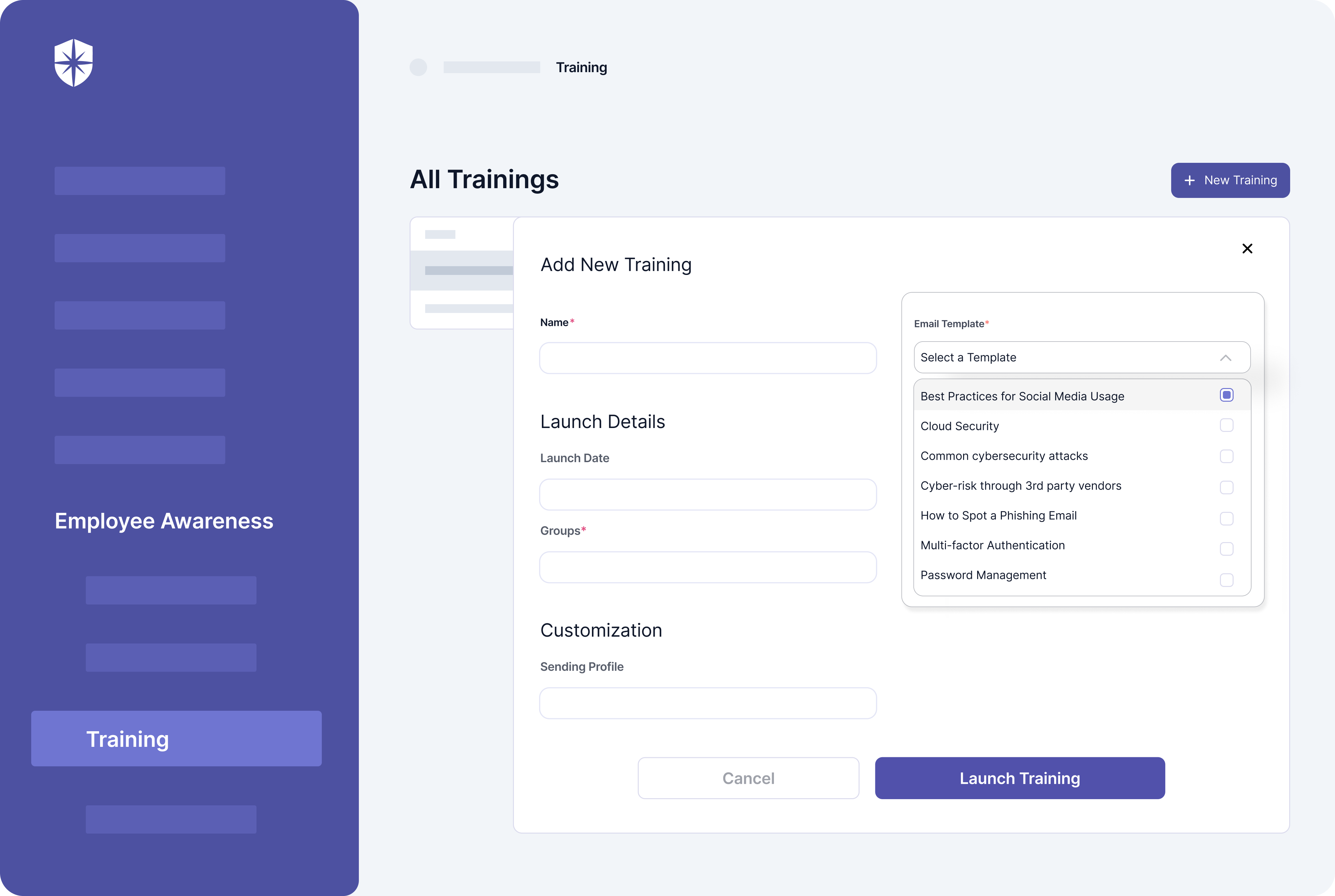
Join thousands of professionals and get the latest insight on Compliance & Cybersecurity.


You've just joined a company with immature GRC practices. The policies exist somewhere. The standards are documented... somewhere else. Compliance requirements are scattered across various documents, and when your executive team asks for a status update on NIST CSF 2.0 implementation, you feel that familiar knot in your stomach. Sound familiar?

"We have policies and we have standards... but we have no central library. I want an easier way to find them rather than trawling through loads of different standards docs." — This sentiment, expressed by a GRC professional on Reddit, captures the frustration many face in developing programs.

If you're nodding along, you're not alone. The good news is that there's a straightforward solution that doesn't require a six-figure investment or months of implementation: a simple spreadsheet.

In this guide, we'll walk through why a spreadsheet is the perfect starting point for your controls library and how to build one that delivers immediate value while setting you up for future success.

What is a Controls Library and Why Do You Need One?

A controls library is a centralized repository that documents all the security and compliance controls your organization has implemented. Think of it as the single source of truth that answers the question: "What are we doing to manage our risks and meet our compliance obligations?"

Without a central controls library, your GRC program will struggle with:

  • Redundant efforts: Teams implementing the same controls multiple times because they don't know what already exists
  • Compliance gaps: Missing controls that should be in place for frameworks like ISO 27001 or NIST CSF
  • Audit nightmares: Scrambling to locate evidence during assessments
  • Stakeholder confusion: Different answers depending on who you ask

As one Reddit user aptly put it: "Our policies reference the implemented controls of the standards, so we have no central library." This approach inevitably leads to inconsistencies, inefficiencies, and missed compliance requirements.

A well-structured controls library solves these problems by:

  1. Creating consistency across your organization
  2. Reducing duplicate work by making existing controls visible
  3. Simplifying compliance mapping across multiple frameworks
  4. Streamlining risk assessments by connecting controls to risks
  5. Providing clear accountability for control implementation and maintenance

The "Low-Tech" Advantage: Why a Spreadsheet Beats a GRC Tool (For Now)

When building your first controls library, you might be tempted to immediately invest in a dedicated GRC platform like ServiceNow. While these tools offer robust capabilities, they often present significant challenges for immature programs:

  • They're expensive (often $50,000+ annually)
  • They require substantial configuration
  • They demand specialized expertise to implement and maintain
  • They can take months to deploy effectively

As one GRC professional noted: "ServiceNow is technically capable of serving as a control library, but realistically, it's probably out of reach for your current program."

This is where the humble spreadsheet shines as your low-hanging fruit solution. Here's why:

1. Simplicity and Accessibility

Everyone in your organization already knows how to use a spreadsheet. There's no learning curve, special training, or technical expertise required. This means you can start populating your library immediately without waiting for IT resources or specialized knowledge.

2. Cost-Effectiveness

Spreadsheets are essentially free, requiring no additional budget approval or procurement process. This allows you to demonstrate value before requesting investment in more sophisticated tools.

3. Flexibility and Customization

You can easily adapt your spreadsheet to fit your organization's specific needs, adding or modifying fields as your program matures without being constrained by a vendor's data model.

4. Immediate Value

Perhaps most importantly, you can create a functional controls library in a spreadsheet in a single afternoon and start reaping the benefits immediately. This rapid time-to-value is crucial for building momentum in an immature program.

As one Reddit user wisely advised: "You're better off starting light: define your core controls in a clear, scalable spreadsheet."

Action Plan: A Step-by-Step Guide to Building Your Controls Library Spreadsheet

Now let's get practical. Here's how to build an effective controls library using a spreadsheet in four straightforward steps:

Step 1: Don't Start from Scratch - Leverage Existing Frameworks

The most common mistake when building a controls library is trying to reinvent the wheel. Fortunately, recognized authorities have already done much of the heavy lifting for you.

"I would recommend starting with downloading the NIST CSF requirements (i.e., controls) spreadsheet and leveraging that as your starting point," advised one GRC practitioner on Reddit.

Here's where to find ready-made control templates:

  • NIST CSF 2.0: The latest Cybersecurity Framework provides an excellent baseline for organizations of all types.
  • NIST 800-53: For more comprehensive security controls, especially if you work with government clients.
  • ISO 27001: If your organization needs to align with international standards.

Pro Tip: NIST provides their entire security and privacy control catalog for SP 800-53 and control baselines for SP 800-53B in spreadsheet format, available directly from their website. This gives you a massive head start.

Step 2: Structure Your Spreadsheet - The Four Essential Columns

Your controls library spreadsheet needs four fundamental columns to be effective:

Column A: Control ID

This is a unique identifier for each control. Use standard naming conventions where applicable (e.g., AC-01 from NIST 800-53) or create your own consistent system (e.g., IAM-001 for Identity and Access Management controls).

The Control ID serves as the primary key for your library and enables clear communication about specific controls across your organization.

Column B: Description

Provide a clear, concise explanation of what the control entails. Importantly, write this for humans, not just auditors. Use plain language that system owners and implementers can understand.

For example, instead of just writing "MFA," describe it as: "All administrative access to critical systems must be protected by Multi-Factor Authentication (MFA)."

Remember what one practitioner noted: "At the end of the day, the controls should be defined in a way that the system owners can actually implement them."

Column C: Framework Mapping

This column connects each control to all relevant compliance frameworks. This is where the real magic happens in terms of efficiency.

For example, a password control might be mapped to:

  • NIST CSF 2.0 (PR.AC-1)
  • ISO 27001 (A.9.4.3)
  • PSPF (Policy 11)
  • ISM (Guidelines 0417, 1173)

This mapping allows you to quickly generate framework-specific control lists when needed for compliance reporting or gap analysis.

Column D: Evidence Link

This critical column provides a direct link to where the evidence for each control is stored. This might be:

  • A link to a SharePoint document
  • A path to a network folder
  • A reference to a specific tool or dashboard
  • A Confluence page URL

As one GRC professional emphasized: "I would definitely recommend adding to your spreadsheet from the start: a column for evidence tracking... If you can show where the evidence lives for each control, it makes assessments (and tool migrations) way smoother later on."

This simple addition will save you countless hours during audits and assessments by eliminating the "evidence scavenger hunt."

Step 3: Populate Your Library

With your structure in place, it's time to populate your library:

  1. Start by importing the controls from your chosen baseline framework (e.g., NIST CSF 2.0)
  2. Review your existing policies and standards to identify controls already documented
  3. Add organization-specific controls that may not be in standard frameworks
  4. Begin mapping your controls to additional frameworks your organization must comply with
  5. Document the location of existing evidence for each control

Remember, this is an iterative process. Start with the basics and expand over time.

Step 4: Review and Iterate

Once you have your initial library, schedule regular reviews to:

  1. Update controls based on new compliance requirements
  2. Add newly implemented controls
  3. Refine control descriptions based on feedback
  4. Improve framework mappings as your understanding deepens
  5. Update evidence links as your documentation evolves

A quarterly review cycle is typically sufficient for most organizations, though you may need more frequent updates during periods of significant change.

Avoiding the Pitfalls: Pro-Tips for Managing Your Spreadsheet Library

While spreadsheets are an excellent starting point, they do come with potential challenges. Let's address these head-on and provide practical solutions to ensure your spreadsheet-based controls library remains effective.

The Human Error Challenge

Studies show that nearly 90% of spreadsheets contain errors, often due to manual data entry. When managing compliance, these errors can lead to serious gaps.

Solution: Implement strict access controls and data validation. Limit editing rights to a select few team members and use dropdown menus for status fields and predefined values wherever possible. This dramatically reduces the risk of inconsistent or incorrect data entry.

The Version Control Nightmare

Without proper management, you might end up with multiple versions of your controls library floating around the organization, leading to confusion about which is authoritative.

Solution: Establish a clear naming convention (e.g., Controls_Library_v1.2_2023-10-15.xlsx) and store the master file in a centralized, access-controlled location. Consider using platforms with version history like SharePoint or Google Sheets to track changes automatically.

The Collaboration Challenge

Multiple team members may need to update the library simultaneously, creating potential conflicts.

Solution: Use cloud-based spreadsheet solutions like Google Sheets or Office 365 that support real-time collaboration. Establish clear roles and responsibilities for who can edit which sections of the spreadsheet.

The Static Data Problem

Unlike dedicated GRC tools, spreadsheets don't automatically update or provide real-time compliance posture.

Solution: Schedule regular (monthly or quarterly) reviews of your controls library. Create calendar reminders and assign clear ownership for these reviews to ensure they actually happen. During these reviews, update control statuses, evidence links, and framework mappings.

The Scalability Concern

As your program matures and the number of controls grows, a simple spreadsheet may become unwieldy.

Solution: Use tabs to organize controls by domain (e.g., Access Control, Risk Management, etc.) and leverage features like filtering, sorting, and pivot tables to maintain usability even as your library expands.

Your Spreadsheet as a Launchpad: Planning for Future GRC Maturity

Your spreadsheet-based controls library isn't just a temporary solution—it's a strategic asset that will facilitate your journey toward GRC maturity.

The Foundation for Tool Migration

When you eventually implement a dedicated GRC tool like ServiceNow, your well-structured spreadsheet will serve as the perfect data source for migration.

As one Reddit user noted: "Once your company gets ServiceNow implemented, you can use your spreadsheet as a baseline to upload into ServiceNow as the controls repository."

The time you invest now in creating clean, well-organized control data will pay enormous dividends during the migration process.

Streamlining Risk Assessments

Your controls library will serve as the foundation for more sophisticated risk assessments. By having a clear inventory of existing controls, you can:

  1. Identify gaps relative to your risk profile
  2. Prioritize control implementations based on risk exposure
  3. Track the effectiveness of controls in mitigating specific risks

Accelerating Compliance Mapping

As regulatory requirements evolve and your organization faces new compliance obligations, your framework mapping column will allow you to quickly identify:

  1. Which existing controls satisfy new requirements
  2. What gaps exist that require new controls
  3. How changes to one control might impact multiple compliance frameworks

This capability is particularly valuable for organizations navigating complex regulatory landscapes where frameworks like NIST CSF 2.0, ISO 27001, PSPF, and ISM overlap.

Building the Business Case for Advanced GRC Tools

When the time comes to invest in a dedicated GRC platform, your spreadsheet will provide concrete evidence of:

  1. The volume of controls you're managing
  2. The complexity of your compliance mapping requirements
  3. The limitations you've encountered with the spreadsheet approach

This data will help you build a compelling business case for investment in tools like ServiceNow, Centraleyes, or CyberSaint by demonstrating clear ROI potential.

Implementation Example: A Sample Controls Library Spreadsheet

To make this concrete, let's look at how a simple controls library spreadsheet might be structured. This example focuses on access control requirements across multiple frameworks:

Control IDDescriptionFramework MappingEvidence Link
AC-01Access Control Policy: The organization must develop, document, and disseminate an access control policy that addresses purpose, scope, roles, responsibilities, and compliance.NIST CSF 2.0 (PR.AC-1)<br>ISO 27001 (A.5.1.1)<br>ISM (0389)Link to Policy Document
AC-02Account Management: The organization must manage system accounts, including establishing, activating, modifying, disabling, and removing accounts.NIST CSF 2.0 (PR.AC-4)<br>ISO 27001 (A.9.2.1)<br>PSPF (Policy 11)Link to Account Management Procedure
AC-03Multi-Factor Authentication (MFA): All administrative access to critical systems and applications must be protected by multi-factor authentication.NIST CSF 2.0 (PR.AC-7)<br>ISO 27001 (A.9.4.2)<br>ISM (0974, 1173)Link to MFA Configuration Standards
AC-04Least Privilege: Access permissions to systems and data must be limited to only those required for users to perform their job functions.NIST CSF 2.0 (PR.AC-4)<br>ISO 27001 (A.9.2.3)<br>ISM (1175)Link to Role Definition Document
AC-05Session Timeout: The system must automatically terminate a user session after 15 minutes of inactivity.NIST CSF 2.0 (PR.AC-7)<br>ISO 27001 (A.9.4.2)<br>PSPF (Policy 11)Link to Configuration Standards

This simple structure provides a clear, accessible way to document your controls while enabling easy filtering and sorting by framework, control domain, or other criteria.

Getting Started Today

Ready to build your first controls library? Here's a simple checklist to get you started:

  1. Download a baseline framework spreadsheet:
  2. Set up your spreadsheet structure:
    • Create the four essential columns (ID, Description, Framework Mapping, Evidence Link)
    • Add optional columns as needed (Owner, Implementation Status, Review Date, etc.)
    • Consider using tabs to organize by control family or domain
  3. Begin populating with your existing controls:
    • Review your current policies and standards
    • Document controls that are already implemented
    • Note gaps where controls should exist but don't yet
  4. Establish a maintenance process:
    • Determine who will own the controls library
    • Set a regular review schedule
    • Create a process for adding new controls
  5. Share with stakeholders:
    • Introduce the central controls library to your team
    • Educate on how to use it for compliance activities
    • Gather feedback for improvements

Conclusion: Take Control of Your Controls

As GRC professionals in immature programs, we're often caught in a frustrating position: executives demanding compliance with frameworks like NIST CSF 2.0 or ISO 27001, while we lack the basic infrastructure to deliver effectively.

A spreadsheet-based controls library isn't just a stopgap—it's the most pragmatic first step toward building a mature GRC program. It provides immediate value, requires minimal investment, and creates a foundation for future growth.

As one Reddit user put it: "I think that sounds like a perfect plan."

By creating a simple, centralized library of your controls, you'll:

  • Stop "trawling through loads of different standards docs"
  • Create a single source of truth for compliance activities
  • Simplify evidence collection during assessments
  • Build a valuable asset for your eventual migration to dedicated GRC tools

So, resist the urge to immediately jump into complex GRC platforms. Instead, start with the low-hanging fruit: a well-structured controls library spreadsheet that delivers immediate value while setting you up for future success.

Your first controls library doesn't need to be perfect—it just needs to exist. The sooner you start, the sooner you'll begin bringing order to your organization's GRC chaos.
Frequently Asked Questions (FAQ)

What is a GRC controls library?

A GRC controls library is a centralized, organized repository of all the security and compliance controls your organization uses to manage risk and meet regulatory requirements. It acts as the single source of truth for your security measures, documenting what each control is, mapping it to relevant frameworks like NIST CSF 2.0 or ISO 27001, and linking to evidence of its implementation. This prevents redundant work, simplifies audits, and ensures consistency.

Why use a spreadsheet for a controls library instead of a dedicated GRC tool?

For organizations with new or immature GRC programs, a spreadsheet is the ideal starting point because it is simple, cost-effective, flexible, and delivers immediate value without a steep learning curve. While powerful GRC platforms are beneficial for mature programs, they are often expensive and complex to set up. A spreadsheet allows you to build a functional library quickly and create a clean data set that can be easily migrated to an advanced tool later.

How do I start building a controls library?

The best way to start is by leveraging an existing, recognized framework, such as the NIST Cybersecurity Framework (CSF) 2.0, as your foundation. Download a pre-existing control set from a reputable source like NIST, then structure your spreadsheet with four essential columns: a unique Control ID, a clear Description, Framework Mapping to connect it to compliance requirements, and an Evidence Link.

What are the most essential pieces of information to include in my controls library?

Every control in your library should have at least four key components: a unique Control ID, a clear Description in plain language, Framework Mapping to all relevant compliance standards (e.g., NIST, ISO, PSPF), and a direct Evidence Link. This last column is crucial, as it provides a direct path to the documentation or reports that prove a control is in place, saving countless hours during audits.

How do I keep my controls library spreadsheet from becoming a mess?

To maintain an effective spreadsheet library, you should implement strict access controls, use data validation, establish clear version control, and schedule regular reviews. Use a cloud-based tool like Google Sheets or Office 365 for collaboration and version history. Limit editing rights to a core team and use dropdown menus for standardized fields to minimize human error. Finally, assign ownership and conduct quarterly reviews to keep the data accurate and current.

When should our organization move from a spreadsheet to a dedicated GRC tool?

You should consider moving to a dedicated GRC tool when your spreadsheet becomes too unwieldy to manage, your team needs real-time automation and reporting, or the complexity of your compliance requirements exceeds what a static spreadsheet can handle. The spreadsheet serves as your launchpad; once you have a mature set of controls, its limitations will become clear, and you will have a strong business case and a clean dataset ready for migration to a more powerful platform.


Have you built a controls library using a spreadsheet? What challenges did you face? Share your experiences in the comments below!

blog-hero-background-image
Continuous Control Monitoring

What is Continuous Control Monitoring (CCM)? And How do I start?

backdrop
Table of Contents

Join thousands of professionals and get the latest insight on Compliance & Cybersecurity.


You've spent countless hours preparing for your annual compliance audit. Your team is stretched thin, frantically collecting evidence and documentation from across the organization. Despite your best efforts, the auditors still find gaps in your controls—issues that existed for months without detection. Now you're facing remediation tasks, potential findings, and the exhausting realization that you'll be doing this all over again next year.

Sound familiar?

In today's rapidly evolving regulatory landscape, traditional point-in-time compliance checks are no longer sufficient. They're resource-intensive, create audit fatigue, and often detect control failures long after they occur—leaving your organization vulnerable to risks and compliance gaps.

"Difficulty in coordinating compliance checks across different roles and disciplines" is one of the most common challenges compliance professionals face, according to discussions on Reddit's NIST Controls community. The "need for efficient delegation and tracking of compliance tasks" and the desire for a "structured program for continuous monitoring of compliance" are other frequently voiced frustrations.

This is where Continuous Controls Monitoring (CCM) comes in—a modern approach that transforms your compliance program from periodic, reactive fire drills into a proactive, ongoing process.

What is Continuous Controls Monitoring?

Continuous Controls Monitoring (CCM) is an automated, technology-driven process for the ongoing evaluation of an organization's internal controls to ensure their effectiveness, consistency, and alignment with risk management goals. Rather than checking controls periodically, CCM uses automation to continuously validate that controls are operating as designed.

According to SafetyCulture, CCM is "the application of automated tools to monitor and evaluate the effectiveness of internal controls on a continuous basis." It's a critical component of a mature Governance, Risk and Compliance (GRC) strategy that enhances the overall risk management posture of your organization.

CCM vs. Traditional Monitoring: A Stark Contrast

FeatureWith CCMWithout CCM (Traditional)
Frequency of MonitoringContinuous, real-timePeriodic, manual testing
Risk DetectionImmediate detection of anomaliesDelayed detection
Response TimeInstant alerts and quick actionsSlow responses
Evidence CollectionAutomated, with digital audit trailManual, time-consuming
Operational EfficiencyImproved efficiency via automationHigh manual effort, resource-intensive
FocusStrategic risk managementCompliance checkbox exercises

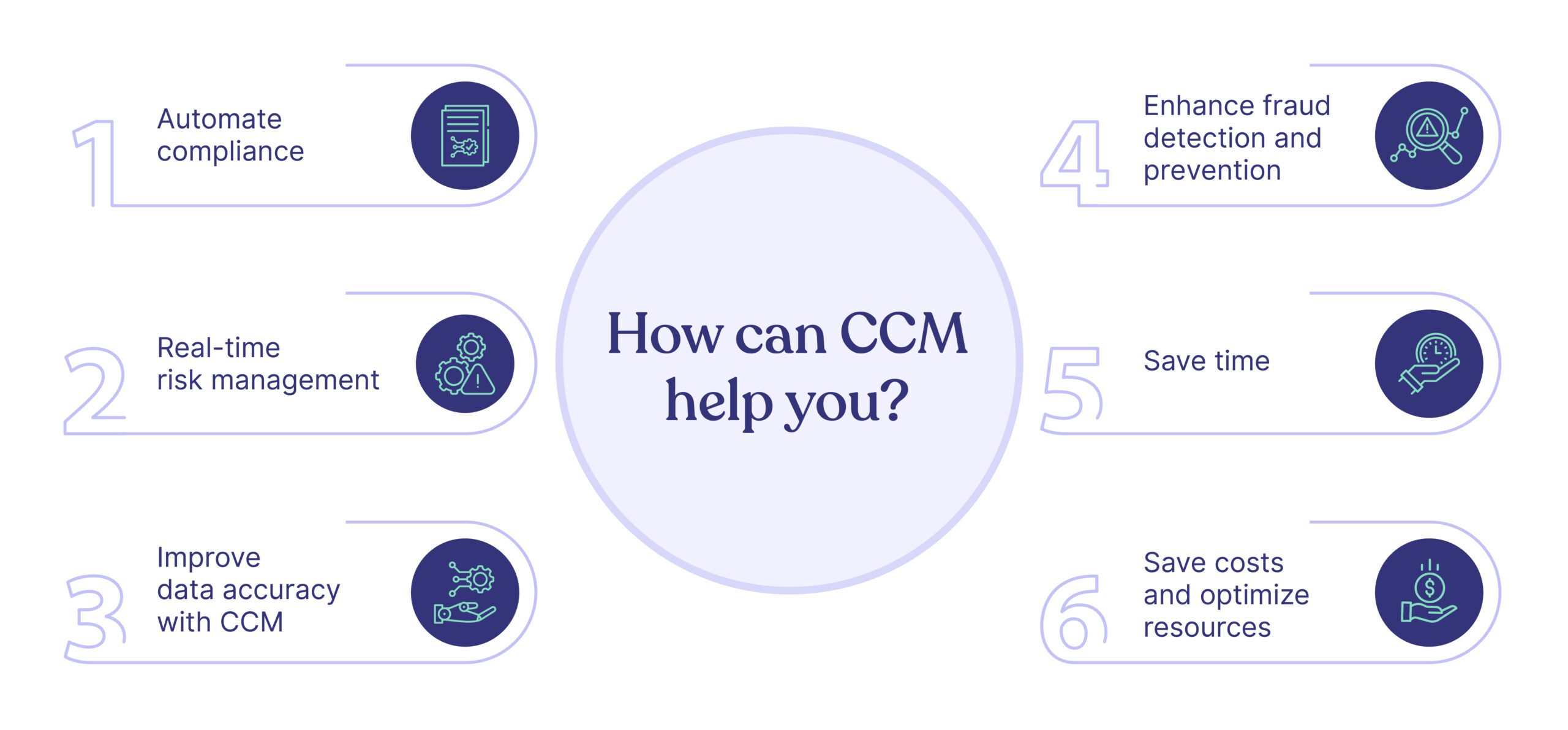
Why Implement Continuous Controls Monitoring?

The benefits of implementing CCM extend far beyond simply checking compliance boxes. Here's how it addresses the core challenges faced by compliance and security professionals:

1. Enhanced Risk Detection and Mitigation

CCM provides real-time insights, enabling immediate identification and response to control weaknesses or anomalies. This proactive stance significantly reduces the risk of data breaches, operational disruptions, and financial losses.

This is especially critical given that a Hyperproof survey found that 64% of organizations reported being negatively affected by a third-party data breach, highlighting the need for continuous vendor risk monitoring.

2. Increased Team Productivity and Operational Efficiency

By automating repetitive checks and evidence collection, CCM frees compliance and internal audit teams from mundane tasks. According to Hyperproof, this allows teams to test more controls and focus on strategic risk management rather than "pencil whipping" compliance tasks—directly addressing the pain of overwhelming manual work voiced by many professionals.

3. Streamlined Audits and Improved Regulatory Standing

CCM automates evidence collection and maintains a reliable audit trail, drastically reducing audit preparation time and costs. Organizations with readily available evidence of risk mitigation enhance their reputation and build trust with regulators, customers, and auditors.

4. Enhanced Visibility and Better Decision-Making

CCM provides senior leaders and managers with clear, real-time dashboards and insights into the organization's risk and compliance posture. This allows for data-backed decisions and better prioritization of risk-handling efforts.

5. Fostering a Culture of Accountability

CCM reinforces the idea that "security is everyone's job" by keeping business unit stakeholders accountable for managing the risks associated with their key processes. This directly addresses the need for "accountability and visibility of compliance tasks" that many organizations struggle with.

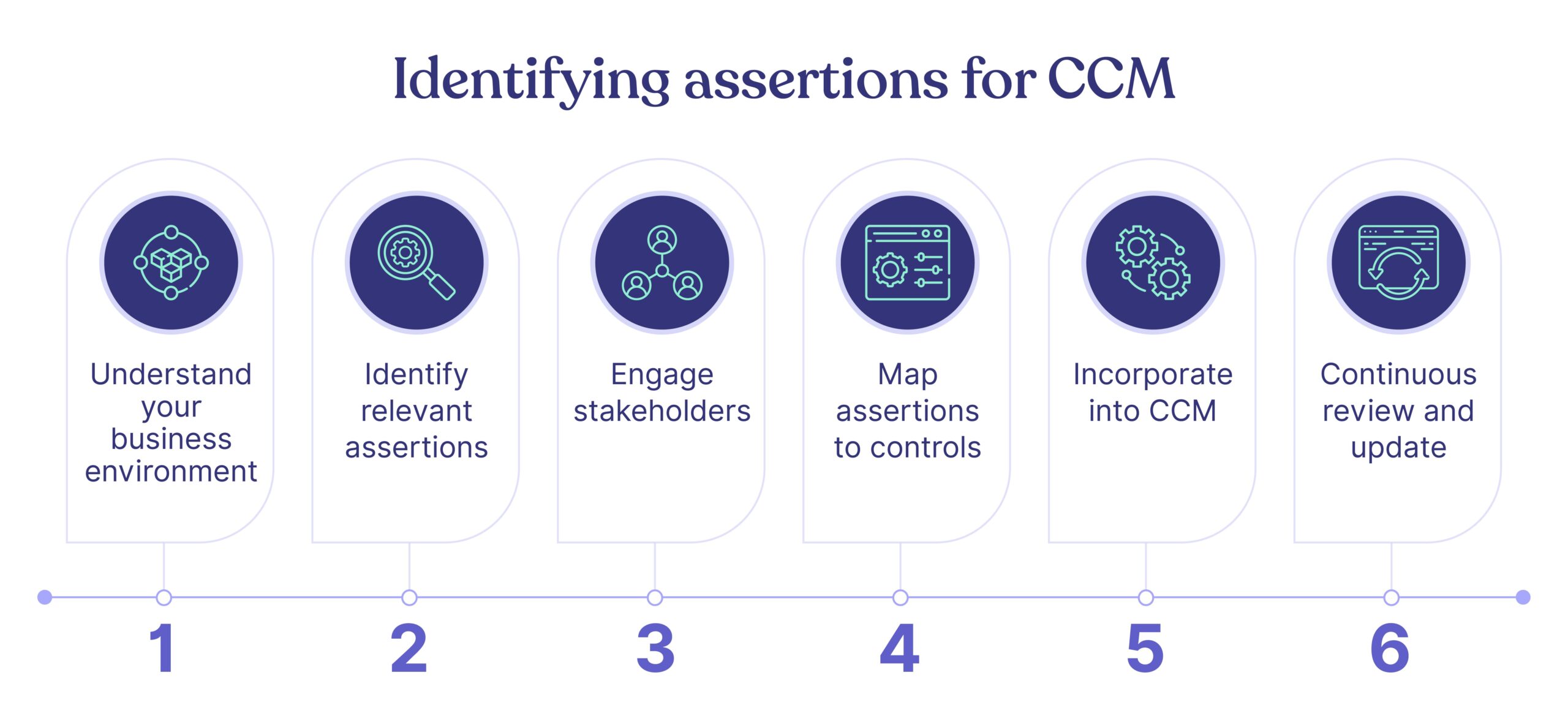
How to Start with Continuous Controls Monitoring: A 6-Step Guide

Implementing CCM doesn't have to be overwhelming. Here's a practical, step-by-step approach to get you started:

Phase 1: Prerequisites - Laying the Foundation

Before diving into implementation, certain foundational elements must be in place:

1. Establish a Central Repository for Controls

You need a single source of truth for your controls. This is often a compliance operations platform or a capable GRC solution. This system is used to document all existing controls, whether defined by oversight authorities or adapted from industry frameworks like COSO, NIST CSF, or ISO 27001.

As discussed in the Cloud Security Alliance blog, "Having a central repository ensures that all stakeholders have access to the same information and can collaborate effectively."

2. Identify Necessary Evidence and Goals

For each control, you must clearly define what evidence is needed to validate its effectiveness. Align the overall objectives of your CCM program with broader business goals and your organization's risk appetite.

Phase 2: Implementation - Building Your CCM Program

Step 1: Select and Prioritize Key Controls for Monitoring

You don't need to monitor everything at once. Start by choosing controls that are:

  • High-frequency: Occur often
  • Critical: Address high-risk areas
  • Automatable: Generate clean, structured data that can be easily pulled from a source system

Examples include controls related to user access management, system configurations (CIS checks), and financial transaction approvals.

Step 2: Select and Deploy Monitoring Tools

Choose a CCM tool or GRC solution that integrates with your existing business systems (e.g., AWS, Azure, Jira, ServiceNow) to automate data collection.

The platform should be intuitive, allowing you to build tests without extensive coding. For example, a good platform allows you to create automated tests for controls like ensuring all Azure monitors have defined priorities.

For organizations just starting out, even task management tools like Jira with automation can be a "fallback plan" for scheduling and assigning recurring compliance checks, as suggested by users in Reddit discussions.

Step 3: Develop Control Frameworks and Automate Tests

For each selected control, define the test parameters:

  • Objective: What does a "pass" look like?
  • Data Source: Where does the evidence come from?
  • Frequency: How often should the test run? (e.g., hourly, daily)

Set up the automated tests within your chosen platform to monitor the control's performance against the established criteria.

Step 4: Determine Responses to Test Failures

A failed test must trigger an action. This is crucial for remediation. Establish clear protocols:

  • Automated Alerts: Set up real-time notifications (email, Slack, etc.) to be sent to the control operator or relevant team when a test fails
  • Task Assignment: Automatically create and assign a task in a system like Jira or your GRC platform for the owner to investigate and remediate the failure

According to Hyperproof's guide, "Effective CCM isn't just about detecting issues—it's about ensuring they're promptly addressed."

Step 5: Build Monitoring Reports and Analyze Findings

Use dashboards and data visualization tools to track the status of all control tests in real time. Establish Key Risk Indicators (KRIs) for ongoing performance tracking and schedule regular reporting intervals to share findings with stakeholders, ensuring transparency and accountability.

Step 6: Implement Corrective Actions and Continuous Improvement

CCM is not "set it and forget it." Use the findings from your monitoring to:

  • Address weaknesses: Implement corrective actions for control failures
  • Document everything: Keep a clear record of failures and remediation steps for audit purposes
  • Refine the process: Establish feedback loops to regularly review and improve your monitoring practices and control effectiveness

Real-World Example: Automating User Access Reviews

Let's consider a practical example of implementing continuous controls monitoring for user access reviews:

Traditional Approach: Quarterly manual reviews where managers receive spreadsheets of user accounts to approve or revoke.

CCM Approach:

  1. Control Definition: All user access must be appropriate for job function and follow least privilege principles
  2. Automated Test: Daily comparison of Active Directory group membership against HR data
  3. Alert Conditions: Any access rights not matching job title or department triggers an alert
  4. Response: Automated ticket creation for the user's manager to review and approve/revoke
  5. Evidence Collection: System automatically logs all reviews, approvals, and revocations

This approach turns a quarterly, manual process into a continuous, automated one that catches access issues in near real-time rather than months later.

Build a Future-Proof Compliance Program

Continuous Controls Monitoring revolutionizes how businesses approach risk and compliance. It moves organizations from a reactive, periodic posture to a proactive, continuous one. By leveraging automation, CCM significantly enhances governance, increases team efficiency, and provides unparalleled visibility into an organization's risk posture.

Even starting small, by automating a few key controls, can begin the journey to maturing your compliance operations and building a more resilient organization. As Alessa notes, "The goal is to start simple and scale over time as your organization's maturity grows."

Frequently Asked Questions (FAQ)

What is the main difference between CCM and traditional monitoring?

The primary difference is frequency and automation. Continuous Controls Monitoring (CCM) uses automated technology to check controls in real-time or on a continuous basis, whereas traditional monitoring relies on periodic, manual testing performed at specific points in time, like quarterly or annually. This means CCM detects issues almost instantly, while traditional methods can leave gaps for months.

Why is Continuous Controls Monitoring important for modern businesses?

CCM is crucial because it transforms compliance from a reactive, periodic exercise into a proactive, ongoing process. It provides real-time visibility into control effectiveness, enabling organizations to detect and mitigate risks immediately. This shift enhances risk management, improves operational efficiency by automating manual tasks, and streamlines audit preparation, making the organization more secure and resilient.

How can a company start implementing Continuous Controls Monitoring?

A company can start implementing CCM by first establishing a central repository for all controls and identifying the evidence needed to prove their effectiveness. The next step is to prioritize a small set of critical, high-frequency controls to monitor. From there, select a CCM tool, automate the tests for those controls, define responses for test failures, and build dashboards to monitor the results.

What are good examples of controls to automate with CCM?

Excellent candidates for CCM automation are controls that are high-frequency, critical to security, and generate structured data. Common examples include user access reviews (checking if user permissions align with their current job role), system configuration checks (verifying that servers meet security benchmarks like CIS), and monitoring for changes in firewall rules or critical system files.

Does CCM replace the need for internal audits?

No, CCM does not replace internal audits, but it significantly enhances them. CCM provides internal auditors with reliable, continuously collected evidence, allowing them to shift their focus from routine control testing to more strategic, risk-focused activities. It makes audits more efficient and data-driven, rather than a time-consuming evidence-gathering exercise.

What tools are needed to implement Continuous Controls Monitoring?

Implementing CCM typically requires a technology platform capable of automating control tests. This is often a dedicated compliance operations platform or a Governance, Risk, and Compliance (GRC) solution that can integrate with your existing business systems (like AWS, Azure, Jira). These tools automate data collection, run tests, and generate alerts, forming the backbone of a CCM program.

Ready to take the first step? Begin by identifying your most critical, high-frequency controls and exploring modern compliance operations platforms that can help automate the process. The future of compliance isn't about doing more manual work—it's about working smarter through continuous controls monitoring.

blog-hero-background-image
Cyber Security

Cybersecurity Hygiene: 5 Basics That Prevent Breaches

backdrop
Table of Contents

Join thousands of professionals and get the latest insight on Compliance & Cybersecurity.


You've invested in cutting-edge security tools, trained your team on the latest threats, and implemented complex defense protocols. Yet, somehow, a breach still occurred. If this sounds familiar, you're not alone.

Most organizations that fall victim to cyberattacks aren't compromised through sophisticated zero-day exploits or advanced persistent threats. Instead, they're breached because of something much simpler: poor cybersecurity hygiene.

"We had all our internal systems protected, but a third-party system that was set up many years ago we just had no visibility into," confessed one security professional after a breach. Another discovered that their compromised vendor "hadn't even updated the server for over 5 years."

The hard truth is that approximately 90% of breaches can be attributed to human error and basic security oversights rather than advanced attack techniques.

Cybersecurity hygiene refers to the routine practices and fundamental controls organizations implement to maintain system health and protect sensitive data. Much like washing your hands prevents the spread of germs, basic security hygiene prevents the spread of threats across your digital environment.

This article breaks down five fundamental, high-impact practices that can prevent the majority of breaches: Multi-Factor Authentication (MFA), patch management, network segmentation, asset management, and security awareness training. Each serves as a critical layer in your defense strategy, working together to create a resilient security posture.

1. Multi-Factor Authentication (MFA) - Your Digital Deadbolt

Multi-Factor Authentication is the digital equivalent of adding both a deadbolt and keypad lock to your front door. It requires users to provide two or more verification factors to gain access:

  • Something you know (password)
  • Something you have (mobile device or security key)
  • Something you are (fingerprint or facial recognition)

Why MFA Is Critical

The statistics are staggering: according to Microsoft and the Cybersecurity and Infrastructure Security Agency (CISA), enabling MFA blocks 99.9% of automated account compromise attacks. When cybercriminals obtain credentials through phishing or data breaches, MFA serves as that critical second line of defense.

Implementing MFA Effectively

  1. Choose the right authentication factors:
    • Authenticator apps (Google Authenticator, Microsoft Authenticator)
    • Hardware tokens like YubiKey
    • Biometric verification
    • SMS verification (though less secure than other options)
  2. Balance security and convenience:
    • "The idea is to somehow try and balance security and convenience," notes one security professional. "Doing MFA daily when off a trusted network is a good general practice, and I would stick to a 7-day frequency for when on a trusted network."
    • This approach helps prevent MFA fatigue, which can lower your overall security posture.
  3. Protect high-value targets first:
    • Prioritize MFA for administrator accounts, remote access (RDP), email, VPNs, and cloud services.
    • Check which of your services support MFA using directories like 2fa.directory.

Remember: MFA isn't foolproof. Sophisticated phishing attacks can still trick users into approving unauthorized access attempts. Train your team to be suspicious of any unsolicited MFA prompts and implement an Incident Response Plan (IRP) for potential compromises.

2. Patch Management - Closing Known Doors to Attackers

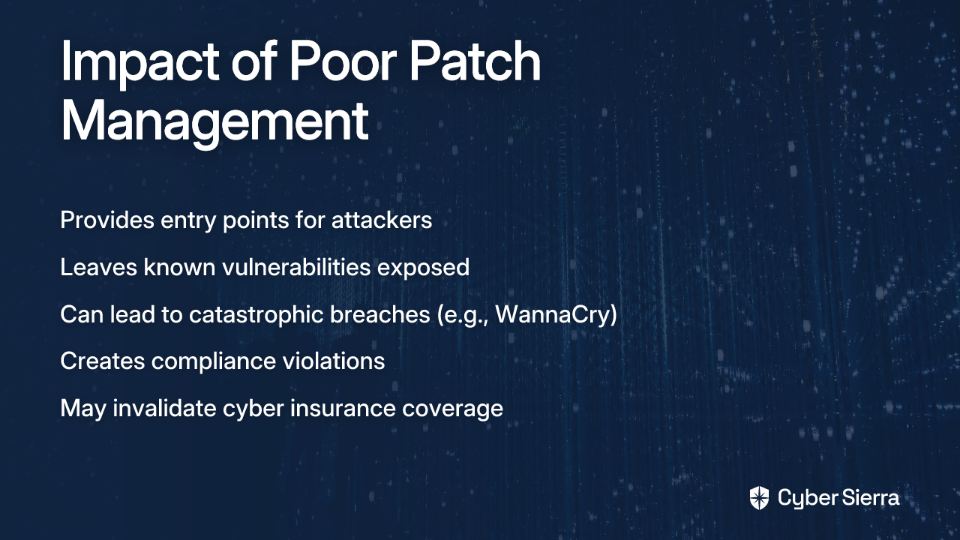
Patch management involves systematically updating software to address security vulnerabilities. It's a critical component of cybersecurity hygiene that directly addresses the weaknesses attackers exploit most frequently.

Why Patching Matters

Unpatched systems are like unlocked doors with "Enter Here" signs for hackers. Consider the sobering example shared by a security professional who discovered a third-party server "hadn't even updated the server for over 5 years" before it was breached.

The 2017 WannaCry ransomware attack, which affected over 200,000 computers across 150 countries, primarily spread by exploiting systems that hadn't installed an available Microsoft patch. The patch had been available for two months before the attack began.

Creating an Effective Patching Strategy

  1. Automate where possible:
    • "Currently working as a Cybersecurity Engineer where 70% of my time is spent rolling out patches," laments one professional. This is unsustainable.
    • Leverage patch management tools like Intune, ManageEngine Patch Manager Plus, or Action1 (which one user noted "people are sleeping on... the patch management is far better than much more expensive things").
  2. Prioritize based on risk:
    • Focus first on internet-facing systems, then critical internal infrastructure.
    • Prioritize patches for vulnerabilities being actively exploited in the wild.
    • Develop an emergency patching process for critical zero-day vulnerabilities.
  3. Test before deployment:
    • Test patches in a staging environment before wide deployment.
    • Document any systems that cannot be immediately patched (legacy systems) and implement compensating controls.
  4. Verify and document:
    • Confirm patches were successfully applied through verification scanning.
    • Maintain detailed records of your patching activities as part of your Disaster Recovery Plan (DRP) documentation.

3. Network Segmentation - Preventing Lateral Movement

Network segmentation divides your network into isolated subnetworks or segments, limiting what systems can communicate with each other. This critical hygiene practice contains security incidents and prevents attackers from moving freely through your environment.

The Security Impact of Segmentation

Even if an attacker breaches one part of your network, proper segmentation prevents them from accessing your entire infrastructure. As one security professional pointed out, "I have lateral movement in my mind—if one server is compromised, there is nothing to prevent poking at others using it as a jump server."

Without segmentation, a single compromised workstation can lead to a total network compromise through lateral movement techniques.

Implementing Effective Network Segmentation

  1. Apply the principle of least privilege:
    • Systems should only be able to communicate with what they absolutely need to.
    • This is a cornerstone of zero-trust security architecture.
  2. Segment by function and sensitivity:
    • Separate production, development, and test environments.
    • Isolate systems containing sensitive data (like customer information).
    • Create dedicated segments for IoT devices, which often have weaker security.
  3. Control traffic with next-generation firewalls:
    • Use firewalls between segments to inspect and control traffic.
    • Implement intrusion detection/prevention systems (IDS/IPS) to monitor for suspicious lateral movement.
  4. Manage vendor access carefully:
    • Create dedicated network segments for third-party access.
    • Implement time-limited access controls for vendors through proper vendor management practices.

Remember: "Security has no end game," as one professional mentioned. It's about layers of protection, with network segmentation serving as a critical barrier to attack propagation.

4. Asset Management - You Can't Protect What You Can't See

Cybersecurity Asset Management (CSAM) involves continuously discovering, inventorying, tracking, and monitoring all assets within your organization. It forms the foundation for nearly all other security controls.

Why Asset Management Is Fundamental

You can't secure what you don't know exists. This painful lesson was learned by the security team who admitted, "We had all our internal systems protected but a third-party system that was set up many years ago we just had no visibility into."

Unknown or forgotten assets often become security blind spots and easy entry points for attackers. A comprehensive asset inventory is essential for effective vulnerability management, patch deployment, and incident response.

Building Effective Asset Management

  1. Continuous discovery:
    • Deploy automated discovery tools to continuously scan your network and cloud environments.
    • Include both traditional IT assets (servers, workstations) and IoT devices, cloud resources, and shadow IT.
    • Maintain a Configuration Management Database (CMDB) to track all assets.
  2. Classify assets by criticality:
    • Tag assets based on their sensitivity, business impact, and exposure level.
    • Focus your protective measures proportionally on your most critical assets.
    • Include ownership information to ensure accountability.
  3. Monitor for security gaps:
    • Regularly audit assets for missing security controls (EDR agents, encryption, etc.).
    • Verify that all assets are included in your vulnerability scanning and patch management processes.
    • Use your asset inventory during security incidents to quickly identify potentially affected systems.
  4. Automate remediation where possible:
    • Implement systems that can automatically deploy missing security controls.
    • Configure alerts for unauthorized devices or shadow IT.
    • Include asset verification in your proactive security hygiene practices.

5. Security Awareness Training - The Human Firewall

Even the most sophisticated technical controls can be bypassed by a single click on a malicious link or attachment. As one security professional bluntly put it, "90% of the time it's always human error."

Effective security awareness training transforms your employees from potential vulnerabilities into active defenders—your human firewall.

Building an Effective Training Program

  1. Go beyond compliance:
    • Move past annual checkbox training to create an ongoing security culture.
    • Use real-world examples and simulations to make threats tangible.
    • Tailor training to specific roles (C-suite executives need different training than IT staff).
  2. Focus on practical, actionable advice:
    • "Don't follow links in emails, google the correct result (and watch out for ads)," advises one security professional.
    • "Don't open PDFs or Word documents sent by email" without verification.
    • Teach employees how to identify phishing attempts, including newer techniques like conversation hijacking.
  3. Create a positive reporting culture:
    • Encourage employees to report suspicious activities without fear of punishment.
    • Provide clear channels for reporting potential security incidents.
    • Offer psychological aftercare for employees who may be involved in security incidents.
  4. Measure effectiveness:
    • Conduct regular phishing simulations to test awareness.
    • Track metrics like reporting rates and click-through rates on simulated phishing emails.
    • Use the results to focus future training efforts.

The Foundation of Cyber Resilience

These five fundamental practices—MFA, patch management, network segmentation, asset management, and security awareness training—form the bedrock of a strong cybersecurity posture. When properly implemented, they prevent the vast majority of breaches.

As one security professional wisely observed, "It's all about risk and layering." No single control is perfect, but together, they create a resilient defense that makes your organization a much harder target.

Your remediation team should focus on these basics before investing in advanced security tools. After all, the most sophisticated threat detection won't help if your users don't use MFA, your systems aren't patched, or your network allows unrestricted lateral movement.

For organizations just beginning their cybersecurity journey or those looking to strengthen their fundamentals, these five practices offer the highest return on investment. They're also critical components for organizations seeking cyber insurance coverage, as insurers increasingly require these basic hygiene measures.

Remember that security is not a destination but a continuous process of improvement. By mastering these fundamentals and implementing proactive security hygiene, you'll significantly reduce your risk of becoming the next breach headline.

blog-hero-background-image
Continuous Control Monitoring

Top 5 CCM Software for Automated Compliance

backdrop
Table of Contents

Join thousands of professionals and get the latest insight on Compliance & Cybersecurity.


Are you drowning in spreadsheets trying to track compliance across your organization? Do you find yourself scrambling to gather evidence just before an audit? If your security team includes server admins, network specialists, and workstation managers all working separately, you know the struggle of ensuring everyone completes their required checks on time.

"What tools are people using to track the security controls that have requirements of 'verify X is done on a Y (frequency)' across a team of multiple disciplines and specializations?" asked one frustrated security professional on Reddit. This common pain point highlights why Continuous Controls Monitoring (CCM) has become essential for modern organizations.

The traditional approach to security compliance—periodic, manual checks with frantic evidence gathering before audits—is no longer sustainable. Today's regulatory landscape demands a more sophisticated solution.

In this article, we'll explore what CCM is, why it matters, key features to look for in a CCM platform, and review the top 5 solutions available today to transform your compliance program from reactive to proactive.

What is Continuous Controls Monitoring and Why Does It Matter Now?

Moving Beyond the Spreadsheet and Periodic Audits

Traditional compliance monitoring relies on exception-based, point-in-time assessments. This approach is fundamentally reactive: auditors periodically check for control gaps, often revealing issues only after they've existed for months. The result? A mad scramble to gather evidence, fix problems, and demonstrate compliance.

Continuous Controls Monitoring (CCM) flips this model. Instead of waiting for annual audits to discover issues, CCM uses automation to constantly verify that security controls are functioning as intended. It's the difference between a yearly doctor's visit and having a health monitor that alerts you the moment something goes wrong.

As one security professional noted, CCM helps "detect deviations, vulnerabilities, or threats in real-time so we can immediately take action." This shift from periodic assessment to continuous validation represents a fundamental evolution in how organizations approach security and compliance.

The Core Benefits of a Modern CCM Strategy

Enhanced Risk Management & Proactive Defense: CCM provides constant awareness of your security posture, enabling you to identify and address vulnerabilities before they become serious issues. This proactive approach helps organizations make informed, risk-based decisions about resource allocation and security investments.

Streamlined Compliance & Audit Readiness: By automating evidence collection for frameworks like SOC2, ISO 27001, NIST, GDPR, and HIPAA, CCM eliminates what one Reddit user described as "the most painful part of an audit." Organizations using CCM remain perpetually audit-ready rather than rushing to prepare as deadlines approach.

Improved Efficiency and Cost Savings: Automation reduces the need for manual control testing, freeing up skilled security professionals to focus on strategic initiatives rather than repetitive compliance tasks. This efficiency translates to lower operational costs and helps prevent expensive security incidents.

Centralized Visibility: CCM creates a single repository for all controls, making it easier to manage overlapping requirements across multiple frameworks. This addresses what one user described as the need for "tools that I can use to map the requirements of various frameworks... to my current network's 'status quo' and evaluate how compliant I am."

Key Features to Look For in a CCM Software

Before diving into specific solutions, it's important to understand what makes a CCM platform effective. Here are the critical features to evaluate when selecting CCM software:

Automation Engine: The platform should connect seamlessly with your tech stack—cloud providers (AWS, Azure, GCP), identity providers (Okta, Auth0), code repositories (GitHub, GitLab), and more—to automatically test controls and collect evidence without manual intervention.

Centralized Control Repository & Framework Mapping: Look for the ability to manage all controls in one place and map them to multiple compliance frameworks. This prevents duplicating work when addressing requirements that overlap across ISO27001, SOC2, NIST, and other frameworks.

Real-time Dashboards and Alerting: Effective CCM solutions provide customizable dashboards that give a clear view of your compliance posture. The best platforms include intelligent alerting that prevents alert fatigue while highlighting critical deviations requiring immediate action.

Task Management & Workflow Automation: As one security professional put it, an ideal solution is "a borderline Jira type application" where you can "assign a frequency-time to security control, and require input from assigned personnel." This feature ensures accountability and streamlines delegation across specialized teams.

Integration Capabilities: The more integrations, the better. A robust CCM tool should connect with hundreds of services across your organization to automatically collect evidence and verify control effectiveness.

Customization and Flexibility: The ability to create custom compliance checks is crucial. As one user noted, this can be "difficult to do with Rapid7 and Tenable," highlighting the need for platforms that allow you to tailor monitoring to your specific environment and requirements.

Top 5 Continuous Controls Monitoring (CCM) Software

1. Secureframe

Overview: Secureframe has established itself as a leader in compliance automation with a platform designed to make security and compliance fast and easy.

Key Features:

  • Robust CCM with over 300 integrations to automatically collect evidence
  • AI-powered remediation suggestions to address control gaps
  • Real-time dashboards providing visibility into compliance posture
  • Strong support for frameworks including SOC 2, ISO 27001, and PCI DSS

Best For: Startups and SMBs looking for a fast path to becoming audit-ready for major compliance frameworks. Secureframe is particularly well-suited for organizations pursuing their first SOC 2 or ISO 27001 certification.

2. Drata

Overview: Drata is frequently recommended in online security communities for its comprehensive capabilities. As one user on Reddit noted, it "looks fairly robust" and makes "staying on top of things a lot easier."

Key Features:

  • Continuous, 24/7 monitoring of controls across your tech stack
  • Extensive library of integrations for automated evidence collection
  • Policy templates and customization options
  • Security awareness training to address the human element of security

Best For: Tech companies, especially in the SaaS space, that need to build and maintain trust with enterprise customers through continuous compliance. Drata excels at helping organizations maintain a strong security posture over time.

3. Vanta

Overview: Often mentioned alongside Drata as a leading compliance automation platform, Vanta has gained popularity for its user-friendly approach to continuous monitoring.

Key Features:

  • Automation for up to 90% of the work required for SOC 2 and ISO 27001
  • Real-time security monitoring with automated alerts
  • Vendor risk management capabilities
  • User-friendly interface with clear guidance through the compliance process

Best For: Organizations that need an efficient, streamlined solution to achieve and maintain compliance certifications to accelerate sales cycles. Vanta is particularly strong for companies with limited compliance expertise on staff.

4. LogicGate (Risk Cloud®)

Overview: LogicGate offers a broader Governance, Risk, and Compliance (GRC) platform with powerful CCM capabilities integrated into its suite.

Key Features:

  • Highly flexible and customizable workflows for complex compliance processes
  • Advanced risk quantification and analysis tools
  • No-code application builder for creating custom compliance applications
  • Comprehensive reporting and analytics capabilities

Best For: Larger enterprises with mature risk programs that need a highly configurable platform to manage a wide array of GRC activities, including CCM. LogicGate is ideal for organizations that want to integrate risk management and compliance into a unified program.

5. Cybersierra

Overview: Cybersierra provides an AI-enabled cybersecurity platform that integrates CCM with other essential security functions like GRC, Third-Party Risk Management (TPRM), and Threat Intelligence.

Key Features:

  • Central controls repository with near real-time updates across multiple frameworks
  • Automated control testing and validation to reduce manual evidence gathering
  • Actionable risk intelligence for data-driven remediation decisions
  • Detection of exceptions and anomalies in real-time

Best For: Organizations looking for a unified platform that not only handles CCM but also provides a holistic view of their entire security posture. Cybersierra stands out for its integrated approach that addresses internal controls alongside vendor risk and employee security training—recognizing that modern security programs must address the human element of risk.

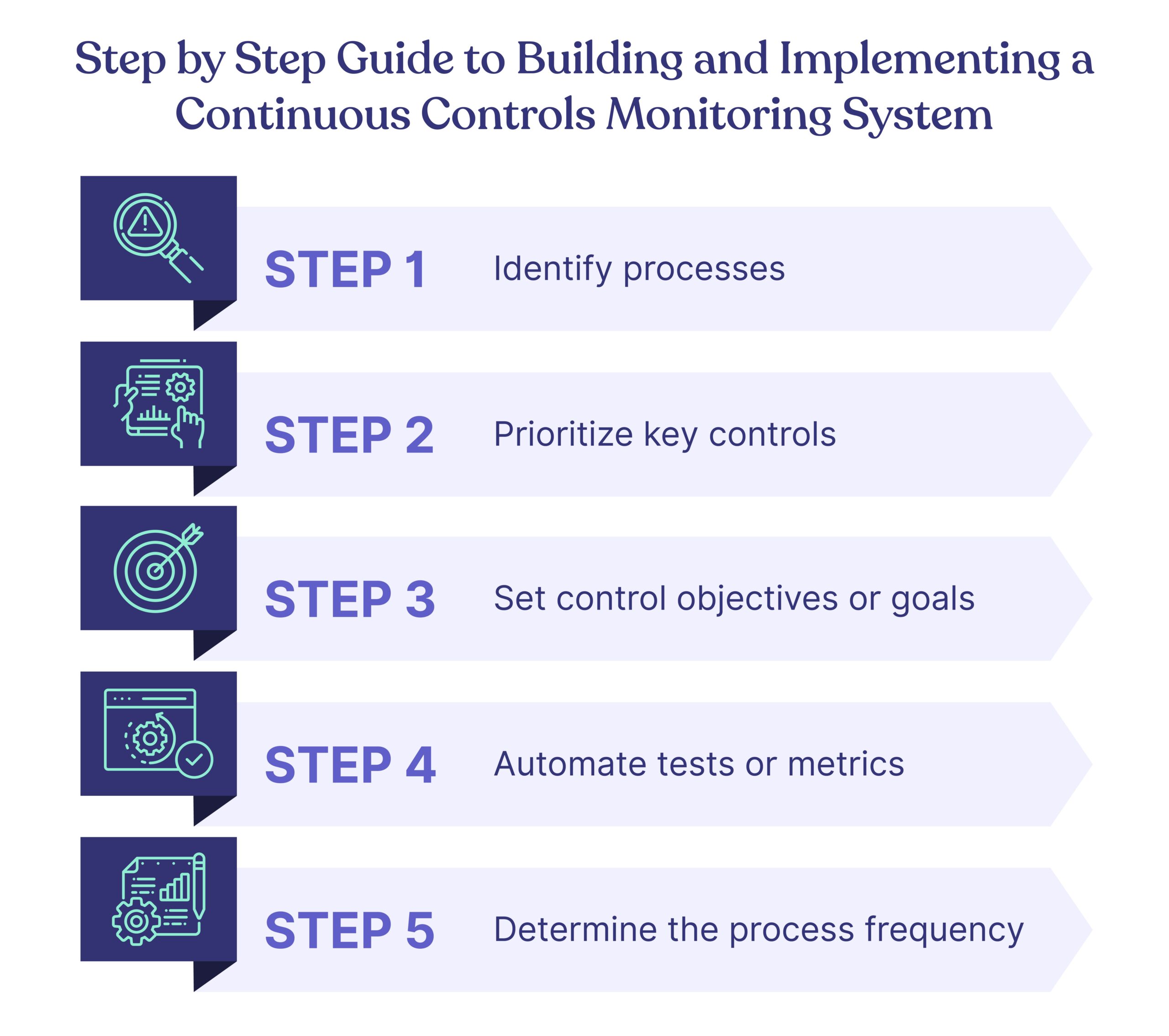
How to Implement a CCM Program: A 5-Step Guide

Regardless of which platform you choose, a successful CCM implementation follows these key steps:

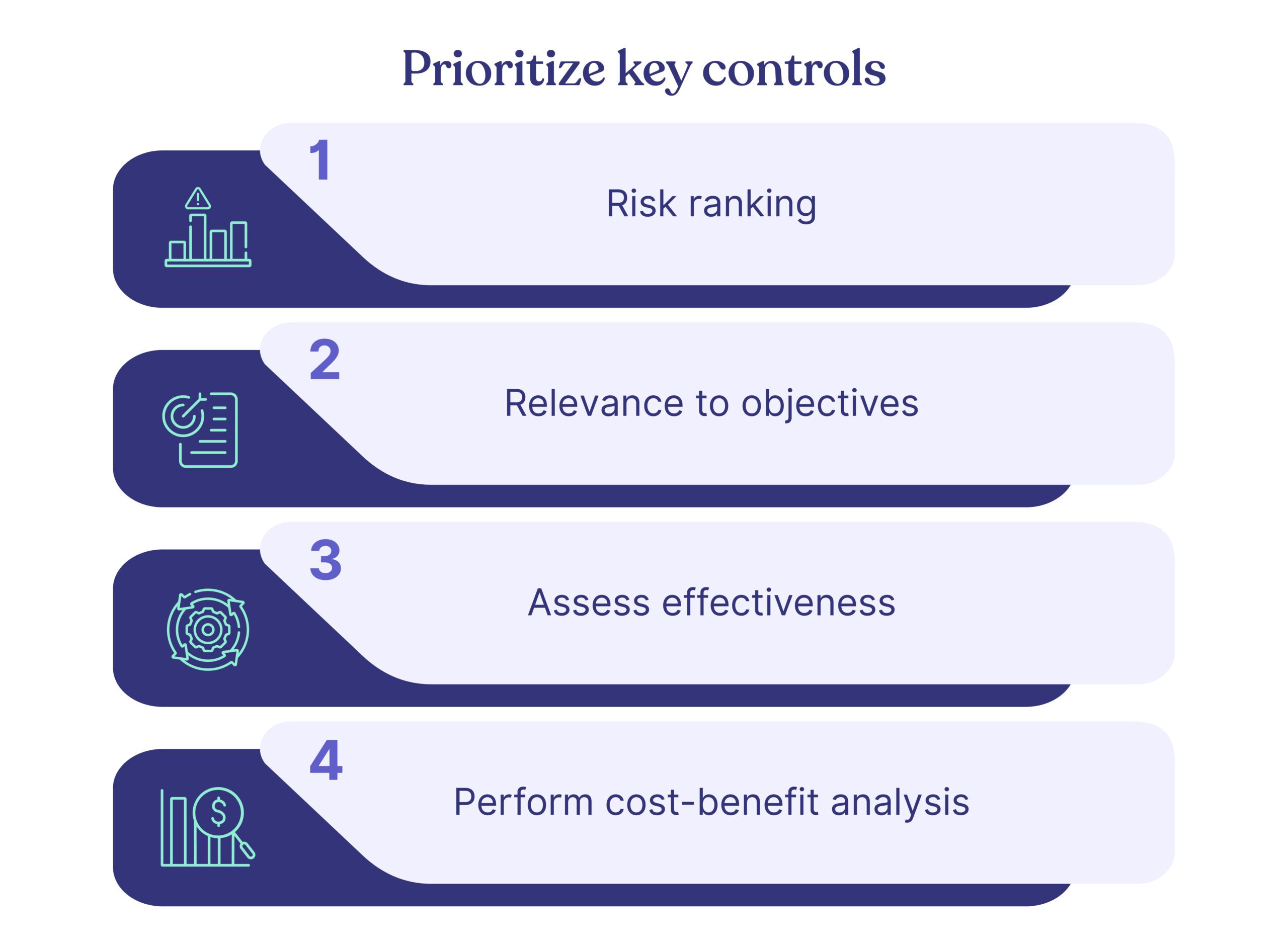
Step 1: Identify and Prioritize Controls

Don't try to monitor everything at once. Start with high-risk areas and critical controls guided by frameworks like the NIST Cybersecurity Framework or COSO. Focus initially on controls with structured data and high-frequency operations that are easiest to automate.

Step 2: Establish a Centralized Control Repository

Use your chosen CCM platform to document all controls in a central location. This moves you beyond the "one spreadsheet" approach and allows for mapping single controls to multiple framework requirements (e.g., a single MFA control satisfying requirements in NIST 800-53, SOC2, and ISO27001).

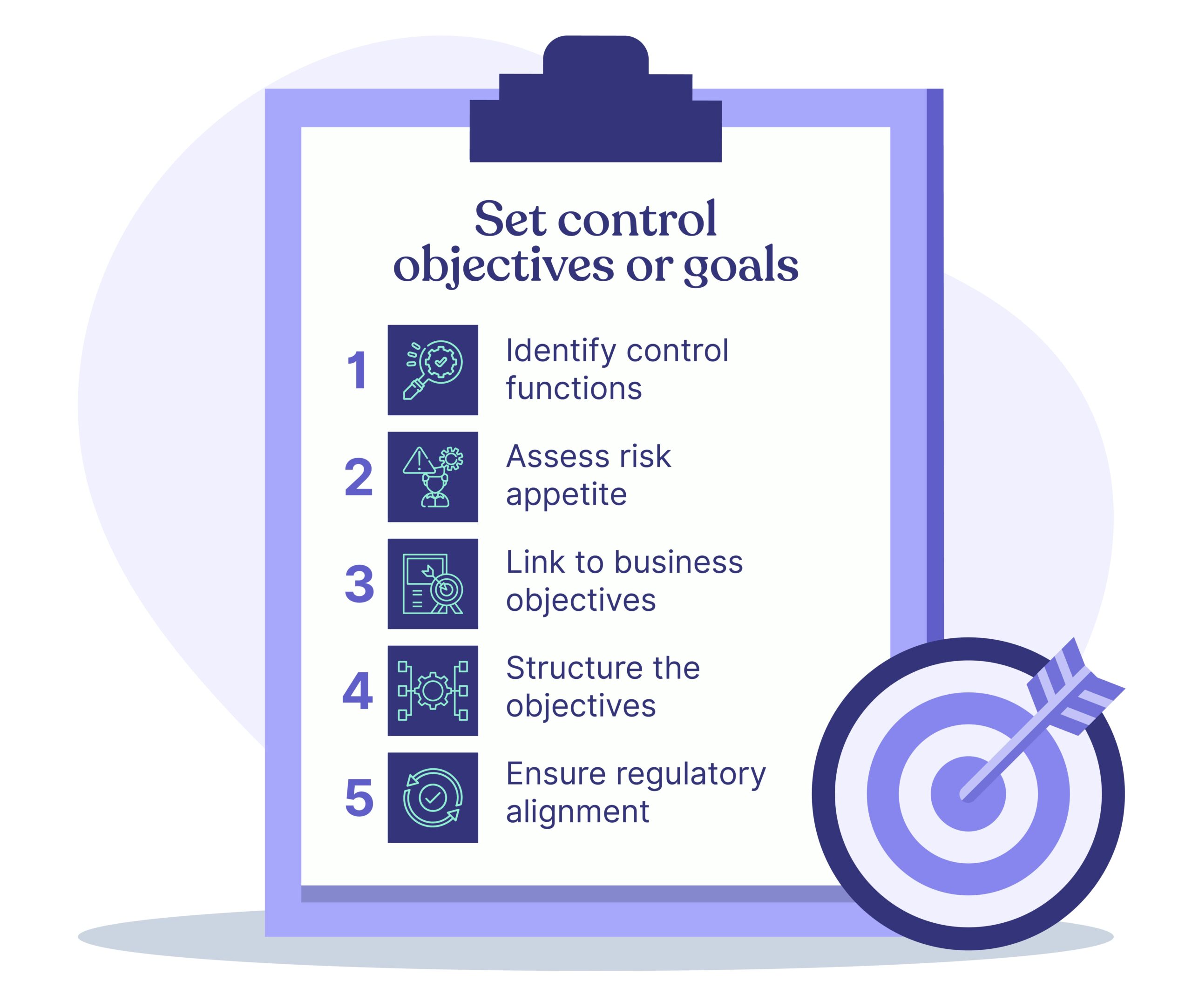
Step 3: Define Control Objectives and Automated Tests

For each control, clearly define its purpose and success criteria. Create automated tests or metrics to monitor the control continuously (e.g., "Verify that all S3 buckets are encrypted" or "Confirm that all new employees complete security training within 7 days").

Step 4: Manage Alerts and Define Response Workflows

Develop clear processes for handling alerts when controls fail. Define who is responsible for investigating issues, the expected timeframe for remediation, and escalation paths for critical failures. This creates the accountable, "Jira-like" process that many security teams seek.

Step 5: Regularly Review and Update

A CCM program is never "done." Review and adapt your monitoring approach as your business processes evolve, new threats emerge, and regulations change. Regular maturity assessments help identify areas for improvement in your CCM program.

Conclusion

The shift from manual, periodic audits to continuous, automated control monitoring represents a fundamental evolution in how organizations approach security and compliance. CCM platforms transform compliance from a burdensome, point-in-time exercise into a strategic, ongoing process that builds trust and resilience.

The right CCM software not only streamlines compliance work but also provides valuable risk insights that inform security investments and business decisions. Whether you're a startup preparing for your first SOC 2 audit or an enterprise managing multiple compliance frameworks, implementing a CCM solution will help you stay perpetually audit-ready while focusing your security team on strategic initiatives rather than manual evidence collection.

Platforms like Cybersierra that offer an integrated approach to security and compliance provide a single source of truth, enabling organizations to manage risk holistically across internal controls, third-party relationships, and employee security awareness. As regulatory requirements continue to expand and cyber threats evolve, this comprehensive approach to continuous monitoring will become increasingly valuable.

By implementing the right CCM platform and following the five-step implementation guide outlined above, you can transform your compliance program from a reactive, audit-driven exercise into a proactive, continuous assurance process that supports business growth while protecting your most valuable assets.

Frequently Asked Questions (FAQ)

What is Continuous Controls Monitoring (CCM)?

Continuous Controls Monitoring (CCM) is an automated approach to security compliance that continuously verifies your security controls are working correctly, rather than checking them only during periodic audits. It uses technology to connect to your systems (like cloud services, code repositories, and identity providers) to automatically collect evidence and test controls in real-time, shifting your compliance posture from reactive to proactive.

How is CCM different from traditional compliance audits?

The main difference is timing and approach: CCM is a proactive, continuous process, while traditional audits are reactive, point-in-time assessments. Traditional audits often discover issues long after they've occurred. In contrast, CCM provides real-time alerts when a control fails, allowing you to address issues immediately and maintain a state of being "always audit-ready."

What are the main benefits of implementing a CCM solution?

The primary benefits of CCM are enhanced risk management, streamlined audit readiness, improved operational efficiency, and centralized visibility into your security posture. By automating control testing and evidence collection, CCM reduces manual work, provides a constant view of your compliance status, and helps you identify and fix vulnerabilities before they can be exploited.

Which compliance frameworks can a CCM platform support?

CCM platforms are designed to support a wide range of security and privacy frameworks. Most leading solutions offer pre-built mapping and automated evidence collection for major frameworks such as SOC 2, ISO 27001, PCI DSS, HIPAA, GDPR, and various NIST standards. A key feature is mapping a single control to multiple framework requirements, saving significant time and effort.

Is CCM suitable for small businesses or just large enterprises?

Yes, CCM is highly beneficial for businesses of all sizes, including startups and SMBs. While enterprises use it for complex regulatory needs, many modern CCM platforms are specifically designed to help smaller companies achieve certifications like SOC 2 efficiently. These tools automate processes that would otherwise require a large compliance team, helping them build customer trust.

What should I look for when choosing a CCM tool?

When choosing a CCM tool, prioritize a strong automation engine with extensive integrations into your tech stack, a centralized control repository with framework mapping, and real-time dashboards with intelligent alerting. The platform's value comes from its ability to automate evidence collection seamlessly, prevent duplication of work across frameworks, and provide clear, actionable insights into your compliance posture.

blog-hero-background-image
Continuous Control Monitoring

The Future of Continuous Control Monitoring (CCM) with AI Agents

backdrop
Table of Contents

Join thousands of professionals and get the latest insight on Compliance & Cybersecurity.


You've implemented compliance monitoring systems, but still find yourself manually checking if your IT team completed their required security controls. Every quarter, you're scrambling to validate dozens of compliance checks, questioning if they were actually done properly or just "pencil whipped" to look complete.

Meanwhile, regulatory requirements keep expanding, increasing both your workload and risk exposure—all while your budget and team size remain unchanged. You need a solution that's both more efficient and more reliable than your current approach.

The Evolution of Compliance Monitoring

Continuous Control Monitoring (CCM) has emerged as a critical technology-driven approach that persistently validates the effectiveness of controls within organizations. Unlike traditional methods relying on periodic audits, CCM offers real-time insights, enhancing overall risk management and compliance efforts.

The traditional approach to compliance—with its point-in-time assessments and manual reviews—is rapidly becoming obsolete in today's complex regulatory environment. Organizations across industries are facing mounting pressures:

As one IT compliance professional noted in a Reddit discussion: "I need a way of ensuring the server person is checking X on Y and reporting compliance... if I can assign them a compliance check task on a recurring frequency, validate the test results, and feed it into a large repository."

This sentiment captures the fundamental challenge that CCM aims to solve—creating a structured, verifiable, and efficient approach to control monitoring.

How CCM Transforms Compliance Across Industries

Continuous Control Monitoring applies across various sectors, each with unique compliance challenges:

  • Financial Services: Real-time fraud detection and transaction monitoring to meet stringent regulatory requirements
  • Manufacturing: Quality assurance and operational standards compliance
  • Technology: Cybersecurity and network security monitoring
  • Healthcare: Patient data protection and regulatory compliance with standards like HIPAA

According to MetricStream, CCM distinguishes itself from traditional monitoring approaches through:

  • Automation: Replacing manual sampling with comprehensive automated testing
  • Frequency: Shifting from periodic to continuous monitoring
  • Coverage: Expanding from limited samples to comprehensive oversight
  • Response Time: Moving from delayed detection to real-time alerts

AI's Transformative Impact on CCM Monitoring

The integration of artificial intelligence into CCM monitoring represents a paradigm shift in how organizations approach compliance. AI-driven systems bring several transformative capabilities:

Automated Monitoring and Detection

AI systems can continually monitor controls across an organization's entire technology stack, automatically detecting anomalies and potential compliance issues without human intervention. This automation addresses a key pain point expressed by compliance professionals: "I come through periodically and check results to ensure no pencil whipping."

With AI-powered CCM monitoring, organizations can:

  • Continuously validate control effectiveness 24/7
  • Automatically flag suspicious patterns that may indicate control failures
  • Generate comprehensive audit trails of all monitoring activities
  • Scale monitoring capabilities without proportionally increasing staff

Predictive Analytics and Risk Forecasting

Perhaps the most powerful aspect of AI in CCM is its predictive capabilities. By analyzing historical compliance data, AI systems can:

  • Identify patterns and trends that may indicate future control failures
  • Prioritize high-risk areas for focused attention
  • Forecast potential compliance issues before they materialize
  • Recommend proactive measures to strengthen controls

As noted by CognitiveView, "AI systems not only automate monitoring but enhance real-time capabilities through predictive analytics."

Enhanced Accuracy and Reduced False Positives

Traditional rule-based monitoring systems often generate numerous false positives that require time-consuming manual investigation. AI-powered CCM systems can:

  • Learn from historical data to reduce false positives
  • Adapt to changing conditions and business environments
  • Apply contextual understanding to monitoring results
  • Improve detection accuracy over time through machine learning

Dynamic Adaptation to Regulatory Changes

Keeping pace with evolving regulations presents a significant challenge for compliance teams. AI can help by:

  • Automatically interpreting new regulatory requirements
  • Suggesting control adjustments to maintain compliance
  • Updating monitoring parameters without extensive manual reconfiguration
  • Providing insights on how regulatory changes impact existing controls

Balancing AI Automation with Human Oversight

Despite the tremendous potential of AI in CCM monitoring, the technology is not without limitations. As one technology professional candidly observed in a Reddit discussion: "The hype around 'fully autonomous agents' really sets the wrong expectations. Most of the systems that actually work are way more grounded, with humans still in the loop."

This insight highlights a crucial consideration in implementing AI-powered CCM systems: the necessity of human oversight. Organizations should adopt a "human-in-the-loop" approach where:

  • AI systems handle routine monitoring and initial analysis
  • Human experts review flagged issues and make final determinations
  • Compliance professionals provide feedback to improve AI accuracy
  • Critical decisions remain under human control

As another industry expert noted: "Every medium to large company will have a human in the loop at the very least for the final approval if not earlier. No company wants to be liable for hallucinations of the agent."

Implementation Framework for AI-Enhanced CCM

Organizations looking to implement AI-enhanced Continuous Control Monitoring can follow a structured approach to maximize effectiveness while minimizing risks:

1. Identify Key Controls Based on Risk Assessment

Begin by identifying the most critical controls based on:

  • Industry-specific regulatory requirements
  • The organization's unique risk profile
  • Frameworks such as COSO, COBIT, or NIST 800-53
  • Historical compliance challenges and control failures

As one compliance professional suggested: "Just establish a continuous monitoring program for the organization" that addresses your specific compliance needs and risk areas.

2. Integrate with Existing Management Tools

Many organizations already use project management tools for various operational processes. Leveraging these existing systems can streamline CCM implementation:

"I'm looking for a borderline JIRA type application," noted one IT compliance manager. This integration approach allows organizations to:

  • Assign compliance tasks to specific team members
  • Track completion status of control activities
  • Maintain comprehensive audit trails
  • Establish recurring compliance check schedules

3. Implement Automated Testing and Monitoring

Develop automated tests for each key control using appropriate technologies:

  • Specialized CCM tools from vendors like MetricStream
  • Security monitoring platforms such as Tripwire or Rapid7
  • Custom AI solutions integrated with existing systems
  • Compliance automation frameworks like Chef Inspec

4. Establish Alert Mechanisms and Response Protocols

Create a structured approach for handling identified control failures:

  • Define alert severity levels based on risk impact
  • Establish clear escalation paths for different alert types
  • Document response procedures for common control failures
  • Implement automated notification systems for stakeholders

5. Continuous Improvement through Learning Loops

AI-powered CCM systems become more effective over time when organizations:

  • Regularly review and refine AI detection parameters
  • Analyze false positives to improve system accuracy
  • Update monitoring rules based on emerging threats
  • Incorporate feedback from compliance and audit teams

The Compelling Business Case for AI-Powered CCM

The economic advantages of implementing AI-enhanced CCM monitoring are increasingly clear. As one technology professional observed on Reddit: "It's extremely cheap. It's hard to justify for large actors to NOT do this because of how cheap it is."

This cost-effectiveness, combined with implementation ease, creates a compelling business case:

  • Reduced Compliance Costs: Automation reduces the need for extensive manual testing and validation
  • Improved Resource Allocation: Staff can focus on addressing issues rather than finding them
  • Enhanced Risk Management: Earlier detection of control failures minimizes potential damages
  • Competitive Advantage: Superior compliance capabilities can differentiate organizations in regulated industries
  • Scalability: AI systems can handle growing compliance requirements without proportional staff increases

The Future of CCM: Integrated Intelligence

The future of CCM monitoring will likely be characterized by increasingly sophisticated integration of AI capabilities with human expertise. We can expect:

  1. Greater Autonomy: AI systems will handle more complex compliance monitoring tasks with less human intervention
  2. Enhanced Prediction: Improved ability to forecast compliance issues before they occur
  3. Cross-System Integration: CCM systems will coordinate with other enterprise applications to provide comprehensive compliance visibility
  4. Industry-Specific Solutions: AI models tailored to the unique compliance challenges of different sectors

Conclusion

The integration of AI into Continuous Control Monitoring represents a transformative opportunity for organizations to enhance compliance capabilities while controlling costs. By combining automated monitoring with human oversight, organizations can create robust compliance programs that effectively address the challenges of today's complex regulatory environment.

As you consider your organization's approach to compliance monitoring, remember that the most effective implementations will balance technological capabilities with human expertise. The goal isn't to replace compliance professionals but to empower them with tools that enhance their effectiveness and allow them to focus on high-value activities.

By embracing AI-enhanced CCM monitoring, organizations can move beyond the inefficiencies of traditional compliance approaches and establish dynamic, resilient control systems that adapt to changing requirements and provide continuous assurance of compliance effectiveness.

Frequently Asked Questions

What is Continuous Control Monitoring (CCM)?

Continuous Control Monitoring (CCM) is a technology-based approach that automatically and continuously validates the effectiveness of an organization's security and compliance controls in real-time. Unlike traditional audits that happen periodically, CCM provides persistent oversight, helping organizations manage risk more effectively and maintain a constant state of compliance.

How does AI enhance Continuous Control Monitoring?

AI enhances CCM by automating the detection of control failures, predicting potential risks before they occur, and reducing the false positives that often plague traditional monitoring systems. AI-powered systems can monitor controls 24/7, use machine learning to identify unusual patterns, forecast future compliance issues, and adapt to new regulations, making the entire compliance process more efficient and accurate.

Is human oversight still necessary with AI-powered CCM?

Yes, human oversight is crucial. A successful AI-powered CCM implementation uses a "human-in-the-loop" approach where AI acts as a tool to empower compliance professionals, not replace them. While AI handles routine monitoring and initial analysis, human experts are needed to review complex issues, make final judgments on flagged anomalies, and provide feedback to improve the AI's performance.

What are the main benefits of adopting AI-enhanced CCM?

The primary benefits include significantly reduced compliance costs, improved risk management through early detection of issues, and better allocation of team resources. By automating manual validation, organizations can lower audit-related expenses and free up staff to focus on resolving identified issues rather than searching for them. This proactive approach minimizes potential damages from control failures and can provide a competitive advantage.

What is the first step to implementing an AI-enhanced CCM program?

The first step is to conduct a thorough risk assessment to identify your organization's most critical controls. This should be based on industry-specific regulatory requirements and your unique business risks. Before implementing any technology, you must understand what you need to monitor. This foundational step ensures your CCM program is targeted, effective, and addresses your most significant compliance challenges.

For more information on implementing effective CCM systems, explore these resources:

blog-hero-background-image
Governance & Compliance

Complete List of CIS Controls v8 - Top 20 Controls with Examples

backdrop
Table of Contents

Join thousands of professionals and get the latest insight on Compliance & Cybersecurity.


You've been tasked with improving your organization's cybersecurity posture, and everyone keeps mentioning the CIS Top 20 Controls. But what exactly are these controls, why do they matter, and how can you implement them effectively? If you're feeling overwhelmed by the complexity of cybersecurity frameworks, you're not alone.

Many security professionals struggle with prioritizing which controls to implement first, finding the right tools for implementation, and tailoring these controls to their specific organizational risks. The good news is that there's a structured approach that can make this process more manageable.

What Are the CIS Top 20 Controls?

The Center for Internet Security (CIS) Critical Security Controls, commonly known as the CIS Top 20 Controls, provide a prioritized set of actions that collectively form a defense-in-depth framework to help organizations improve their cybersecurity posture.

These controls are developed by a community of IT experts who continuously update the framework to address evolving cyber threats. The controls are organized into three implementation groups based on an organization's resources and cybersecurity maturity:

  • Basic (IG1): Essential cyber hygiene practices that every organization should implement
  • Foundational (IG2): Technical best practices for organizations with moderate complexity
  • Organizational (IG3): Advanced measures for organizations with significant resources and expertise

Key Insight: According to the Verizon Data Breach Investigations Report, implementing just the first five Basic Controls can mitigate up to 85% of common cyber attacks.

The Complete List of CIS Top 20 Controls

Let's explore each of the CIS Top 20 Controls with practical examples of implementation:

1. Inventory and Control of Hardware Assets

Objective: Actively manage and inventory all hardware devices on your network.

Example Implementation:

  • Implement an asset discovery tool like Nmap or Qualys to automatically scan your network
  • Use a configuration management database (CMDB) to maintain an updated inventory
  • Deploy network access control (NAC) solutions to prevent unauthorized devices from connecting

Why It Matters: You can't protect what you don't know exists. Unmanaged devices represent significant security gaps in your environment.

2. Inventory and Control of Software Assets

Objective: Maintain an inventory of authorized software and prevent unauthorized software from being installed.

Example Implementation:

  • Use application whitelisting tools like Microsoft AppLocker
  • Implement software inventory tools such as Lansweeper or Belarc Advisor
  • Create standardized software images for workstations and servers

Why It Matters: Unauthorized software often introduces vulnerabilities and can be a vector for malware.

3. Continuous Vulnerability Management

Objective: Continuously acquire, assess, and take action on new information to identify and remediate vulnerabilities.

Example Implementation:

  • Deploy vulnerability scanners like Tenable Nessus or Qualys
  • Establish a regular patching schedule for all systems
  • Prioritize vulnerabilities based on criticality and exploitability

Why It Matters: Unpatched systems remain one of the most common entry points for attackers.

4. Controlled Use of Administrative Privileges

Objective: Track, control, prevent, and correct the use of administrative privileges.

Example Implementation:

  • Implement multi-factor authentication for administrative accounts
  • Use privileged access management (PAM) solutions like CyberArk
  • Maintain separate accounts for administrative and standard user activities
  • Regularly audit administrative account usage

Why It Matters: Compromised admin accounts give attackers significant control over your systems.

5. Secure Configuration for Hardware and Software

Objective: Establish and maintain secure configuration of devices.

Example Implementation:

  • Use CIS Benchmarks as baseline configurations
  • Implement configuration management tools like Ansible or Chef
  • Regularly scan systems for configuration drift
  • Disable unnecessary services, ports, and default accounts

Why It Matters: Default configurations often prioritize usability over security, leaving systems vulnerable.

6. Maintenance, Monitoring, and Analysis of Audit Logs

Objective: Collect, manage, and analyze audit logs of events.

Example Implementation:

  • Deploy a Security Information and Event Management (SIEM) solution
  • Configure centralized logging for all critical systems
  • Establish log retention policies that meet compliance requirements
  • Set up alerts for suspicious activities

Why It Matters: Without proper logging, organizations lack visibility into potential security incidents.

7. Email and Web Browser Protections

Objective: Minimize attack surface and opportunities for attackers to manipulate users via email and web browsers.

Example Implementation:

  • Implement email filtering solutions like Mimecast or Proofpoint
  • Use DNS filtering to block malicious websites
  • Deploy browser extensions that block malicious content
  • Disable unnecessary browser plugins and extensions

Why It Matters: Email and web browsing remain primary vectors for phishing and malware distribution.

8. Malware Defenses

Objective: Control the installation, spread, and execution of malicious code.

Example Implementation:

  • Deploy endpoint protection platforms with advanced threat detection
  • Implement application whitelisting
  • Use network-based anti-malware filtering
  • Conduct regular anti-malware scans

Why It Matters: Malware continues to be a significant threat, with increasingly sophisticated variants emerging regularly.

9. Limitation and Control of Network Ports, Protocols, and Services

Objective: Manage the secure use of ports, protocols, and services on networked devices.

Example Implementation:

  • Use host-based firewalls to restrict unnecessary ports
  • Regularly scan for open ports using tools like Nmap
  • Disable or remove unnecessary services from systems
  • Document all required ports and services for business operations

Why It Matters: Open ports and unnecessary services expand the attack surface for potential exploitation.

10. Data Recovery Capabilities

Objective: Properly maintain backups of critical systems and data.

Example Implementation:

  • Implement the 3-2-1 backup strategy (3 copies, 2 different media, 1 offsite)
  • Regularly test backup restoration processes
  • Use encryption for sensitive backup data
  • Establish recovery time objectives (RTOs) for critical systems

Why It Matters: Effective backup and recovery capabilities are crucial for business continuity and ransomware mitigation.

11. Secure Configuration for Network Devices

Objective: Establish and maintain secure configuration of network infrastructure.

Example Implementation:

  • Use secure templates for routers, switches, and firewalls
  • Implement configuration management for network devices
  • Disable unused network ports and services
  • Regularly audit network device configurations

Why It Matters: Improperly configured network devices can provide attackers with entry points or allow lateral movement.

12. Boundary Defense

Objective: Detect, prevent, and correct the flow of information across network boundaries.

Example Implementation:

  • Deploy next-generation firewalls at network boundaries
  • Implement intrusion detection/prevention systems (IDS/IPS)
  • Use data loss prevention (DLP) tools to monitor outbound traffic
  • Segment networks based on security requirements

Why It Matters: Effective boundary controls limit an attacker's ability to move between network segments.

13. Data Protection

Objective: Protect data-at-rest and data-in-transit.

Example Implementation:

  • Encrypt sensitive data in storage and during transmission
  • Implement data classification policies and tools
  • Use DLP solutions to prevent unauthorized data transfers
  • Establish data retention and destruction policies

Why It Matters: Data breaches can result in significant financial, reputational, and regulatory consequences.

14. Controlled Access Based on the Need to Know

Objective: Track, control, prevent, and correct secure access to critical assets.

Example Implementation:

  • Implement the principle of least privilege for all accounts
  • Use role-based access controls (RBAC)
  • Regularly review and audit access rights
  • Implement data access governance solutions

Why It Matters: Limiting access to only what users need reduces the risk of insider threats and limits the impact of compromised accounts.

15. Wireless Access Control

Objective: Track, control, prevent, and correct the security use of wireless networks.

Example Implementation:

  • Use WPA3 encryption for wireless networks
  • Implement network access control for wireless connections
  • Segment guest wireless networks from corporate networks
  • Regularly scan for rogue wireless access points

Why It Matters: Unsecured wireless networks can provide attackers with easy access to your environment.

16. Account Monitoring and Control

Objective: Actively manage the lifecycle of accounts and their access.

Example Implementation:

  • Implement automated account provisioning and deprovisioning
  • Require multi-factor authentication for all accounts
  • Monitor for suspicious account activities
  • Regularly audit user accounts and remove inactive ones

Why It Matters: Unmanaged accounts, especially those with elevated privileges, present significant security risks.

17. Implement a Security Awareness and Training Program

Objective: Educate users on cybersecurity risks and their role in defense.

Example Implementation:

  • Conduct regular security awareness training
  • Run simulated phishing campaigns
  • Develop role-specific security training
  • Create clear security policies and procedures

Why It Matters: Users remain a critical component of security; well-trained users can serve as an effective defense layer.

18. Application Software Security

Objective: Manage the security lifecycle of all in-house developed and acquired software.

Example Implementation:

  • Incorporate security into the software development lifecycle
  • Perform regular code reviews and security testing
  • Use static and dynamic application security testing tools
  • Implement secure coding standards

Why It Matters: Insecure applications can provide attackers with direct access to sensitive data and systems.

19. Incident Response and Management

Objective: Protect information and systems through a comprehensive incident response plan.

Example Implementation:

  • Develop and regularly test incident response plans
  • Establish clear roles and responsibilities during incidents
  • Create communication protocols for security incidents
  • Document lessons learned after incidents

Why It Matters: Effective incident response can significantly reduce the impact of security breaches.

20. Penetration Tests and Red Team Exercises

Objective: Test the organization's defenses through simulated attacks.

Example Implementation:

  • Conduct regular penetration tests against critical systems
  • Perform red team exercises to test detection and response capabilities
  • Address identified vulnerabilities promptly
  • Use the results to improve security controls

Why It Matters: These exercises help identify security gaps before real attackers exploit them.

Getting Started with CIS Top 20 Controls

If you're new to implementing the CIS Top 20 Controls, consider this approach:

  1. Start with IG1 controls: Focus on implementing the basic controls first, which provide the highest security return on investment.
  2. Assess your current state: Use the CIS Controls Self Assessment Tool (CSAT) to identify gaps in your security posture.
  3. Prioritize based on risk: Address the controls that mitigate your organization's most significant risks first.
  4. Leverage existing tools: Many organizations already have tools that can help implement these controls; identify what you have before investing in new solutions.
  5. Document your progress: Keep track of your implementation journey to demonstrate improvement over time.

The CIS Top 20 Controls provide a practical, prioritized approach to cybersecurity that can significantly reduce your organization's risk profile. By focusing on these controls, you're addressing the most common and impactful attack vectors that threaten organizations today.

Remember that cybersecurity is a journey, not a destination. Continuous improvement and adaptation to evolving threats are essential for maintaining an effective security posture. The CIS Top 20 Controls provide the roadmap—your organization's unique circumstances will determine the specific route you take.

Frequently Asked Questions

What are the CIS Top 20 Controls?

The CIS Top 20 Controls, now formally known as CIS Controls v8, are a prioritized set of best practices to help organizations defend against the most common cyber attacks. Developed by the Center for Internet Security (CIS), they provide an actionable, defense-in-depth framework that is regularly updated by a community of global experts to address evolving threats.

Why are the CIS Controls important for cybersecurity?

The CIS Controls are important because they provide a prioritized, data-driven framework that helps organizations focus on actions that mitigate the most common cyber threats. By concentrating on a limited number of high-impact controls—such as the first five—organizations can significantly reduce their risk of a successful cyber attack, often by up to 85%.

How do the CIS Controls differ from other frameworks like NIST or ISO 27001?

The primary difference is that CIS Controls are a prioritized, implementation-focused set of technical safeguards, while frameworks like the NIST Cybersecurity Framework (CSF) and ISO 27001 are broader risk management frameworks. CIS Controls offer prescriptive guidance on what to do first, making them highly actionable. In contrast, NIST and ISO provide a structure for how to manage a cybersecurity program, and they are often used in conjunction with the CIS Controls.

Where should an organization start with implementing the CIS Controls?

An organization should start by focusing on Implementation Group 1 (IG1), which contains the "basic cyber hygiene" controls. These foundational controls are designed to provide the greatest risk reduction for the least investment and are considered essential for all organizations, regardless of size or industry. A self-assessment using the CIS CSAT tool is also a recommended first step to identify existing gaps.

Are the CIS Top 20 Controls still relevant?

Yes, the principles of the CIS Controls are highly relevant, though the framework has evolved. The "Top 20" branding refers to an older version; the current version is CIS Controls v8, which consists of 18 revised and reprioritized controls. The framework is continuously updated to address the modern threat landscape, ensuring it remains a practical and effective guide for cybersecurity defense.

What are Implementation Groups (IGs) in the CIS Controls?

Implementation Groups (IG1, IG2, and IG3) are categories that help organizations prioritize their implementation efforts based on their specific risk profile and available resources. IG1 is for essential cyber hygiene, IG2 is for organizations with more complex IT environments, and IG3 is for mature organizations with significant resources that handle sensitive data. This tiered approach makes the controls scalable for any organization.

blog-hero-background-image
Continuous Control Monitoring

Practical Approach to Continuous Control Monitoring

backdrop
Table of Contents

Join thousands of professionals and get the latest insight on Compliance & Cybersecurity.


Practical Approach to Continuous Control Monitoring

How confident are you in your organization’s capacity to promptly and adeptly identify and counter cybersecurity risks?


Despite your best efforts to fortify your cybersecurity approach, it’s probable that your endeavors fall short.


In the present landscape, risk factors are in a constant state of flux, demanding swift and efficient counteractions.


An avenue to tackle this predicament lies in Continuous Control Monitoring (CCM), a method that aids enterprises in upholding regulatory compliance and curtailing cyber threat vulnerabilities. 


In this article, you will understand how to select the right CCM solution and how to implement the same.


Let’s get started.

Understanding continuous control monitoring

Continuous Control Monitoring (CCM) stands as an innovative risk management approach, empowering enterprises to consistently evaluate, handle, and alleviate business risks. In today’s swiftly evolving digital realm, it’s imperative for risk managers and IT administrators to possess a comprehensive grasp of CCM and skillfully integrate it within their organizations.


At its core, CCM systematically examines controls and processes to ensure that they are 

  • Effectively preventing or detecting risk, 
  • Reducing the likelihood of non-compliance, and 
  • Other potentially costly incidents. 


CCM leverages advanced technologies such as Artificial Intelligence (AI) and Machine Learning (ML) to streamline and automate risk-monitoring processes. This, in turn, significantly decreases the time and resources spent on manual risk assessments and audits.

Choosing the right CCM solution

Choosing the appropriate CCM solution involves careful consideration. Here are some actionable tips to guide your selection process:

Choosing the Right CCM Solution


1. Identify your organization’s requirements


Start by identifying your organization’s specific needs and challenges in risk management and compliance. These could include specific industry or regulatory requirements, a shortage of risk management resources, or a need to improve operational efficiency.

 Some of the challenges can include:

  • Inadequate risk visibility: Limited insight into real-time risk and compliance status across different business units.
  • Limited resources: Insufficient workforce or expertise to efficiently manage risks and ensure compliance.
  • Inefficient processes: Current manual risk management and compliance monitoring processes may be time-consuming and prone to error.
  • Data integration issues: Difficulty integrating data from disparate sources and systems for comprehensive risk assessment.
  • Scalability concerns: The current risk management system may not be capable of handling increased data volume and complexity as the business grows.
  • Lack of real-time reporting: Insufficient mechanism for generating real-time reports for swift decision-making.
  • Security concerns: Ensuring the security of sensitive data while performing risk and compliance-related tasks.


2. Look for advanced features


Advanced features can help organizations to get the most out of their risk management systems. Some of these features include:

  • Single source of truth (SSOT): The ability to view all data related to a business process from one source, including transaction details and related documentation, in a single user interface.
  • Robust data modeling capabilities: Users can create and modify data models without technical knowledge or assistance from IT staff.
  • Advanced data visualization capabilities: Users can create dashboards and reports with a wide range of visualizations, including charts and graphs.
  • Automated workflow management: This feature automatically routes tasks to relevant stakeholders, enforces accountability, and streamlines the risk management process. It can also provide reminders for incomplete tasks or tasks nearing their due date, improving efficiency and ensuring timely action.
  • Predictive analytics: Using AI and ML to access predictive analytics and foresight into potential risks or issues can help organizations anticipate risks, devise counteractive strategies, and make better informed decisions about risk mitigation.


3. Integration with existing systems


When we talk about the integration capabilities of a CCM solution, it refers to the system’s ability to work in harmony with your existing IT infrastructure. This includes linking with various business applications, databases, IT systems, and other sources of creating or storing data within your organization.

Here are a few core aspects this comprises:

  1. Data Collection: A powerful CCM solution should be capable of extracting data from different systems like ERP, HRM, CRM, and other bespoke applications. 
  2. Data Consistency: Since the CCM system interacts with multiple data sources, it should ensure data consistency and resolve any potential conflicts. That way, each system using the data can have the correct and most up-to-date information.
  3. Tools Compatibility: The CCM solution should be compatible with your existing reporting, visualization, and data analysis tools so that you can immediately put it to use. 

The primary goal of integration is to bring about efficient and consistent data management across all systems, making risk management a streamlined and automated process.


4. Consider vendor support and training


Don’t let your organization’s proficiency be constrained by your team’s capabilities to adopt a risk management solution. 


The provider should furnish training and assistance throughout both the setup phase and beyond. This approach guarantees that all members within your organization grasp the tool’s mechanics, the data prerequisites for each process stage, and optimal utilization techniques. 


It’s crucial to verify that the vendor offers robust customer support and comprehensive training initiatives, aiding your team during system implementation and continuous utilization.


5. Evaluate user-friendliness


Prior to procuring a CCM solution, prioritize the following checkpoints to guarantee a user-friendly experience and ease of use:

  • Intuitive Interface: Clean, organized, and easily navigable layout
  • Ease of use: Straightforward execution of typical activities
  • Guided steps: Helpful tooltips or guides for complex tasks
  • Customization: Tailored dashboards, reports, and configurable aspects
  • Accessible support: Comprehensive user manuals, tutorials, and responsive customer service
  • Compatibility: Availability on various devices and platforms

Step-by-Step implementation process of CCM

Implementing a new CCM system may seem daunting, but it doesn’t have to be.

We’ll walk you through the process, from planning to execution, ensuring each phase is thoroughly completed to set your CCM solution up for success.

step by step implementation process of CCM

1. Consider a simple start


Every successful digital transformation starts small and builds upon early successes. Hence, when orchestrating the introduction of CCM, initiate with routine processes that stand to gain the most from sustained surveillance.


Begin by identifying vulnerable domains or those presently grappling with elevated risk levels. They Internal audit software findings serve as invaluable inputs, spotlighting problematic processes and controls with substantial financial implications. 


Additionally, consider testing CCM on procedures previously subjected to manual audits, facilitating a comparison of efficacy and efficiency. already been audited manually to compare the efficiency and effectiveness of both methods.


Using Cyber Sierra’s solutions can further simplify the start, as it assists with accurately mapping your business relationships and identifying potential areas of concern.


2. Select the appropriate solution


Continuous control monitoring involves complex procedures and requires a robust and reliable tool or software. While an array of off-the-shelf solutions may promise comprehensive coverage, it’s vital to recognize your organization’s distinctive needs, processes, and control environment.


The selection process demands a laser focus on locating a solution that harmonizes with your organization’s requisites and integrates seamlessly within your IT framework. Flexibility for customization to match your unique demands is equally paramount.


Cyber Sierra, for instance, provides an interoperable solution tailored to your organization’s needs governing data, risk assessments, policies, vendors, and employees in one central hub.


3. Develop monitoring routines


Developing and fine-tuning CCM routines is critical for the ongoing success of your monitoring activities.


Initially, you’ll program the system to generate high probability exceptions (HPEs), potentially indicative of control failures. 


This might involve a process of iterative refinement; as the CCM system processes more data and exceptions are investigated and resolved, you’ll get a clearer picture of what indicates a likely control failure, and you can refine your routines accordingly.


This important step significantly reduces false positives and allows your team to focus more on true control issues.


4. Implement exception management


All exceptions generated by CCM need analyzing and resolution. Exceptions should be captured in a secure environment, and operational staff should be tasked with resolving them. This process must be carefully designed to avoid overwhelming staff with false positives.


5. Transition to business-as-usual


Once established, CCM should be part of the business’s standard operational procedures and processes. Regular system administration tasks, such as resolving data load issues, managing user access, or refining test logic, are essential for smooth operation.

Training your team for CCM adoption

Implementing CCM in your organization implies a technological shift and a cultural one, and involves understanding the skill set requirements, planning effective training strategies, and fostering a CCM-focused culture within your organization.


1. Skill set requirements


A successful CCM adoption demands a diverse skill set within your team, spanning comprehension of compliance intricacies, identification of cybersecurity threats, and mastery of analytics and data interpretation.

Your team must also learn to adapt to new workflows, understand the system’s outputs, reassess the risk levels of various assets, and comprehend their impacts on business operations.


2. Training strategies


Adopting a structured and gradual approach to training can be beneficial. Introduce your team to the new CCM system and train them in various aspects of CCM, such as continuous monitoring, risk assessment procedures, and control strategies.

Also, consider conducting hands-on training sessions where your team can explore and learn about the system’s features, enhancing their understanding and proficiency.


3. Fostering a CCM-focused culture


Beyond individual skills and training, nurturing a corporate culture that esteems CCM is pivotal. This culture champions transparency, risk awareness, and perpetual self-audit, necessitating a mindset shift from reactive to proactive risk management.

This transformation enhances the entire CCM implementation, fostering enthusiastic team participation in consistent control and risk evaluations. An ingrained CCM-focused culture strengthens your organization’s risk resilience and ensures an enduring commitment to effective risk management.

Identifying assertions for CCM

Assertions form a pivotal part of CCM. These are statements that management makes about certain aspects of the business, thereby validating compliance with the organization’s rules and policies.

Here’s how to identify relevant assertions for your enterprise and incorporate them into your CCM system:

Identifying Assertions For  CCM


1. Understand your business environment


Start by understanding your organization’s environment, including its functions, operations, policies, and procedures. Identify the risk spots and performance indicators. Evaluate the various systems, controls, and procedures to mitigate these risks.


2. Identify relevant assertions


Different sectors and operations typically require distinct assertions. For example, a manufacturing unit might need assertions about inventory control, whereas a service-based firm could require claims about data privacy or service delivery timelines. Identifying relevant assertions depends on your organization’s specific requirements, industry standards, and regulatory mandates.


3. Engage stakeholders


Engage relevant stakeholders while identifying assertions. This includes managers from different departments and frontline staff who work directly with the systems being monitored by CCM.


4. Map assertions to controls


Once the assertions are identified, the next step is to map them to relevant controls within your organization. This mapping helps identify what control activities can validate which assertions.


5. Incorporate into CCM


After mapping, integrate these assertions into your CCM system. These become the metrics and checkpoints that continuous monitoring will track to ensure that all controls function as per required standards.


6. Continuous review and update


Business environments change and evolve. So, the assertions and their respective controls must be reviewed and updated frequently to ensure relevance and effectiveness.

Remember, assertions contribute to the reliability of your system’s compliance status. Thus, carefully identified and curated assertions can dynamically support your efforts in implementing and fine-tuning CCM in your organization.

Conclusion

CCM can be a potent tool for ensuring compliance. However, it requires careful planning and execution to be effective.


When implementing a CCM solution, it is best to do so gradually—refining processes based on practical learning and experiences. This will ensure the effective integration of CCM into business processes, leading to improved control effectiveness and risk management.


Nevertheless, CCM implementation forms only one piece of a larger puzzle. Comprehensive organizational security demands a multifaceted approach, encompassing:


Establish Employee Security Awareness & Training


This is where Cyber Sierra comes in. Cyber Sierra’s platform enables enterprises to keep company policies in one central location and make them accessible to all employees. The platform also offers a comprehensive training regimen that addresses the risks posed by today’s most pressing cybersecurity issues.


Book a demo to learn how to use Cyber Sierra to set up your CCM program.

  • Continuous Control Monitoring
  • CISOs
  • CTOs
  • Cybersecurity Enthusiasts
  • Enterprise Leaders
  • Startup Founders
Srividhya Karthik

Srividhya Karthik is a seasoned content marketer and the Head of Marketing at Cyber Sierra. With a firm belief in the power of storytelling, she brings years of experience to create engaging narratives that captivate audiences. She also brings valuable insights from her work in the field of cybersecurity and compliance, possessing a deep understanding of the challenges and pain points faced by customers in these domains.

A weekly newsletter sharing actionable tips for CTOs & CISOs to secure their software.


Thank you for subscribing!
Please check your email to confirm your email address.

Find out how we can assist you in
completing your compliance journey.

blog-hero-background-image
Continuous Control Monitoring

Benefits of Continuous Control Monitoring

backdrop
Table of Contents

Join thousands of professionals and get the latest insight on Compliance & Cybersecurity.


Benefits of Continuous Control Monitoring

With the rise of emerging technologies and the increasing demand for data quality, organizations constantly face new challenges that can impact their business.


This is especially true for those regulated by HIPAA, PCI DSS, and GDPR. These laws require organizations to ensure their data is always safe, private, and confidential.


However, companies are often challenged by the amount of data they have to process and manage. This can make it difficult for them to detect threats or breaches in  near real-time.


In order to improve their security posture, they need a technology partner that can provide them with access to the right tools and expertise. Continuous Control Monitoring (CCM) is a powerful solution that can help organizations comply with regulations while also ensuring their business efficiency is not compromised.


In this article, we’ll delve into the multifaceted benefits of implementing CCM and how it can help your business.

What is Continuous Control Monitoring?

Continuous Control Monitoring (CCM) is a technology-driven process involving automated auditing techniques firms utilize to reduce business risks, increase accuracy, and ensure compliance. This approach provides near real-time insight into operations, increasing both efficiency and transparency. 


With CCM, companies can manage their risks in real-time and automate compliance using machine learning algorithms to detect fraud, data anomalies, and other threats.


The goal is to reduce the need for manual audits and human error while providing a higher level of control and oversight.

Top Benefits of Continuous Control Monitoring

The benefits of CCM include:

Benefits of Continuous Controls Monitoring

Let’s take a closer look at each of these benefits.


1. Automate compliance


Ensuring compliance can be a costly and time-consuming task for most businesses.


With CCM, however, the compliance process becomes automated. Controls are tested continuously, greatly reducing the risk of non-compliance due to outdated information or human error.


This continuous monitoring assures that business processes align with internal policies and regulatory requirements, reducing the likelihood of fines or penalties associated with non-compliance.


2. Real-time risk management


CCM enables you to monitor, control, and respond effectively to risk. This continuous approach detects anomalies, flags potential issues, and alerts management, all in near real-time. This instant, round-the-clock monitoring means risks can be dealt with almost immediately, reducing potential impacts.


Moreover, you can use CCM to manage risk across the entire organization, from frontline workers to the C-suite. It provides a single view of all risks, so it’s easy to see how they impact each other and where they might intersect.


3. Improve data accuracy with CCM


Another crucial benefit is the significant improvement it brings about in data accuracy. Traditional auditing methods, being manual, are inherently prone to errors. These errors can compound over time, leading to inaccuracies affecting decision-making.


In contrast, CCM minimizes the potential for human error by utilizing automated systems to monitor and evaluate controls and processes.


It also helps companies make better decisions by providing more accurate and up-to-date assessments of their security posture. 


4. Enhance fraud detection and prevention


The financial ramifications of fraud in a business environment can be astronomical. And financial fraud continues to pose a significant threat to businesses. Kroll’s 2023 Fraud reveals that over $800 billion is laundered annually worldwide. 


On top of that, reputational damage can be long-lasting and severely affected. A Forbes article states that corporate fraud can destroy up to 1.6% of equity value annually, impacting investor trust and overall business reputation.


Using CCM introduces a robust layer of protection to your business security.


With its near real-time continuous monitoring and alert functionality, CCM can promptly identify any suspicious activities. This quick detection enables a more timely investigation and subsequent response, significantly reducing potential losses.


It can also assist your business in upholding its reputation as an entity that takes fraud detection and prevention seriously. This will provide you with a more trusted business environment for stakeholders.


5. Save time


At its core, CCM is designed to automate the process of identifying irregularities within a business’s operations. 


It screens numerous data streams in real-time, tracing any deviations from established norms. When any such anomaly is detected, CCM promptly directs alerts to designated personnel responsible for addressing the issue. 


Automating tasks in this way can dramatically reduce the effort required by employees. This helps to reduce the time spent on routine tasks and allows both auditors and business executives to focus on strategic tasks and decision-making.


6. Save costs and optimize resources


The initial investment in setting up a CCM system can be substantial. However, the long-term savings resulting from its enhanced efficiency make it well worth the cost.


CCM reduces the extensive time spent on manual auditing processes and compliance tasks. This reduction in turnaround time allows your organization to reallocate resources to areas that could benefit more significantly – such as business strategy and innovation.


As a result, operational costs are greatly minimized, and business productivity is significantly enhanced.

Best solution for CCM

The immense advantages of CCM can be transformative for organizations seeking to optimize their operations and maintain strict regulatory compliance. 


However, the successful integration and implementation of CCM necessitate meticulous planning and execution.


Despite the effective integration of CCM, organizations may still grapple with managing various security elements without an appropriate solution. 


To protect against potential threats, organizations must also prioritize additional security measures comprising:


  • Regularly conducting employee security awareness training
  • Continuous monitoring of regulatory compliance updates
  • Swiftly addressing cloud misconfigurations, and
  • Vigilantly maintaining and renewing cyber insurance policies when required.


This is where Cyber Sierra comes in.


Cyber Sierra delivers a comprehensive security management platform that not only incorporates CCM as a foundational element but also cohesively integrates other crucial security measures to cover all bases. 


scan dashboard


With Cyber Sierra, you can promptly meet your compliance obligations, effectively manage risk, and solidify your overall security strategy. 


Book a demo with us to know how you can use Cyber Sierra to set your CCM program.

  • Continuous Control Monitoring
  • CISOs
  • CTOs
  • Cybersecurity Enthusiasts
  • Enterprise Leaders
  • Startup Founders
Srividhya Karthik

Srividhya Karthik is a seasoned content marketer and the Head of Marketing at Cyber Sierra. With a firm belief in the power of storytelling, she brings years of experience to create engaging narratives that captivate audiences. She also brings valuable insights from her work in the field of cybersecurity and compliance, possessing a deep understanding of the challenges and pain points faced by customers in these domains.

A weekly newsletter sharing actionable tips for CTOs & CISOs to secure their software.


Thank you for subscribing!

Please check your email to confirm your email address.

Find out how we can assist you in
completing your compliance journey.

blog-hero-background-image
Continuous Control Monitoring

Building and Implementing a Continuous Control Monitoring

backdrop
Table of Contents

Join thousands of professionals and get the latest insight on Compliance & Cybersecurity.


Building and Implementing a Continuous Control Monitoring

Imagine if companies received real-time alerts whenever their operational controls were compromised. How many data breaches, operational hiccups, and costly regulatory non-compliance issues could be immediately addressed or even completely avoided?


IBM’s Cost of a Data Breach Report found that companies took an average of 277 days to identify and contain a data breach. That’s nearly 9 months of potentially catastrophic damage before an organization even realizes they’ve been compromised!


Delays in cybersecurity can cause drastic damage and significant losses.


That’s where Continuous Control Monitoring (CCM) comes into play and becomes essential for your organization’s resilience and long-term success.


Building and implementing a CCM system requires thoughtful planning, prioritization, and a systematic approach. However, the rewards for enhanced risk management, adherence to regulatory rules, and operational efficiency far outweigh the initial efforts.


In this guide, you will understand how to build and implement a Continuous Control Monitoring system.

Implementing Continuous Control Monitoring

Continuous Control Monitoring (CCM), also called ‘audit in motion’, is a key component of an effective enterprise risk management program. It ensures that your organization adheres to industry, regional, and local regulatory standards at all times. 


A CCM system also helps you set clear expectations for employees to follow, and it reduces the risk of non-compliance with laws and regulations.


But setting up a CCM system isn’t just about having control frameworks like COBIT 5 or ISO 27001; it also requires a data-driven approach to ensure you have all the information needed for effective decision-making.

Step by Step Guide to Building and Implementing a Continuous Control Monitoring System

Here is a step-by-step guide to building and implementing your own CCM system.

Step by Step Guide to Building and Implementing a Continuous Controls Monitoring System

Let’s look at them one by one.


1. Identify processes


The initial step in implementing CCM involves identifying and thoroughly understanding the crucial processes within your organization that need control monitoring. This identification is vital since it helps prioritize the areas where control monitoring can provide the most value in mitigating risk and ensuring compliance.

To effectively identify these business processes, consider the following factors:

  • Alignment with objectives: Prioritize processes closely tied to strategic goals like revenue generation, expense management, or boosting operational efficiency.
  • Risk exposure: High-risk processes (financial, operational, regulatory) should be primary candidates for CCM.
  • Regulatory requirements: Processes governed by stringent compliance regulations and likely to attract penalties or fines if non-compliant are also crucial for monitoring.
  • Past issues: Consider your history of control weaknesses and errors to identify areas needing monitoring and control measures.

With these, you can prioritize the processes and controls that need to be addressed first.


2. Prioritize key controls


The second step in establishing your CCM is prioritizing key controls for critical processes. These controls are guidelines, actions, or procedures implemented to mitigate risks and ensure data accuracy. 

Prioritize key controls

Here’s how to do it:

  1. Risk ranking: List your processes according to their associated risks. Give higher priority to key controls that target your riskiest processes.
  2. Relevance to objectives: Analyze how each control contributes to meeting business goals. Those directly supporting essential objectives should gain precedence.
  3. Assess effectiveness: Evaluate past performance of controls. Those proven to reduce risks and uphold data accuracy should be a focus.
  4. Perform cost-benefit analysis: Weigh the cost of implementing each control against its benefits. Maximize return on investment by focusing on cost-effective controls.

Through these steps, you can prioritize key controls, effectively use resources, and create the most considerable impact on risk management and objective fulfillment.


3. Set control objectives or goals


After identifying and prioritizing key controls, the next step is to establish what you want those controls to accomplish. Control objectives act as reference points, enabling you to validate the performance of your selected controls in decreasing risks and upholding regulatory compliance. Ensuring these objectives align with your wider risk management strategy and business goals is essential.


Set control objectives or goals

To define control objectives:

  1. Identify control functions: Start by identifying the specific function each control serves. Determine if it is designed to prevent, detect, or correct losses, errors, or incidents that pose risks.
  2. Assess risk appetite: Understand your organization’s risk tolerance, including acceptable levels of risk exposure and potential impacts. Incorporate risk appetite into your control objectives to maintain a balanced approach.
  3. Link to business objectives: Your control objectives should support your strategic goals. Ensure each control objective is linked to a corresponding business objective or overarching risk management strategy.
  4. Structure the objectives: Your control objectives should be specific, measurable, attainable, relevant, and time-bound (SMART). Ensure they are clear and concise, providing a solid framework for assessment.
  5. Ensure regulatory alignment: Factor regulatory and compliance requirements into your control objectives to avoid pitfalls.

Defining well-aligned control objectives will guide the implementation and evaluation of your Continuous Control Monitoring (CCM), helping to improve efficiency and effectiveness across your organization’s risk management and compliance efforts.


4. Automate tests or metrics


Once you’ve set your control objectives, you must develop automated tests or metrics. Automated tests allow you to check the effectiveness of your key controls continuously. This strategic move toward automation reduces your need for manual oversight, minimizes the potential for human errors, and speeds up your ability to spot control weaknesses. These benefits boost your risk management efforts and can lead to cost savings and improved operational efficiency.


Using these automated systems, you’ll gain real-time insights into how well your control measures are performing. These tests regularly monitor key indicators and produce quantitative evaluations, helping you make informed decisions. This is where the role of third-party solutions comes into play.


Third-party solutions are especially important when you’re dealing with a large number of data points and multiple control measures. They help ensure that the tests are conducted consistently across all channels, reducing human error risk.


With Cyber Sierra, you can streamline continuous control monitoring through automation, effortless integration into current systems, and a scalable infrastructure. The platform is purpose-built to help you achieve regulatory compliance even while it offers robust analytics for identifying risks and reporting on control performance. 


5. Determine the process frequency


The final step in establishing your Continuous Control Monitoring (CCM) system entails choosing the appropriate monitoring frequency and establishing a consistent review process for the results generated by your automated tests or metrics. Once the controls are in place and metrics established, continuous checks provide near real-time assurance of effectiveness.


The frequency of monitoring isn’t a one-size-fits-all solution. It’s influenced by numerous elements, such as your organization’s risk profile and industry-specific regulatory requirements. The key is to identify a balance; too frequent checks may burden your resources, while infrequent monitoring could miss out on critical early warning signs.


You must institute regular review processes alongside determining the appropriate monitoring frequency. This guarantees that the data collected from automated tests is analyzed thoroughly and turned into actionable insights on a scheduled basis.


With continuous monitoring and effective review processes, you’ll achieve prompt identification of control weak spots and faster resolution of any rising issues. Ensuring these issues are intercepted and rectified as soon as possible prevents them from escalating further, providing an overall safety net and boosting the efficiency of your organization’s risk and compliance management.

Wrapping Up

Building and implementing a Continuous Control Monitoring system requires thoughtful planning, prioritization, and a systematic approach. However, the rewards for enhanced risk management, adherence to regulatory rules, and operational efficiency far outweigh the initial efforts.


Remember, CCM is not a one-off strategy; instead, it’s an ongoing commitment to designing, measuring, monitoring, and refining your controls to ensure their alignment with your evolving business objectives and the changing risk and regulatory landscapes.


Perform Data Protection Impact Assessment (DPIA)


Cyber Sierra’s platform enables enterprises to keep company policies in one central location and make them accessible to all employees. The platform also offers a comprehensive training regimen that addresses the risks posed by today’s most pressing cybersecurity issues.


To discover how Cyber Sierra can help you establish your CCM program, book a demo today.

  • Continuous Control Monitoring
  • CISOs
  • CTOs
  • Cybersecurity Enthusiasts
  • Enterprise Leaders
  • Startup Founders
Srividhya Karthik

Srividhya Karthik is a seasoned content marketer and the Head of Marketing at Cyber Sierra. With a firm belief in the power of storytelling, she brings years of experience to create engaging narratives that captivate audiences. She also brings valuable insights from her work in the field of cybersecurity and compliance, possessing a deep understanding of the challenges and pain points faced by customers in these domains.

A weekly newsletter sharing actionable tips for CTOs & CISOs to secure their software.


Thank you for subscribing!

Please check your email to confirm your email address.

Find out how we can assist you in
completing your compliance journey.

blog-hero-background-image
Continuous Control Monitoring

What is Vulnerability Scanning (The Ultimate Guide)

backdrop
Table of Contents

Join thousands of professionals and get the latest insight on Compliance & Cybersecurity.


Vulnerability scanning is integral to the successful navigation of today’s increasingly complex cyber security landscape, helping to strengthen an organization’s overall security framework. 

A crucial part of the vulnerability management lifecycle, vulnerability scans are extensively conducted across an organization’s entire attack surface to identify weaknesses and structural flaws that might otherwise be overlooked. 

This article defines vulnerability scanning, detailing the inner workings of and varied approaches to the process. It will also outline the key challenges faced while undertaking the process and how to mitigate them while explaining the overall importance of vulnerability scanning. You will also get a clear idea of what to look for when embarking on your very first vulnerability scanning endeavor!

Let us first begin by understanding what vulnerability scanning is and how it works.

What is Vulnerability Scanning?

what-is-vulnerability-scanning

Vulnerability scanning refers to the automated process of identifying, assessing, and evaluating security vulnerabilities in an organization or enterprise’s network systems and IT infrastructure, which is crucial to building an effective vulnerability management program. 

An effective vulnerability management program aims to neutralize cybersecurity risk, be it in the form of insider threats or malicious attacks. To protect the entire attack surface and secure vulnerable systems, the organization or enterprise must first pinpoint areas where exploitable vulnerabilities might lie. This is where vulnerability scanning comes in.

How Does Vulnerability Scanning Work?

how-does-vulnerability-scanning-work

Vulnerability scanning works by deploying software tools that survey targeted systems, networks, and web applications for structural flaws, misconfigurations, and contemporary relevance.

Manual scanning is not always feasible when your network’s attack surfaces are scattered across physical endpoint devices and cloud environments. Vulnerability scanning tools undertake regular vulnerability scanning so organizations and enterprises don’t have to spend manual resources for a task that requires sustained operational efficiency over long periods. 

To that end, these tools search for potential vulnerabilities in operating systems and networks, alerting your IT team when a particular flaw in your attack surface triggers a match in these vulnerability scanning tools’ regularly updated database of known software vulnerabilities. The National Vulnerability Database (NVD) is a popular database used by vulnerability scanning software.

On the basis of detected matches, a comprehensive report is generated. A basic vulnerability report usually lists every security issue that your software tool has shortlisted. Advanced security scanning tools can also prioritize the identified security risks according to their criticality, even providing severity ratings where applicable. 

Moreover, some tools allow you to schedule scans according to the criticality of areas under assessment, such that highly critical assets are scanned more frequently than other less important assets. Other tools offer continuous scanning, offering round-the-clock surveillance. Depending on your needs, you have a lot to choose from!

Simply put, vulnerability scanning as a process involves the following:

  • Maintaining an inventory of all your digital assets, including interconnected network systems, cloud environments, user accounts, open ports, and endpoint devices. This helps determine what your attack surface looks like.
  • Scanning your entire identified attack surface for attack vectors and sources of potential cyber threats.
  • Identifying matches with an existing vulnerability database which lists out thousands of vulnerabilities and security threats.
  • Classifying and prioritizing the identified software vulnerabilities on the basis of their criticality.
  • Generating alerts based on these matches, and sending these alerts to relevant decision makers and endpoint devices.
  • Generating reports with remediation recommendations for identified weaknesses in your overall security posture.
  • Activating the remediation process by automating security patch management, software updates, and other security protocols.
  • Continuously monitoring on a regular basis or at scheduled intervals in order to facilitate immediate threat detection. 

Let us now learn more about the different types of vulnerability scans your enterprise can undertake.

Types of Vulnerability Scans

types-of-vulnerability-scans

Several different types of scans determine the types of vulnerability scanning tools available in the market at any given point in time. Here are the seven different types of vulnerability scans you must know:

1. Internal vulnerability scans

As the name suggests, internal vulnerability scans focus on the identification of vulnerabilities within your organization’s network systems and security framework. This type of scan is conducted only within the bounds of your internal digital infrastructure and prioritizes the swift assessment of internal threats to your organization’s smooth functioning. 

Compliance scans, which ensure your organization stays current with rapidly evolving regulatory practices, as well as network and database scanning, are examples of internal scans.

2. External vulnerability scans

External vulnerability scans assess and analyze areas of your organization’s IT infrastructure that are continually connected to external internet networks, such as cloud services and web applications, which need to remain accessible to your users or collaborators.

A vulnerability scan of your public resources and digital assets, cloud vulnerability scanning, and web application scanning are common examples of external attack surface scans.

3. Authenticated vulnerability scans

Authenticated scanning refers to scanning activity that occurs upon using internal login credentials provided by the targeted network systems under scrutiny. Internal vulnerability scans are usually authenticated because the data and attack surfaces being assessed cannot be accessed without the necessary credentials. Thus, an authenticated vulnerability scan provides you with detailed feedback from a legitimate user account’s perspective regarding your internal security landscape.

4. Unauthenticated vulnerability scans

Unauthenticated vulnerability scans do not require legitimized access. This is because unauthenticated scans focus on attack surfaces that are open to external threats. External scans can be either authenticated or unauthenticated, but unauthenticated scans are always external because they do not have access to your login credentials.

5. Environmental vulnerability scans

Environmental scans function within a defined target environment based on which technological platforms an enterprise wants to examine. 

Cloud-based scanning, source code vulnerability scanning, external port scanning, host-based scanning, and endpoint device scanning are all examples of environmental scans, where there is a clear demarcation of the areas under evaluation.

6. Intrusive vulnerability scans

Intrusive scans are used when stress testing is required. It utilizes methods, such as authentication bypasses, security flaw exploitation, and in extreme cases, malicious attack simulations. These scans are generally conducted in controlled environments since the process requires a breaching of vulnerable systems. Penetration testing is a good example of an intrusive scan.

7. Non-intrusive vulnerability scans

Non-intrusive scans do not rely on active exploitation of security weaknesses and are more passive in nature. These scans are the standard when it comes to vulnerability assessments, and simply focus on a generalized understanding of how secure your IT infrastructure is. 

If you’re puzzled by the overlapping of intrusive scans and penetration testing,  don’t worry because we’ve got you covered! Read on to learn about the difference between vulnerability scanning and penetration testing.

Vulnerability Scanning vs. Penetration Testing

vulnerability scanning vs penetration testing

The difference between vulnerability scanning and penetration testing is that the former focuses on identifying and evaluating system vulnerabilities that might potentially lead to aggravated security issues whereas the latter simulates the behavior of malicious attackers to determine the resilience of your security framework.

The following table lists the obvious differences between vulnerability scanning and penetration testing:

Vulnerability scanningPenetration testing 
Identifies, assesses, and evaluates the weaknesses and flaws in your security framework.Tests the impenetrability of a particular attack surface and determines the root cause of critical vulnerabilities.
Its approach is research-focused, with security issues identified by matching system vulnerabilities to a built-in database of known vulnerabilities.Its approach is application-based, with the penetration tester actively simulating attacks to try and breach your cyber security systems and infrastructure.
Vulnerability scanning is more holistic, and best used when you require an overall understanding of your general security posture.Penetration testing is an action best carried out once you have identified the attack surface in need of exhaustive and focused testing.
Intrusive vulnerability scanning can sometimes use penetration testing to generate more detailed reports.Vulnerability scanning comes before penetration testing. It helps identify where to focus on penetration tests.
Vulnerability scanning can be deployed for non-critical network systems.Penetration testing is usually deployed when there are critical issues.
Vulnerability scanning is largely automated and carried out by specialized software.Penetration testing is typically carried out by ethical hackers. While some aspects can be automated, manual testing is usually preferable for an in-depth analysis.
Relatively less expensive, depending on your tool of choice.Generally more expensive than vulnerability scanning as it is much more specialized.

Thus, vulnerability scanning can provide a starting point for penetration testing, while penetration testing can provide the fleshing-out necessary for scan reports. All in all, using vulnerability scanning alongside penetration testing yields the best results, making your vulnerability management program more comprehensive.

Next, we shall tackle the key challenges of vulnerability scanning.

Why is Vulnerability Scanning Important?

several-benefits-of-vulnerability-scanning

Vulnerability scanning is important because it proactively detects and analyzes weaknesses or flaws in your cybersecurity framework, ensuring that your organization is not blindsided by potential threats leading to security breaches.

There are several benefits of vulnerability scanning. They are:

  • Early detection of vulnerabilities before malicious attackers can identify them for exploitation. This is an indispensable benefit in remote work frameworks as cloud environments are even more vulnerable.
  • Facilitation of remediation processes based on collated evidence, which ensures that your fixes for identified vulnerabilities are effective, relevant, and long-lasting.
  • Prioritization of patch management by organization vulnerabilities by severity, criticality, urgency, and potential impact, thus ensuring that IT teams can fix critical patches first.
  • Assessment of your overall security posture, giving you a holistic understanding of where your cybersecurity framework stands with respect to industry standards and regulatory guidelines. 
  • Compliance with regulatory frameworks in the long run as outdated software is also a vulnerability that will be flagged in comprehensive scans. This is important because unnecessary legal hassles when it comes to GRC guidelines are best avoided.
  • Boost in operational efficiency, especially if you choose a tool that offers the right integrations for your business or enterprise. Syncing across network systems and databases allows vulnerability scanning to get a bird’s eye view of your entire security framework, and generate reports with actionable feedback.
  • Cost saving due to the potential losses avoided as a result of unchecked data breaches, cyber attacks, regulatory non compliance, and other security issues that can be expensive and time consuming to fix.
  • Maintenance of your professional reputation, ensuring that your credibility in the industry as an upholder of client privacy and best practices is safeguarded.

Key Challenges of Vulnerability Scanning and How to Overcome Them

key-challenges-of-vulnerability-scanning

There are five main challenges to vulnerability scanning. These are:

1. Outdated vulnerability scanning tools

Sometimes, vulnerability tools might not be up to date with relevant regulatory frameworks. This can lead to issues with governance, risk, and compliance (GRC) guidelines. Your scanning software not only needs to be compliant with existing regulatory frameworks and legal practices but also needs to be continually updated with new developments such as changes in state laws. 

To avoid dealing with outdated software, you need to ensure that your vulnerability scanning software follows prevalent security guidelines such as PCI-DSS, NIST, ISO 27001, HIPAA, and GDPR, depending on your industry and geographical location.

Additionally, when vulnerability scans are undertaken, it is essential to obtain permissions from all involved stakeholders and asset owners of targeted assessment surfaces, especially when an enterprise’s cloud activities are simultaneously scattered and interconnected. Without this, you run the risk of violating privacy laws or breaching client contracts and damaging your professional standing permanently. 

Repeated maintenance and updation are the reason why most professionals choose to automate the vulnerability scanning process. Some vulnerability scanners also require specially installed agents to oversee update installations and maintenance. 

2. False positives

False positives refer to when your scanning software generates an alert for vulnerabilities that are not necessarily dangerous and may even be an intentional part of your security framework. Such errors are inevitable in vulnerability scanning since the area under assessment is usually large, and every potential vulnerability cannot be double-checked. Dealing with false positives can be time-consuming and resource-draining, especially since ignoring a potential vulnerability may result in serious consequences.

A common vulnerability scanning example of a false positive could be that your scanning software generates a malicious activity alert when in actuality it is your software developer patching a dependency in your source code.

False positives can be reduced by ensuring that your vulnerability scanning software is appropriately configured according to your system requirements.

3. Incomplete scanning

The coverage of your vulnerability scan determines its completeness. Since the area under survey is often sprawling and large, vulnerability scanning can sometimes miss out on crucial flaws or weaknesses. Network segmentation, firewall frameworks, authentication and authorized credential-obtaining processes, and detailed encryption protocols can aggravate this issue, leading to an incomplete scan.

Dealing with this limitation requires you to be thorough and patient with the access you provide to your vulnerability scanning tool. The coverage area of your scan needs to be clearly defined. You should also maintain a detailed inventory of all digital assets under survey along with other infrastructure that these assets might be dependent on or interconnected with.

Another helpful way to mitigate coverage and incompleteness issues is to use multiple vulnerability scanning methods, such as the ones outlined earlier in this article. Incorporating approaches such as authenticated scans is also recommended so that all your network systems are examined in depth, including cloud environments, web applications, and APIs.

4. Performance issues

Vulnerability scanning requires a substantial amount of network bandwidth and computing capacity within your IT infrastructure. This can take a toll on the resources you share with the scanning software, leading to performance issues such as inefficient scanning, and, in extreme cases, a drastic drop in your overall operational efficiency. Manual scanning especially requires extensive verification, which can slow down application development processes and important software updates.

The pairing of vulnerability scanning software with already existing security solutions in your infrastructure can further aggravate this issue and result in siloed tooling. Siloed tooling refers to when different cybersecurity software functions simultaneously form data silos, distorting vulnerability management and making it difficult to effectively gauge your organization's security posture.

To avoid such issues, you need to shortlist the right vulnerability scanning tool depending on the size of your business or enterprise. Ensure that your tool of choice offers the necessary integrations for smooth functioning and comprehensive scanning.

5. Overreporting

Because vulnerability scanning involves sifting through large surface areas of entire digital networks and systems, many things can trigger your software’s radar. This can result in an overreporting and overidentification of vulnerabilities. False positives also contribute substantially to this tiresome issue.

The best way to deal with overreporting is to select software that prioritizes results according to their severity, criticality, and potential impact. It doesn’t hurt to compare and contrast scan results with reports from your existing software tools, to gauge whether changes in tool settings streamline your experience.

What to Look for in Vulnerability Scanning?

some-pointers-for-conducting-vulnerability-scans

To get you started on your vulnerability assessment journey, here are some pointers to keep in mind when conducting vulnerability scans:

1. Continuous monitoring or scheduled scanning

When signing up for a vulnerability scanning software, you must select one that offers continuous monitoring. You don't want to be saddled with a tool that is cumbersome to manage because of the manual initiation requirements. 

Source

Vulnerability scanners that allow scheduled scans are also a good investment because you can then arrange the frequency of exhaustive scans around your system workload such that the scanning software does not slow down the day-to-day operations of your organization or enterprise.

2. Prioritization of vulnerabilities by criticality and potential impact

As discussed earlier, vulnerability prioritization can save time and resources spent on manually sifting through flaws in your system, allowing your security team to focus on immediate threats to your attack surface.

Vulnerability scanning tools that have this feature are also able to correlate vulnerabilities on the basis of their severity, thus reducing the amount of notifications you receive and avoiding alert fatigue. As a security professional, it’s always a good idea to obtain an understanding of scoring systems like the Common Vulnerability Scoring System (CVSS) to better comprehend scan reports.

3. Holistic integration

Ensure that your scanning tool seamlessly integrates with other tools, such as

  • SIEM (Security Information and Event Management) tools 
  • SCM (Security Configuration Management) tools, and
  • Log management tools

This allows your security infrastructure to be synced for timely and verified threat detection and vulnerability identification simultaneously.

4. Customizable compliance templates

Highly effective scanning software tools offer customizable templates for compliance. These templates are pre-built according to the latest regulatory frameworks such as GDPR, PCI-DSS, ISO 27001 and HIPAA, and can be customized according to the guidelines that your enterprise must legally adhere to. 

Expert-recommended vulnerability scanning tools such as Cyber Sierra also include a set of checks and controls with these compliance templates so that you are always up to date with your security protocols. 

Why Cyber Sierra?

Cyber Sierra's unified platform approach to cybersecurity provides a holistic view of your attack surface, enabling efficient vulnerability remediation. Our comprehensive solution offers:

  • A detailed security scorecard, delivering insights into your security controls' effectiveness and helping prioritize improvement areas.
  • Thorough network infrastructure scans to identify and prioritize potential vulnerabilities that threat actors could exploit.
  • Cloud infrastructure assessment to evaluate security posture and detect misconfigurations or vulnerabilities.
  • Continuous monitoring using our proprietary outside-in scanning approach to identify vulnerabilities in systems and applications.

Our AI-powered platform integrates continuous control monitoring, smart GRC, and third party risk management into a single, cohesive system, offering near real-time insights and automated vulnerability assessments.

This ensures robust protection against evolving threats, with capabilities to swiftly detect, analyze, and mitigate risks. Cyber Sierra's intuitive interface and customizable features enhance usability, while its scalability accommodates organizations of all sizes.

To experience the power of streamlined vulnerability management for your organization, book a demo today and discover how Cyber Sierra can transform your cybersecurity strategy.

FAQs

What are the three types of vulnerability scanners?

The three types of vulnerability scanners are host-based scanners, network-based scanners, and application-based scanners. Host-based scanners focus on identifying vulnerabilities in individual host servers and systems, network-based scanners scan wired or wireless network systems and devices, whereas application-based scanners cover security points across web applications, taking into account the Internet of Things (IoT).

Why is vulnerability scanning important?

Vulnerability scanning is important because it helps to proactively detect and analyze weaknesses or flaws in your cybersecurity framework, ensuring that your organization or enterprise is not blindsided by potential threats that might result in security breaches.

Which tool is used for vulnerability scanning?

Tools used for vulnerability scanning are usually specialized software applications specially designed to carry out the identification, assessment, and evaluation of security weaknesses in an enterprise’s IT infrastructure. Cyber Sierra is a good example of an effective vulnerability scanning software tool.

Srividhya Karthik

Srividhya Karthik is a seasoned content marketer and the Head of Marketing at Cyber Sierra. With a firm belief in the power of storytelling, she brings years of experience to create engaging narratives that captivate audiences. She also brings valuable insights from her work in the field of cybersecurity and compliance, possessing a deep understanding of the challenges and pain points faced by customers in these domains.

A weekly newsletter sharing actionable tips for CTOs & CISOs to secure their software.


Thank you for subscribing!

Please check your email to confirm your email address.

Find out how we can assist you in
completing your compliance journey.

toaster icon

Thank you for reaching out to us!

We will get back to you soon.